Fluentterminal: How to integrate with cmder?
This app is perfect,but I'm used to cmder(using linux style commands in cmd).How can I put them together?
 sixtar
All 7 comments
I was wondering the same thing. With a little trial and error, I came up with the following:
@echo off
title fterm
cmd /k C:\cmder\vendor\init.bat
... in a batch file. Then, from FT, point to that batch file instead of directly to cmder's init.bat:
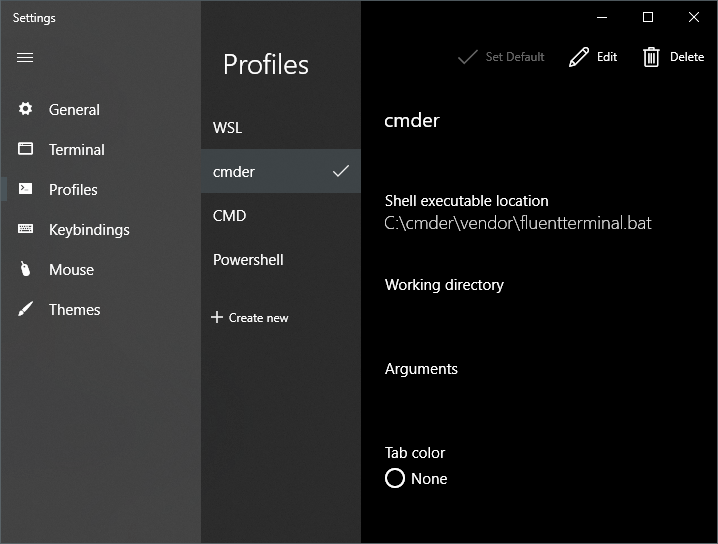
Doesn't matter where you place it, seems like the path to init.bat has to be absolute.
I don't know why pointing directly to init.bat doesn't work, but here we are. The thing I can't figure out myself is why passing the current directory (i.e. from Explorer) doesn't work, but this seems like a more general issue. The "Open in current directory" bug is mentioned in this commit and although I haven't managed to make a build myself, applying the changes there directly to the registry has worked for me for the explorer integration.
 kamenminkov
on 5 Dec 2018
kamenminkov
on 5 Dec 2018
It works.Ths,Minkov.
BTW,for chinese and other none-english users,ls command can't show correct (chinese) characters,just add setting like below to {cmder directory}\vendorinit.bat file's correct position:
set "LANG=zh_CN.UTF-8"
@kamenminkov You actually don't need the fluentterminal.bat part,
instead you should just use the following settings:
- Name: Cmder
- Shell executable location:
C:\Windows\System32\cmd.exe - Arguments:
batch
/k title Cmder & %CMDER_ROOT%\vendor\init.bat
This process has also been documented at Cmder's wiki:
https://github.com/cmderdev/cmder/wiki/Seamless-FluentTerminal-Integration
 DRSDavidSoft
on 30 Jan 2019
DRSDavidSoft
on 30 Jan 2019
That guide works like a charm 👌 I guess with that solution the issue can be closed @felixse? Perhaps it is an idea to put this (and other questions such as #146) in a FAQ somewhere?
 ericcornelissen
on 30 Jan 2019
ericcornelissen
on 30 Jan 2019
Nice guide 👍
Yeah, I think we should start a wiki. We could also move the build instructions in readme.md to make it less intimidating
 felixse
on 30 Jan 2019
felixse
on 30 Jan 2019
Seems like a great idea.
Hans Kokx
On January 30, 2019 8:17:27 AM Felix notifications@github.com wrote:
Nice guide 👍
Yeah, I think we should start a wiki. We could also move the build
instructions in readme.md to make it less intimidating—
You are receiving this because you are subscribed to this thread.
Reply to this email directly, view it on GitHub, or mute the thread.
 hanskokx
on 30 Jan 2019
hanskokx
on 30 Jan 2019
I created a FAQ page
The wiki is open for contribution by everyone, let's see how that works out 😅
felixse
on 30 Jan 2019
Related issues
 TheLastZombie
·
5Comments
TheLastZombie
·
5Comments
 BroJenuel
·
5Comments
BroJenuel
·
5Comments
 Sharlaan
·
6Comments
Sharlaan
·
6Comments
 raw-egg
·
6Comments
raw-egg
·
6Comments
 byrnes
·
3Comments
byrnes
·
3Comments
Most helpful comment
@kamenminkov You actually don't need the
fluentterminal.batpart,instead you should just use the following settings:
C:\Windows\System32\cmd.exebatch /k title Cmder & %CMDER_ROOT%\vendor\init.batThis process has also been documented at Cmder's wiki:
https://github.com/cmderdev/cmder/wiki/Seamless-FluentTerminal-Integration