Fluentterminal: This is pretty much a nightmare for non-Windows developers!
I don't think I'm alone in this because of WSL. There are going to be a lot of people thinking maybe they can try Windows, but there is no decent terminal. Seriously, none. But here is what a Linux or Mac refuge is going to experience:
First:
git clone https://github.com/felixse/FluentTerminal.git
Then follow...
https://github.com/felixse/FluentTerminal#how-to-install
Hmmm, find . -name '*cer' and find . -name '*appx*' reveal nothing.
Okay, follow...
https://github.com/felixse/FluentTerminal#how-to-build
choco install nodejsworkschoco install VisualStudio2017Communityworks- Developer Mode enabled
On to...
https://github.com/felixse/FluentTerminal#visual-studio-2017-configuration
- Uh, "Under Workloads"? Wat?
- "Under individual components"? Wat?
- Maybe I'll just try to open the FluentTerminal.sln file...
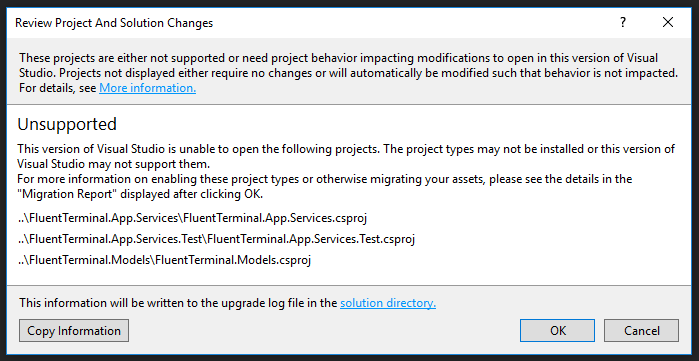
- Ok, I guess...
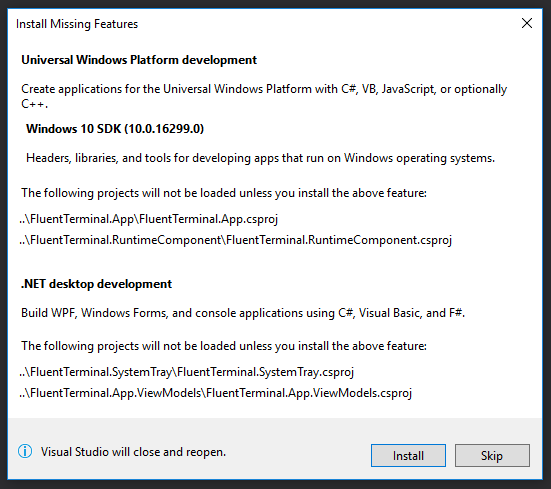
- Oh, good. It's going to install them for me...
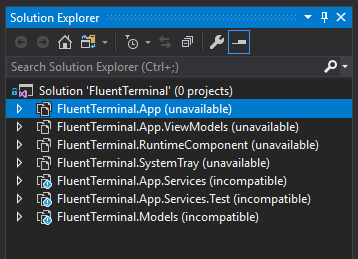
- Wat?
Hmmm... Maybe the new MacBook Pro isn't as terrible as I thought.
Hey, it's your project and you are free to do it however you want. I just know that as the maintainer of many projects myself, I always wonder what the experience is like for people not on the inside. I'd love feedback like this on https://github.com/RichardBronosky/pi-init2 and I go and give presentations and hands-on workshops at Meetups to get it.
 RichardBronosky
All 12 comments
Why not just download the latest release off the releases page? 🤔
Hans Kokx
On September 22, 2018 00:13:06 Bruno Bronosky notifications@github.com wrote:
I don't think I'm alone in this because of WSL. There are going to be a lot
of people thinking maybe they can try Windows, but there is no decent
terminal. Seriously, none. But here is what a Linux or Mac refuge is going
to experience:
First:
git clone https://github.com/felixse/FluentTerminal.git
Then follow...
https://github.com/felixse/FluentTerminal#how-to-install
Hmmm, find . -name 'cer' and find . -name 'appx*' reveal nothing.
Okay, follow...
https://github.com/felixse/FluentTerminal#how-to-build
choco install nodejs works
choco install VisualStudio2017Community works
Developer Mode enabled
On to...
https://github.com/felixse/FluentTerminal#visual-studio-2017-configuration
Uh, "Under Workloads"? Wat?
"Under individual components"? Wat?
Maybe I'll just try to open the FluentTerminal.sln file...Ok, I guess...
Oh, good. It's going to install them for me...
Wat?
Hmmm... Maybe the new MacBook Pro isn't as terrible as I thought.
Hey, it's your project and you are free to do it however you want. I just
know that as the maintainer of many projects myself, I always wonder what
the experience is like for people not on the inside. I'd love feedback like
this on https://github.com/RichardBronosky/pi-init2 and I go and give
presentations and hands-on workshops at Meetups to get it.
—
You are receiving this because you are subscribed to this thread.
Reply to this email directly, view it on GitHub, or mute the thread.
 hanskokx
on 22 Sep 2018
hanskokx
on 22 Sep 2018
Adding a Step 1 (or maybe 2) to https://github.com/felixse/FluentTerminal#how-to-install would help a lot!
- Download the latest
FluentTerminal.App_*.zipfrom https://github.com/felixse/FluentTerminal/releases
RichardBronosky
on 22 Sep 2018
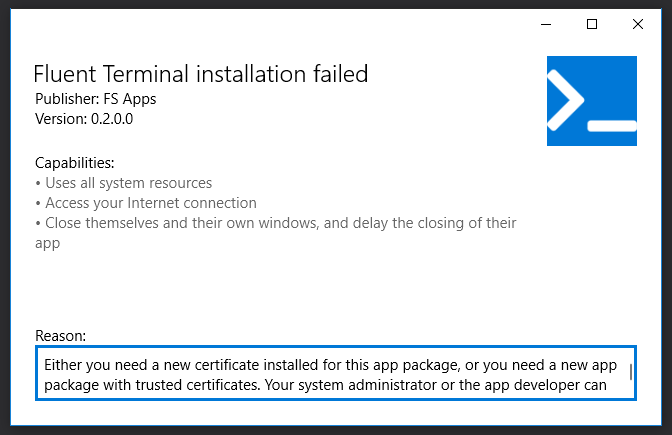
Also, this is what I get when I open the .cer and allow it to "Automatically select the certificate store...". I would suggest some additional instruction here too.
RichardBronosky
on 22 Sep 2018
README: https://github.com/felixse/FluentTerminal#how-to-install
Do not automatically select the certificate store, use the one suggested:
Local Machine -> Trusted Root Certification Authorities
 benplm
on 23 Sep 2018
benplm
on 23 Sep 2018
@benplm Yes, I figured that out. I'm suggesting that your README should be more clear for people not familiar with Windows. I imagine that you would expect that most people who would use a product like this are the more advanced users and you can assume a lot of base experience. However, WSL is attracting a new audience of highly technical people... with little to no recent Windows experience. This is a very strange and frustrating position for these people, but also for project owners having to deal with their needs. This post is intended to help you with that.
I made 2 suggestions for ways to improve the README. Seems a bit overkill to fork and pull request for that, but I can if you'd like.
RichardBronosky
on 24 Sep 2018
Thanks for your feedback @RichardBronosky. I will make some additions to the README to address the issues you had with installing.
This is all pretty much in beta right now, in the end this should be either available in Microsoft Store or we create an installer.
 felixse
on 24 Sep 2018
felixse
on 24 Sep 2018
Until this makes it into the Microsoft Store, this should be considered beta niche software. While I'm sensitive to your concerns, UWP apps are either a massive pain in the *, or dead simple, depending on whether or not they are in the store. Like iOS apps, and putting an iPhone into developer mode.
That said, since your profile says you love automating hard stuff, we welcome any PRs that automate the installation process. 😸
I've made PR #83 for documentation clarifications so I recommend that specific changes be suggested on the PR's thread.
 Riebart
on 28 Sep 2018
Riebart
on 28 Sep 2018
@RichardBronosky can you check the PR and let us know if this addresses your concerns?
Riebart
on 30 Sep 2018
I merged this for now, we can make another update if we find additional points. Thanks for your great help @Riebart
felixse
on 5 Oct 2018
This is great stuff. Thanks, all. I know you consider this _niche software_, and it probably is to life-long Windows folk. However, the perfect storm of the new Mac hardware sucking and WSL making Windows finally usable by web professionals is making _this niche_ very desirable. Mac and Linux folk are used to having great terminals and there just isn't one for Windows. We are clamoring for it.
RichardBronosky
on 5 Oct 2018
I don't really consider a good terminal emulator niche software, but while anything is in development, there's definitely a niche market that's willing to tackle the more complicated installation/usage workflows.
Again, and I can't stress this enough, if you're willing to contribute an automated installer/updater for users, that would likely go a long way to alleviating many of your concerns.
Riebart
on 6 Oct 2018
I'm willing to take a shot at scripting this. The good news is that the included Add-AppDevPackage.ps1 does most of what we want already. The problem is that it requires a developer license, so it doesn't work if you're in sideload mode.
The side benefit is that we could also integrate the explorer context menu addition into the install.
 justingallagher
on 7 Oct 2018
justingallagher
on 7 Oct 2018
Related issues
 phamgiahung1368
·
4Comments
phamgiahung1368
·
4Comments
 TheLastZombie
·
5Comments
TheLastZombie
·
5Comments
 Sharlaan
·
6Comments
Sharlaan
·
6Comments
 Loreno10
·
5Comments
Loreno10
·
5Comments
 BroJenuel
·
5Comments
BroJenuel
·
5Comments
Most helpful comment
Why not just download the latest release off the releases page? 🤔
Hans Kokx
On September 22, 2018 00:13:06 Bruno Bronosky notifications@github.com wrote: