Fluent-bit: GELF message is missing mandatory "host" field
Bug Report
Describe the bug
During getting gelf messages from fluent-bit, i see continuous repeated error in graylog logs:
2020-01-20 21:56:28,029 WARN [GelfCodec] - GELF message <bla-bla-bla> (received from <10.224.5.83:49072>) is missing mandatory "host" field. - {}
To Reproduce
In GELF documentation: "If you're using Fluent Bit in Kubernetes and you're using Kubernetes Filter Plugin, this plugin adds host value to your log by default, and you don't need to add it by your own."
But looks like that's not true.
That possible to see logs in raw/text format on graylog side and there's not really the 'host' field
I've tried to set Gelf_Host_Key for gelf plugin, but no any intelligible explanations how to use that, any values were ignored
Expected behavior
add neccessary 'host' field into log
Screenshots
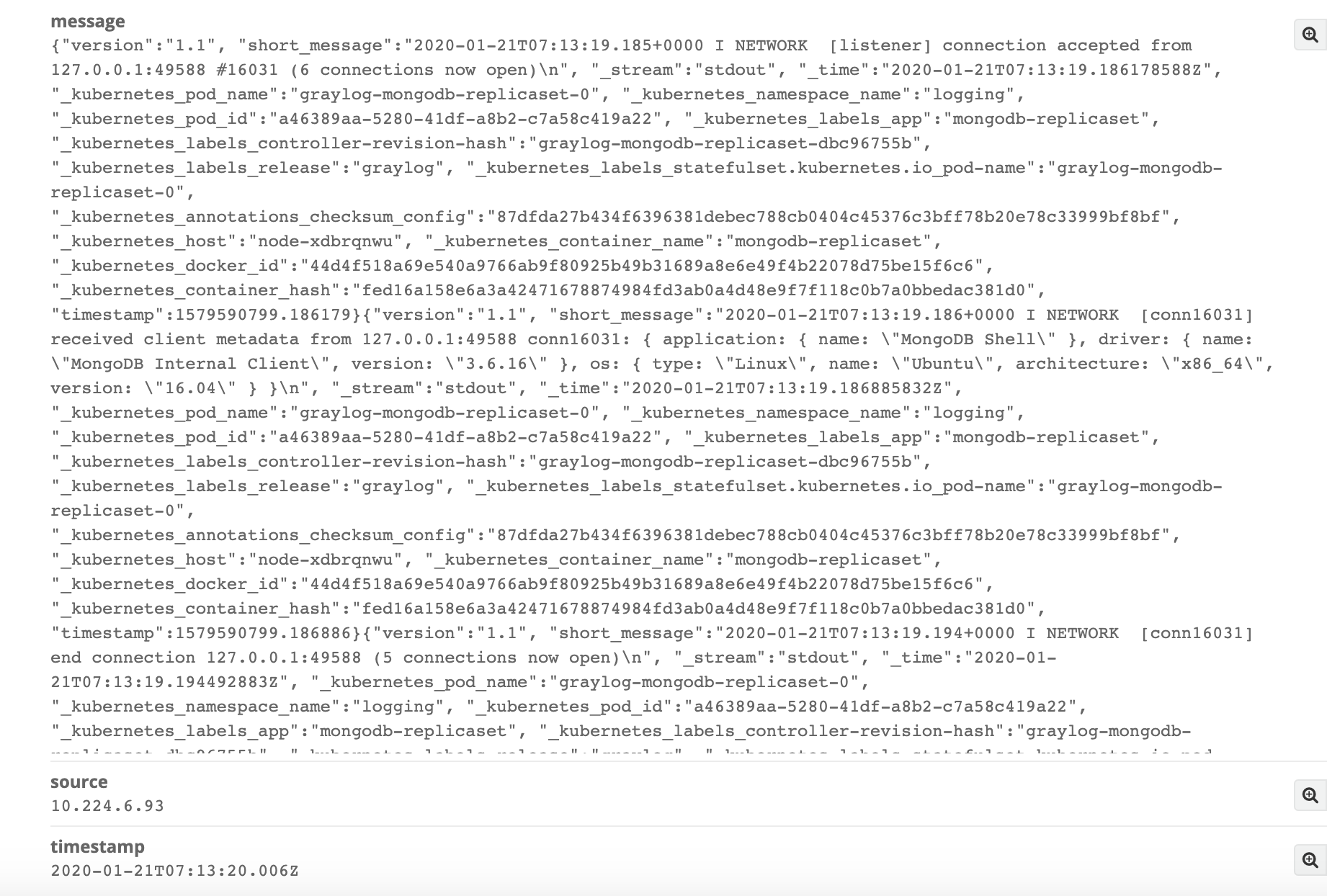
Your Environment
Platform: k8s v1.16.4
fluent-bit:1.3.5
graylor:3.1
- Configuration:
fluent-bit configuration:
  input-kubernetes.conf: |
    [INPUT]
        Name              tail
        Tag               kube.*
        Path              /var/log/containers/*.log
        Parser            docker
        DB                /var/log/flb_kube.db
        Mem_Buf_Limit     5MB
        Skip_Long_Lines   On
        Refresh_Interval  10

  filter-kubernetes.conf: |
    [FILTER]
        Name                kubernetes
        Match               kube.*
        Kube_URL            https://kubernetes.default.svc:443
        Kube_CA_File        /var/run/secrets/kubernetes.io/serviceaccount/ca.crt
        Kube_Token_File     /var/run/secrets/kubernetes.io/serviceaccount/token
        Kube_Tag_Prefix     kube.var.log.containers.
        Merge_Log           On
        Merge_Log_Key       log_processed
        K8S-Logging.Parser  On
        K8S-Logging.Exclude Off

  output-elasticsearch.conf: |
    [OUTPUT]
        Name            gelf
        Match           kube.*
        Host            log-input-12201.logging.svc.cluster.local
        Port            12201
        Mode            tcp
        Gelf_Short_Message_Key    log
Additional context
This WARN does not prevent logs collection, but overfill journal log of the graylog
 alekseydemidov
All 7 comments
Someone who faces the same issues:
Workaround found:
- To avoid WARN about 'missing mandatory "host" field.'
  output-elasticsearch.conf: |
    [OUTPUT]
        Name            gelf
        ...
        Gelf_Host_Key             stream
        Gelf_Short_Message_Key    log
- To avoid ERROR about empty short_message for docker logs like that:
{"log":"\n","stream":"stdout","time":"2020-01-21T09:12:57.043094018Z"}
add filter before kubernetes filter:
    [FILTER]
        Name              grep
        Match             kube.*
        Exclude           log ^$
I can confirm with the fluent-bit 1.5 that this bug exist. Adding the Gelf_Host_key still does not work. The host key is not being passed to Graylog with GELF. Has anyone tested this. Seem if there is a recommendation it should be fully vetted.
DB
 DarkBlaez
on 14 Aug 2020
DarkBlaez
on 14 Aug 2020
No this has worked for me. I'm using the latest fluent-bit helm chart from fluent itself and the latest graylog helm chart from stable as of this writing.
 jstewart612
on 21 Aug 2020
jstewart612
on 21 Aug 2020
@alekseydemidov when I set Gelf_Host_Key to stream I will get stdout or stderr as source. What can I do if I want something else like container name or similar?
 peetasan
on 9 Sep 2020
peetasan
on 9 Sep 2020
Same here.
Someone has any updated info about this issue?
 thiagolinhares
on 29 Sep 2020
thiagolinhares
on 29 Sep 2020
Any updates on this one? I could not find a way to workaround this properly. The fixes mentioned above only create fixed hosts fields.
 fkoehler
on 25 Nov 2020
fkoehler
on 25 Nov 2020
You can omit the Gelf_Host_Key if a variable named host exists. In my case, I use the variable from the Kubernetes Filter Plugin.
[FILTER]
        Name kubernetes
        Match kube.*
        Merge_Log On
        Keep_Log Off
        Annotations On
        Labels On

    [FILTER]
        Name nest
        Match *
        Operation lift
        Nested_under kubernetes
I also omit the Gelf_Short_Message_Key by ensuring that the relevant data is stored in a variable called short_message.
For that I use the Modify Filter Plugin
# field version is required in GELF
    # rename field "log" to "short_message" as required by GELF
    [FILTER]
        Name modify
        Match *
        Add version 1.1
        Rename log short_message
````

Finally my Output plugin looks like this:
[OUTPUT]
Name gelf
Match *
Host somewhere.de
Port 12202
Mode tls
tls On
tls.verfiy On
tls.ca_file /ect/ssl/certs/ca-certificates.crt
You can use `udp` or unencrypted `tcp` as mode as well (c.f. https://docs.fluentbit.io/manual/pipeline/outputs/gelf#configuration-file-example)

Furthermore https://github.com/fluent/fluent-bit-docs/blob/master/pipeline/outputs/gelf.md#configuration-file-example gives a configuration file example for GELF.

To verify your output. I used the HTTP Plugin instead in order to direct the output to a service that logs the payload e.g. https://hub.docker.com/r/mendhak/http-https-echo, e.g.
[OUTPUT]
Name http
Match *
Host 192.168.2.3
Port 80
```
 uluzox
on 25 Nov 2020
uluzox
on 25 Nov 2020
Related issues
 thrift24
·
4Comments
thrift24
·
4Comments
 mhf-ir
·
4Comments
mhf-ir
·
4Comments
 Barbazoo
·
3Comments
Barbazoo
·
3Comments
 mbelchin
·
3Comments
mbelchin
·
3Comments
 iamshreeram
·
3Comments
iamshreeram
·
3Comments
Most helpful comment
Someone who faces the same issues:
Workaround found:
{"log":"\n","stream":"stdout","time":"2020-01-21T09:12:57.043094018Z"}add filter before kubernetes filter: