Fluent-bit: Multiple problems parsing JSON, escaping, encoding JSON
I'd like to preface all the following with a note to the developers: Thank you for your work on fluent-bit, and please take the following as an attempt to help others / constructive criticism.
These issues have been hounding me for a while and apologies if some of that frustration peeks through in my language. 🙂
I was investigating various problems with JSON parsing in fluent-bit.
There's a lot of other Issues about this, but I felt it'd be useful to get a minimal reproduction, against latest master, and with all the issues I found in one place.
Issues I believe are related, at least based on a quick scan: #278, #580, #615, #617, #673, #831, #907, #965, #1021, #1044, #1114, #1130, #1170
If you came here looking for a quick fix
As far as I can tell, there's no way currently to configure fluent-bit to correctly parse a JSON string value.
You can get most of the way there with a config that applies the escaped_utf8 decoder _followed by_ the escaped decoder.
This will work for everything except strings that contain literal backslashes. See below for detail.
Alternately, if you want to parse nested JSON, you should apply the json decoder only.
Note that any string values contained in this nested JSON will then ALSO need to be decoded as above.
My setup
All the following is based on commit 00dd804420e1c5aff2166fd32e8306ff4e457f28, which is master at time of writing.
Here is my config file. I am using the tail input and file output for testing purposes and to keep the tests free of other distractions.
[SERVICE]
    Log_Level debug
    Parsers_File parsers.conf
    Daemon off

[INPUT]
    Name tail
    Tag test
    Path test.in
    Parser test

[OUTPUT]
    Name file
    Path test.out
    Format out_file
and parsers.conf:
[PARSER]
    Name test
    Format json
    # We will be adding decoders here
Parsing JSON
The crux of the whole problem is with how fluent-bit parses JSON values that contain strings.
This is done by flb_pack_json(), which converts the incoming buffer to a list of tokens using the jsmn library. jsmn returns tokens corresponding to objects, arrays, strings and primitives.
These tokens are then handled by tokens_to_msgpack which converts this list of tokens to a msgpack-encoded string.
The issue lies in the JSMN_STRING case:
        flen = (t->end - t->start);
        switch (t->type) {
...
        case JSMN_STRING:
            msgpack_pack_str(&pck, flen);
            msgpack_pack_str_body(&pck, js + t->start, flen);
            break;
The string tokens returned by jsmn point to the section of the buffer that is between the opening and closing quotes of the string. For example, in the JSON buffer {"foo": "two\nlines"}, the token corresponding to the "two\nlines" value points to:
{"foo": "two\nlines"}
         ^start   ^end
Note how this substring still contains the escaped newline as a backslash then an n, not as an unescaped actual newline character.
fluent-bit does no further processing on this value, but copies it into the new msgpack value verbatim.
The result is a msgpack value which contains the literal characters 't', 'w', 'o', '\', 'n', 'l', 'i', 'n', 'e', 's'.
Hence, if no other decoding is done, this string would be converted back into JSON as {"foo": "two\\nlines"}, as the encoder will see the backslash and escape it.
Now, I would argue that the program is already badly behaved because its JSON parser does not, in fact, correctly parse JSON.
However, the documentation (somewhat obliquely) indicates that you are meant to use a _decoder_ to rectify this siutation.
If you know in advance exactly what fields you need to apply this to, then we can attempt to use decoders to improve this.
However, I'd like to point out that at this point we already are no longer able to process arbitrary JSON objects, since there's no way to apply a decoder to "all string fields" without hard-coding that set of fields in your config file.
Let's now consider the behaviour if you attempt to use various decoders on this string value.
Option 1: Use escaped decoder
The escaped decoder will convert the escapes \n, \a, \b, \t, \v, \f and \r to their respective standard interpretations (eg. \n becomes a newline).
Any other escaped characters (eg. \", \\ or \w) will be converted to the escaped character, eg. ", \ and w respectively.
This is problematic for un-escaping a JSON string because it lacks support for the \uXXXX escape, converting the \u to a u. For example, {"foo": "Pok\u00e9mon"}, when decoding the foo key in this way, becomes {"foo": "Poku00e9mon"}.
It also happens to handle escapes that JSON does not support such as \v, but this is fine since any valid JSON input won't have those escapes, and jsmn checks for validity when parsing.
Option 2: Use escaped_utf8 decoder
This decoder will successfully convert \uXXXX escapes. However, this line:
if (*in_buf == '\\' && !is_json_escape(next)) {
means that any other JSON escapes will be ignored.
In addition, this decoder has a somewhat subtle bug. It doesn't handle \\ correctly.
The code loops through each character, checking if it is a backslash and the next char is not in the list of chars that would make it a JSON escape. This includes \\, so it treats the first backslash as not being part of any escape, then moves on to the next character.
The next character, of course, is another backslash. This also gets interpreted as an escape.
So, for example, "\\v" will be interpreted as \, then \v, which gets converted to a vertical tab, and the output will be \<VT>.
Amusingly, if \\ is the last thing in the string, then the final backslash is instead joined with the terminating nul character of the string, ie. \, \, NUL becomes \, NUL,
the nul terminator is skipped over, and one byte past the end of the buffer is dereferenced before the length check kicks in and halts the loop.
Turning this minor buffer overflow into a segfault or further business is left as an exercise for the reader.
Since fluent-bit keeps string lengths alongside all its strings, the fact that we have an extra NUL terminator doesn't seem to affect things too much. It shows up in the output, eg.
{"foo": "\\\u0000"}.
Option 3: Both
If you use a config like this:
Decode_Field_As escaped_utf8 MY_FIELD do_next
Decode_Field_As escaped MY_FIELD
then all escapes will be decoded. You will still have to deal with the escaped-backslash issues above, further filtered through the second layer of escaping, for example \\h -> h, \\u002f -> /.
This is the least broken option I've been able to find.
The 'json' decoder (nested json)
For fields which contain strings intended to be parsed as JSON, eg. {"log": "{\"inner\": \"foo\"}"}, the json decoder is provided.
One important aspect of this decoder (and not documented anywhere as far as I can tell) is that it first does a escaped decode on the string before attempting to parse it.
ie. Continuing the above example of {"log": "{\"inner\": \"foo\"}"}, the log field is initially parsed as {\"inner\": \"foo\"}, then the json decoder unescapes it to {"inner": "foo"}, which is then parsed as JSON.
However, note that as discussed above, the escaped decoder does not correctly parse unicode escapes.
This is not generally an issue, since there are no characters in valid JSON which would need to be escaped using a unicode escape (\ is escaped as \\, " is escaped as \", etc).
But there are valid (albeit pathological) JSON documents which will therefore fail to parse, as any character may be replaced with a unicode-escaped version even if it's otherwise valid.
For example if the same example as above was written as {"log": "{\u0022inner\u0022: \u0022foo\u0022}"}, the escaped decoder would result in the string {u0022inneru0022: u0022foou0022}, which will then fail to parse as JSON.
You can mitigate this by passing the field through the encoded_utf8 decoder first, but that then exposes you to the \\ bugs noted above, which is likely worse since any escaped characters inside the nested JSON will cause \\s to appear in the string. For example, under this scheme {"log": "{\"ctcp\": \"\\u0001PING\\u0001\"}" will be first decoded by the encoded_utf8 decoder to {\"ctcp\": \"\<SOH>PING\<SOH>\"} then by the encoded decoder to {"ctcp": "<SOH>PING<SOH>"} (where in both cases <SOH> indicates a literal 0x01 character). This is not valid JSON due to the unescaped control code and will be rejected by the JSON decoder.
Finally, it should be noted that the implementation currently also has a check that the first character of the JSON string is a { or [:
    /* It must be a map or array */
    if (dec->buffer[0] != '{' && dec->buffer[0] != '[') {
        return -1;
    }
Hence any JSON document with leading whitespace will not be parsed despite being a valid object.
Note that any fields parsed into JSON using this decoder will themselves need to have the escaped_utf8 and escaped decoders applied to them in order for escapes in them to be processed.
Output encoding issues
In addition to all the above issues with parsing JSON fields, there are also issues with outputting data in JSON format.
The code which encodes a record to JSON uses non-JSON escapes \a and \v. For example, the input {"vtab": "\u000b"}, properly decoded, should produce the same output, but instead produces {"vtab": "\v"}, which is not valid JSON.
The code is also not capable of outputting non-BMP unicode characters.
This could arguably be considered a parsing bug, not an encoding bug.
Non-BMP unicode chars are encoded in JSON as a surrogate pair in \u notation (RFC4627).
For example, 🙂 (U+1F642 SLIGHTLY SMILING FACE) is encoded in JSON as \ud83d\ude42.
Fluent-bit does not handle this case specially, instead (assuming you've used the encoded_utf8 decoder) decoding the two code points individually and storing them internally in utf-8.
Surrogate pairs are not valid in utf-8 strings, and when these characters are attempted to be encoded, the implementation (arguably correctly) reports [pack] invalid UTF-8 bytes, skipping and drops those characters.
Suggested fixes
The following are obviously bugs (ie. not intended behaviour) and should be fixed:
- The behaviour of
\\inescaped_utf8 - The use of non-JSON escapes (
\a,\v) in JSON output - The inability for nested JSON fields to begin with whitespace
After that, things get trickier. I'm not sure why escaped_utf8 does not parse JSON escapes (and in fact this directly contradicts the examples in its documentation), but it appears to be intentional.
I suggest fixing this to bring it in line with its documentation, so that users need only decode with escaped_utf8 in order to get correct JSON string decoding.
As part of this change, the json decoder should also use this decoding step instead of escaped, so it can correctly interpret unicode-escaped characters.
Decoding surrogate pairs during escaped_utf8 decoding (and then in turn encoding them back into surrogate pairs when encoding as JSON) should also be done.
However, none of this deals with the case where the user cannot hard-code in their config file the full list of fields that need to be decoded. Not to mention that the current scheme of splitting the full JSON parsing process over two independent steps (JSON parser + escaped_utf8 decoder) is extremely confusing to users.
Unfortunately at this point fixing that behaviour would introduce breaking changes.
I suggest either:
Deprecate the existing JSON parser and introduce a new parser which correctly decodes escapes when parsing the JSON (ie. in
tokens_to_msgpack()). Call itjson2orjson_fullorjson_decodedor something.Add a flag that affects the behaviour of the JSON parser.
Another option would be to add a new form of decoder specification which applies to all fields, eg. by allowing a wildcard for field name or via a new directive. This would allow all fields to be decoded after being parsed, but will break in cases (such as when parsing nested JSON) where it is unknown which fields are "new" and need decoding and which are not (and double-decoding is a bug, as it will eg. remove literal backslashes or turn \\n into a newline instead of \n).
In any case, the documentation should be updated to very clearly instruct the user on how to configure the parser to correctly parse all valid JSON objects.
 ekimekim
All 83 comments
We are facing the same issue.
I tried to use combination of decoders with try_next like this:
        Decode_Field_As   escaped_utf8 log   do_next
        Decode_Field_As   json                log   try_next
        Decode_Field_As   escaped         log
Which should escape only if JSON parsing fails (eg. event is not json) but it doesn't seem to be working.
When I use do_next instead, it will handle JSON logs fine but regular logs won't get parsed (events looks fine but regex parsers won't match).
 fpytloun
on 24 May 2019
fpytloun
on 24 May 2019
FYI: working on this.
 edsiper
on 3 Jun 2019
edsiper
on 3 Jun 2019
Super excited to hear that you are looking at this @edsiper - I have ran into several issues when trying to fix all of our logging issues with fluentbit and have come up with a decent list of issues/impact of using different decoders which I will create a new issue with.
It will be great to be able to solve all/most of these soon!
BTW, great catching up with you at KubeCon Europe!
 kiich
on 3 Jun 2019
kiich
on 3 Jun 2019
I am doing some progress here. Here are the results of a simple modification where only a 'json' parser without decoders do the work.
I am using these 3 simple lines as examples (if you have others please feel free to share)
{"id": 0, "log": "utf-8 code message: Fluent Bit \u00a9"}
{"id": 1, "log": "escaped \"message\""}
{"id": 2, "log": {"nested": {"key": "\\\u00a9"}}}
stdout Msgpack output:
[0] tail.0: [1559706413.733776628, {"id"=>0, "log"=>"utf-8 code message: Fluent Bit ©"}]
[1] tail.0: [1559706413.733791898, {"id"=>1, "log"=>"escaped "message""}]
[2] tail.0: [1559706413.733801106, {"id"=>2, "log"=>{"nested"=>{"key"=>"\©"}}}]
stdout JSON output:
{"date":1559706413.733777, "id":0, "log":"utf-8 code message: Fluent Bit \u00a9"}
{"date":1559706413.733792, "id":1, "log":"escaped \"message\""}
{"date":1559706413.733801, "id":2, "log":{"nested":{"key":"\\\u00a9"}}}
I have not tested "stringified JSONs yet".. work in process.
edsiper
on 5 Jun 2019
Are nested escaped messages covered by the above too? Our Kubernetes log is structured like:
{"Timestamp":"2019-06-05T05:23:51.7911585+00:00","MessageTemplate":"{StatusCode} {StatusCodeName}","RenderedMessage":"404 \"NotFound\""}
i.e. strings in the RenderedMessage property value are always quoted and so escaped.
 gitfool
on 5 Jun 2019
gitfool
on 5 Jun 2019
Great to hear your progress @edsiper !
I'll be super interested to hear what happens with stringified JSON which I assume means logs produced by Docker, right?
Also +1 to what @gitfool mentioned about the nested escaped messages as that is for sure 1 issue i found that the resulting log sent to Splunk breaks Splunk displaying/recognising it as JSON. (it gets fixed if i use decoder escaped_utf8 but that then breaks many other things as i mentioned in #1370 )
Also, could we test escaped new line i.e. \\n as part of this as that is also breaking/not showing correctly in Splunk for me.
kiich
on 5 Jun 2019
Update
(thanks again for the feedback!).
Looks like we are seeing some light here, please review carefully the following behavior, results and share some feedback:
__1.__ Parsers configuration file __parsers.conf__
[PARSER]
    Name   json
    Format json
    Decode_Field_As  json  log
__2.__ Fluent Bit configuration file
[SERVICE]
    Flush        1
    Log_Level    info
    Parsers_File parsers.conf
    Daemon       off

[INPUT]
    Name   tail
    Path   test.log
    Parser json

[OUTPUT]
    Name   stdout
    Match  *

[OUTPUT]
    Name   stdout
    Match  *
    Format json_lines
__3__ Log file __test.log__ with different JSON lines (with special characters):
{"id": 0, "log": "utf-8 code message: Fluent Bit \u00a9"}
{"id": 1, "log": "escaped \"message\""}
{"id": 2, "log": {"nested": {"key": "\\\u00a9"}}}
{"id": 3, "Timestamp":"2019-06-05T05:23:51.7911585+00:00","MessageTemplate":"{StatusCode} {StatusCodeName}","RenderedMessage":"404 \"NotFound\""}
{"id": 4, "message": "\"firstline\"\n\"second line\"\nliteral breakline \\n"}
{"id": 5, "log":"{\"message\": \"1. first line\\n2. A \\\"quoted\\\" word\\n3. literal breakline \\\\n\\n4. Copyright char: \\u00a9\\n5. Backslash: \\\\\\n\", \"second_key\": 123}\n","stream":"stdout","time":"2019-06-05T17:27:48.854223332Z"}
Comments about the file content:
On record 5 (id 5), the original message was generated by reading a text file and then creating a JSON map with it:
- Raw text file content
<ol>
<li>first line</li>
<li>A "quoted" word</li>
<li>literal breakline \n</li>
<li>Copyright char: ©</li>
<li>Backslash: \<br />
- Raw text file content
- A Python script read the file content above and compose an outgoing map with two keys, JSON output generated is:
```json
{"message": "1. first line\n2. A "quoted" word\n3. literal breakline \n\n4. Copyright char: u00a9\n5. Backslash: \\n", "second_key": 123}
- A Docker container runs a script that prints out the JSON message from previous step, so the final Docker log content is:
```json
{"log":"{\"message\": \"1. first line\\n2. A \\\"quoted\\\" word\\n3. literal breakline \\\\n\\n4. Copyright char: \\u00a9\\n5. Backslash: \\\\\\n\", \"second_key\": 123}\n","stream":"stdout","time":"2019-06-05T17:27:48.854223332Z"}
__4__ Running Fluent Bit and outputs in msgpack and json:
- __4.1__: msgpack output:
[0] tail.0: [1559759324.245235220, {"id"=>0, "log"=>"utf-8 code message: Fluent Bit ©"}]
[1] tail.0: [1559759324.245251275, {"id"=>1, "log"=>"escaped "message""}]
[2] tail.0: [1559759324.245262709, {"id"=>2, "log"=>{"nested"=>{"key"=>"\©"}}}]
[3] tail.0: [1559759324.245270281, {"id"=>3, "Timestamp"=>"2019-06-05T05:23:51.7911585+00:00", "MessageTemplate"=>"{StatusCode} {StatusCodeName}", "RenderedMessage"=>"404 "NotFound""}]
[4] tail.0: [1559759324.245274444, {"id"=>4, "message"=>""firstline"
"second line"
literal breakline \n"}]
[5] tail.0: [1559759324.245296339, {"id"=>5, "log"=>{"message"=>"1. first line
2. A "quoted" word
3. literal breakline \n
4. Copyright char: ©
5. Backslash: \
", "second_key"=>123}, "stream"=>"stdout", "time"=>"2019-06-05T17:27:48.854223332Z"}]
- __4.2__: JSON output:
{"date":1559759324.245235, "id":0, "log":"utf-8 code message: Fluent Bit \u00a9"}
{"date":1559759324.245251, "id":1, "log":"escaped \"message\""}
{"date":1559759324.245263, "id":2, "log":{"nested":{"key":"\\\u00a9"}}}
{"date":1559759324.245270, "id":3, "Timestamp":"2019-06-05T05:23:51.7911585+00:00", "MessageTemplate":"{StatusCode} {StatusCodeName}", "RenderedMessage":"404 \"NotFound\""}
{"date":1559759324.245275, "id":4, "message":"\"firstline\"\n\"second line\"\nliteral breakline \\n"}
{"date":1559759324.245296, "id":5, "log":{"message":"1. first line\n2. A \"quoted\" word\n3. literal breakline \\n\n4. Copyright char: \u00a9\n5. Backslash: \\\n", "second_key":123}, "stream":"stdout", "time":"2019-06-05T17:27:48.854223332Z"}
__5__ Extra Test using the Stream Processor
This is a new feature landing in the upcoming Fluent Bit v1.2.0:
Query all streams from tail and select the record where the map log['second_key'] equals 123:
$ fluent-bit -R parsers.conf -i tail -p path=test.log -p parser=json \
  -T "SELECT * FROM STREAM:tail.0 WHERE log['second_key'] = 123;" -o null -f 1
Fluent Bit v1.2.0
Copyright (C) Treasure Data

[2019/06/05 12:36:22] [ info] [storage] initializing...
[2019/06/05 12:36:22] [ info] [storage] in-memory
[2019/06/05 12:36:22] [ info] [storage] normal synchronization mode, checksum disabled
[2019/06/05 12:36:22] [ info] [engine] started (pid=5026)
[2019/06/05 12:36:22] [ info] [sp] stream processor started
[2019/06/05 12:36:22] [ info] [sp] registered task: flb-console:0
[0] [1559759782.051455, {"id"=>5, "log"=>{"message"=>"1. first line
2. A "quoted" word
3. literal breakline \n
4. Copyright char: ©
5. Backslash: \
", "second_key"=>123}, "stream"=>"stdout", "time"=>"2019-06-05T17:27:48.854223332Z"}]
As of this point please share your feedback!.
note: What I am digging into now is the special characters in the key names.
edsiper
on 5 Jun 2019
I should clarify, the example output I specified was raw stdout from the app, using structured log middleware that writes json output to stdout; also the same as shown with kubectl logs:
{"Timestamp":"2019-06-05T05:23:51.7911585+00:00","MessageTemplate":"{StatusCode} {StatusCodeName}","RenderedMessage":"404 \"NotFound\""}
So by the time Fluent Bit sees it, the above would be in the nested log element in the tailed Docker log, presumably with more escaping, along with the usual stream and time elements.
gitfool
on 5 Jun 2019
@gitfool Your app JSON output becomes the following content in Docker log:
{"log":"{\"Timestamp\":\"2019-06-05T05:23:51.7911585+00:00\",\"MessageTemplate\":\"{StatusCode} {StatusCodeName}\",\"RenderedMessage\":\"404 \\\"NotFound\\\"\"}\n","stream":"stdout","time":"2019-06-05T19:29:26.885083823Z"}
Processing with Fluent Bit
__1__. msgpack output:
[1559763024.832672445, {"id"=>6, "log"=>{"Timestamp"=>"2019-06-05T05:23:51.7911585+00:00", "MessageTemplate"=>"{StatusCode} {StatusCodeName}", "RenderedMessage"=>"404 "NotFound""}, "stream"=>"stdout", "time"=>"2019-06-05T19:29:26.885083823Z"}]
__2__ JSON output:
{"date":1559763024.832672, "id":6, "log":{"Timestamp":"2019-06-05T05:23:51.7911585+00:00", "MessageTemplate":"{StatusCode} {StatusCodeName}", "RenderedMessage":"404 \"NotFound\""}, "stream":"stdout", "time":"2019-06-05T19:29:26.885083823Z"}
it looks good to me, please confirm if is the expected output in your side.
edsiper
on 5 Jun 2019
LGTM. Also matches what I see in Datadog logs - which uses its own parser and bypasses Fluent Bit.
gitfool
on 5 Jun 2019
Wow, thanks for the update @edsiper
Taking a look now but i can confirm that the Docker log file created in your test
{"log":"{\"message\": \"1. first line\\n2. A \\\"quoted\\\" word\\n3. literal breakline \\\\n\\n4. Copyright char: \\u00a9\\n5. Backslash: \\\\\\n\", \"second_key\": 123}\n","stream":"stdout","time":"2019-06-05T17:27:48.854223332Z"}
is not quite the same as mine in that Docker log generated by my app looks like:
{"log":"{\"timestamp\":\"2019-06-03T20:41:27.292+00:00\",\"level\":\"INFO\",\"message\":\"org.xml.sax.SAXParseException: Premature end of file.\\n\\tat org.apache.xerces.util.ErrorHandlerWrapper.createSAXParseException(Unknown Source)\\n\\tat org.apache.xerces.util.ErrorHandlerWrapper.fatalError(Unknown Source)\\n\\tat org.apache.xerces.impl.XMLErrorReporter.reportError(Unknown Source)\\n\\tat org.apache.xerces.impl.XMLErrorReporter.reportError(Unknown Source)\\n\\tat org.apache.xerces.impl.XMLErrorReporter.reportError(Unknown Source)\\n\\tat org.apache.xerces.impl.XMLVersionDetector.determineDocVersion(Unknown Source)\"}\n", "stream":"stdout","time":"2019-06-03T20:41:27.292925629Z"}
i.e. with only 2 backslash for new line (and for tab also).
So the app is logging stack trace which in turn the logger of the app escapes it as \n and then Docker string-JSON it as \\n i believe.
I can confirm though that the escaping of quotes inside quotes looks the same as mine so that looks promising!
Happy to test it out as well in my cluster.
kiich
on 5 Jun 2019
I'd also be happy to test given a prerelease Docker image for Fluent Bit.
gitfool
on 5 Jun 2019
After re-reading the Docker logline again and 4.2 JSON output, I realised it is the same as my app's Docker logfile and the JSON output looks like something Splunk will be able to display!
Will try and send the JSON output from your test @edsiper to Splunk and see how it looks!
kiich
on 5 Jun 2019
Update: __we are ready to test out the new changes__
Please use the following new Docker image:
edsiper/fluent-bit-1.2-next:0
To make sure it works properly your Docker parser must look like this:
[PARSER]
    Name         docker
    Format       json
    Time_Key     time
    Time_Format  %Y-%m-%dT%H:%M:%S.%L
    Time_Keep    On
    # Command      |  Decoder | Field | Optional Action
    # =============|==================|=================
    Decode_Field_As    json     log
Note: if you skip the decode_field_as line it's fine too, since filter kubernetes will do it parsing if not done before (if Merge_Log option is set).
If you want to see the recent changes in the code base refer to the following link:
https://github.com/fluent/fluent-bit/commits/issue-1278
Please test it and share some feedback!
edsiper
on 6 Jun 2019
Did a quick test with a service that mixes structured (json) and unstructured (text) log output around startup and it looks good! Also means a filter now kicks in since merge_log succeeds and the logs display as expected in Kibana.
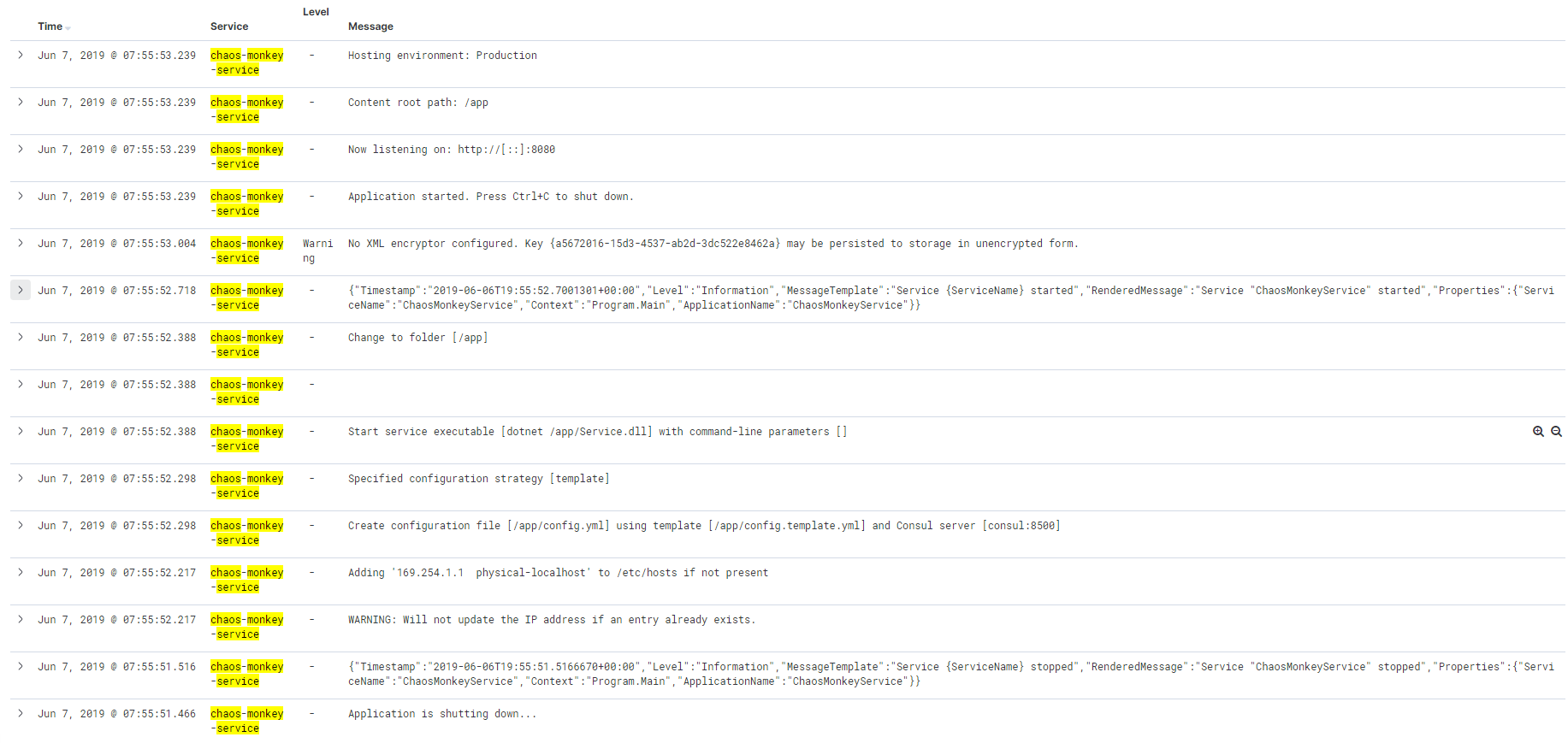
(before)
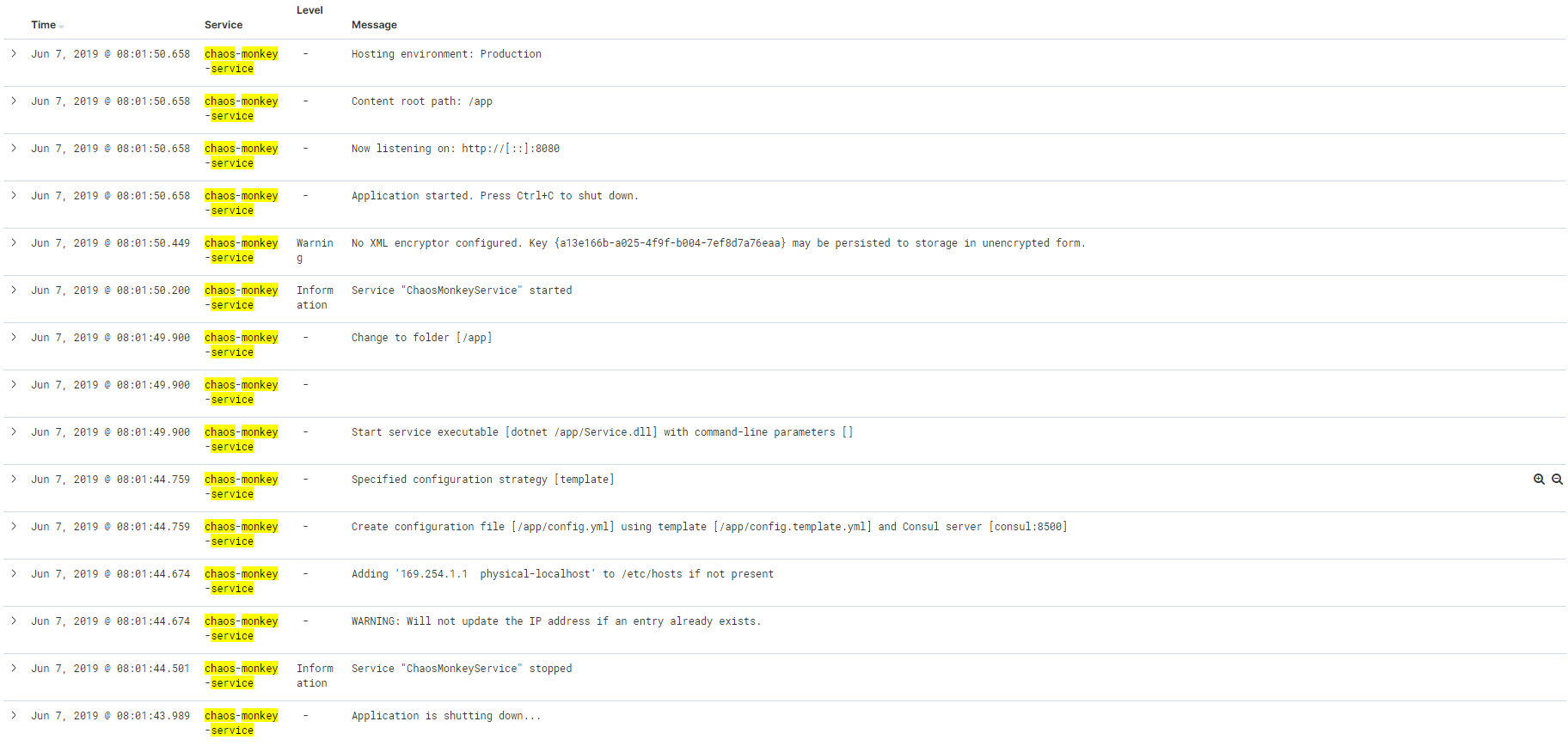
(after)
No more time today, but I'll try do a test with an exception stack trace in the json payload, which has a lot of embedded newlines etc.
gitfool
on 6 Jun 2019
Great news @edsiper - will commence testing in my cluster asap!
kiich
on 6 Jun 2019
Initial tests look good for the MOST log lines @edsiper BUT the use case with special character I mention in #1370 is now broken :(
FYI, these are log lines with special character such as double byte (Japanese/Chinese and so on)
e.g.
{"log":"{\"timestamp\":\"2019-06-03T20:41:27.292+00:00\",\"level\":\"INFO\",\"message\":
\\\"destinationName\\\":\\\"Markotabödöge, Győr, Hungary\\\",\\\"city\\\":\\\"上海市\\\",\\\"country\\\":\\\"الرياض\\\"\"}\n", "stream":"stdout","time":"2019-06-03T20:41:27.292925629Z"}
With this new image and decoder setting, the values of destinationName, city and country becomes:
"destinationName":"Markotabdge, Gyr, Hungary"
"city":""
"country":""
i.e. the ö and ő is removed for destinationName, city is blank and so is country.
The other test log lines, double quotes inside double quotes and multilines are working great though so thanks for great patch so far! Hoping you know what the issue is with the special characters, which I do not think is utf8 encoded in the Docker log line?
FYI, if i revert back image 1.0.4, the special characters appear fine but the other issues comes back.
kiich
on 6 Jun 2019
I am testing japanese characters but I am not facing that issue.
Note that the log string you have provided specifically the _stringified_ message is not a valid JSON, special characters must be encoded, e.g:
the following raw string:
destinationName Markotabödöge, Győr, Hungary
in JSON string must become:
destinationName Markotab\u00f6d\u00f6ge, Gy\u0151r, Hungary
Thanks @edsiper - i'm attaching the original log line as discussed but for sure in the Docker container log file, those raw string has not become what you say.
I'm following up with the app owners to see how they are logging it.
1 interesting fact remains though if I switch back to fluent-bit 1.0.4 image, the characters appear fine.
Please find the log line in question - to-eduardo.1line.log
kiich
on 7 Jun 2019
@kiich
I've pushed a new Docker image (tag '1'), please re-test with this one:
edsiper/fluent-bit-1.2-next:1
@edsiper
first a big thanks for your work.
I ran some tests based on edsiper/fluent-bit-1.2-next:1
it's working better than v1.1.2 but sill have some issue.
echo '{"thread": "pool-6-thread-1", "log": "{\"reponse\":[\"\"]}"}' | nc 127.0.0.1 24110
the output
2019/06/07 05:59:09] [ info] [storage] normal synchronization mode, checksum disabled
[2019/06/07 05:59:09] [ info] [engine] started (pid=19)
[2019/06/07 05:59:09] [ info] [in_tcp] binding 0.0.0.0:24110
[2019/06/07 05:59:09] [ info] [sp] stream processor started
[0] tcp.0: [1559887151.765219397, {"thread"=>"pool-6-thread-1", "log"=>"{"reponse":[""]}"}]
 {"date":1559887151.765219, "thread":"pool-6-thread-1", "log":"{\"reponse\":[\"\"]}"}
the nested json is not properly processed (maybe my conf is wrong too)
- output: "log"=>"{"reponse":[""]}"
- expected "log"=>"{"reponse"=>[""]}"
my conf
[PARSER]
    Name   my_json
    Format json
    Decode_Field_As    json     log
[SERVICE]
    Flush        1
    Daemon       Off
    Log_Level    info
    Parsers_File parsers.conf
    Plugins_File plugins.conf
    HTTP_Server  Off
    HTTP_Listen  0.0.0.0
    HTTP_Port    2020

[INPUT]
    Name tcp
    Parser my_json
    Port 24110

[OUTPUT]
    Name  stdout
    Match *

[OUTPUT]
    Name   stdout
    Match  *
    Format json_lines
let me know how I can help
 nicosto
on 7 Jun 2019
nicosto
on 7 Jun 2019
I doubt Merge_log On works properly. Possibly related to what @nicosto reported ( : vs => json is not recognized?)
- Json in "log" key is not merged in my case to root of record.
- Otherwise it looks good
- escaping seems to be ok
- processing 400MB of ~20 different apps/logs does not throw any error and input count = output count
- One more: (@edsiper ) "log" key, assume mixed input (some lines are parsable . json, some (common case in containers are plain text lines, logged by 3rd party library you don't have in control)). With OUTPUT to Elasticsearch, you will end up once with "log" as string, once "log" as map which will fail to write to the index. So the decision behind shall be (at least when
Merge_log On) that "log" key is always passed out as string.
I have used:
edsiper/fluent-bit-1.2-next:1
And this setup: (with some minor modifications, to load other input files)
https://github.com/epcim/fluentbit-sandbox
My docker log
{"log":"{\"severity\":\"INFO\",\"time\":\"2019-06-07T06:13:54.669Z\",\"message\":\"\",\"tenant\":\"customer1\",\"appType\":\"bookinfo\",\"namespace\":\"bookinfo\",\"vhTypeName\":\"VS:productpage\",\"srcSite\":\"re01\",\"dstSite\":\"re01\",\"srcInstance\":\"UNKNOWN\",\"srcSvc\":\"N:public\",\"dstSvc\":\"S:productpage\",\"reqMethod\":\"GET\",\"reqPath\":\"/productpage\",\"reqScheme\":\"http\",\"respCode\":\"200\",\"respSize\":\"4569\",\"reqSize\":\"0\",\"durationWithDataTxDelay\":\"31345779\",\"durationNoDataTxDelay\":\"31186578\",\"forwardedFor\":\"\",\"userAgent\":\"Go-http-client/1.1\",\"reqID\":\"7b80aa92-2e47-433c-a0e7-905d0f311652\",\"authority\":\"bookinfo.customer1.demo1.xxxx.us\",\"remoteLocation\":\"ff::c0:a864:301:5d00:0:9080\",\"messageid\":\"dea91c9a-beed-4561-67af-ab4112426b1f\"}\n","stream":"stderr","time":"2019-06-07T06:13:54.669895082Z"}
And I have output like this (not merged, even "log" looks like json):
kube.var.vc.logs.obelix-s98ql_ves-system_obelix-272c5dc6d94699bd83ca8e891017d8153bcfd4e788459610f2bab7eb265ffab5.log: [1559888034.669895, {"log":{"severity":"INFO", "time":"2019-06-07T06:13:54.669Z", "message":"", "tenant":"customer1", "appType":"bookinfo", "namespace":"bookinfo", "vhTypeName":"VS:productpage", "srcSite":"re01", "dstSite":"re01", "srcInstance":"UNKNOWN", "srcSvc":"N:public", "dstSvc":"S:productpage", "reqMethod":"GET", "reqPath":"/productpage", "reqScheme":"http", "respCode":"200", "respSize":"4569", "reqSize":"0", "durationWithDataTxDelay":"31345779", "durationNoDataTxDelay":"31186578", "forwardedFor":"", "userAgent":"Go-http-client/1.1", "reqID":"7b80aa92-2e47-433c-a0e7-905d0f311652", "authority":"bookinfo.customer1.demo1.xxxx.us", "remoteLocation":"ff::c0:a864:301:5d00:0:9080", "messageid":"dea91c9a-beed-4561-67af-ab4112426b1f"}, "stream":"stderr", "time":"2019-06-07T06:13:54.669895082Z", "severity":"INFO", "time":"2019-06-07T06:13:54.669Z", "message":"", "tenant":"customer1", "appType":"bookinfo", "namespace":"bookinfo", "vhTypeName":"VS:productpage", "srcSite":"re01", "dstSite":"re01", "srcInstance":"UNKNOWN", "srcSvc":"N:public", "dstSvc":"S:productpage", "reqMethod":"GET", "reqPath":"/productpage", "reqScheme":"http", "respCode":"200", "respSize":"4569", "reqSize":"0", "durationWithDataTxDelay":"31345779", "durationNoDataTxDelay":"31186578", "forwardedFor":"", "userAgent":"Go-http-client/1.1", "reqID":"7b80aa92-2e47-433c-a0e7-905d0f311652", "authority":"bookinfo.customer1.demo1.xxxx.us", "remoteLocation":"ff::c0:a864:301:5d00:0:9080", "messageid":"dea91c9a-beed-4561-67af-ab4112426b1f", "kubernetes":{"dummy":"Fri Jun 7 07:27:19 2019"}, "pmichalec":"test1"}]
 epcim
on 7 Jun 2019
epcim
on 7 Jun 2019
@edsiper Just seen your comment re: using edsiper/fluent-bit-1.2-next:1
I have just tested this image version and I can confirm that ALL of my use cases mentioned in #1370 is FIXED!!
Thank you so much for such quick resolution - will wait for this release but at least I can now tell our Devs that a fix is coming!
thanks again.
kiich
on 7 Jun 2019
Just a comment on my use case, I can use a filter to process the encapsulated Jason but this bring the json one level up and lose the context.
nicosto
on 7 Jun 2019
Trying your image for my use-case and I am experiencing similar issue as before when having logs from some containers as JSON and others using different format.
When using docker json parser and decode fields as following, JSON logs works fine but I get unparsed logs for anything else (some escaping missing so that my regex parsers won't match?):
Decode_Field_As json log
When I am using only escaped + escaped_utf8, non-JSON logs with regex parsers works fine but JSON is obviously not parsed:
        Decode_Field_As   escaped_utf8 log   do_next
        Decode_Field_As   escaped         log
So trying to combine things, decode JSON first (should fail on non-JSON so try_next should be used instead of do_next right?) and then do escaping (should fail when JSON is decoded which is fine, otherwise escape things for regex parsers to work):
        Decode_Field_As   json            log   do_next
        Decode_Field_As   escaped_utf8    log   do_next
        Decode_Field_As   escaped         log
but it doesn't seem to work (but JSON is decoded fine). Any ideas why this happens? How to setup docker json parser with decoders to support both JSON-formatted log and log being string that just needs to handle escaping?
Maybe json decoder should return escaped string if field is not JSON and therefore replace escaped + escaped_utf8 decoders?
BTW instead of relying on Merge_Log, I tried to use nest filter to lift decoded log field:
    [FILTER]
        Name         nest
        Match        *
        Operation    lift
        Nested_under log
@kiich thanks for your help! please keep testing and monitoring, if some encoding issue comes up just let me know.
@nicosto @fpytloun please provide as an attachment your original docker log file (no copy paste) that's generating some issues so I can troubleshoot.
edsiper
on 7 Jun 2019
@edsiper Here's example of regular non-JSON log (lot of escaping that needs to be handled correctly before parser):
{"log":"2019-06-07T20:44:27.026Z\u0009INFO\u0009log/log.go:54\u0009Processing ves.io.rakar.k8s_resource.Object succeeded\u0009{\"virtual_k8s\": \"8f912c4e-b045-40dc-a742-69890e5631ac\", \"k8s_type\": \"k8s.io.api.core.v1.Node\", \"k8s_object\": \"/ce02-master-0\", \"notification\": \"Changed\", \"site\": \"ce02\", \"messageid\": \"3573f16f-0908-4fd0-a347-43ef5b6d6edf\"}\n","stream":"stderr","time":"2019-06-07T20:44:27.026317814Z"}
No other special characters, everything seems to be escaped by Docker.
This is parser we are using:
    [PARSER]
        Name   svc
        Format regex
        Regex  ^(?<time_parsed>[0-9\-\+:A-Z]+)[-.0-9A-Z]*[\v(\t|\\u0009) ]+(?<severity>[A-Z]+)[\v(\t|\\u0009) ]+(?:(?<filename>[a-zA-Z0-9\/\._]+\.[\w\d]+)(?::(?<line>[0-9]+))?[\v(\t|\\u0009) ]+)?(?:(?<uid>[-[:xdigit:]]*):?[\v(\t|\\u0009) ]*)?(?<message>[\w\d\ (\t|\\u0009),\.\"\':\?\!\-_\(\)]*)(?:[\v(\t|\\u0009) ]+(?<message_extra>\{.*))?(?:(?:\R\R?|\z)(?<exception>(?:\R?|[a-z].*|(\t|\\u0009).*)+))?$
        Time_Keep   On
        Types time_parsed:string line:integer uid:string
We need this kind of logs working together with JSON-decoded ones. Here's example of JSON log:
{"log":"{\"severity\":\"INFO\",\"time\":\"2019-06-06T17:36:08.111Z\",\"message\":\"API Audit pre-handling\",\"req.transport\":\"rest\",\"req.oper\":\"GET\",\"req.url\":\"/public/namespaces/test/routes\",\"req.body\":\"\",\"req.useragent\":\"Go-http-client/1.1\",\"tenant\":\"customer1\",\"ctx.creatorcls\":\"\",\"ctx.creatorid\":\"\",\"namespace\":\"test\",\"server.id\":\"v1/pgm=_bin_akard/host=akar-796b599687-52626/svc=S:akar.gc01.int.ves.io/site=gc01\",\"trace.info\":\"\",\"time.start\":\"2019-06-06 17:36:08.111309324 +0000 UTC m=+86976.560561026\",\"messageid\":\"10b5c329-094c-47e5-a5b2-e8c04f5b2efe\"}\n","stream":"stderr","time":"2019-06-06T17:36:08.11150043Z"}
@fpytloun are you running this with filter_kubernetes or standalone ?
edsiper
on 7 Jun 2019
@fpytloun
I think I understand what you mean. Let me explain the workflow.
Your original log message was converted to string JSON format, which means it get escaped. That message don't have a structure and it's not a stringified map but you need to convert it at a later stage.
If you are using Kubernetes, your Pod can simply specify the parser to be used on top of the content of 'log' value, e.g: imagine the following Yaml belongs to your Pod, pay attention to the annotation:
apiVersion: v1
kind: Pod
metadata:
  name: apache-logs
  labels:
    app: apache-logs
  annotations:
    fluentbit.io/parser: svc
spec:
  containers:
  - name: apache
    image: edsiper/apache_logs
ref: https://docs.fluentbit.io/manual/filter/kubernetes#kubernetes-annotations
At this point, in_tail will apply JSON parser on top of the whole line of log, generating the structure with keys log, stream and time. Then IF the configuration Decode_Field_As exists, it will try to handle the content as a JSON map, but this is not the case for your first line example, but applies for the second.
Then the record will hit Kubernetes filter, where once it tries to discover the metadata of that Pod it will find the annotation that specifies that the content of __log__ must be processed using __svc__ parser, and if you set Merge_Log property the new structure will be added in the top level of the final record.
For short: use Pod annotations to specify which parser must be used for non-JSON map cases.
If you have questions feel free to ask if this is not working, provide me a script that generates some log data samples that I can use in a container to reproduce the situation.
edsiper
on 7 Jun 2019
@fpytloun I forgot to mention, you only need to use json decoder, nothing else.
edsiper
on 7 Jun 2019
@edsiper my use case is a bit different as this is not related to docker log but an application that stream in tcp to fluent-bit.
Log are json formatted with inside a "message": escaped json
I had the issue as the one encounter with the docker logs.
attaching the full log as generated by the application
app.log
nicosto
on 8 Jun 2019
@nicosto
On that case, tcp input plugin do not support configurable parsing, it's just json or messagepack format, to workaround the missing parsing of your data you can use Filter Parser, e.g:
$ fluent-bit -R parsers.conf -i tcp -F parser -m '*' -p preserve_key=on -p reserve_data=on -p key_name=message -p parser=tcp -o stdout -p format=json_lines -f 1 | jq
my parsers.conf looks like:
[PARSER]
    Name   tcp
    Format json
    Decode_Field_As  json  message
Final output printed with jq is:
{
  "date": 1560013161.690512,
  "reponse": [
    ""
  ],
  "reason": [
    ""
  ],
  "id": [
    "Some id"
  ],
  "BizMsg": {
    "xmlns": "urn:asx:xsd:xasx.802.001.02",
    "xsi:schemaLocation": "urn:asx:xsd:xasx.802.001.02 ASX_AU_CHS_comm_802_001_02_xasx_802_001_01.xsd",
    "xmlns:xsi": "http://www.w3.org/2001/XMLSchema-instance",
    "AppHdr": {
      "xmlns": "urn:iso:std:iso:20022:tech:xsd:head.001.001.01",
      "CreDt": "2019-06-07T09:07:34.634Z",
      "MsgDefIdr": "admi.002.001.01",
      "xsi:schemaLocation": "urn:iso:std:iso:20022:tech:xsd:head.001.001.01 ASX_AU_CHS_comm_801_001_01_head_001_001_01.xsd",
      "BizMsgIdr": "00001|+LlYCBkdRZKtwTibCgVT0A==",
      "xmlns:sig": "http://www.w3.org/2000/09/xmldsig#",
      "Sgntr": {
        "sig:auto-generated_for_wildcard": ""
      },
      "To": {
        "OrgId": {
          "Id": {
            "OrgId": {
              "Othr": {
                "Id": "00002"
              }
            }
          }
        }
      },
      "Fr": {
        "OrgId": {
          "Id": {
            "OrgId": {
              "Othr": {
                "Id": "00001"
              }
            }
          }
        }
      },
      "Rltd": {
        "CreDt": "2018-04-12T04:53:21.123Z",
        "MsgDefIdr": "DRAFT4reda.014.001.01",
        "BizMsgIdr": "00002|123456780001234567891000|00",
        "To": {
          "OrgId": {
            "Id": {
              "OrgId": {
                "Othr": {
                  "Id": "00001"
                }
              }
            }
          }
        },
        "Fr": {
          "OrgId": {
            "Id": {
              "OrgId": {
                "Othr": {
                  "Id": "00002"
                }
              }
            }
          }
        },
        "BizSvc": "inte_904_001_01_!p"
      },
      "BizSvc": "comm_807_001_01_!p"
    },
    "Document": {
      "xmlns": "urn:iso:std:iso:20022:tech:xsd:admi.002.001.01",
      "admi.002.001.01": {
        "RltdRef": {
          "Ref": "00002|123456780001234567891000|00"
        },
        "Rsn": {
          "RsnDesc": "No corresponding schema found for Inte_904_001_01_DRAFT4reda_014_001_01. Actual XML values: /BizMsg/AppHdr/MsgDefIdr = DRAFT4reda.014.001.01, /BizMsg/AppHdr/BizSvc = inte_904_001_01_!p.",
          "RjctgPtyRsn": "0099",
          "RjctnDtTm": "2019-06-07T09:07:34.638Z"
        }
      },
      "xsi:schemaLocation": "urn:iso:std:iso:20022:tech:xsd:admi.002.001.01 ASX_AU_CHS_comm_807_001_01_admi_002_001_01.xsd"
    }
  },
  "thread": "pool-6-thread-1",
  "level": "DEBUG",
  "loggerName": "com.asx.adapter.bmw.stages.outbound.ESBPublisher",
  "marker": {
    "name": "OutboundPublishedJson"
  },
  "message": "{\"reponse\":[\"\"],\"reason\":[\"\"],\"id\":[\"Some id\"],\"BizMsg\":{\"xmlns\":\"urn:asx:xsd:xasx.802.001.02\",\"xsi:schemaLocation\":\"urn:asx:xsd:xasx.802.001.02 ASX_AU_CHS_comm_802_001_02_xasx_802_001_01.xsd\",\"xmlns:xsi\":\"http://www.w3.org/2001/XMLSchema-instance\",\"AppHdr\":{\"xmlns\":\"urn:iso:std:iso:20022:tech:xsd:head.001.001.01\",\"CreDt\":\"2019-06-07T09:07:34.634Z\",\"MsgDefIdr\":\"admi.002.001.01\",\"xsi:schemaLocation\":\"urn:iso:std:iso:20022:tech:xsd:head.001.001.01 ASX_AU_CHS_comm_801_001_01_head_001_001_01.xsd\",\"BizMsgIdr\":\"00001|+LlYCBkdRZKtwTibCgVT0A==\",\"xmlns:sig\":\"http://www.w3.org/2000/09/xmldsig#\",\"Sgntr\":{\"sig:auto-generated_for_wildcard\":\"\"},\"To\":{\"OrgId\":{\"Id\":{\"OrgId\":{\"Othr\":{\"Id\":\"00002\"}}}}},\"Fr\":{\"OrgId\":{\"Id\":{\"OrgId\":{\"Othr\":{\"Id\":\"00001\"}}}}},\"Rltd\":{\"CreDt\":\"2018-04-12T04:53:21.123Z\",\"MsgDefIdr\":\"DRAFT4reda.014.001.01\",\"BizMsgIdr\":\"00002|123456780001234567891000|00\",\"To\":{\"OrgId\":{\"Id\":{\"OrgId\":{\"Othr\":{\"Id\":\"00001\"}}}}},\"Fr\":{\"OrgId\":{\"Id\":{\"OrgId\":{\"Othr\":{\"Id\":\"00002\"}}}}},\"BizSvc\":\"inte_904_001_01_!p\"},\"BizSvc\":\"comm_807_001_01_!p\"},\"Document\":{\"xmlns\":\"urn:iso:std:iso:20022:tech:xsd:admi.002.001.01\",\"admi.002.001.01\":{\"RltdRef\":{\"Ref\":\"00002|123456780001234567891000|00\"},\"Rsn\":{\"RsnDesc\":\"No corresponding schema found for Inte_904_001_01_DRAFT4reda_014_001_01. Actual XML values: /BizMsg/AppHdr/MsgDefIdr = DRAFT4reda.014.001.01, /BizMsg/AppHdr/BizSvc = inte_904_001_01_!p.\",\"RjctgPtyRsn\":\"0099\",\"RjctnDtTm\":\"2019-06-07T09:07:34.638Z\"}},\"xsi:schemaLocation\":\"urn:iso:std:iso:20022:tech:xsd:admi.002.001.01 ASX_AU_CHS_comm_807_001_01_admi_002_001_01.xsd\"}}}",
  "endOfBatch": false,
  "loggerFqcn": "org.apache.logging.log4j.spi.AbstractLogger",
  "instant": {
    "epochSecond": 1559862454,
    "nanoOfSecond": 645000000
  },
  "threadId": 64,
  "threadPriority": 5
}
Yeah, we should add the parsing option to in_tcp as an enhancement request, but as of now the data processing looks good.
edsiper
on 8 Jun 2019
all,
I am planning to merge these improvements on GIT master shortly, please test the docker image and provide some feedback.
thanks
edsiper
on 8 Jun 2019
@epcim I've missed your comment above.
So the problem is Elasticsearch and data types right ?, currently the workflow is as follows:
- If tail parser decode JSON key log as json, it will convert it to a Map if possible. So here is the problem for containers that do not generate JSON lines, so you should skip the Decode_Field_As line.
- Upon Merge_Log option enabled on Filter Kubernetes, it will decode and if a Map exists, keys are set on the root map.
So on this case enabling Merge_Log will be enough but removing the Decode_Field_As:
https://github.com/epcim/fluentbit-sandbox/blob/master/parsers.conf#L164
am I right ?
edsiper
on 8 Jun 2019
@edsiper
Thanks for your explaination, doing that.
nicosto
on 9 Jun 2019
@edsiper Thank you, I tried to remove Decode_Field_As from docker parser and keep Merge_Log and Merge_Log_Trim enabled.
As a result, regular non-JSON logs are working just fine (we are already using parser from pod annotations) but JSON logs are not processed with Merge_Log and I get unparsed log field:
{"severity":"ERROR","time":"2019-06-09T08:04:59.839Z","message":"table syncer watch handling returned error","table-syncer":"Upstream","table":"ves.io.schema.app_type.Object.default","last-resource-version":0,"error":"table syncer(Upstream-ves.io.schema.app_type.Object.default) very short watch: Unexpected watch close - watch lasted less than a second and no items received","messageid":"fee125e8-a3d4-4835-83fa-eb14352413b2"}
These are still parsed only if I use this on docker parser
Decode_Field_As json log
but that will break anything else.
Is Merge_Log applied only if there's no parser annotation? It seems that this works for pods without parser annotation. My use-case is to use parser annotation for pod logging in combination of JSON and non-JSON logs.
fpytloun
on 9 Jun 2019
@edsiper I've been testing this in my cluster since your pushed the new image and it's been working fine for me, for what it's worth.
thanks
kiich
on 9 Jun 2019
@epcim I've missed your comment above.
So the problem is Elasticsearch and data types right ?, currently the workflow is as follows:
- If tail parser decode JSON key log as json, it will convert it to a Map if possible. So here is the problem for containers that do not generate JSON lines, so you should skip the Decode_Field_As line.
- Upon Merge_Log option enabled on Filter Kubernetes, it will decode and if a Map exists, keys are set on the root map.
So on this case enabling Merge_Log will be enough but removing the Decode_Field_As:
https://github.com/epcim/fluentbit-sandbox/blob/master/parsers.conf#L164
am I right ?
Yes, with ES as output, quite sure merge_log is mandatory and whatever "decode_field_as" is set, the "log" (if json parsing fails) shall have type "string".
epcim
on 10 Jun 2019
@epcim Note that Parser configuration and it decoders will process and respect the content type of the data, so if we ask the parser to interpret field X as JSON and it contains a stringified Map, it will convert the string to a map, e.g:
{"log": "{\"key\": \"val\"}"}
decoded as JSON becomes:
{"log": {"key": "val"}}
Now I think this is not ideal for Elasticsearch case because we don't know if other logs what kind of data they have. So the solution would be to get rid of the decoder line and let Kubernetes filter handle that for you with Merge_Log option enabled, where it will keep the original string in the _log_ key and add the new processed keys to the record.
edsiper
on 10 Jun 2019
@fpytloun
I've tested and it works properly, this is my test case (I've used your content provided above), note this test emulates an annotated Pod.
__Docker Log file Content__
{"log":"2019-06-07T20:44:27.026Z\u0009INFO\u0009log/log.go:54\u0009Processing ves.io.rakar.k8s_resource.Object succeeded\u0009{\"virtual_k8s\": \"8f912c4e-b045-40dc-a742-69890e5631ac\", \"k8s_type\": \"k8s.io.api.core.v1.Node\", \"k8s_object\": \"/ce02-master-0\", \"notification\": \"Changed\", \"site\": \"ce02\", \"messageid\": \"3573f16f-0908-4fd0-a347-43ef5b6d6edf\"}\n","stream":"stderr","time":"2019-06-07T20:44:27.026317814Z"}
__Parsers File__
[PARSER]
    Name         docker
    Format       json
    Time_Key     time
    Time_Format  %Y-%m-%dT%H:%M:%S.%L
    Time_Keep    On

[PARSER]
    Name   svc
    Format regex
    Regex  ^(?<time_parsed>[0-9\-\+:A-Z]+)[-.0-9A-Z]*[\v(\t|\\u0009) ]+(?<severity>[A-Z]+)[\v(\t|\\u0009) ]+(?:(?<filename>[a-zA-Z0-9\/\._]+\.[\w\d]+)(?::(?<line>[0-9]+))?[\v(\t|\\u0009) ]+)?(?:(?<uid>[-[:xdigit:]]*):?[\v(\t|\\u0009) ]*)?(?<message>[\w\d\ (\t|\\u0009),\.\"\':\?\!\-_\(\)]*)(?:[\v(\t|\\u0009) ]+(?<message_extra>\{.*))?(?:(?:\R\R?|\z)(?<exception>(?:\R?|[a-z].*|(\t|\\u0009).*)+))?$
    Time_Keep   On
    Types time_parsed:string line:integer uid:string
__Running Fluent Bit from the Command Line__
Note that here I am using a new filter_kubernetes option called __merge_parser__ to simulate a custom parser set by an annotation:
fluent-bit -R parsers.conf      \
  -i tail -p path=test.log      \
     -p parser=docker           \
  -F kubernetes -m '*'          \
     -p dummy_meta=on           \
     -p merge_log=on            \
     -p merge_parser=svc        \
     -p merge_log_key=processed \
   -o stdout -p format=json_lines -f 1
the console output (formatted with _jq_ ) is:
{
  "date": 1560185156.609292,
  "log": "2019-06-07T20:44:27.026Z\tINFO\tlog/log.go:54\tProcessing ves.io.rakar.k8s_resource.Object succeeded\t{\"virtual_k8s\": \"8f912c4e-b045-40dc-a742-69890e5631ac\", \"k8s_type\": \"k8s.io.api.core.v1.Node\", \"k8s_object\": \"/ce02-master-0\", \"notification\": \"Changed\", \"site\": \"ce02\", \"messageid\": \"3573f16f-0908-4fd0-a347-43ef5b6d6edf\"}\n",
  "stream": "stderr",
  "time": "2019-06-07T20:44:27.026317814Z",
  "processed": {
    "time_parsed": "2019-06-07T20:44:27",
    "severity": "INFO",
    "filename": "log/log.go",
    "line": 54,
    "message": "Processing ves.io.rakar.k8s_resource.Object succeeded",
    "message_extra": "{\"virtual_k8s\": \"8f912c4e-b045-40dc-a742-69890e5631ac\", \"k8s_type\": \"k8s.io.api.core.v1.Node\", \"k8s_object\": \"/ce02-master-0\", \"notification\": \"Changed\", \"site\": \"ce02\", \"messageid\": \"3573f16f-0908-4fd0-a347-43ef5b6d6edf\"}"
  },
  "kubernetes": {
    "dummy": "Mon Jun 10 10:45:56 2019"
  }
}
Now consider the following log with stringified JSON map:
{"log": "{\"key\": \"val\"}"}
If I do the same exact test BUT __without__ a merge_parser (meaning: no Pod annotation) I get the following in my output:
{
  "date": 1560185482.296428,
  "log": "{\"key\": \"val\"}",
  "processed": {
    "key": "val"
  },
  "kubernetes": {
    "dummy": "Mon Jun 10 10:51:22 2019"
  }
}
I thing so. We now have your latest version in testing and it seems to be all right.On 10 Jun 2019 17:57, Eduardo Silva notifications@github.com wrote:@epcim Note that Parser configuration and it decoders will process and respect the content type of the data, so if we ask the parser to interpret field X as JSON and it contains a stringifier Map, it will convert the string to a map, e.g:
{"log": "{"key": "val"}"}
decoded as JSON becomes:
{"log": {"key": "val"}}
Now I think this is not ideal for Elasticsearch case because we don't know if other logs what kind of data they have. So the solution would be to get rid of the decoder line and let Kubernetes filter handle that for you with Merge_Log option enabled, where it will keep the original string in the log key and add the new processed keys to the record.
—You are receiving this because you were mentioned.Reply to this email directly, view it on GitHub, or mute the thread.
epcim
on 10 Jun 2019
thanks.
FYI: I've merged changes into GIT Master and all of this work will be part of v1.2 release. If you have questions or found an issue feel free to comment on this thread.
edsiper
on 10 Jun 2019
@edsiper trying image built from master and seems it still doesn't work for nested JSONs.
Eg. following log is not parsed (it's log field from kibana):
{"severity":"INFO","time":"2019-06-11T15:55:17.399Z","message":"API Audit pre-handling","req.transport":"grpc","req.oper":"unary","req.url":"/ves.io.vega.cfg.adc.virtual_host.crudapi.API/Replace","req.body":"{"objectUid":"0d3a0660-2b0b-4f84-b097-fd9ddca53d80","metadata":{"name":"vhost","namespace":"system","uid":"0d3a0660-2b0b-4f84-b097-fd9ddca53d80","labels":{"ves.io/app":"rhaegal.ves-vk8s.svc.cluster.local","ves.io/appType":"vk8s-apigw"}},"spec":{"gcSpec":{"hostname":"spectrum","domains":["spectrum.ves-system.svc.cluster.local"],"routes":[{"kind":"route","uid":"9cc1d7c0-ae5e-4d6f-8404-5af2428ed267"},{"kind":"route","uid":"b25905b3-c929-4c61-bbe1-36c8306a7907"},{"kind":"route","uid":"a4dc32c0-5656-43d2-b7dc-1fbff11b7088"},{"kind":"route","uid":"eed1b9fe-7482-46cc-a9e4-5948640db579"},{"kind":"route","uid":"3fbb70ed-873d-48ac-a0dd-54617bb0ed27"},{"kind":"route","uid":"55100c29-2895-470e-b312-1dc0f7b02c55"},{"kind":"route","uid":"d4c23f53-1d5a-4ebd-810c-cd3170e59ce5"},{"kind":"route","uid":"74a56e20-15f2-4c43-9787-a73721741fdc"},{"kind":"route","uid":"7538acbd-7ed8-435f-ac15-1c46899cc6b7"},{"kind":"route","uid":"a7b26fff-6e67-4ec6-9a3c-c63579c93003"},{"kind":"route","uid":"a151f3d3-ed1f-43be-8f4b-90866be38fab"},{"kind":"route","uid":"1cb92389-5721-41be-9bf2-7f1963f024f5"},{"kind":"route","uid":"e55add6d-b854-4d64-b099-4a59fd059418"},{"kind":"route","uid":"6ae6f98c-40e9-48cc-a72c-c86438b39b02"},{"kind":"route","uid":"fbb7a709-11cc-4013-bebd-fcfb283fcbf3"},{"kind":"route","uid":"c79ed115-9c9e-4e33-b5c9-b7782be18702"},{"kind":"route","uid":"931f682e-906d-4121-a9ae-9d4d1400f7b9"},{"kind":"route","uid":"690908f1-6f34-4172-8753-d0943eff2491"},{"kind":"route","uid":"45a4c693-4f49-4127-900d-81794589a60b"},{"kind":"route","uid":"9a3e00fa-fd1e-4509-8303-fb34800b2105"},{"kind":"route","uid":"00842a10-b7a1-45c1-98be-6eaaf7b5b82f"},{"kind":"route","uid":"0ad6f0ca-7a18-4129-abfc-31dfec22afe1"},{"kind":"route","uid":"43258573-4511-47b4-bf4f-72b85a980d9f"},{"kind":"route","uid":"9c61ee8e-a5e9-47b4-bf9a-aea6ac38b567"},{"kind":"route","uid":"1db5f491-beaf-4ecc-a34d-c4c9ec688acb"},{"kind":"route","uid":"12d55f48-568e-4a29-b43e-7e492209bd18"},{"kind":"route","uid":"476bec59-2ce0-426d-8bd5-2caa826ea50c"},{"kind":"route","uid":"05297abd-eec3-483c-8e7c-2ca8f6ff1c84"},{"kind":"route","uid":"c79cc561-0a75-41ac-8865-59be71fbb3a0"},{"kind":"route","uid":"941cefb8-b939-4540-bdcb-b8c8a9173597"},{"kind":"route","uid":"66facee4-5879-4821-9756-9ea539a0c372"},{"kind":"route","uid":"a6a2b84b-dea6-4990-b534-1ffd1550ddbd"},{"kind":"route","uid":"94e41f8d-f3a2-4654-94f0-676612cddd79"},{"kind":"route","uid":"13923ab1-1eea-4a52-874d-96168d8c94f3"},{"kind":"route","uid":"03617ca6-2505-4c59-9f64-d479db507372"},{"kind":"route","uid":"2ac4fa71-6f2f-4840-b3e9-1becb184c849"},{"kind":"route","uid":"541b9217-59b6-40b6-8a56-5e3533d68472"},{"kind":"route","uid":"2a142dde-b4a7-4a92-9beb-69b4111e187c"},{"kind":"route","uid":"62f825cf-c0a5-45f6-a393-8fd961be8f6f"},{"kind":"route","uid":"13976205-2eec-4585-9ef1-6a8f1c47aab7"},{"kind":"route","uid":"246d28e1-23a4-482c-afcc-917da05407f5"},{"kind":"route","uid":"9e78410f-21c8-4585-8f8c-f17decd9e0f5"},{"kind":"route","uid":"f43ee303-a2c0-4ed8-b1a8-38148cee8877"},{"kind":"route","uid":"5fe942b3-962e-47c3-96b7-343c06b74b4f"},{"kind":"route","uid":"1c57d27e-1601-4815-8ea1-312ea18e19ee"},{"kind":"route","uid":"01343702-0892-48c2-8796-61dba98300d6"},{"kind":"route","uid":"e0d4019f-85c4-4392-b5b6-8b195f979785"}]},"verSpec":{"listener":[{"kind":"ves.io.vega.cfg.adc.listener.Object","uid":"27de5236-6e99-4f2a-980c-e70ebfccc077"}]}}}","req.useragent":"grpc-go/1.17.0","ctx.tenant":"","ctx.creatorcls":"","ctx.creatorid":"","server.id":"v1/pgm=_bin_nio/host=spectrum-767d47cbdc-s7wv7/svc=spectrum.gc01.int.ves.io/site=gc01","trace.info":"15dd5ffebccebe48:15dd5ffebccebe48:0:1","time.start":"2019-06-11 15:55:17.399404193 +0000 UTC m=+48403.070550418","messageid":"61e3a73e-ec01-41d9-a53d-2bd604f32ae8"}
Here's another one (raw from docker log):
{"log":"{\"severity\":\"INFO\",\"time\":\"2019-06-11T15:40:50.110Z\",\"message\":\"API Audit post-handling\",\"req.url\":\"/ves.io.vega.cfg.adc.virtual_host.crudapi.API/Get\",\"req.len\":52,\"req.useragent\":\"grpc-go/1.17.0\",\"server.id\":\"v1/pgm=_bin_nio/host=spectrum-767d47cbdc-s7wv7/svc=spectrum.gc01.int.ves.io/site=gc01\",\"resp.len\":3546,\"resp.code\":0,\"time.amount\":\"1.49105ms\",\"trace.info\":\"5c9eb31a2a239748:5c9eb31a2a239748:0:1\",\"rsp.body\":\"{\\\"metadata\\\":{\\\"name\\\":\\\"vhost\\\",\\\"namespace\\\":\\\"system\\\",\\\"uid\\\":\\\"0d3a0660-2b0b-4f84-b097-fd9ddca53d80\\\",\\\"labels\\\":{\\\"ves.io/app\\\":\\\"rhaegal.ves-vk8s.svc.cluster.local\\\",\\\"ves.io/appType\\\":\\\"vk8s-apigw\\\"}},\\\"systemMetadata\\\":{\\\"uid\\\":\\\"0d3a0660-2b0b-4f84-b097-fd9ddca53d80\\\",\\\"creationTimestamp\\\":\\\"2019-03-06T09:13:11.455146655Z\\\",\\\"modificationTimestamp\\\":\\\"2019-06-11T15:40:49.901739289Z\\\",\\\"traceInfo\\\":\\\"ff32cd2e9eebf1e:ff32cd2e9eebf1e:0:1\\\"},\\\"spec\\\":{\\\"gcSpec\\\":{\\\"hostname\\\":\\\"spectrum\\\",\\\"domains\\\":[\\\"spectrum.ves-system.svc.cluster.local\\\"],\\\"routes\\\":[{\\\"kind\\\":\\\"route\\\",\\\"uid\\\":\\\"9cc1d7c0-ae5e-4d6f-8404-5af2428ed267\\\"},{\\\"kind\\\":\\\"route\\\",\\\"uid\\\":\\\"b25905b3-c929-4c61-bbe1-36c8306a7907\\\"},{\\\"kind\\\":\\\"route\\\",\\\"uid\\\":\\\"a4dc32c0-5656-43d2-b7dc-1fbff11b7088\\\"},{\\\"kind\\\":\\\"route\\\",\\\"uid\\\":\\\"eed1b9fe-7482-46cc-a9e4-5948640db579\\\"},{\\\"kind\\\":\\\"route\\\",\\\"uid\\\":\\\"3fbb70ed-873d-48ac-a0dd-54617bb0ed27\\\"},{\\\"kind\\\":\\\"route\\\",\\\"uid\\\":\\\"55100c29-2895-470e-b312-1dc0f7b02c55\\\"},{\\\"kind\\\":\\\"route\\\",\\\"uid\\\":\\\"d4c23f53-1d5a-4ebd-810c-cd3170e59ce5\\\"},{\\\"kind\\\":\\\"route\\\",\\\"uid\\\":\\\"74a56e20-15f2-4c43-9787-a73721741fdc\\\"},{\\\"kind\\\":\\\"route\\\",\\\"uid\\\":\\\"7538acbd-7ed8-435f-ac15-1c46899cc6b7\\\"},{\\\"kind\\\":\\\"route\\\",\\\"uid\\\":\\\"a7b26fff-6e67-4ec6-9a3c-c63579c93003\\\"},{\\\"kind\\\":\\\"route\\\",\\\"uid\\\":\\\"a151f3d3-ed1f-43be-8f4b-90866be38fab\\\"},{\\\"kind\\\":\\\"route\\\",\\\"uid\\\":\\\"1cb92389-5721-41be-9bf2-7f1963f024f5\\\"},{\\\"kind\\\":\\\"route\\\",\\\"uid\\\":\\\"e55add6d-b854-4d64-b099-4a59fd059418\\\"},{\\\"kind\\\":\\\"route\\\",\\\"uid\\\":\\\"6ae6f98c-40e9-48cc-a72c-c86438b39b02\\\"},{\\\"kind\\\":\\\"route\\\",\\\"uid\\\":\\\"fbb7a709-11cc-4013-bebd-fcfb283fcbf3\\\"},{\\\"kind\\\":\\\"route\\\",\\\"uid\\\":\\\"c79ed115-9c9e-4e33-b5c9-b7782be18702\\\"},{\\\"kind\\\":\\\"route\\\",\\\"uid\\\":\\\"931f682e-906d-4121-a9ae-9d4d1400f7b9\\\"},{\\\"kind\\\":\\\"route\\\",\\\"uid\\\":\\\"690908f1-6f34-4172-8753-d0943eff2491\\\"},{\\\"kind\\\":\\\"route\\\",\\\"uid\\\":\\\"45a4c693-4f49-4127-900d-81794589a60b\\\"},{\\\"kind\\\":\\\"route\\\",\\\"uid\\\":\\\"9a3e00fa-fd1e-4509-8303-fb34800b2105\\\"},{\\\"kind\\\":\\\"route\\\",\\\"uid\\\":\\\"00842a10-b7a1-45c1-98be-6eaaf7b5b82f\\\"},{\\\"kind\\\":\\\"route\\\",\\\"uid\\\":\\\"0ad6f0ca-7a18-4129-abfc-31dfec22afe1\\\"},{\\\"kind\\\":\\\"route\\\",\\\"uid\\\":\\\"43258573-4511-47b4-bf4f-72b85a980d9f\\\"},{\\\"kind\\\":\\\"route\\\",\\\"uid\\\":\\\"9c61ee8e-a5e9-47b4-bf9a-aea6ac38b567\\\"},{\\\"kind\\\":\\\"route\\\",\\\"uid\\\":\\\"1db5f491-beaf-4ecc-a34d-c4c9ec688acb\\\"},{\\\"kind\\\":\\\"route\\\",\\\"uid\\\":\\\"12d55f48-568e-4a29-b43e-7e492209bd18\\\"},{\\\"kind\\\":\\\"route\\\",\\\"uid\\\":\\\"476bec59-2ce0-426d-8bd5-2caa826ea50c\\\"},{\\\"kind\\\":\\\"route\\\",\\\"uid\\\":\\\"05297abd-eec3-483c-8e7c-2ca8f6ff1c84\\\"},{\\\"kind\\\":\\\"route\\\",\\\"uid\\\":\\\"c79cc561-0a75-41ac-8865-59be71fbb3a0\\\"},{\\\"kind\\\":\\\"route\\\",\\\"uid\\\":\\\"941cefb8-b939-4540-bdcb-b8c8a9173597\\\"},{\\\"kind\\\":\\\"route\\\",\\\"uid\\\":\\\"66facee4-5879-4821-9756-9ea539a0c372\\\"},{\\\"kind\\\":\\\"route\\\",\\\"uid\\\":\\\"a6a2b84b-dea6-4990-b534-1ffd1550ddbd\\\"},{\\\"kind\\\":\\\"route\\\",\\\"uid\\\":\\\"94e41f8d-f3a2-4654-94f0-676612cddd79\\\"},{\\\"kind\\\":\\\"route\\\",\\\"uid\\\":\\\"13923ab1-1eea-4a52-874d-96168d8c94f3\\\"},{\\\"kind\\\":\\\"route\\\",\\\"uid\\\":\\\"03617ca6-2505-4c59-9f64-d479db507372\\\"},{\\\"kind\\\":\\\"route\\\",\\\"uid\\\":\\\"2ac4fa71-6f2f-4840-b3e9-1becb184c849\\\"},{\\\"kind\\\":\\\"route\\\",\\\"uid\\\":\\\"541b9217-59b6-40b6-8a56-5e3533d68472\\\"},{\\\"kind\\\":\\\"route\\\",\\\"uid\\\":\\\"2a142dde-b4a7-4a92-9beb-69b4111e187c\\\"},{\\\"kind\\\":\\\"route\\\",\\\"uid\\\":\\\"62f825cf-c0a5-45f6-a393-8fd961be8f6f\\\"},{\\\"kind\\\":\\\"route\\\",\\\"uid\\\":\\\"13976205-2eec-4585-9ef1-6a8f1c47aab7\\\"},{\\\"kind\\\":\\\"route\\\",\\\"uid\\\":\\\"246d28e1-23a4-482c-afcc-917da05407f5\\\"},{\\\"kind\\\":\\\"route\\\",\\\"uid\\\":\\\"9e78410f-21c8-4585-8f8c-f17decd9e0f5\\\"},{\\\"kind\\\":\\\"route\\\",\\\"uid\\\":\\\"f43ee303-a2c0-4ed8-b1a8-38148cee8877\\\"},{\\\"kind\\\":\\\"route\\\",\\\"uid\\\":\\\"5fe942b3-962e-47c3-96b7-343c06b74b4f\\\"},{\\\"kind\\\":\\\"route\\\",\\\"uid\\\":\\\"1c57d27e-1601-4815-8ea1-312ea18e19ee\\\"},{\\\"kind\\\":\\\"route\\\",\\\"uid\\\":\\\"01343702-0892-48c2-8796-61dba98300d6\\\"},{\\\"kind\\\":\\\"route\\\",\\\"uid\\\":\\\"e0d4019f-85c4-4392-b5b6-8b195f979785\\\"}]},\\\"verSpec\\\":{\\\"listener\\\":[{\\\"kind\\\":\\\"ves.io.vega.cfg.adc.listener.Object\\\",\\\"uid\\\":\\\"27de5236-6e99-4f2a-980c-e70ebfccc077\\\"}]}}}\",\"messageid\":\"c8b17e64-ebe1-43ac-bf3c-7666ab8829e9\"}\n","stream":"stderr","time":"2019-06-11T15:40:50.110344051Z"}
Using following configuration and annotation to use svc parser:
    [INPUT]
        Name              tail
        Tag               kube.*
        Path              /var/log/containers/*.log
        Parser            docker
        DB                /var/log/flb_kube.db
        Skip_Long_Lines   Off
        Docker_Mode       On
        Rotate_Wait       10
        Refresh_Interval  10
        Chunk_Size        32k
        Mem_Buf_Limit     1M
        Ignore_Older      24h
        # log lines bigger than 256k will cause monitored file to be removed from the monitored file list
        Buffer_Max_Size   256k

    [FILTER]
        Name                kubernetes
        Match               kube.*
        Kube_URL            https://kubernetes.default.svc.cluster.local:443
        # process log key as json
        Merge_Log           On
        Merge_Log_Trim      On
        # allowed annotations
        K8S-Logging.Parser  On
        K8S-Logging.Exclude Off

    [PARSER]
        Name        docker
        Format      json
        Time_Key    time
        Time_Format %Y-%m-%dT%H:%M:%S.%L
        Time_Keep   On
        # Command      |  Decoder | Field | Optional Action
        # =============|==================|=================
        Decode_Field_As   escaped_utf8    log    do_next
        Decode_Field_As   escaped         log    do_next

    [PARSER]
        Name        svc
        Format      json
        Time_Key    time
        Time_Format %Y-%m-%dT%H:%M:%S.%L%z
        Time_Keep   On
I tried to remove Decode_Field_As and disable Merge_Log but result is the same. This setup works fine for regular JSON logs without nested JSONs, applied escaping makes JSON invalid and parsing fails.
fpytloun
on 11 Jun 2019
@fpytloun maybe I am misunderstanding but your raw docker log looks very similar to mine where I have nested JSON like this:
{"log":"{\"@timestamp\":\"2019-06-11T20:21:32.582+00:00\",\"@version\":\"1\",\"message\":\"192.1.2.0 - - [2019-06-11T20:21:32.582+00:00] \\\"GET /healthcheck HTTP/1.1\\\" 200 -1\",\"method\":\"GET\",\"protocol\":\"HTTP/1.1\",\"status_code\":200,\"requested_url\":\"GET /healthcheck HTTP/1.1\",\"request_headers\":{\"connection\":\"close\",\"host\":\"xyz.com:80\",\"user-agent\":\"curl/1.0-1030\",\"x-forwarded-for\":\"192.1.2.3\",\"x-forwarded-host\":\"xyz.com\",\"x-forwarded-port\":\"80\",\"x-forwarded-proto\":\"http\",\"x-scheme\":\"http\"},\"response_headers\":{\"transfer-encoding\":\"chunked\",\"connection\":\"close\",\"date\":\"Mon, 03 Jun 2019 12:05:26 GMT\",\"content-type\":\"application/vnd.spring-boot.actuator.v2+json;charset=UTF-8\"},\"logType\":\"access\",\"podName\":\"xyz-5cc44b945d-prclx\",\"build\":\"xyz.1.0.182\"}\n","stream":"stdout","time":"2019-06-11T20:21:32.58264104Z"}
The above raw docker log with the below PARSER config, I'm able to see the nested JSON properly in Splunk - appreciate that Splunk is not what you are using though but thought I'll paste my config.
   [INPUT]
        Name             tail
        Path             /var/log/containers/*.log
        Parser           docker
        Tag              kube.*
        Refresh_Interval 5
        Mem_Buf_Limit    32MB
        Skip_Long_Lines  On
[...]
    [PARSER]
        Name        docker
        Format      json
        Time_Key    time
        Time_Format %Y-%m-%dT%H:%M:%S.%L
        Time_Keep   Off
        Decode_Field      json          log
@fpytloun thanks. Indeed there is an issue when processing that Docker log record, I am working on that.
edsiper
on 11 Jun 2019
All,
I've pushed a new test Docker image with the latest changes, this include the fixes for the use case of @fpytloun reported above:
edsiper/fluent-bit-1.2-next:3
Please use the following parser setup:
[PARSER]
    Name         docker
    Format       json
    Time_Key     time
    Time_Format  %Y-%m-%dT%H:%M:%S.%L
    Time_Keep    On
note: __NO__ decoders are required.
edsiper
on 11 Jun 2019
@edsiper Great, it's working with your latest image :-) Thank you.
One more question, maybe unrelated: since master build, kubernetes field became an object with structure like:
{ "pod_name": "maurice-c7b7b54cb-jp7z7", "namespace_name": "ves-system", "pod_id": "216a3d02-8c7f-11e9-bb5f-2203474c3ceb", "labels": { "app": "maurice", "name": "maurice", "pod-template-hash": "736361076" }, "annotations": { "checksum/config": "077ea092006d5b01a81fb74bb5c5b7216fc95d52f4b236810fe7831ca50cd4b9", "fluentbit.io/parser-etcd-check": "initscript", "fluentbit.io/parser-maurice": "serviceframework", "ves.io/app_id": "633b5a63-1274-4d8a-97b0-71a43efe7502" }, "host": "aks-agentpool-42065748-5", "container_name": "maurice", "docker_id": "a84c3a4a66d960588eec42002310edc51660147dbe19b834ed135655674b78a6" }
So it's not possible to use analytics with Kibana, display field in column like kubernetes.labels.app, etc. because Analysis is not available for object fields. Do you know what was changed since v1.1.1 or if it's related to this fix?
UPDATE: this "workarounds" issue with kubernetes object field on fluentd side:
    <filter kube.**>
      @type flatten_hash
      separator .
      flatten_array false
    </filter>
@fpytloun please share your output JSON
edsiper
on 12 Jun 2019
all, the docker image has been pulled more than 4000 times, have you face any issue with the latest image (edsiper/fluent-bit-1.2-next:3) ?
edsiper
on 12 Jun 2019
Hi
I’m still using the :1 tab and haven’t had any issues. Am I right in thinking when I upgrade to :3, I completely remove the decoder section?
From: Eduardo Silva notifications@github.com
Sent: Wednesday, June 12, 2019 5:34 pm
To: fluent/fluent-bit
Cc: Kiichiro Okano; Mention
Subject: Re: [fluent/fluent-bit] Multiple problems parsing JSON, escaping, encoding JSON (#1278)
all, the docker image has been pulled more than 4000 times, have you face any issue with the latest image (edsiper/fluent-bit-1.2-next:3) ?
—
You are receiving this because you were mentioned.
Reply to this email directly, view it on GitHubhttps://github.com/fluent/fluent-bit/issues/1278?email_source=notifications&email_token=ABBWGRGXZWM5NRL7ME5S3ILP2EQPRA5CNFSM4HF7X27KYY3PNVWWK3TUL52HS4DFVREXG43VMVBW63LNMVXHJKTDN5WW2ZLOORPWSZGODXRA6AQ#issuecomment-501354242, or mute the threadhttps://github.com/notifications/unsubscribe-auth/ABBWGRDHHLKVDLPU2IZNM63P2EQPRANCNFSM4HF7X27A.
kiich
on 12 Jun 2019
@kiich yes, no decoders, only json parser and merge log option.
edsiper
on 12 Jun 2019
💯 No issues so far; latest image working _really_ well, including messages with multi-line stack traces.
gitfool
on 12 Jun 2019
@edsiper thanks - regarding Merge_Log option, do you mean have that On now?
I ask because I have it off at the moment and things are working perfectly as well (albeit using the edsiper/fluent-bit-1.2-next:1 image) ? Do I need to turn on that option?
kiich
on 12 Jun 2019
@kiich we need testing on __edsiper/fluent-bit-1.2-next:3__ image.
- remove decoders from docker parser
- on filter kubernetes set: __Merge_Log on__
edsiper
on 12 Jun 2019
Got it - thanks @edsiper
Tested with edsiper/fluent-bit-1.2-next:3 and removed decoders from docker parser section and added Merge_Log on in kubernetes section.
Logs looks the same as it did with edsiper/fluent-bit-1.2-next:1 image but guessing that's because my original log i tested with didn't have the issues you subsequently fixed in 2 and 3 tags?
Not 100% sure how the Merge_Log On affects me though.
kiich
on 12 Jun 2019
If Merge_Log is enabled it will do:
- if the content of log is a Map or a stringified JSON Map, process the map and append the keys to the root map.
- If Merge_Log_Key is set, all packed keys from above will be under this new key.
edsiper
on 12 Jun 2019
Thanks @edsiper I guess what I'm trying to say is - having Merge_Log set to On or Off does not seem to make a difference with the way Splunk displays/understands my app's log at this moment.
Will test with more apps and see which value is best. Again, am I right in assuming it should be On for your recent fixes to work??
kiich
on 12 Jun 2019
if some app generate JSON logs and you care about that in your database, you need Merge_Log on.
edsiper
on 13 Jun 2019
Got it (and yes, most of our apps now log in JSON) so I'll keep that to On.
Thanks for all your help!
kiich
on 13 Jun 2019
@edsiper
Here's json output:
{"date":1560410873.093285, "log":" {\"date\":1560410808.118705, \"log\":\"2019-06-13T07:26:48.118Z\\tINFO\\tlog/log.go:54\\tProcessing ves.io.rakar.k8s_resource.Object succeeded\\t{\\\"virtual_k8s\\\": \\\"00000000-0001-0001-1111-000000000188\\\", \\\"k8s_type\\\": \\\"k8s.io.api.core.v1.Node\\\", \\\"k8s_object\\\": \\\"/mhalenka-test-06120836-master-0\\\", \\\"notification\\\": \\\"Changed\\\", \\\"site\\\": \\\"mhalenka-test-06120836\\\", \\\"messageid\\\": \\\"3573f16f-0908-4fd0-a347-43ef5b6d6edf\\\"}\\n\", \"stream\":\"stderr\", \"time\":\"2019-06-13T07:26:48.118705126Z\", \"kubernetes\":{\"pod_name\":\"vk8s-00000000-0001-0001-1111-000000000188-c5868478d-svs26\", \"namespace_name\":\"ves-vk8s\", \"pod_id\":\"d358d169-8d54-11e9-a8d6-06f201d71fd3\", \"labels\":{\"app\":\"drogon-00000000-0001-0001-1111-000000000188\", \"name\":\"drogon-00000000-0001-0001-1111-000000000188\", \"pod-template-hash\":\"714240348\"}, \"annotations\":{\"fluentbit.io/parser-drogon\":\"serviceframework\", \"fluentbit.io/parser-etcd-check\":\"initscript\", \"fluentbit.io/parser-rhaegal\":\"serviceframework\", \"fluentbit.io/parser-wingman\":\"serviceframework\"}, \"host\":\"aks-agentpool-42065748-3\", \"container_name\":\"drogon\", \"docker_id\":\"2ad4e6b469a66ebfbf6216fd8dc181e2e83ea6bd61cc0d554cef66b9e65ad967\"}, \"cluster_name\":\"gc01-int-ves-io\"}\n", "stream":"stdout", "time":"2019-06-13T07:27:53.093285431Z", "kubernetes":{"pod_name":"fluentbit-dp7cr", "namespace_name":"monitoring", "pod_id":"9b20336e-8dac-11e9-a8d6-06f201d71fd3", "labels":{"app":"fluentbit", "controller-revision-hash":"206033827", "kubernetes.io/cluster-service":"true", "pod-template-generation":"41"}, "annotations":{"checksum/config":"e4c84b0c04aeae66fb97d36dad7813316cec8117da9b70f1c86bc61e4a975d8e", "fluentbit.io/parser":"fluentbit", "prometheus.io/path":"/api/v1/metrics/prometheus", "prometheus.io/port":"2020", "prometheus.io/scrape":"true"}, "host":"aks-agentpool-42065748-3", "container_name":"fluentbit", "docker_id":"42b98c74ea06672626a22e4c62ce309417c07f546b3798b95dfe6e91898b63d6"}, "cluster_name":"gc01-int-ves-io"}
I confirm this fix works for me. When the new version 1.2 is going to be officially released?
 robertwol
on 13 Jun 2019
robertwol
on 13 Jun 2019
@fpytloun for a new option to replicate that Fluentd filter behavior and provide a workaround for Elasticsearch let's open a new ticket.
edsiper
on 13 Jun 2019
@edsiper i might have found an issue with the patched image.
In my fluent-bit config, I'm also capturing logs that gets logged to file using the following:
          [INPUT]
              Name              tail
              Tag               helloworld.${POD_NAME}_${POD_NAMESPACE}.*
              Path              /logs/helloworld.log
              Path_Key          source_path
              Parser_Firstline  app_log
              Multiline         On
              DB                /var/log/flb.db
              Buffer_Chunk_Size 32KB
              Buffer_Max_Size   2048KB
              Skip_Long_Lines   On
              Refresh_Interval  10
with the following FILTER
          [FILTER]
              Name                kubernetes
              Match               *
              Regex_Parser        k8s-metadata
              Kube_URL            https://kubernetes.default.svc.cluster.local:443
              Merge_Log           On
              K8S-Logging.Parser  On
              K8S-Logging.Exclude On
Using the previous image of fluent/fluent-bit:1.0.4, the logs gets decorated with Kubernetes metadata via the filter above.
However, when I switch to the image edsiper/fluent-bit-1.2-next:3, I do not get any of the Kubernetes metadata in the log that ends up in Splunk.
The fluent-bit logs for both shows:
Fluent Bit v1.2.0
Copyright (C) Treasure Data

[2019/06/13 16:28:51] [ info] [storage] initializing...
[2019/06/13 16:28:51] [ info] [storage] in-memory
[2019/06/13 16:28:51] [ info] [storage] normal synchronization mode, checksum disabled
[2019/06/13 16:28:51] [ info] [engine] started (pid=1)
[2019/06/13 16:28:51] [error] [sqldb] cannot open database /var/log/flb.db
[2019/06/13 16:28:51] [error] [in_tail] could not open/create database
[2019/06/13 16:28:51] [ info] [filter_kube] https=1 host=kubernetes.default.svc.cluster.local port=443
[2019/06/13 16:28:51] [ info] [filter_kube] local POD info OK
[2019/06/13 16:28:51] [ info] [filter_kube] testing connectivity with API server...
[2019/06/13 16:28:51] [ info] [filter_kube] API server connectivity OK
[2019/06/13 16:28:51] [ info] [http_server] listen iface=0.0.0.0 tcp_port=2020
[2019/06/13 16:28:51] [ info] [sp] stream processor started
(The cannot open database line is always there, even for 1.0.4 which works in terms of Kube metadata).
So fluent-bit seems to think everything is ok in terms of connecting to API server?
I haven't investigated fully yet but just wanted to highlight a difference in behaviour I noticed.
kiich
on 13 Jun 2019
@kiich I suspect that's a setup issue and involve the recent changes described here on v1.1 series:
https://docs.fluentbit.io/manual/installation/upgrade_notes
I think that adding the following configuration key in your kubernetes filter will fix the problem:
Kube_Tag_Prefix helloworld.${POD_NAME}_${POD_NAMESPACE}.
or
Kube_Tag_Prefix helloworld.
If the issue persist, let's work on that in a new ticket since this is not related to JSON encoding.
edsiper
on 13 Jun 2019
Ah I see @edsiper - good to know these upgrade notes as I was not aware of them.
Though I don't think this is what's affecting as I am not using the Tag expansion for Kubernetes filter but rather using regex below:
          [PARSER]
            Name         k8s-metadata
            Format       regex
            Regex        (?<tag>[^.]+)?\.?(?<pod_name>[a-z0-9](?:[-a-z0-9]*[a-z0-9])?(?:\.[a-z0-9]([-a-z0-9]*[a-z0-9])?)*)_(?<namespace_name>[^.]+).*\.log$
It is something related to this area as you say because reverting back to 1.0.4 makes things work again.
Anyways, as you say, I'll raise another issue for it! thanks.
FYI - raised https://github.com/fluent/fluent-bit/issues/1383
kiich
on 13 Jun 2019
@edsiper I just tested out the new image without a decoder and now the log messages are parsed into fields if it is json. Nice work!
 mitchellmaler
on 14 Jun 2019
mitchellmaler
on 14 Jun 2019
All,
first of all thanks to @ekimekim for taking time to report the issue, troubleshoot, provide insights and suggest the proper fixes, this ticket was a very valuable contribution, thanks!
I would say "most" of the problems were addressed, the remaining encoding issue is the handling of surrogates (re: Emojis and other chars), that implementation will be handled separately and it's already in the roadmap.
The fixes will be part of Fluent Bit v1.2 release that will be available during the next week. At this point and after 11k pulls of the test image I am closing this ticket as fixed.
thanks again everyone that helped out providing feedback and testing.
edsiper
on 14 Jun 2019
@edsiper I'm seeing an issue with tag 5 of your test Docker image where an escaped string inside the JSON map generated by an app running on Kubernetes doesn't get unescaped correctly, despite the rest of the map being parsed fine.
Relevant config bits:
# For Java stack traces
[PARSER]
    Name        first_line
    Format      regex
    Regex       ^{"log":"(?!\\u0009)(?<log>\S(?:(\\")|[^"]){9}(?:(\\")|[^"])*)"

[PARSER]
    Name        nested_json
    Format      json
    Time_Keep   true
    Time_Key    time
    Time_Format %Y-%m-%dT%H:%M:%S.%L
    Decode_Field_As json log do_next
    Decode_Field_As escaped message

[FILTER]
    Name                kubernetes
    Match               kube.*
    Kube_URL            https://kubernetes.default.svc:443
    Kube_CA_File        /var/run/secrets/kubernetes.io/serviceaccount/ca.crt
    Kube_Token_File     /var/run/secrets/kubernetes.io/serviceaccount/token
    Merge_Log           On
    K8S-Logging.Parser  On
    K8S-Logging.Exclude On

[INPUT]
    Name             tail
    Path             /var/log/containers/*.log
    Parser           nested_json
    Tag              kube.*
    Refresh_Interval 5
    Mem_Buf_Limit    5MB
    Skip_Long_Lines  On
    Multiline        On
    Multiline_Flush  5
    Parser_Firstline first_line
Original log message from container stdout:
{"@timestamp":"2019-06-20T02:04:20.698Z","@version":"1","message":"172.22.25.128 - - [2019-06-20T02:04:20.698Z] \"GET /healthcheck HTTP/1.1\" 200 -1","method":"GET","protocol":"HTTP/1.1","status_code":200,"requested_url":"GET /healthcheck HTTP/1.1","requested_uri":"/healthcheck","remote_host":"172.22.25.128","remote_user":"-","content_length":-1,"elapsed_time":0}
Object as displayed in Kibana:
{"@timestamp":"2019-06-20T02:14:03.214Z","@version":"1","message":"172.22.1.68 - - [2019-06-20T02:14:03.214Z] \"GET /healthcheck HTTP/1.1\" 200 -1","method":"GET","protocol":"HTTP/1.1","status_code":200,"requested_url":"GET /healthcheck HTTP/1.1","requested_uri":"/healthcheck","remote_host":"172.22.1.68","remote_user":"-","content_length":-1,"elapsed_time":1}
What is the recommended way to unescape message? Should I escape before json in the list of decoders?
 rafaelmagu
on 20 Jun 2019
rafaelmagu
on 20 Jun 2019
@rafaelmagu as stated above you should not use decoders
edsiper
on 22 Jun 2019
Thanks, @edsiper. I removed the decoders completely (so it's just using default docker parser) and the string is still encoded:
172.22.1.68 - - [2019-06-20T02:14:03.214Z] \"GET /healthcheck HTTP/1.1\" 200 -1
To be honest, this looks correct. With Python 3 json module, you can see that the message decodes correctly (using the "Object as displayed in Kibana" in the comment further up):
>>> import json
>>> print(json.loads(rb'{"@timestamp":"2019-06-20T02:14:03.214Z","@version":"1","message":"172.22.1.68 - - [2019-06-20T02:14:03.214Z] \"GET /healthcheck HTTP/1.1\" 200 -1","method":"GET","protocol":"HTTP/1.1","status_code":200,"requested_url":"GET /healthcheck HTTP/1.1","requested_uri":"/healthcheck","remote_host":"172.22.1.68","remote_user":"-","content_length":-1,"elapsed_time":1}')["message"])
172.22.1.68 - - [2019-06-20T02:14:03.214Z] "GET /healthcheck HTTP/1.1" 200 -1
 gjcarneiro
on 22 Jun 2019
gjcarneiro
on 22 Jun 2019
@gjcarneiro That's the output I'd expect to see in Kibana. But I'm still getting the quotes.
rafaelmagu
on 23 Jun 2019
The fixes will be part of Fluent Bit v1.2 release that will be available during the next week.
@edsiper - Is the release timeline still relevant or is it postponed as we are still investigating this issue?
 qingling128
on 24 Jun 2019
qingling128
on 24 Jun 2019
@qingling128 this ticket is already fixed. The release should be this week depending of a pending feature we are implementing in the stream processor.
edsiper
on 24 Jun 2019
Hi Eduardo,
I was able to see the commits you made Eduardo in 1.1.2 release so we’ve decided to use that instead? (And I assumed 1.2 you mentioned was a mistake and you meant 1.1.2 instead!)
From: Eduardo Silva notifications@github.com
Sent: Monday, June 24, 2019 5:26 pm
To: fluent/fluent-bit
Cc: Kiichiro Okano; Mention
Subject: Re: [fluent/fluent-bit] Multiple problems parsing JSON, escaping, encoding JSON (#1278)
@qingling128https://github.com/qingling128 this ticket is already fixed. The release should be this week depending of a pending feature we are implementing in the stream processor.
—
You are receiving this because you were mentioned.
Reply to this email directly, view it on GitHubhttps://github.com/fluent/fluent-bit/issues/1278?email_source=notifications&email_token=ABBWGRFTSA5SCHPOMCNKGVTP4DYS5A5CNFSM4HF7X27KYY3PNVWWK3TUL52HS4DFVREXG43VMVBW63LNMVXHJKTDN5WW2ZLOORPWSZGODYNPEWY#issuecomment-505082459, or mute the threadhttps://github.com/notifications/unsubscribe-auth/ABBWGRH7735SGU5VFREM2P3P4DYS5ANCNFSM4HF7X27A.
kiich
on 24 Jun 2019
@edsiper - Glad to hear that. Thanks!
qingling128
on 24 Jun 2019
@kiich
- 1.1.x -> minor release of 1.1 series (latest is 1.1.3)
- 1.2.x -> next major release
edsiper
on 24 Jun 2019
Fluent Bit v1.2.0 is out: https://fluentbit.io/announcements/v1.2.0/
edsiper
on 27 Jun 2019
FYI I've upgraded my cluster to use 1.2.0, and now no JSON logs are being parsed (I have removed the decoders as per the upgrade notes).
rafaelmagu
on 28 Jun 2019
@rafaelmagu please open a new ticket and share your configmap
edsiper
on 28 Jun 2019
@edsiper Am I correct thinking that with those fixes v1.2 will still output (invalid) \v in a HTTP json output? (meaning, item named Output encoding issues in the bug description is still open ?)
For example, a docker container running a command like this: echo -e one\\vtwo will yield a docker log file with: {"log":"one\u000btwo\n","stream":"stdout","time":"2019-07-03T15:40:19.840758223Z"}
and fluent-bit sends out a payload like this: [{"date":"2019-07-03T15:40:19.840758Z", "log":"one\vtwo\n", "stream":"stdout", "time":"2019-07-03T15:40:19.840758223Z"}]
EDIT: (add config)
[PARSER]
    Name        docker
    Format      json
    Time_Key    time
    Time_Format %Y-%m-%dT%H:%M:%S.%L
    Time_Keep   On

[PARSER]
    Name        ns_k8s_parser
    Format      regex
    # The cache used by the k8s filter uses the namespace:podname:containername as a key
    # The regex has been modified to include the container id as part of the container_name
    # so that we do not use the same meta data for same ns:podname:containername  (different run == different meta)
    # <tag>.ns-job-b393033d-7191-423a-a060-07a20794067a_ns_ns-job-b393033d-7191-423a-a060-07a20794067a-1-41be60b64fd943743d5b5b9e09b20a8ab50e360f461637c1d20aea8d52749662.log
    Regex       (?<tag>[^.]+)?\.?(?<pod_name>[^_]+)_(?<namespace_name>[^_]+)_(?<container_name>.+-(?<docker_id>[a-z0-9]{64}))\.log$

[INPUT]
    Name              tail
    Tag               ns.*
    Path              /var/log/containers/*_ns_*.log
    Parser            docker
    DB                /var/log/flb_kube_ns.db
    Mem_Buf_Limit     64MB
    Skip_Long_Lines   On
    Refresh_Interval  1
[FILTER]
    Name           kubernetes
    Match          ns.*
    Kube_URL       https://kubernetes.default.svc:443
    Regex_Parser   ns_k8s_parser
    Merge_JSON_Log On
[OUTPUT]
    Name            http
    Match           ns.*
    Host            127.0.0.1
    Port            9011
    URI             /logit
    Format          json
    json_date_format iso8601
    Retry_Limit     False
 jraby
on 3 Jul 2019
jraby
on 3 Jul 2019
@jraby thanks for reporting the issue.
In order to work on specific remaining problems found after v1.2 release we are opening new tickets. For this specific case, I've opened https://github.com/fluent/fluent-bit/issues/1415.
FYI: the following commits address the issue:
- 9b00fadf : encoding fix
- efdcc2a1: add more unit tests
edsiper
on 4 Jul 2019
This thread will be locked/muted, please feel free to open new tickets and reference this one for similar problems found.
edsiper
on 4 Jul 2019
Related issues
 benclive
·
3Comments
benclive
·
3Comments
 jcdauchy-moodys
·
3Comments
edsiper
·
4Comments
jcdauchy-moodys
·
3Comments
edsiper
·
4Comments
 mhf-ir
·
4Comments
mhf-ir
·
4Comments
 iamshreeram
·
3Comments
iamshreeram
·
3Comments
Most helpful comment
All,
first of all thanks to @ekimekim for taking time to report the issue, troubleshoot, provide insights and suggest the proper fixes, this ticket was a very valuable contribution, thanks!
I would say "most" of the problems were addressed, the remaining encoding issue is the handling of surrogates (re: Emojis and other chars), that implementation will be handled separately and it's already in the roadmap.
The fixes will be part of Fluent Bit v1.2 release that will be available during the next week. At this point and after 11k pulls of the test image I am closing this ticket as fixed.
thanks again everyone that helped out providing feedback and testing.