Flow: [Vaadin 19] Custom offline page is not used when navigating to Java views
Description of the bug / feature
I've prepared my custom offline.html page. I've put it in 3 places in my project (java + spring app on Vaadin 19):
1) src/main/resources/META-INF/resources/ (according to https://vaadin.com/docs-beta/latest/guide/configuration/pwa/#offlinePath)
2) even in src/main/webapp/ (because the above didn't work)
3) even in frontend/ (where index.html resides successfully)
Of course I have this @PWA(... , offlinePath = "offline.html") in my AppShellConfigurator class.
But when I'm testing offline mode (Chrome / Network / Offline ) my custom offline.html page is not show only Vaadin default one is shown:

Expected behavior
I want my custom offline page to be shown.
Is this a bug or I'm doing something wrong?
Versions:
- Vaadin / Flow version: Vaadin 19.0.0.beta4
- Java version: 8
- OS version: Win10
- Browser version (if applicable): Chrome
 darmro
All 12 comments
Hi @darmro, thanks for reporting. I tried to download a new v19 java + spring project from Vaadin starter, the custom offline page works fine for me. (I made a typo on my first try, thus the blocker label and the deleted comment).
Could you try to clear the local cache (by clicking the clear site data in the attached screenshot) to see if it helps?
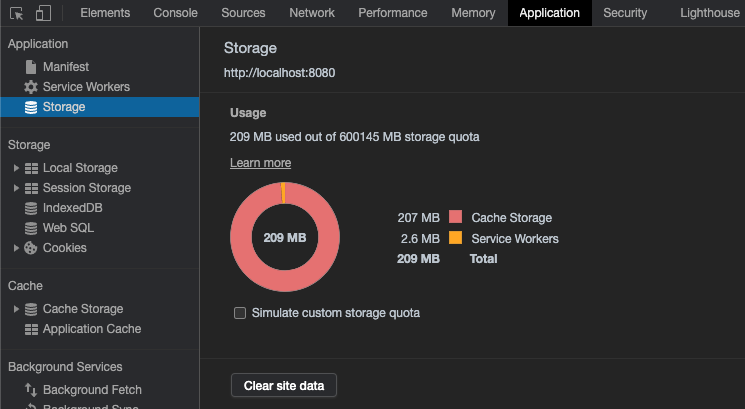
If you still have the problem, could you help to share a reproducible project?
 haijian-vaadin
on 2 Mar 2021
haijian-vaadin
on 2 Mar 2021
Hi @haijian-vaadin, thank you for your answer.
I did in my real project what you've recommended (cleared all site data as above) and it still doesn't work :( When browser goes offline only vaadin default offline page is shown not mine.
So I entered the Vaadin www, choose "Start building -> Vaadin 18", I run the Vaadin app builder, I changed Vaadin version to 19, and I generated and downloaded the app. Then imported the app as a war into my eclipse, added offline.html page in src/main/resources/META-INF/resources/ (it is a Spring projects) and offlinePath in @PWA (according to https://vaadin.com/docs-beta/latest/guide/configuration/pwa/)
Then I run this app as a war on Tomcat 9, entered my app in Chrome when online:
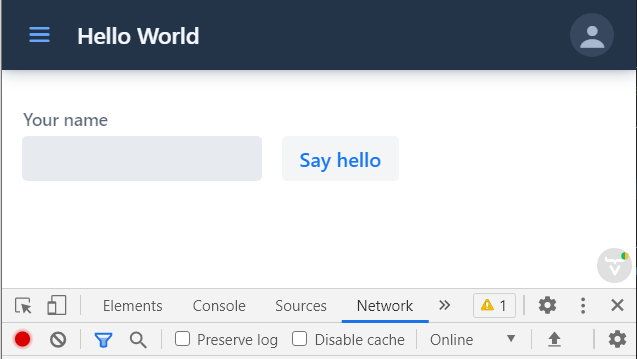
Then I changed Network to offline, clicked somewhere in menu (new menu item) and...
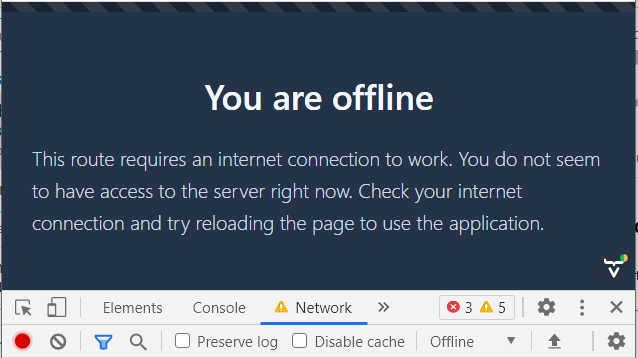
I've even did clear site data in Application / Storage and try again but it didn't help ... no matter what i do i never see mine offline page only the vaadin default one :/
Sorce code:
my-app.zip
darmro
on 2 Mar 2021
Hi @darmro, thanks for the info. Now I think the problem is this part
Then I run this app as a war on Tomcat 9
If I run the attached app with just mvn, then it works as expected for me.
Did you try to run it in a standalone tomacat 9 server? or inside some IDE?
haijian-vaadin
on 2 Mar 2021
I did previous tests runnin my app on Tomcat9 server inside my Eclipse. So I did the test again.
I run mvn with clean package, then I took myapp-1.0-SNAPSHOT.war and istall it directly in Tomcat9 (outside Eclipse), putting war into <tomcat>\webapps foler. App was installed and run by Tomcat. I entered in the Chrome http://localhost:8080/myapp-1.0-SNAPSHOT, next went offline and ... :(
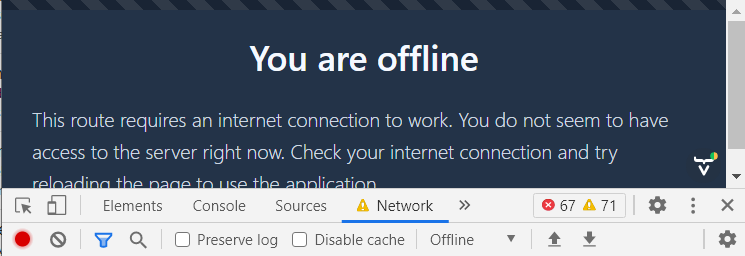
The default vaadin offline page is shown, not mine.
O course I did also clear site data in Application / Storage- no effect.
Our real app has to be distributed as war package of course.
darmro
on 2 Mar 2021
Hi @darmro, I tried the application I think you did nothing wrong. The custom offline page currently is only for offline start (refresh the page while offline), it's indeed confusing.
There are 2 problems on our side:
- Clicking on the menu item when offline doesn't show the custom offline page. This is a bad dx, the issue is the same as in https://github.com/vaadin/flow/issues/9679.
- Refresh the page while offline gives the default browser offline page, I made a ticket
haijian-vaadin
on 3 Mar 2021
When you have a Vaadin app with both Java and TS views, the offlinePath is considered a backwards compatibility feature. This should probably be clarified in the documentation. As the app shell with navigation and client side views can work offline, and you probably want to be able to navigate between client side views for example, you probably don't want the whole page including navigation menus to be replaced with a custom offline page.
You should not use the offlinePath feature in this case as the file you declare by that property is only used for starting the app (or reloading) while offline, as mentioned above, and that file is supposed to be the _whole document_, not something that gets injected into an app shell. We can't assume the file declared by offlinePath to be something that would not break the app shell or page layout if being added inside the app shell so we can't use that directly in place of the "offline stub" that you see now in place of the Java view as part of the page when trying to navigate to a Java view while offline.
The main problem is that #9679 isn't implemented yet, but when it is you should use this new way to customize the offline content for Java views (in hybrid Java + TS apps) and then you don't need the old offlinePath. Unless we instead make it so that the old style offline page configured via offlinePath could be shown in an iframe in the app shell, but that's not ideal.
For some more context about related feature design see the issue and discussion at #8856.
 Haprog
on 11 Mar 2021
Haprog
on 11 Mar 2021
If somebody has other ideas about the design of how this could/should work better, feel free to discuss it here.
Haprog
on 11 Mar 2021
Unless we instead make it so that the old style offline page configured via offlinePath could be shown in an iframe in the app shell, but that's not ideal
I plan to implement sth like that, hope it can improve the UX of offline in a pure Flow application. that after setting the offlinePath, the offline start shows the custom offline page but offline navigation shows the default offline stub, and the user gets the impression that the customized offline page doesn't work.
haijian-vaadin
on 11 Mar 2021
Hi @Haprog
I have only java views (no TS, so far). Plus static html page (static and closed - I mean seperated from views, theme, styles) called offline.html. I thought that if I give it to offlinePath my static html page is shown, but no, only vaadin default page is shown, moreover in English of course- it is a problem, cause it should be in Polish :)
If it was possible to parametrize this default offline page and give your texts it wolud be enough. For example via CustomizedSystemMessages, where I can set my texts for eg. session expiration, or in the same way as I configure reconnect text (via dedicated ReconnectDialogConfiguration class).
darmro
on 11 Mar 2021
Another solution would be to not show the offline stub when navigating to Java view, but keep it the same behavior as in v18(14), that is, not navigating to the view, but showing a progress bar and an indication of offline, like in the screenshot.

Would this behavior work for you @darmro?
haijian-vaadin
on 16 Mar 2021
Hi @haijian-vaadin. Of course this solution is also acceptable :)
darmro
on 16 Mar 2021
Decided on a solution were the custom offline page is used in both cases (stand-alone and embedded in the app shell protected by an <iframe>). So the behavior will be:
Offline start:
offlinePath=custom.html: rendercustom.htmlas a single page in browser- No custom
offlinePathset: render app shell with the Flow default offline page in iframe
Offline navigation:
offlinePath=custom.html: render appshell withcustom.htmlembedded in iframe- no custom
offlinePathset: render appshell with the Flow default offline page in iframe
Currently blocked by #10031
 joheriks
on 24 Mar 2021
joheriks
on 24 Mar 2021
Related issues
 mcollovati
·
4Comments
mcollovati
·
4Comments
 vlukashov
·
3Comments
vlukashov
·
3Comments
 knoobie
·
4Comments
knoobie
·
4Comments
 TatuLund
·
3Comments
TatuLund
·
3Comments
 Artur-
·
4Comments
Artur-
·
4Comments