Flow: PreserveOnRefresh - enabled, PushMode=Automatic, PushTransport=LongPolling - Application fails when page is reloaded
Description of the bug / feature
Due to certain environment conditions / restrictions, for one of our clients, WebSockets cannot be enabled, therefore, the application falls back to LONG_POLLING.
PreserveOnRefresh=enabled
PushMode=AUTOMATIC
PushTransport=LONG_POLLING
Everything works nice, with the following exception:
if there is an Overlay opened (e.g. a ConfirmationDialog) and the user makes a page-reload (F5 or click from the browser), the application fails with the following exception and the result is an empty screen:
Assertion error: No child found with id 3

The following error is displayed on the server-side:
[Atmosphere-Shared-2] ERROR com.vaadin.flow.server.communication.PushAtmosphereHandler - Exception in push connection
org.eclipse.jetty.io.EofException
    at org.eclipse.jetty.server.HttpConnection$SendCallback.reset(HttpConnection.java:708)
    at org.eclipse.jetty.server.HttpConnection$SendCallback.access$300(HttpConnection.java:667)
    at org.eclipse.jetty.server.HttpConnection.send(HttpConnection.java:526)
    at org.eclipse.jetty.server.HttpChannel.sendResponse(HttpChannel.java:910)
    at org.eclipse.jetty.server.HttpChannel.write(HttpChannel.java:987)
    at org.eclipse.jetty.server.HttpOutput.channelWrite(HttpOutput.java:284)
    at org.eclipse.jetty.server.HttpOutput.channelWrite(HttpOutput.java:268)
    at org.eclipse.jetty.server.HttpOutput.flush(HttpOutput.java:713)
    at org.eclipse.jetty.server.Response.flushBuffer(Response.java:1110)
    at javax.servlet.ServletResponseWrapper.flushBuffer(ServletResponseWrapper.java:215)
    at org.atmosphere.cpr.AtmosphereResponseImpl.flushBuffer(AtmosphereResponseImpl.java:506)
    at org.atmosphere.cpr.AtmosphereInterceptorWriter.flush(AtmosphereInterceptorWriter.java:102)
    at org.atmosphere.cpr.AtmosphereResponseImpl$Stream.flush(AtmosphereResponseImpl.java:1001)
    at org.atmosphere.handler.AbstractReflectorAtmosphereHandler.onStateChange(AbstractReflectorAtmosphereHandler.java:156)
    at com.vaadin.flow.server.communication.PushAtmosphereHandler.onStateChange(PushAtmosphereHandler.java:52)
    at org.atmosphere.cpr.DefaultBroadcaster.invokeOnStateChange(DefaultBroadcaster.java:1037)
    at org.atmosphere.cpr.DefaultBroadcaster.prepareInvokeOnStateChange(DefaultBroadcaster.java:1057)
    at org.atmosphere.cpr.DefaultBroadcaster.executeAsyncWrite(DefaultBroadcaster.java:871)
    at org.atmosphere.cpr.DefaultBroadcaster$2.run(DefaultBroadcaster.java:474)
    at java.util.concurrent.Executors$RunnableAdapter.call(Executors.java:511)
    at java.util.concurrent.FutureTask.run(FutureTask.java:266)
    at java.util.concurrent.ThreadPoolExecutor.runWorker(ThreadPoolExecutor.java:1149)
    at java.util.concurrent.ThreadPoolExecutor$Worker.run(ThreadPoolExecutor.java:624)
    at java.lang.Thread.run(Thread.java:748)
Minimal reproducible example
Code below and also as archive (it can be easily reproduced from a starter app).
Steps to reproduce:
- Click on the "Say hello" button
- A Confirmation Dialog appears
- Reload the page (F5 or click from the browser)
package org.vaadin.example;

import com.vaadin.flow.component.button.Button;
import com.vaadin.flow.component.button.ButtonVariant;
import com.vaadin.flow.component.confirmdialog.ConfirmDialog;
import com.vaadin.flow.component.orderedlayout.VerticalLayout;
import com.vaadin.flow.component.page.Push;
import com.vaadin.flow.component.textfield.TextField;
import com.vaadin.flow.router.PreserveOnRefresh;
import com.vaadin.flow.router.Route;
import com.vaadin.flow.shared.communication.PushMode;
import com.vaadin.flow.shared.ui.Transport;

@Route("")
@PreserveOnRefresh
@Push(value = PushMode.AUTOMATIC, transport = Transport.LONG_POLLING)
public class MainView extends VerticalLayout {

    public MainView() {
        TextField textField = new TextField("Your name");
        Button button = new Button("Say hello",
                e -> {
                    ConfirmDialog cd = new ConfirmDialog();
                    cd.setText("Test content");
                    cd.open();
                });

        button.addThemeVariants(ButtonVariant.LUMO_PRIMARY);
        add(textField, button);
    }
}
Expected behavior
No matter if WebSockets are enabled or disabled, the main layout should be rendered along with the Overlay, without exceptions.
Actual behavior
_If WebSockets are enabled, and there is an Overlay opened_, the issue cannot be reproduced, everything works as expected (main layout is rendered and the overlay is also rendered back).
_If WebSockets are enabled, and there is no Overlay opened_, again, everything works as expected: main layout is rendered without issues.
_If WebSockets are disabled, and there is an Overlay opened_, then a blank page is shown along with an exception:
Assertion error: No child found with id 3
_If WebSockets are disabled, and there is no Overlay opened_, then everything works as expected: main layout is rendered without issues.
The issue can also be reproduced, with any other component which is attached directly to the root.
Versions:
- Vaadin version: 14.4.7
- Java version: OpenJDK 1.8
- OS version: Linux / Windows / MacOS
- Browser version (if applicable): Chrome 88.0.4324.182 (Official Build) (x86_64), Safari 14.0.3 (16610.4.3.1.4) and Firefox
- Application Server (if applicable): Jetty 9.4.35.v20201120, Wildfly 18.0.1
- IDE (if applicable): -
Would be really appreciated if you can make some light here.
Thank you.
 silvan-lincan
All 21 comments
Hi @silvan-lincan
Thanks for submitting the issue with the details and steps to reproduce.
It may seems a little odd but I can see the issue on Chrome even without disabling the websockets (I'm using the 88.0.4324.150 on Mac). On the other hand, I could not reproduce it anyhow on Firefox even by disabling the websockets.
So, I was curious to know whether you can see it on Firefox in your environment.
 taefi
on 22 Feb 2021
taefi
on 22 Feb 2021
Hi @taefi
Thank you very much for looking into this.
Sorry for delay.
I wanted to test again.
MacOS (transport set to LONG_POLLING):
- Safari 14.0.3 (16610.4.3.1.4) - _fails_
- Chrome 88.0.4324.182 - _fails_
- Firefox 85.0.2 (64-bit): _works_
Linux (transport set to LONG_POLLING):
- Chrome 88.0.4324.150 (64-bit): _fails_
- Firefox 85.0: _works_
So, it seems indeed that on Firefox is working. Sorry about this, but I mentioned it as one of my colleagues saw this error also on Firefox, but I think this was some time ago.
Then the question is, do you really think this is only a browser (Chrome / Safari) related issue?
The problem is, it seems that most of our users are using Chrome and Safari.
Thank you.
silvan-lincan
on 22 Feb 2021
Hi @taefi,
MacOS (PushMode=Automatic, Transport=WEBSOCKET_XHR)
- Safari 14.0.3 (16610.4.3.1.4) - works
- Chrome 88.0.4324.182 - works
- Firefox 85.0.2 (64-bit) - works
Linux (PushMode=Automatic, Transport=WEBSOCKET_XHR)
- Chrome 88.0.4324.150: works
- Firefox 85.0: works
So, it is indeed odd that on your Chrome version on Mac you could reproduce this even with WebSockets enabled.
Can it be related with the fact that you have 88.0.4324.150 and I have 88.0.4324.182?
Even though, on Linux, I also have 88.0.4324.150, but cannot reproduce the issue when WebSockets are enabled.
silvan-lincan
on 22 Feb 2021
Hi @silvan-lincan,
Great Info, thanks for the update.
Yeah it is really strange.
I only followed your steps:
- Downloaded the project
- Did not do anything to disable the websocket on Chrome
mvn clean installand thenmvn jetty:run- With
Transport.LONG_POLLINGit is failing on my current version of chrome. - The same works on FireFox. I disabled websockets on Firefox by going to
about:configand set0fornetwork.websocket.max-connectionsand I can see the failingwsconnections, But, again everything works. - I could verfiy that changing transport to
Transport=WEBSOCKET_XHRresolves the issue on chrome also.
So, I'm going to investigate more. First, I'll update my Chrome to see what happens.
taefi
on 22 Feb 2021
Hi @taefi ,
yes, to reproduce the issue, it is enough to set the transport to LONG_POLLING, don't need to really disable the websockets, not even on the server-side.
Thank you for investigating further. Would be really great if you find something, since convincing the client to enable WebSockets in the environment (Apache, Firewalls etc.) it takes quite some time and it needs certain approvals.
silvan-lincan
on 22 Feb 2021
Hello,
any further findings on this would be appreciated (even a workaround or something).
Thank you.
silvan-lincan
on 24 Feb 2021
Everything works correctly without Push.
The error is coming form the client side and it's about node with id=4.
There is a command to attach the node as a child but the node itself is not sent at all with Push.
Node with id=4 is a confirmation dialog.
 denis-anisimov
on 25 Mar 2021
denis-anisimov
on 25 Mar 2021
The problem is apparently caused by the fact that ConfirmationDialog instance is attached directly to the UI instance.
The workaround is extremely simple: don't rely on auto attach the dialog to the UI : attach the dialog instance to some non UI component. E.g. to the VerticalLayout
ConfirmDialog cd = new ConfirmDialog();
add(cd);
Hi Denis,
thank you very much for your answer.
In regards with Push, we cannot disable it since we have functionality based on this.
On the other hand, I will try the recommended workaround.
Do you think that there is still a chance for an official fix?
Thank you.
silvan-lincan
on 25 Mar 2021
I'm just writing my thoughts and results here during the investigation.
I don't know whether it's feasible to fix this since I still don't know the exact reason of this behavior.
I'm working on this.
denis-anisimov
on 25 Mar 2021
Cool, thank you very much.
silvan-lincan
on 25 Mar 2021
This is apparently a Push only issue.
I see that on the server side everything behaves correctly.
The changes are collected two times after reload .
The first set of changes contains command to attach the dialog.
The second set contains command to add the dialog node to the UI .
I see the second command in the Network tab but there is no the first command.
So for some reason the first command disappeared.
I assume it happens because of Push.
In fact sometimes I see a random failure even when I try load the page without any reload/refresh.
And there is a Push failure in the JS console :
Failed to load 'http://localhost:8080/?v-r=push&v-uiId=10&v-pushId=d2d5982e-3864-40bc-acc3-153fcfc30abb&X-Atmosphere-Transport=close&X-Atmosphere-tracking-id=0db29591-8b52-4fac-a252-7c25e32539bf&_=1616742572444': Synchronous XHR in page dismissal. See https://www.chromestatus.com/feature/4664843055398912 for more details.
Push connection using long-polling failed!
| nD | @ | client-FCEED70EEBF39…10B720.cache.js:213
-- | -- | -- | --
| ao | @ | client-FCEED70EEBF39…0B720.cache.js:1016
| fo | @ | client-FCEED70EEBF39…10B720.cache.js:907
| lq | @ | client-FCEED70EEBF39…10B720.cache.js:530
| Fp | @ | client-FCEED70EEBF39…0B720.cache.js:1037
| (anonymous) | @ | client-FCEED70EEBF39…0B720.cache.js:1002
| sb | @ | client-FCEED70EEBF39…10B720.cache.js:440
| vb | @ | client-FCEED70EEBF39…10B720.cache.js:897
| (anonymous) | @ | client-FCEED70EEBF39…10B720.cache.js:627
| _f | @ | vaadinPush.js:2774
| _invokeFunction | @ | vaadinPush.js:2754
| _invokeCallback | @ | vaadinPush.js:2884
| _onError | @ | vaadinPush.js:1665
| _executeRequest | @ | vaadinPush.js:2128
| _pushOnClose | @ | vaadinPush.js:2565
| _disconnect | @ | vaadinPush.js:462
| _close | @ | vaadinPush.js:491
| AtmosphereRequest.close | @ | vaadinPush.js:2922
Fri Mar 26 2021 10:09:32 GMT+0300 (Moscow Standard Time) Atmosphere: Firing onError, reasonPhrase: NetworkError: Failed to execute 'send' on 'XMLHttpRequest': Failed to load 'http://localhost:8080/?v-r=push&v-uiId=10&v-pushId=d2d5982e-3864-40bc-acc3-153fcfc30abb&X-Atmosphere-Transport=close&X-Atmosphere-tracking-id=0db29591-8b52-4fac-a252-7c25e32539bf&_=1616742572444': Synchronous XHR in page dismissal. See https://www.chromestatus.com/feature/4664843055398912 for more details.
Navigated to http://localhost:8080/
vaadinPush.js?v=2.6-SNAPSHOT:3500 Vaadin push loaded
This is very similar to https://github.com/vaadin/flow/issues/7600
https://github.com/vaadin/flow/issues/7600#issuecomment-805774413
denis-anisimov
on 26 Mar 2021
On the other hand Push error has happened on close event and may be is unrelated to the issue.
It might be that this is just a push issue which loses some server responses.
denis-anisimov
on 26 Mar 2021
Without Push there is only one response which contains all the changes including attach for the dialog.
When Push is enabled there are two responses are supposed (as mentioned above) and the first one is not transferred to the client.
denis-anisimov
on 26 Mar 2021
OK, this is pure Push issue related to the fact that Push connection has not been closed properly most likely.
If I comment out closing Push connection in the vaadinPush.js then the error in the console is not shown.
But the bug is still there.
The problem appeared with https://www.chromestatus.com/feature/4664843055398912: it disallows calling send synchronously on page close.
There is a Chrome flag #allow-sync-xhr-in-page-dismissal whose value can be changed via chrome://flags/ .
If I set it to true (and reload the browser) then I can't reproduce the issue.
So it proves that the issue is caused by the push connection behavior.
xhr close should be called somehow asynchronously in vaadinPush.js .
I don't have any knowledge of Push. Help from someone who has this knowledge is needed.
@Artur- , could you please take a look ?
denis-anisimov
on 26 Mar 2021
I've updated the JS push from here: https://github.com/Atmosphere/atmosphere-javascript/blob/master/modules/javascript/src/main/webapp/javascript/atmosphere.js
We are using vaadinPush.js which is modified atmosphere.js . But the version which we are using is 2.4.30.
The latest atmosphere.js version seems work fine with our Atmosphere runtime.
There are no errors.
And the latest version doesn't throw the error related to call send synchronously.
But the bug is still there.
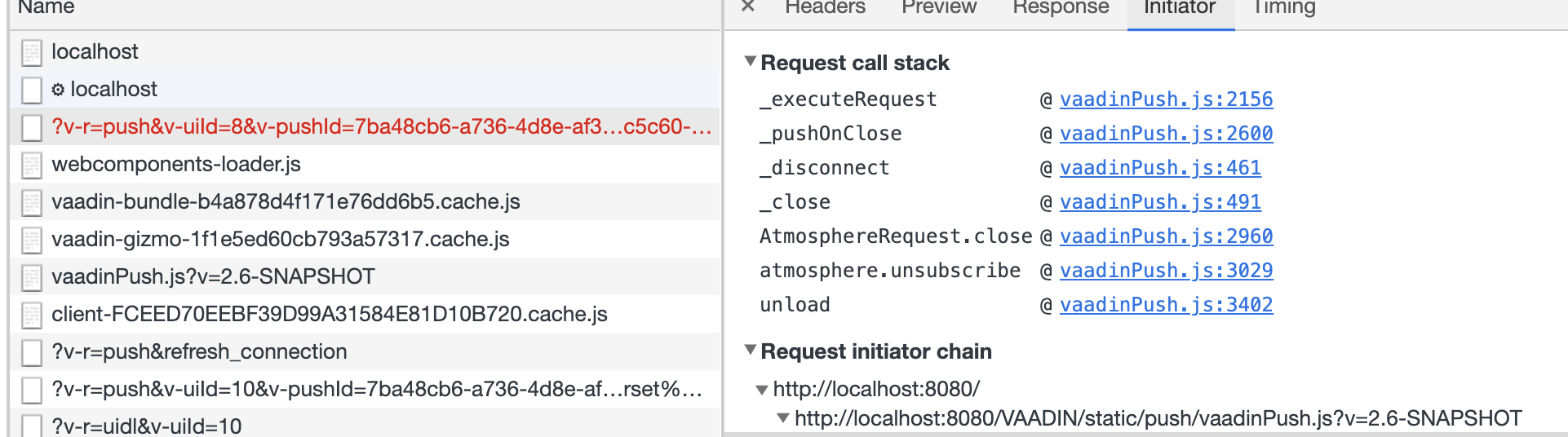
Apparently with the new atmosphere.js version the close command is simply cancelled in browser refresh:
http://localhost:8080/?v-r=push&v-uiId=4&v-pushId=7ba48cb6-a736-4d8e-af3b-e8e0291f48f7&X-Atmosphere-Transport=close&X-Atmosphere-tracking-id=85f35659-3b70-43a4-b863-a1a28676763d&_=1617005027288
(see attached images)
denis-anisimov
on 29 Mar 2021

denis-anisimov
on 29 Mar 2021
So this is an Atmosphere issue and it's fixed in 2.7.0 and 3.1.0 .
https://github.com/Atmosphere/atmosphere/commit/8f082dafb526ee08c0cb534c2c825d052e6e9b24
https://github.com/Atmosphere/atmosphere-javascript/commit/a1cf7a11b9043707d840c91e27968b06f8a71998
We have to update JS version AND Java Atmosphere binaries since change affects the server side code as well.
denis-anisimov
on 5 Apr 2021
Perfect. This is good news I would say.
silvan-lincan
on 5 Apr 2021
2.7.0 has a fix for this but it cannot be used with Vaadin: integration is broken because of other issue.
It's not clear whether this is a regression in Atmosphere or our integration needs to be corrected.
Anyway, this is out of my knowledge. I cannot proceed with this.
denis-anisimov
on 12 Apr 2021
Thank you very much Denis.
I closed this by mistake (wrong keyboard shortcut). Now is reopened.
I wait, maybe there is still a chance that this gets into some Vaadin 14.x version.
silvan-lincan
on 12 Apr 2021
Related issues
 mstahv
·
3Comments
mstahv
·
3Comments
 joheriks
·
4Comments
joheriks
·
4Comments
 marcushellberg
·
4Comments
marcushellberg
·
4Comments
 knoobie
·
4Comments
knoobie
·
4Comments
 SomeoneToIgnore
·
4Comments
SomeoneToIgnore
·
4Comments
Most helpful comment
So this is an Atmosphere issue and it's fixed in
2.7.0and3.1.0.https://github.com/Atmosphere/atmosphere/commit/8f082dafb526ee08c0cb534c2c825d052e6e9b24
https://github.com/Atmosphere/atmosphere-javascript/commit/a1cf7a11b9043707d840c91e27968b06f8a71998
We have to update JS version AND Java Atmosphere binaries since change affects the server side code as well.