Flow: applyTheme includes undesired styles to components
There seems to be a regression regarding how applyTheme works between versions 19.0.0.alpha4 and 19.0.0.beta1. While applying custom theme to a view, each Vaadin Web Component in that view also gets applied styles that affect the appearance of the component.
Example: see the difference in spacing of radio buttons inside a group:
 tomivirkki
All 12 comments
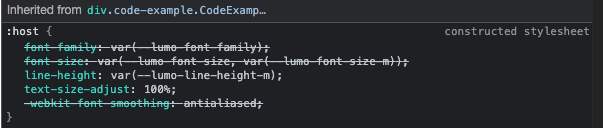
It seems like the changes are because the <span part="label"> for a radio-button is inheriting css from
<div class="render CodeExample-module--render--1x58S" data-has-example="true" style="min-height: 64px;"></div>
which has line height that is applied
constructed stylesheet
:host {
...
    line-height: var(--lumo-line-height-m);
...
}
But why
 pleku
on 16 Feb 2021
pleku
on 16 Feb 2021
This is also noticeable on https://start.vaadin.com/ Every component inherits those styles from a constructed stylesheet
tomivirkki
on 16 Feb 2021
I guess this is caused by https://github.com/vaadin/flow/commit/ecfb800747a0d54ed4ce72a5423105aa23ef5368
 Haprog
on 22 Feb 2021
Haprog
on 22 Feb 2021
This is quite an urgent issue imo. As time passes and people get used to these styles getting included in the Components, someone may consider fixing this a breaking change.
tomivirkki
on 7 Apr 2021
What exactly is the problem? I don't understand it based on the text here. Which styles are applied where?
 Artur-
on 7 Apr 2021
Artur-
on 7 Apr 2021
If you open the "after the regression" link, the <vaadin-radio-button> -elements are too far apart due to the styles included via constructed stylesheet:
tomivirkki
on 7 Apr 2021
and where are the styles from?
Artur-
on 7 Apr 2021
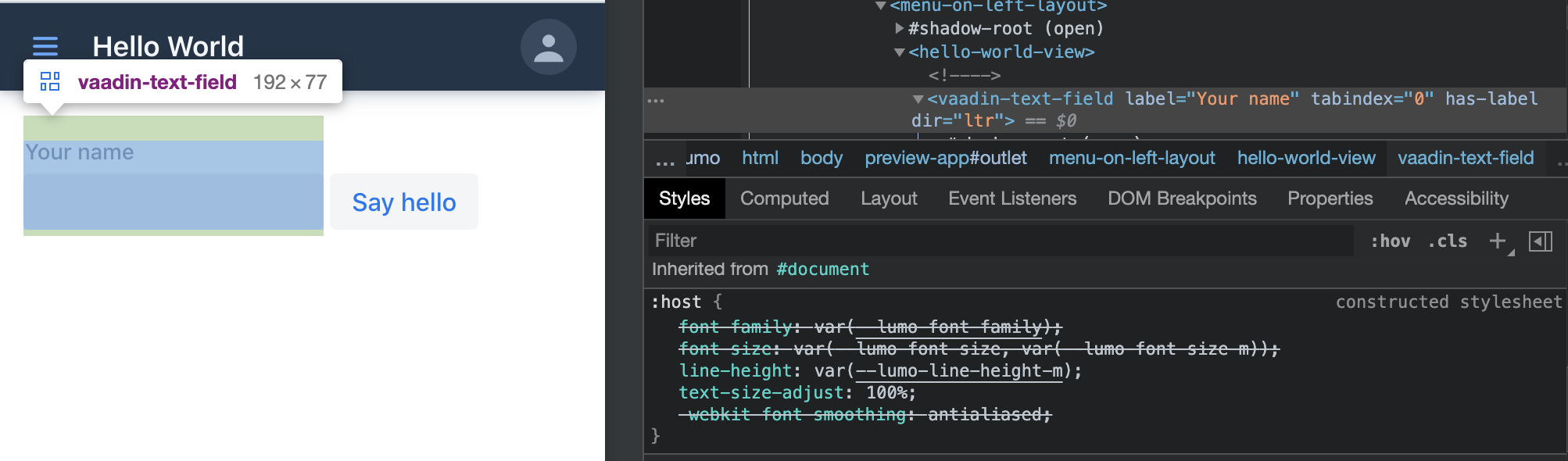
That's for the fixer to find out. As mentioned, it's not just an issue in the docs, if you inspect the components in https://start.vaadin.com/ you can see they have the same constructed stylesheet applied
tomivirkki
on 7 Apr 2021
Which components do you mean?
e.g. line-height: var(--lumo-line-height-m); is at least defined in https://github.com/vaadin/vaadin-lumo-styles/blob/master/typography.html#L46 so that it should be applied to both html and all shadow roots
Artur-
on 7 Apr 2021
Which components do you mean?
tomivirkki
on 7 Apr 2021
So you have a <radio-button-basic-imported-86907302> in the "after" example. For that element (its shadow root) the theme is applied. The theme is based on Lumo, which contains line-height: var(--lumo-line-height-m);. Why should this line-height not apply to the vaadin-radio-button instances inside <radio-button-basic-imported-86907302> as you are not overriding it?
Artur-
on 7 Apr 2021
Took another look and you're right. Seems like the change in fact _fixed_ the appearance of the example. The "before" example was missing the Lumo typography styles.
tomivirkki
on 8 Apr 2021
Related issues
 ggecy
·
3Comments
ggecy
·
3Comments
 mcollovati
·
4Comments
mcollovati
·
4Comments
 knoobie
·
4Comments
knoobie
·
4Comments
 TatuLund
·
3Comments
Artur-
·
4Comments
TatuLund
·
3Comments
Artur-
·
4Comments
Most helpful comment
I guess this is caused by https://github.com/vaadin/flow/commit/ecfb800747a0d54ed4ce72a5423105aa23ef5368