Flow: JavaScript annotation doesn't work with context:// URLs in npm mode
I have the @JavaScript("context://js/test.js") attached to my route, in hopes to load JavaScript files as plain JS (not as a module) from src/main/webapp/js/test.js.
However, Vaadin tries to look up the javascript file from the node_modules and fails.
Minimal reproducible example
- The Skeleton Starter project: Add
@JavaScript("context://js/test.js")annotation to theMainViewclass. - Run the Skeleton Starter.
Expected behavior
The produced HTML page should load a script from src/main/webapp/js/test.js.
Actual behavior
The webpack compilation fails with
 Failed to find the following imports in the `node_modules` tree:
      - context://js/test.js
  If the build fails, check that npm packages are installed.
Versions:
- Vaadin / Flow version: 4.1.27 / 2.1.9
- Java version: 8
- OS version:
- Browser version (if applicable):
- Application Server (if applicable):
- IDE (if applicable): Intellij
 mvysny
All 26 comments
Full console log:
...
2020-05-11 11:46:50.860 [RMI TCP Connection(2)-127.0.0.1] INFO com.vaadin.flow.server.startup.DevModeInitializer - Starting dev-mode updaters in /home/mavi/work/my/vok/karibu10-helloworld-application folder.
2020-05-11 11:46:50.921 [RMI TCP Connection(2)-127.0.0.1] INFO dev-updater - Visited 63 classes. Took 42 ms.
2020-05-11 11:46:51.024 [RMI TCP Connection(2)-127.0.0.1] INFO dev-updater - Skipping `npm install`.
2020-05-11 11:46:51.024 [RMI TCP Connection(2)-127.0.0.1] INFO dev-updater - Copying frontend resources from jar files ...
2020-05-11 11:46:51.049 [RMI TCP Connection(2)-127.0.0.1] INFO dev-updater - Visited 11 resources. Took 25 ms.
2020-05-11 11:46:51.082 [RMI TCP Connection(2)-127.0.0.1] INFO dev-updater -

  Failed to find the following imports in the `node_modules` tree:
      - context://js/test.js
  If the build fails, check that npm packages are installed.

  To fix the build remove `package-lock.json` and `node_modules` directory to reset modules.
  In addition you may run `npm install` to fix `node_modules` tree structure.


2020-05-11 11:46:51.085 [RMI TCP Connection(2)-127.0.0.1] INFO dev-updater - No js modules to update '/home/mavi/work/my/vok/karibu10-helloworld-application/target/frontend/generated-flow-imports.js' file
2020-05-11 11:46:52.203 [RMI TCP Connection(2)-127.0.0.1] INFO dev-webpack - Starting webpack-dev-server, port: 40673 dir: /home/mavi/work/my/vok/karibu10-helloworld-application
2020-05-11 11:46:52.205 [RMI TCP Connection(2)-127.0.0.1] INFO dev-webpack - Running webpack to compile frontend resources. This may take a moment, please stand by...
2020-05-11 11:46:57.810 [webpack] ERROR dev-webpack - ERROR in ../target/frontend/generated-flow-imports.js
2020-05-11 11:46:57.810 [webpack] ERROR dev-webpack - Module not found: Error: Can't resolve 'context://js/test.js' in '/home/mavi/work/my/vok/karibu10-helloworld-application/target/frontend'
2020-05-11 11:46:57.810 [webpack] ERROR dev-webpack -  @ ../target/frontend/generated-flow-imports.js 85:0-30
2020-05-11 11:46:57.810 [webpack] ERROR dev-webpack - ERROR in ../target/frontend/generated-flow-imports.js
2020-05-11 11:46:57.810 [webpack] ERROR dev-webpack - Module not found: Error: Can't resolve 'context://js/test.js' in '/home/mavi/work/my/vok/karibu10-helloworld-application/target/frontend'
2020-05-11 11:46:57.811 [webpack] ERROR dev-webpack -  @ ../target/frontend/generated-flow-imports.js 85:0-30
2020-05-11 11:46:57.811 [webpack] ERROR dev-webpack - ℹ 「wdm」: Failed to compile.
2020-05-11 11:46:57.811 [webpack] ERROR dev-webpack -
------------------ Frontend compilation failed. -----------------
2020-05-11 11:46:57.811 [RMI TCP Connection(2)-127.0.0.1] INFO dev-webpack - Webpack startup and compilation completed in 5608ms
2020-05-11 11:46:57.827 [RMI TCP Connection(2)-127.0.0.1] INFO com.vaadin.flow.server.startup.ServletDeployer - Automatically deploying Vaadin servlet with name com.vaadin.flow.server.startup.ServletDeployer to /*
[2020-05-11 11:46:58,052] Artifact Gradle : karibu10-helloworld-application.war (exploded): Artifact is deployed successfully
[2020-05-11 11:46:58,052] Artifact Gradle : karibu10-helloworld-application.war (exploded): Deploy took 9,033 milliseconds
2020-05-11 11:46:58.637 [http-nio-8080-exec-1] WARN com.vaadin.flow.server.DefaultDeploymentConfiguration -
====================================================================
Vaadin is running in DEBUG MODE.
In order to run your application in production mode and disable debug features, you should enable it by setting the servlet init parameter productionMode to true.
See https://vaadin.com/docs/v14/flow/production/tutorial-production-mode-basic.html for more information about the production mode.
====================================================================
/home/mavi/local/apache-tomcat-9.0.31/bin/catalina.sh stop
Disconnected from the target VM, address: '127.0.0.1:37955', transport: 'socket'
I just recently changed @StyleSheet annotations of Handsontable wrapper to use "context://" (due other reasons and possible another issue which I will report later) and that works, so I would assume it should work with @JavaScript as well, and if not, then I would feel that it is a bug.
 TatuLund
on 13 May 2020
TatuLund
on 13 May 2020
Handsontable uses compatibility mode, so I assume that @JavaScript annotation behaves differently in npm mode and in compat mode.
In npm mode the workaround is to place the file into src/main/webapp/js/test.js and call Page.addJavaScript("context://js/test.js").
mvysny
on 13 May 2020
No, Handsontable can be used in both compatibility and npm mode. And @JavaScript annotation behaves differently as discussed in #8285, but that does not prevent Handsontable add-on to work in npm mode.
TatuLund
on 13 May 2020
@JavaScript works in old fashion (in the same way as in "compatibility mode") (avoiding bundling) only with external URLs.
For all "internal" URLS @JavaScript is just the same as @JsModule.
So in fact context is simply ignored in npm mode.
On the other hand it's still works as expected in compatibility mode.
Flow 2.x still supports the compatibility mode and this is the reason why @JavaScript javadocs have not been updated.
So, finally:
- this is not a bug. It works as expected.
@JavaScriptis just an alias for@JsModulefor internal URLs by design. - To be able to do what you want you may use programmatic
Page::addJavaScript(whose javadocs are already updated for npm by the way). - The issue is just only about confusing Javadocs for
@JavaScript.
@mvysny , are you OK with this ? ( so I will fix only javadocs for @JavaScript )
 denis-anisimov
on 10 Jun 2020
denis-anisimov
on 10 Jun 2020
@denis-anisimov I'd expect context://-based URLs to still work even in npm mode. Imagine that you have a bunch of old javascript files that you need to keep around for compatibility reasons (e.g. https://www.tiny.cloud/ which is not distributed via npm and doesn't support webcomponents); the most obvious way is to place those in src/main/webapp/js and load them via @JavaScript("context://js/test.js"), especially since Page.addJavaScript("context://js/test.js") works also in npm mode.
Documenting that @JavaScript doesn't support context:// (but leaving Page.addJavaScript() as-is which does support context:// and is perceived as an imperative alias for @JavaScript) would create confusion amongst the programmers. Therefore I insist on fixing this bug.
I don't intuitively perceive @JavaScript is an alias for @JsModule since @JavaScript references plain global javascript files while @JsModule uses the new ES6 module mumbo-jumbo whatever.
mvysny
on 10 Jun 2020
context:// refers to a file deployed to the servlet context path. I'm not 100% sure what an "internal" URL is but it certainly does not sound like one. Why would we want to ignore it instead of making it work?
 Artur-
on 10 Jun 2020
Artur-
on 10 Jun 2020
Please don't ask me such complicated questions.
It's not my decision. This has been designed by the people who implemented NPM support.
I'm just explaining how it works now.
JavaScript is just an alias for JsModule.
By design.
I can't add anything to this.
There was an explicit decision about external URLs : if URL starts from http /https then this is the definition of external URL (in this specific case) and it works in the previous old fashion way: via HTTP avoiding bundle.
Why would we want to ignore it instead of making it work?
Let's summon the decision makers/implementors :
@Legioth , @manolo , whoever.....
denis-anisimov
on 10 Jun 2020
My understanding is that @JavaScript isn't a 1:1 alias for @JsModule since it already has special support for some categories of external URLs. Extending that exception to also cover e.g. context:// and maybe also base:// seems to make sense since it would enable some additional use cases with minimal risk of regressions.
It would surely be better to have a more explicit way of controlling whether resources are inlined to the bundle or loaded as standalone files, and also whether they should be loaded as a regular <script src=...> or as <script module src=...>. This would however be a slightly bigger effort, especially with regards to ensuring the design is sensible. For that reason, I would suggest considering that separately.
 Legioth
on 10 Jun 2020
Legioth
on 10 Jun 2020
When the developer adds JavaScript - he should be able to decide what Vaadin does with the file. He knows the best how the code has to be inserted, interpreted and executed. As stated above, some files aren’t in npm.
Proposal: Change JavaScript or JsModule to something like this:
public @interface JavaScript {

String value();

Type type default Type.NPM; // Enum of „NPM, EXTERNAL_RESOURCE, INTERNAL_RESOURCE...“

Location location default Location.BUNDLE; // Enum of „HEAD, BODY, BUNDLE...“

Integer order() default -1; // Order in which the file should be added to head or body. Used if files depend on each other and have to be inserted in the correct order to work
}
This isn’t really perfect - just a rough idea to work with. This could help with the current situation, because flow doesn’t have to „guess“ what the user wants - the user says it. Totally transparent without magic.
 knoobie
on 10 Jun 2020
knoobie
on 10 Jun 2020
@knoobie , your suggestion is far away from the original issue.
It may be a separate ticket because of location and order.
These add a new feature which is completely absent at the moment.
So I would suggest do not mix these things here.
type looks reasonable.
But then we have a problem (as always) with compatibility:
- if
typeis NPM thenvalueshould be used as a location of a file to bundle it - and we currently have the exception for "external URLs" : such URL is considered as a plain JS and won't be included into a bundle but will be added as a plain
scripttag.
We have to keep backward compatibility and this limits us in the decisions .
I would really go with type to avoid any confusion with JavaScript but then I don't understand what to do with the special case.
denis-anisimov
on 11 Jun 2020
With the necessity to keep backward compatibility I think we may consider context and base schema as external URLs and apply the same logic as we have for external URLs.
denis-anisimov
on 11 Jun 2020
Treating context:// URLs as external would pass them to the browser as-is; browser will then fail to fetch anything from such an URL. I'm sure we don't want to preserve this "functionality" in the name of backward compatibility?
mvysny
on 11 Jun 2020
Don't treat me so straightforwardly :)
What I meant is: the logic which applies for external URLs in JavaScript should be used also for
context and base schemas.
Of course the resolver should be used for such URLs.
But in fact I think the resolver logic should work out of the box: resolver works both server side and client side. But this needs to be checked of course.
denis-anisimov
on 11 Jun 2020
I skimmed briefly through the PR and it seems to me that in npm mode, @JavaScript("context://foo.js") will be passed-through to the html code as the <script src="context://foo.js"> element?
mvysny
on 16 Jun 2020
Yes and no.
The URL will be passed to the client side.
Client side knows how to deal with this kind of URLs.
As I said:
Of course the resolver should be used for such URLs.
But in fact I think the resolver logic should work out of the box: resolver works both server side and client side.
There is an IT for this case.
Do you think it's broken ?
denis-anisimov
on 16 Jun 2020
I have no idea about the IT tests, but I'm pretty sure the browser will not know how to load context://foo.js unless there is some specific Vaadin machinery that would convert such links into http(s) links. Is there?
mvysny
on 16 Jun 2020
Is there?
I've said it two times already :
But in fact I think the resolver logic should work out of the box: resolver works both server side and client side.
OK, third time:
yes, there is a resolver which is applied for _ANY_ such URL on the server side and client side before doing anything with that.
There is an IT which proves that it works.
Do you have a proof that this doesn't work ?
denis-anisimov
on 16 Jun 2020
The idea is that the server-side URI resolver will translate context://foo.js into foo.js (or maybe the equivalent ./foo.js) which is included as src for the script tag. This means that the file needs to be put in a location from where static files are served by the servlet container, e.g. src/main/webapp/foo.js if deploying as a .war, rather than included in the frontend/ directory.
Legioth
on 16 Jun 2020
Excellent, thank you @Legioth for a clear explanation. I suggest to add your comment into @JavaScript javadoc as well, since the javadoc in the PR it's not clear enough, especially for a person who doesn't care about URI resolvers and such.
mvysny
on 16 Jun 2020
The PR is already merged.
Could you please create another ticket and suggest the clearer javadoc for JavaScript ?
I've made it similar to Page:addJavaScript method being based on existing javadocs.
It's quite possible that it's not clear but I have no idea how to make it better without going into details.
Also I'm confusing since you mentioned Page.addJavaScript("context://js/test.js") here, so you know how it works and you requested the same functionality for @JavaScript but now it looks like the feature you requested is unclear for you.
denis-anisimov
on 16 Jun 2020
Is there any chance to get this backported to Vaadin 14?
 AB-xdev
on 14 Aug 2020
AB-xdev
on 14 Aug 2020
@AB-xdev Hi thanks for the heads up - we simply missed picking this. I've pushed it to the cherry-pick branch and it should then be in 2.3.5 and another 14.3 release in two weeks or so.
 pleku
on 18 Aug 2020
pleku
on 18 Aug 2020
@pleku
2.3.5 got released this week; however I can't find any fixes regarding this issue in the changelogs 🤔
AB-xdev
on 11 Sep 2020
@pleku
The fix was also not included in 2.3.6 (couldn't spot it in the release notes) 🤔
It seems as if neither of the backport commits is located on any branch :frowning:
https://github.com/vaadin/flow/commit/402eee887516b20ce3a5adab0123b35d458624c4
https://github.com/vaadin/flow/commit/8ad87c144571cbeb7cc77a198734ba570f65c1c3
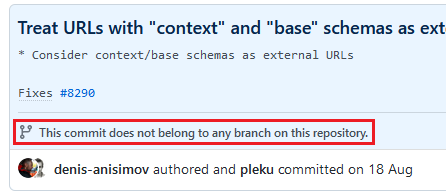
Can you please check what happened to the commits?
AB-xdev
on 29 Sep 2020
@AB-xdev I'm very sorry, you're right. I think the commits were pushed to our cherry-pick branch for 2.3, but someone accidentally deleted it and created new one for picking changes into without this change. This is our mistake, we'll do a new 2.3.7 release ASAP and push the changes there. Sorry for the mess.
pleku
on 29 Sep 2020
Related issues
 rucko24
·
3Comments
knoobie
·
4Comments
Artur-
·
4Comments
Artur-
·
4Comments
pleku
·
4Comments
rucko24
·
3Comments
knoobie
·
4Comments
Artur-
·
4Comments
Artur-
·
4Comments
pleku
·
4Comments