Flow: Import module written in Typescript
Hello,
I have big module in typescript, I dont have much time for rewrite to Flow. Is it any way to import Typscript module in Flow file?
I tried without any special dependencies, just added preset-typescript in babel (for transpile TS).
// @flow

import TSModule from 'components/MyTSModule'
// Module not found: Error: Can't resolve 'components/MyTSModule'

class GenerateReport extends Component<Props, ComponentState> {
   return (
        <TSModule />
   )
}
Thank you :-)
 Merynek
All 11 comments
If your TS workflow is outputting the transpiled .js file into the same directory, you can import that with Flow as usual.
As for Flow being able to read a non-transpiled .ts file, that won't be possible. Flow has its own JS parser, completely independent of tools like Babel, which hasn't had extra support added for TS syntax.
 jamesisaac
on 16 Feb 2020
jamesisaac
on 16 Feb 2020
I dont have much time for rewrite to Flow
One option you could look into is https://github.com/joarwilk/flowgen
jamesisaac
on 16 Feb 2020
If your TS workflow is outputting the transpiled .js file into the same directory, you can import that with Flow as usual.
As for Flow being able to read a non-transpiled .ts file, that won't be possible. Flow has its own JS parser, completely independent of tools like Babel, which hasn't had extra support added for TS syntax.
For transpile I use babel where is preset-flow and I added preset-typescript. I found the solution for this.
In TSModule I create index.js with:
import test from './tsmodule'

export default test
Now it works in Flow files.
Is it good solution ? I am afraid of types from TSmodule
Merynek
on 16 Feb 2020
I think what's happening there is that Flow sees that your index.js file has no // @flow header, so just ignores it, and treats any imports of it as the any type. And therefore you could have any content in that file, and Flow won't complain.
So that solution sounds fine, if it gets things working for you in Babel. But just bear in mind that Flow will only be typechecking files that have a // @flow header.
I think another solution might be that you could just import the .ts module directly from the Flow file, but you'd have to configure Flow to also resolve .ts files. And then, I think, it won't typecheck them because they don't have // @flow headings.
jamesisaac
on 17 Feb 2020
I tried add
module.file_ext=.ts
module.file_ext=.tsx
in .flowConfig, and it works.
I think its best solution, isnt it?
Bcs I dont need write $FlowFixMe comment, and even dont need index.js file for export TSModule.
Merynek
on 18 Feb 2020
It's fine if you don't mind that no usages of your TSModule in flow files will be typechecked (imports are just treated as the any type).
If you wanted typechecking, you'd instead want something transpiling to .js files, which then get imported by flow (and make sure the .js file has a // @flow header).
jamesisaac
on 18 Feb 2020
I tried add
module.file_ext=.ts
module.file_ext=.tsx
in .flowConfig, and it works.
I think its best solution, isnt it?
Bcs I dont need write $FlowFixMe comment, and even dont need index.js file for export TSModule.
Oh, sorry. I was wrong.
I have flow error

Its path to test.tsx
I dont know why, bcs I have
module.file_ext=.ts
module.file_ext=.tsx
in flowConfig
Merynek
on 18 Feb 2020
Probably because you do not have "components" package.
 TrySound
on 18 Feb 2020
TrySound
on 18 Feb 2020
Probably because you do not have "components" package.
I have

Merynek
on 18 Feb 2020
Is it a real package or you aliased to src/components?
TrySound
on 18 Feb 2020
Sorry, my bad.
I had wrong flowConfig.
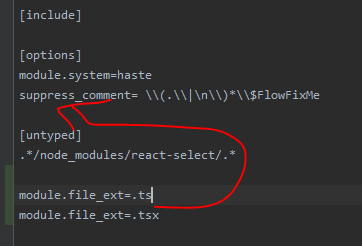
I can import TS, TSX files in flow file :-)
Now, it works, without $FlowFixMe comment and index.js file.
Merynek
on 18 Feb 2020
Related issues
 ghost
·
3Comments
ghost
·
3Comments
 philikon
·
3Comments
philikon
·
3Comments
 tp
·
3Comments
tp
·
3Comments
 pelotom
·
3Comments
pelotom
·
3Comments
 iamchenxin
·
3Comments
iamchenxin
·
3Comments
Most helpful comment
Sorry, my bad.

I had wrong flowConfig.
I can import TS, TSX files in flow file :-)
Now, it works, without $FlowFixMe comment and index.js file.