Flow: @PWA annotation does not create ServiceWorker and manifest
Setup: Vaadin 14.0.2, Java 11, OpenSuse 15.2
Hello, I am not sure if this is a bug or a misconfiguration on my side. I am having an application with multiple servlets, one is working with Vaadin 14 where a PWA is developed.
The connection is running over HTTPS.
I use the following PWA annotation in my MainView:
@Route("main")
@PWA(name = "Test", shortName = "Test")
public class MainView extends AppLayout implements RouterLayout, BeforeEnter
If I access my application/sw.js there is no ServiceWorker found. Firefox also does not recognize the ServiceWorker. No installation window is shown.
The Vaadin Bakery example worked fine in the browser. I could see the ServiceWorker in Firefox and access the .json over the application/sw.js.
Chrome Lighthouse confirmed that no ServiceWorker and manifest is running / was created.
My application is working fine, no errors there. Only the PWA part is not working.
I am not sure if only the ServiceWorker is effected by this or also the creation of the Webmanifest.
I would like to provide more information about this possible bug or the issue itself but I am not sure how.
If this is the wrong place for this ticket feel free to close it, please.
 mkemmerz
All 11 comments
@mkemmerz Sorry to hear about your trouble with PWA. For completion, could you provide information about which server you are using, whether you are using Spring, and any custom configuration you have in place for your Vaadin servlet? It would be even more excellent if you could provide a minimal project as an attachment (including MainView, pom.xml and any server configuration .xml files).
 joheriks
on 30 Sep 2019
joheriks
on 30 Sep 2019
We use Vaadin 14.0.2. We also have another Servlet in our project that uses Vaadin 8.8 (not sure if they have concurrency about specific paths, variables?).
Server: Jetty 9.4.20.v20190813
The Vaadin 14 Servlet:
Vaadin14Servlet.txt
MainView:
MainView.txt
ServletContext:
ServletContext.txt
I will also try to reproduce it with an example project, as suggested.
mkemmerz
on 1 Oct 2019
My issue seems related to: https://vaadin.com/forum/thread/17483200/vaadin-12-with-jetty-embedded-within-an-osgi-bundle-missing-vaadin-sta
I am getting the resource: META-INF/resources/VAADIN/static/client/client-59E69D05DF6B41AFC722309793280A0E.cache.js if I request /icons/icon.png
Maybe some has an idea how to fix the routing for the resources.
We run Vaadin 8 and Vaadin 14 on one jetty - maybe this is a problem?
vaadin.major.version>8.8
    <dependency>
        <groupId>com.vaadin</groupId>
        <artifactId>vaadin-core</artifactId>
        <version>${vaadin14.version}</version>
    </dependency>

<dependencyManagement>
    <dependencies>
        <dependency>
            <groupId>com.vaadin</groupId>
            <artifactId>vaadin-bom</artifactId>
            <version>${vaadin.version}</version>
            <type>pom</type>
            <scope>import</scope>
        </dependency>
        <dependency>
            <groupId>com.vaadin</groupId>
            <artifactId>flow-bom</artifactId>
            <version>2.0.8</version>
            <type>pom</type>
               <scope>import</scope>
        </dependency>
    </dependencies>
</dependencyManagement>

        <groupId>com.vaadin</groupId>
        <artifactId>vaadin-server</artifactId>
        <version>${vaadin.version}</version>
    </dependency>
    <dependency>
        <groupId>com.vaadin</groupId>
        <artifactId>vaadin-push</artifactId>
        <version>${vaadin.version}</version>
    </dependency>
    <dependency>
        <groupId>com.vaadin</groupId>
        <artifactId>vaadin-client-compiled</artifactId>
        <version>${vaadin.version}</version>
    </dependency>
@mkemmerz The project setup seems quite complex. We would need a minimal project with the same setup to be able to reproduce the issue first.
joheriks
on 4 Oct 2019
we have same issue here, service worker wasn't created and in the log, we see error message from VaadinPush.js (we config to use long-polling):
VM50 vaadinPush.js:2124 GET http://newalb-8014591.ap-southeast-1.elb.amazonaws.com/?v-r=push&v-uiId=1&v-pushId=49df753e-cd4a-4249-a5f0-9da6c4f245eb&X-Atmosphere-tracking-id=b1b741b7-3d97-4897-adf9-3948c68315fd&X-Atmosphere-Framework=2.3.2.vaadin1-javascript&X-Atmosphere-Transport=long-polling&X-Atmosphere-TrackMessageSize=true&Content-Type=application%2Fjson%3B%20charset%3DUTF-8&X-atmo-protocol=true&_=1570202009076 net::**ERR_INCOMPLETE_CHUNKED_ENCODING 200**
 letrthang
on 4 Oct 2019
letrthang
on 4 Oct 2019
@joheriks Thanks for the feedback! I will try to provide a minimal project if I have the time.
I think our issue is that we use Vaadin 8 and Vaadin 14 in the same project. Some plugins (like vaadin-maven-plugin) are still running the Vaadin 8 version but are used for the Vaadin 14 code as well.
I am not experienced enough to say if this is our issue so it is only a guess after some investigation.
mkemmerz
on 7 Oct 2019
also you need SSL to enable service worker
letrthang
on 7 Oct 2019
@letrthang Thanks for the hint. SSL is working fine in our application.
We were able to track down the issue a bit more. During the initialization of PwaRegistry.java. the steps for the PWA are skipped because the object of PwaConfiguration thinks it is not enabled but the PWA-notation is used in the application.
(https://github.com/vaadin/flow/blob/master/flow-server/src/main/java/com/vaadin/flow/server/PwaRegistry.java)
private PwaRegistry(PWA pwa, ServletContext servletContext)
        throws IOException {
    ...
    pwaConfiguration = new PwaConfiguration(pwa, servletContext);

    // Build pwa elements only if they are enabled
    if (pwaConfiguration.isEnabled()) { // <-- This one is false
        // execute all the PWA stuff like manifest and serviceworker
    else
        // skip
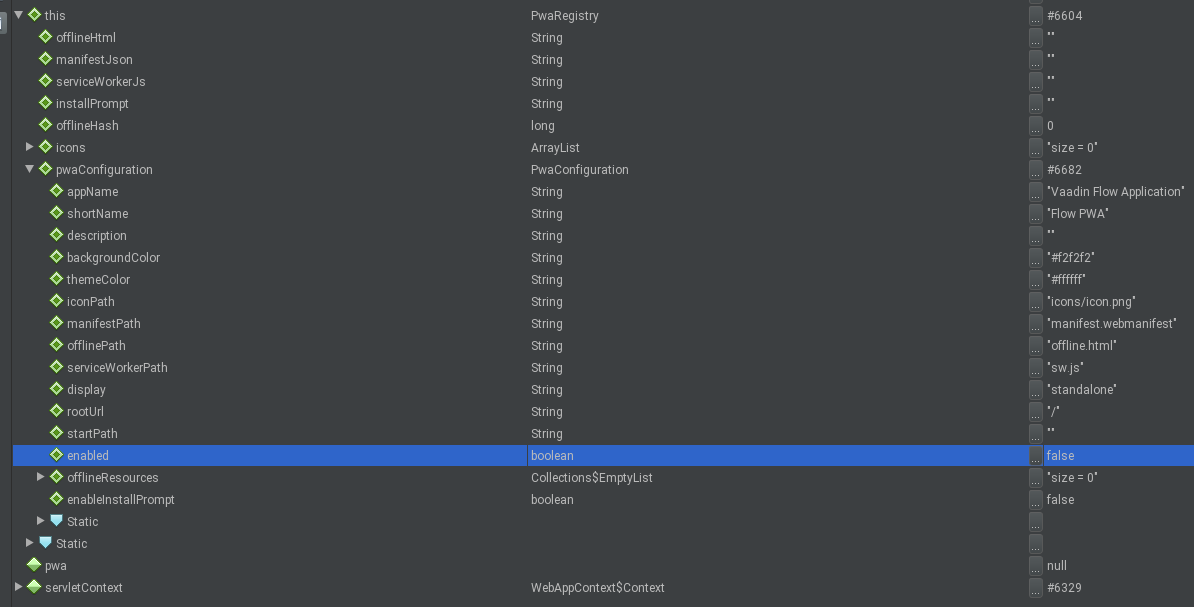
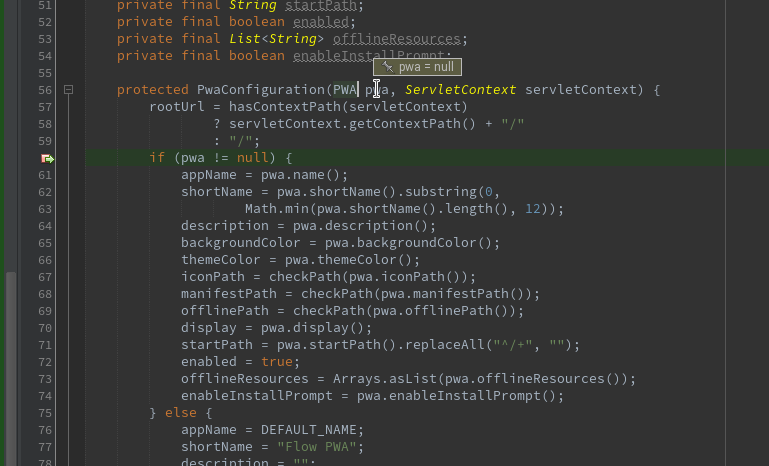
ApplicationRouteRegistry.java
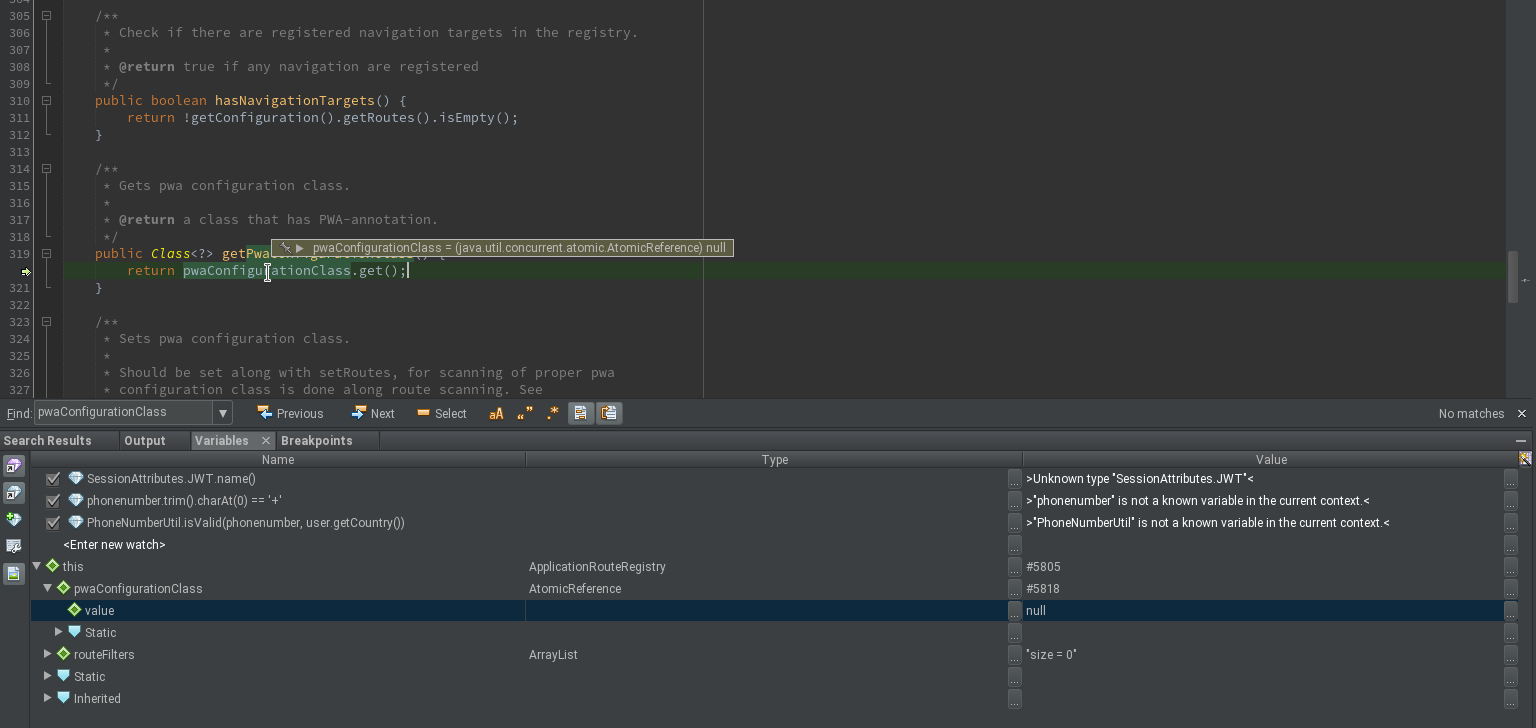
mkemmerz
on 11 Oct 2019
@mkemmerz
if PwaConfiguration::isEnabled returns false then it means that PwaRegistry has been created with a null value for pwa parameter. It means that PWA annotation has not been found.
Even though you have the annotation on the class the functionality which searches for it was not able to find it.
You mentioned here https://github.com/vaadin/flow/issues/6567#issuecomment-536868501 a custom servlet context class.
I have a suspicion that the issue is caused by the custom servlet context.
We have a code :
attribute = servletContext
                    .getAttribute(PwaRegistry.class.getName());

            if (attribute == null) {
                ApplicationRouteRegistry reg = ApplicationRouteRegistry.getInstance(servletContext);

                // Initialize PwaRegistry with found PWA settings
                PWA pwa = reg.getPwaConfigurationClass() != null ? reg
                        .getPwaConfigurationClass().getAnnotation(PWA.class)
                        : null;
                // will fall back to defaults, if no PWA annotation available
                try {
                    attribute = new PwaRegistry(pwa, servletContext);
                    servletContext.setAttribute(PwaRegistry.class.getName(),
                            attribute);
So the behavior may be cause by the behavior of the custom servlet context.
 denis-anisimov
on 11 Oct 2019
denis-anisimov
on 11 Oct 2019
@denis-anisimov Yes, it seems you are right.
I had a success by adding the class that has the PWA annotation by myself.
Init of my Servlet:
public class VaadinFlowServlet extends com.vaadin.flow.server.VaadinServlet {
    @Override
    public void init(ServletConfig servletConfig) throws ServletException {
        var registry = ApplicationRouteRegistry.getInstance(servletConfig.getServletContext());
        registry.setPwaConfigurationClass(LoginView.class); // contains @PWA

        super.init(servletConfig);
    }
...
Now my application notices that I have the PWA annotation set.
ServiceWorker and Manifest were created and are running. I was able to install the PWA on a mobile device so I think everything is working now.
The registration of the PWA class is done in Spring Boot projects (in https://github.com/vaadin/spring/blob/master/vaadin-spring/src/main/java/com/vaadin/flow/spring/VaadinServletContextInitializer.java) on initializatoin.
Why is it not done in the Servlet's init() as well?
mkemmerz
on 11 Oct 2019
@joheriks This issue can be closed. I was able to solve it (see comment above).
mkemmerz
on 14 Oct 2019
Related issues
 Artur-
·
4Comments
Artur-
·
4Comments
 rucko24
·
3Comments
rucko24
·
3Comments
 anezthes
·
4Comments
anezthes
·
4Comments
 pleku
·
4Comments
joheriks
·
4Comments
pleku
·
4Comments
joheriks
·
4Comments