I'm trying to do a type casting for my custom type inside array functions
return ((Object.values(terms).sort((t1: mixed, t2: mixed) => {
                // Cast t1 and t2 from mixed to Term
        term1 = ((t1: any): Term)
        term2 = ((t2: any): Term)
        // Sort by date
        return new Date(term1.details.startDate) - new Date(term2.details.startDate)
    }): any): Array<Term>)
However, in VSCode, it shows me blue error saying "[flow coverage] uncovered code", and I believe the way of me doing this casting is correct based on this link
Is there any way I can get rid of this error? Or is my implementation not correct? Thanks
 thousight
All 4 comments
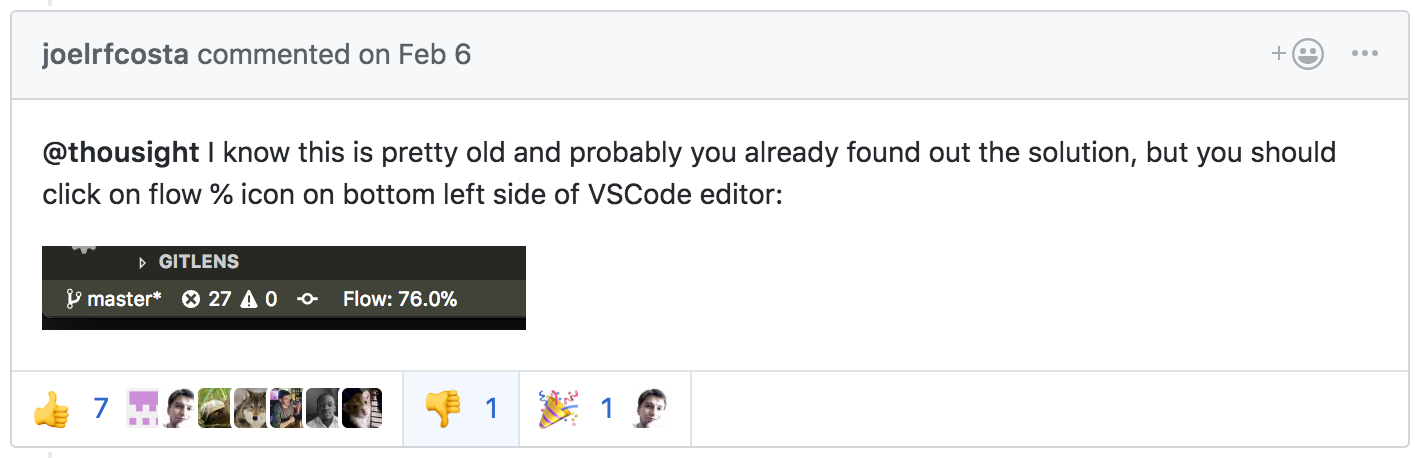
@thousight I know this is pretty old and probably you already found out the solution, but you should click on flow % icon on bottom left side of VSCode editor:

 joelrfcosta
on 6 Feb 2018
joelrfcosta
on 6 Feb 2018
I end up here many time to find out how to fix false positive warning "uncovered code".
To show the [flow coverage] uncovered code warning, I had include_warnings=true in .flowconfig
I finally find out adding //@flow strict at the beginning of each file fix that:
EDIT: I just notice that adding only //@flow at the beginning of each file as the same result. I don't understand this behavior, I have all=true in the options .flowconfig section which should avoid the need to add //@flow at the beginning of each file.
Without flow strict:

With flow strict:
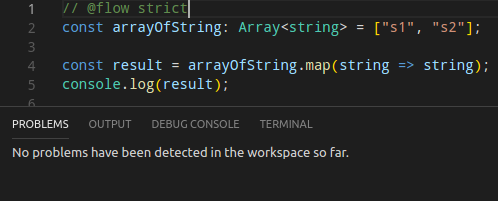
real uncovered code: (any instead of string)
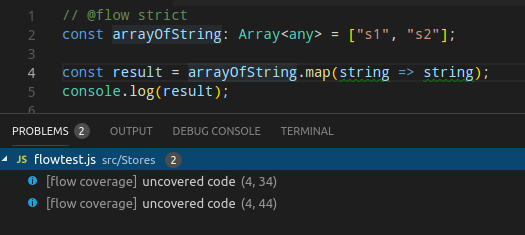
Notes:
- At first, I still add false positive. I use flow-bin locally, restarting vscode did not help, I had to restart linux mint. (twice in my case)
- next step should be adding features in [strict] section of .flowconfig https://flow.org/en/docs/strict/
Anyone knows/understand why there are false positive warning without "flow strict"?
 YohMer
on 14 Jul 2018
YohMer
on 14 Jul 2018
Well, actually, it's not just VS Code, I use Atom and the Flow IDE plugin which calls flow coverage and shows the same error on this expression:
function cloneAndExtend<T: Object>(obj: T, extension: $Shape<T>): T {
  const clone = ((Object.create(obj): any): T);
  return Object.assign(clone, extension);
}

module.exports = cloneAndExtend;
  const clone = ((Object.create(obj): any): T);
//      ^^^^^      ^^^^^^^^^^^^^^^^^^^^^^^
//      Flow IDE Coverage: Uncovered code
Also the raw flow coverage call gives the same uncovered locations (that's where the IDEs get the ranges to highlight):
flow coverage --json /Users/sompylasar/__CENSORED__/cloneAndExtend.js | jq
{
  "expressions": {
    "covered_count": 13,
    "uncovered_count": 2,
    "uncovered_locs": [
      {
        "source": "/Users/sompylasar/__CENSORED__/cloneAndExtend.js",
        "type": "SourceFile",
        "start": {
          "line": 2,
          "column": 9,
          "offset": 78
        },
        "end": {
          "line": 2,
          "column": 13,
          "offset": 83
        }
      },
      {
        "source": "/Users/sompylasar/__CENSORED__/cloneAndExtend.js",
        "type": "SourceFile",
        "start": {
          "line": 2,
          "column": 19,
          "offset": 88
        },
        "end": {
          "line": 2,
          "column": 41,
          "offset": 111
        }
      }
    ]
  }
}
So the previously mentioned highly upvoted solution to click the Flow % icon doesn't quite apply.
A sidenote question to those who upvoted this, why should it have fixed the Flow coverage?
 sompylasar
on 3 Dec 2018
sompylasar
on 3 Dec 2018
Based on your original code snippet it would generate this try. The only parts that would be uncovered would be the areas where you are casting through any. any is unsound and therefore uncovered. Though that doesn't mean it's the wrong approach.

The only way you could solve this is if you do type refinement through if statements, checking that it's an object that has certain properties instead of casting it to any and then back to Term.
 Brianzchen
on 29 Aug 2020
Brianzchen
on 29 Aug 2020
Related issues
 marcelbeumer
·
3Comments
marcelbeumer
·
3Comments
 john-gold
·
3Comments
john-gold
·
3Comments
 ctrlplusb
·
3Comments
ctrlplusb
·
3Comments
 pelotom
·
3Comments
pelotom
·
3Comments
 philikon
·
3Comments
philikon
·
3Comments
Most helpful comment
@thousight I know this is pretty old and probably you already found out the solution, but you should click on flow % icon on bottom left side of VSCode editor: