Flow-for-vscode: Activating extension `flowtype.flow-for-vscode` failed: Cannot read property 'assign' of undefined
I've got a project (linked at the bottom) that I've been using this extension to make for the past few months. This morning, I noticed the extension had stopped giving warnings and did not show a status in the status bar anymore. I've tried updating flow-bin, using flow-bin from modules and globally, updating npm, and (as always) lots of restarting. I've reinstalled the extension a couple times as well- no luck. I've had this happen once before, but that time I couldn't get flow to run over my project because I had a bad flowconfig file. This time, flow runs fine- the extension can't start properly for some other reason. Looking in the dev tools of Code, I see:
[Extension Host] Activating extension `flowtype.flow-for-vscode` failed:  Cannot read property 'assign' of undefined
t.log @ /usr/share/code/resources/app/out/vs/workbench/workbench.main.js:263
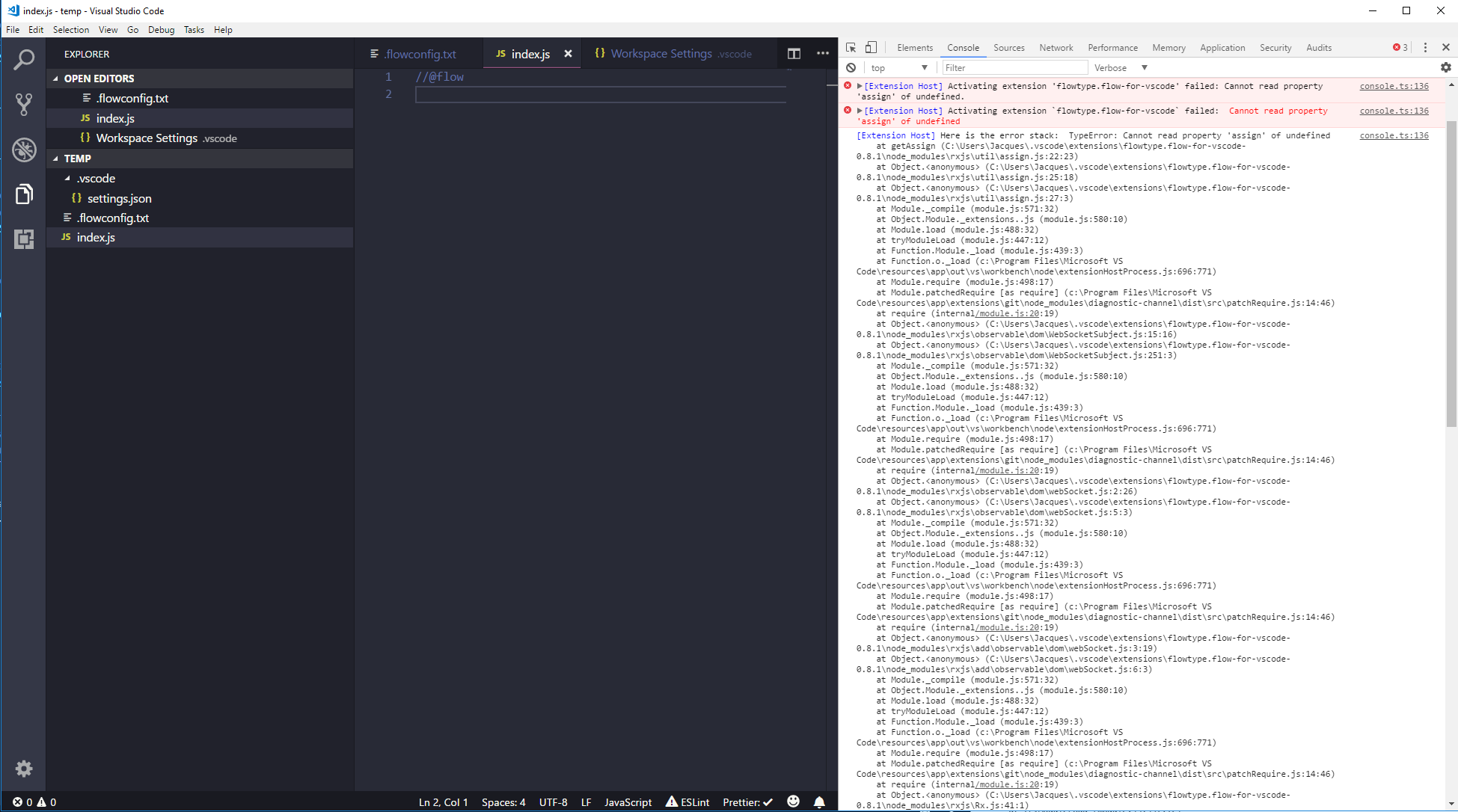
/usr/share/code/resources/app/out/vs/workbench/workbench.main.js:263 [Extension Host] Here is the error stack:  TypeError: Cannot read property 'assign' of undefined
    at getAssign (/home/duncan/.vscode/extensions/flowtype.flow-for-vscode-0.8.1/node_modules/rxjs/util/assign.js:22:23)
    at Object.<anonymous> (/home/duncan/.vscode/extensions/flowtype.flow-for-vscode-0.8.1/node_modules/rxjs/util/assign.js:25:18)
    at Object.<anonymous> (/home/duncan/.vscode/extensions/flowtype.flow-for-vscode-0.8.1/node_modules/rxjs/util/assign.js:27:3)
    at Module._compile (module.js:571:32)
    at Object.Module._extensions..js (module.js:580:10)
    at Module.load (module.js:488:32)
    at tryModuleLoad (module.js:447:12)
    at Function.Module._load (module.js:439:3)
    at Function.o._load (/usr/share/code/resources/app/out/vs/workbench/node/extensionHostProcess.js:696:771)
    at Module.require (module.js:498:17)
    at Module.patchedRequire [as require] (/usr/share/code/resources/app/extensions/git/node_modules/diagnostic-channel/dist/src/patchRequire.js:14:46)
    at require (internal/module.js:20:19)
    at Object.<anonymous> (/home/duncan/.vscode/extensions/flowtype.flow-for-vscode-0.8.1/node_modules/rxjs/observable/dom/WebSocketSubject.js:15:16)
    at Object.<anonymous> (/home/duncan/.vscode/extensions/flowtype.flow-for-vscode-0.8.1/node_modules/rxjs/observable/dom/WebSocketSubject.js:251:3)
    at Module._compile (module.js:571:32)
    at Object.Module._extensions..js (module.js:580:10)
    at Module.load (module.js:488:32)
    at tryModuleLoad (module.js:447:12)
eventually followed by
console.ts:136 [Extension Host] No editors associated with document: /home/duncan/Projects/modular/.vscode/settings.json
t.log @ console.ts:136
t._logExtensionHostMessage @ extensionHost.ts:393
(anonymous) @ extensionHost.ts:210
emitTwo @ events.js:106
emit @ events.js:194
process.nextTick @ internal/child_process.js:766
_combinedTickCallback @ internal/process/next_tick.js:73
_tickCallback @ internal/process/next_tick.js:104
These errors stay the same no matter how I configure the extension, as far as I can tell. I did update Code recently to version 1.23.1-1525968403. I'm running Ubuntu 18, in case that's relevant. Hopefully this is just some bad configuring on my part?
Thanks,
Duncan Walter
 DuncanWalter
All 8 comments
I'm also seeing this in an almost completely empty test case.
 betaorbust
on 23 May 2018
betaorbust
on 23 May 2018
Internally, it appears that rxjs is getting the wrong global window.
The thing that actually throws is
"use strict";
var root_1 = require('./root');
function assignImpl(target) {
    var sources = [];
    for (var _i = 1; _i < arguments.length; _i++) {
        sources[_i - 1] = arguments[_i];
    }
    var len = sources.length;
    for (var i = 0; i < len; i++) {
        var source = sources[i];
        for (var k in source) {
            if (source.hasOwnProperty(k)) {
                target[k] = source[k];
            }
        }
    }
    return target;
}
exports.assignImpl = assignImpl;
;
function getAssign(root) {
    return root.Object.assign || assignImpl;
}
exports.getAssign = getAssign;
exports.assign = getAssign(root_1.root);
//# sourceMappingURL=assign.js.map
But in debugging a bit, it appears the object it's getting back as root isn't the right global js object.
From the required ./root.js files above:
"use strict";
// CommonJS / Node have global context exposed as "global" variable.
// We don't want to include the whole node.d.ts this this compilation unit so we'll just fake
// the global "global" var for now.
var __window = typeof window !== 'undefined' && window;
var __self = typeof self !== 'undefined' && typeof WorkerGlobalScope !== 'undefined' &&
    self instanceof WorkerGlobalScope && self;
var __global = typeof global !== 'undefined' && global;
var _root = __window || __global || __self;
exports.root = _root;
// Workaround Closure Compiler restriction: The body of a goog.module cannot use throw.
// This is needed when used with angular/tsickle which inserts a goog.module statement.
// Wrap in IIFE
(function () {
    if (!_root) {
        throw new Error('RxJS could not find any global context (window, self, global)');
    }
})();
//# sourceMappingURL=root.js.map
In this case, I've logged out _root, which is apparently coming from __window instead of __global and it is a two-property object that looks like:
notificationsAlerts.ts:39 {"$c":{},"Colors":{}}
__global is the thing we'd probably want to be pulling off of here.
Did something recently change with what was assigned to window?
betaorbust
on 23 May 2018
Was just about to file this bug. If it appears you're using the BracketPairColorizer extension, it might be causing the issue as it introduced an update recently (an issue has already been opened here). If not it surely is weird because this extension has not been updated just so recently.
 madiodio
on 23 May 2018
madiodio
on 23 May 2018
Oh, snap, that was it.
Looks like somebody blew away the window object.
Yoiks...
betaorbust
on 23 May 2018
@betaorbust exactly what I was thinking
madiodio
on 23 May 2018
@madiodio That was the exact issue i had! glad an issue was opened there. Gonna unfollow this and follow that issue 👍
 browne0
on 23 May 2018
browne0
on 23 May 2018
Yeah, that got mine working too. Awesome- thanks guys!
DuncanWalter
on 23 May 2018
BracketPairColorizer author here, I rolled back my release so it should work again. Sorry for the inconvenience.
 CoenraadS
on 23 May 2018
CoenraadS
on 23 May 2018
Related issues
 FezVrasta
·
5Comments
FezVrasta
·
5Comments
 thymikee
·
6Comments
thymikee
·
6Comments
 vojtatranta
·
4Comments
vojtatranta
·
4Comments
 wbinnssmith
·
5Comments
wbinnssmith
·
5Comments
 siegebell
·
5Comments
siegebell
·
5Comments
Most helpful comment
BracketPairColorizer author here, I rolled back my release so it should work again. Sorry for the inconvenience.