Flow-for-vscode: no errors are shown in VSCode 1.8.0
I am not getting any errors in VSCode 1.8.0 with version 276.3.0. running flow in a terminal does output flow errors normally.
here's my .flowconfig:
[ignore]
./node_modules/config-chain/test/*
./node_modules/npm/node_modules/config-chain/test/*
./node_modules/npm/test/fixtures/config/*

[include]

[libs]
src/types.js

[options]
module.name_mapper='.*\(.css\)' -> 'empty/object'
 maxjvh
All 11 comments
I am not getting any errors either. My vscode version is 1.8.1
 qdwang
on 26 Dec 2016
qdwang
on 26 Dec 2016
What are you seeing in the Flow output panel?
e.g.

 orta
on 26 Dec 2016
orta
on 26 Dec 2016
I don't think I have that option:

maxjvh
on 27 Dec 2016
The activation events are any files that are javascript or javascriptreact
    "activationEvents": [
        "onLanguage:javascriptreact",
        "onLanguage:javascript"
    ],
So if that's not showing, and you're in one of those files it must be crashing before it gets there. Can you run the command "Developer: Toggle Developer Tools" and check the console to see if there are crashes?
orta
on 27 Dec 2016
Also, you need a .flowconfig file in your folder structure.
orta
on 29 Dec 2016
+1
 agrcrobles
on 6 Jan 2017
agrcrobles
on 6 Jan 2017
@agrcrobles please don't just +1
See all the things above I've said above your comment, can you please let us know that you've tried them all and are still not getting anything.
orta
on 6 Jan 2017
@orta I first got:
[2017-01-07T12:48:01.523Z] [INFO] flow - [unknown]: Flow server in /home/zetta/...
[2017-01-07T12:48:01.779Z] [INFO] flow - [init]: Flow server in /home/zetta/...
[2017-01-07T12:48:01.968Z] [INFO] flow - [not running]: Flow server in /home/zetta/...
Then I fixed it by installing flow-bin globally npm i -g flow-bin
Then I had to move flow version of my project in _package.json_ and in at very bottom in _.flowconfig_ because getting the following message:
The config specifies version 0.36.0 but this is version 0.37.4
Now flow is working as expected and I am getting flow warnings and errors in vscode!
vscode version: 1.8.1
ubuntu: 16.04
agrcrobles
on 7 Jan 2017
Thanks for the writeup!
I think it's propbably worth making a note about the usePackagedFlow in the README - which would have fixed that, https://github.com/flowtype/flow-for-vscode/blob/master/package.json#L40
Unlike in the nuclide version this option isn't easily shown to a user.
orta
on 8 Jan 2017
This got a README fix PR - closing
orta
on 10 Feb 2017
Hi, I know this is an old issue but I'm just experiencing the same error, I think.
I created a new react native project, I installed flow-for-vscode, set "flow.useNPMPackagedFlow": true and then added flow-bin as a devDependency (same version as I have in .flowconfig 0.63.0)
If I run flow in terminal I get an error and I even see it in the Problems tab. But it doesn't show inline in the editor. If I go to the flow output I see this
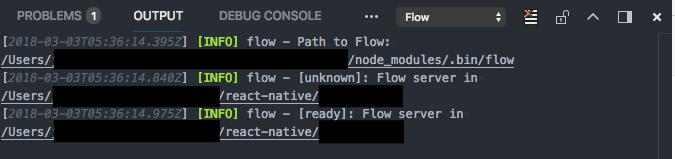
If I actually double click on the error on the Problems tab, it opens the same file twice and then it does show the error inline
No error

Problems Tab

Inline error when double clicking on error from problems tab
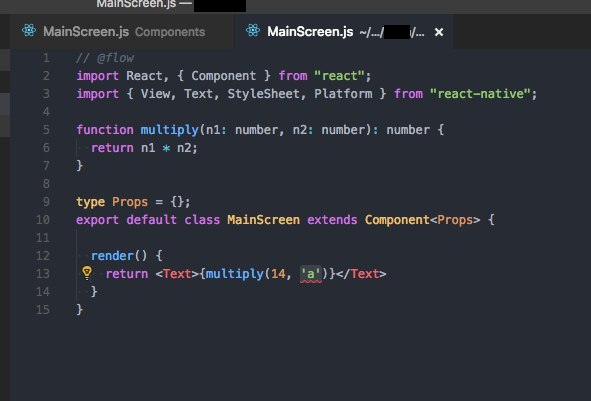
I'm using VSCode Version 1.20.1
Any ideas how to fix this?
Thanks
 tafelito
on 3 Mar 2018
tafelito
on 3 Mar 2018
Related issues
 ianwalter
·
5Comments
ianwalter
·
5Comments
 vojtatranta
·
4Comments
vojtatranta
·
4Comments
 thymikee
·
6Comments
thymikee
·
6Comments
 booboothefool
·
4Comments
booboothefool
·
4Comments
 spudly
·
6Comments
spudly
·
6Comments
Most helpful comment
Hi, I know this is an old issue but I'm just experiencing the same error, I think.
I created a new react native project, I installed flow-for-vscode, set
"flow.useNPMPackagedFlow": trueand then added flow-bin as a devDependency (same version as I have in .flowconfig 0.63.0)If I run flow in terminal I get an error and I even see it in the Problems tab. But it doesn't show inline in the editor. If I go to the flow output I see this
If I actually double click on the error on the Problems tab, it opens the same file twice and then it does show the error inline
No error

Problems Tab

Inline error when double clicking on error from problems tab

I'm using VSCode Version 1.20.1
Any ideas how to fix this?
Thanks