Describe the bug
Since v4.4.0 (also with v4.4.1) on Firefox (Win10) I am receiving the error "E019: HTTP status 403. Failed PUT request. Check your server configuration and log." and am unable to sync with Nextcloud Bookmarks. Sync is still working on another maching that is using v4.3.x on Firefox (Win 10).
To Reproduce
Steps to reproduce the behavior:
Manual or Auto-Sync causes the error. No sync occurs.
Expected behavior
A clear and concise description of what you expected to happen.
Expected sync to take place.
Screenshots
If applicable, add screenshots to help explain your problem.
Desktop (please complete the following information):
- OS: Windows 10
- Browser: Firefox
- Browser Version: 81.0.2 (64-bit)
- Floccus version: v4.4.0 & v4.4.1
- Floccus sync method: nextcloud folders, using nextcloud 19
Server (please complete the following information):
- OS: Ubuntu 20.04.1 LTS
- Nextcloud version: 19.0.3
- Bookmarks app version: 3.4.4
Note: Please write down the actual version numbers instead of writing 'latest'.
Debug log
2020-10-20T23:08:58.075Z Starting sync process for account
2020-10-20T23:08:58.075Z Starting sync process for account
2020-10-20T23:08:58.190Z onSyncStart: begin
2020-10-20T23:08:58.192Z https://
2020-10-20T23:08:58.075Z Starting sync process for account
2020-10-20T23:08:58.190Z onSyncStart: begin
2020-10-20T23:08:58.192Z https://
2020-10-20T23:08:59.734Z https://
2020-10-20T23:08:58.075Z Starting sync process for account
2020-10-20T23:08:58.190Z onSyncStart: begin
2020-10-20T23:08:58.192Z https://
2020-10-20T23:08:59.734Z https://
2020-10-20T23:08:59.805Z Syncing failed with E019: HTTP status 403. Failed PUT request. Check your server configuration and log.
2020-10-20T23:08:59.812Z onSyncFail
2020-10-20T23:08:58.075Z Starting sync process for account
2020-10-20T23:08:58.190Z onSyncStart: begin
2020-10-20T23:08:58.192Z https://
2020-10-20T23:08:59.734Z https://
2020-10-20T23:08:59.805Z Syncing failed with E019: HTTP status 403. Failed PUT request. Check your server configuration and log.
2020-10-20T23:08:59.812Z onSyncFail
- [ Y] Debug log provided
Additional context
Add any other context about the problem here.
This has been working flawlessly for over a year until the Firefox plugin updated to v4.4.0 from v4.3.x and the issue continues with v4.4.1.
 GrahamH68
All 22 comments
Your account settings seem to be broken. Try removing the account and recreating it.
 marcelklehr
on 21 Oct 2020
marcelklehr
on 21 Oct 2020
Same issue for me since the upgrade to 4.4.1 on Linux, Firefox 81.0.1. Removing and re-adding the account results in the same error:
E019: HTTP status 403. Failed PUT request. Check your server configuration and log.
Sync continues to work on Chromium with version 4.3.
 banjonerd
on 22 Oct 2020
banjonerd
on 22 Oct 2020
@banjonerd could you submit your debug log?
marcelklehr
on 22 Oct 2020
Yes, of course:
2020-10-21T23:19:31.059Z Starting sync process for account [email protected]
2020-10-21T23:19:31.255Z onSyncStart: begin
2020-10-21T23:19:31.256Z https://mydomain.com/nextcloud/remote.php/webdav/.floccus-.lock
2020-10-21T23:19:31.491Z https://mydomain.com/nextcloud/remote.php/webdav/.floccus-.lock
2020-10-21T23:19:31.611Z Syncing failed with E019: HTTP status 403. Failed PUT request. Check your server configuration and log.
2020-10-21T23:19:31.637Z onSyncFail
Please let me know if I can provide any more information that might help.
:edited credentials/URL for privacy
banjonerd
on 22 Oct 2020
@banjonerd This indicates that your credentials are wrong
marcelklehr
on 22 Oct 2020
I cut and pasted the same credentials into the Firefox and Chromium versions to test. Firefox still fails with the same error and Chromium continues to sync successfully.
banjonerd
on 22 Oct 2020
Mmh, let's try the same thing with a curl command.
curl -X PUT -u 'username:password' -v https://mydomain/nextcloud/remote.php/webdav/.floccus-.lock
This should return a lot of things, but most importantly a line that says HTTP/2 204 (could also say HTTP/1.1 or similar)
marcelklehr
on 22 Oct 2020
That returns HTTP/1.1 403 Forbidden
Please let me know if you'd like the full error. I'll be away from my PC for a bit but will respond ASAP. And thanks for your trouble-shooting efforts.
banjonerd
on 22 Oct 2020
Some additional info which may help:
If I use my nextcloud username & account password then it works fine, but if I use the application token instead of the password (which has worked for months) then it fails with the error above.
I've just tried creating a new app token (without filesystem access) and I get the same error.
If I then enable File System Access on the Token then it works again, so this seems to have changed since 4.3.0.
It seems like I now have a workaround - enable file system access for the token.
GrahamH68
on 22 Oct 2020
Aha. That makes sense. Since v4.4.0 floccus uses a file to coordinate access between different instances. I will update the error message to reflect these insights.
marcelklehr
on 22 Oct 2020
That explains why I'm seeing all these nextcloud log entries "Synced .floccus-xxxxxx.lock"
I've also noticed that sync is take much much longer than with v4.3.0 - minutes rather than seconds.
GrahamH68
on 22 Oct 2020
That explains why I'm seeing all these nextcloud log entries "Synced .floccus-xxxxxx.lock"
I will deal with that soon.
I've also noticed that sync is take much much longer than with v4.3.0 - minutes rather than seconds.
mmmh. I'll investigate that.
marcelklehr
on 22 Oct 2020
Mmmh, apparently the hash endpoint is getting blocked by the browser.
UPDATE: I've found the issue that is causing slow syncs and will publish a new server app release soon.
marcelklehr
on 22 Oct 2020
Thanks Marcel, I love this plugin and really appreciate your work in creating and maintaining it :-)
GrahamH68
on 22 Oct 2020
Thanks, @GrahamH68; allowing file system access also worked for me (though I'm not experiencing the slow syncs that you are; my speed seems normal). I should've added earlier that I'm using 2FA on my account, so I use an app password with Floccus.
Also, count me in as being very appreciative of Marcel for making and maintaining this app. I can't contribute code but I do make a monthly donation. ^_^
banjonerd
on 22 Oct 2020
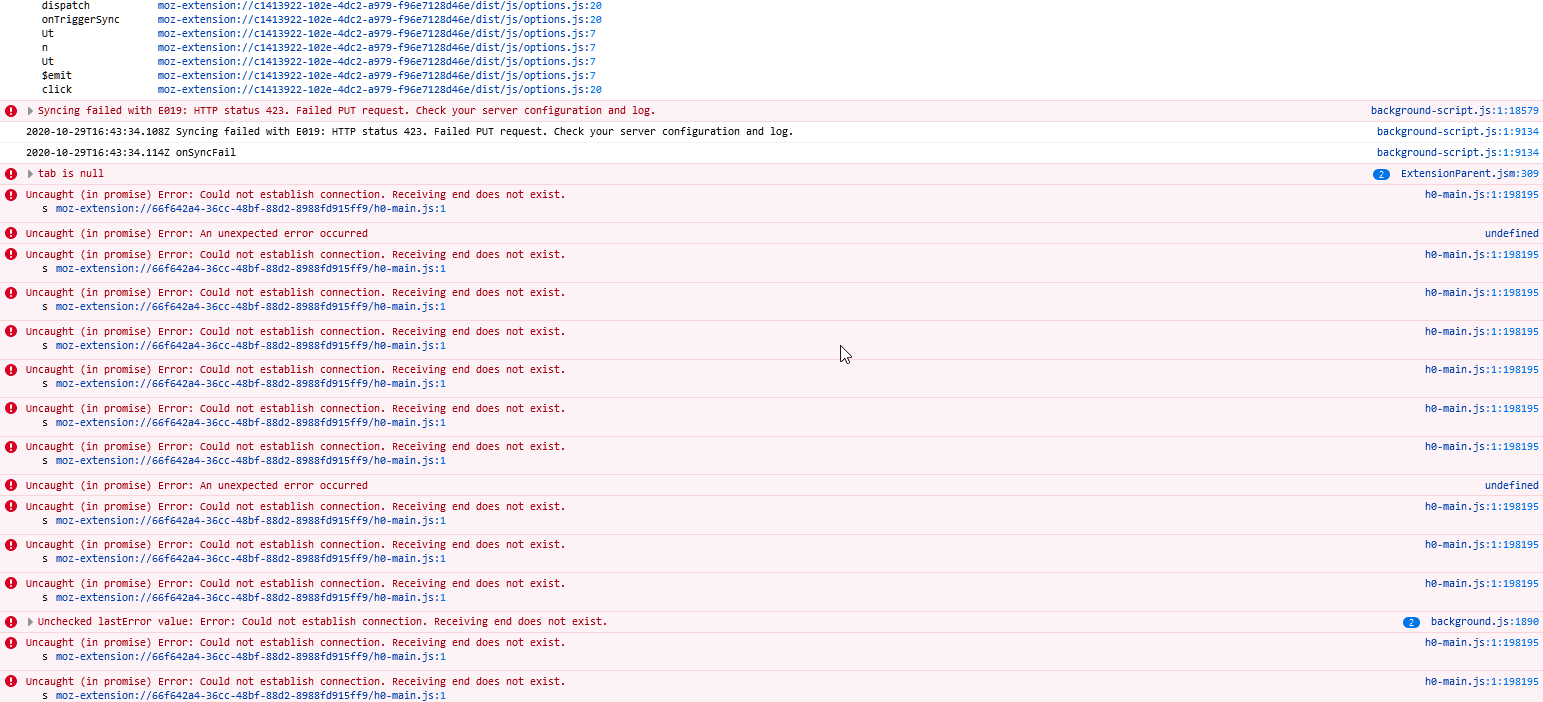
i cant seem to get mine working again, tried w/ app password and real password:
 errolsancaktar
on 29 Oct 2020
errolsancaktar
on 29 Oct 2020
423 means the resource is locked :scream:
Depending on which server you are using, try unlocking .floccus-xxx.lock
marcelklehr
on 29 Oct 2020
i tried deleting it. is that what you mean?
errolsancaktar
on 29 Oct 2020
WebDAV has file locking. If the file is locked, floccus cannot touch it or change it. Floccus doesn't lock files, though. So, a different entity locked the file and now you're stuck
marcelklehr
on 29 Oct 2020
is it more complicated than deleting the file?
errolsancaktar
on 29 Oct 2020
If you deleted the file and you still get 423, then yes.
marcelklehr
on 29 Oct 2020
@errolsancaktar let's continue this in #712
marcelklehr
on 29 Oct 2020
Related issues
 jochen-01
·
4Comments
marcelklehr
·
5Comments
jochen-01
·
4Comments
marcelklehr
·
5Comments
 sunjam
·
4Comments
sunjam
·
4Comments
 lightlike
·
4Comments
marcelklehr
·
5Comments
lightlike
·
4Comments
marcelklehr
·
5Comments
Most helpful comment
Thanks, @GrahamH68; allowing file system access also worked for me (though I'm not experiencing the slow syncs that you are; my speed seems normal). I should've added earlier that I'm using 2FA on my account, so I use an app password with Floccus.
Also, count me in as being very appreciative of Marcel for making and maintaining this app. I can't contribute code but I do make a monthly donation. ^_^