Floccus: sync fails since upgrade of Floccus to 4.4.1
Describe the bug
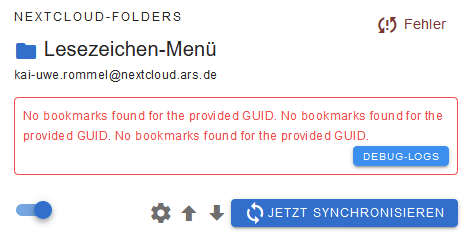
Since I upgraded our Nextcloud server to from 18.0.7 to 19.0.4 the floccus sync fails.
To Reproduce
See above.
Expected behavior
Should work.
Screenshots
Desktop (please complete the following information):
- OS: Windows 10
- Browser: Firefox
- Browser Version: 81.0.2
- Floccus version: 4.4.1
- Floccus sync method: nextcloud folders
Server (please complete the following information):
- OS: Ubuntu 18.0.4 LTS
- Nextcloud version: 19.0.4
- Bookmarks app version:
Debug log
Will provide when useful.
Additional context
Want to now if this is a known issue or new.
 kai-uwe-rommel
All 22 comments
I have the same issue. I think I just upgraded my Firefox addon to version 4.4.1 in firefox 82.0 before this started happening. Nothing was changed on my nextcloud backend.
 spiezmaestro
on 20 Oct 2020
spiezmaestro
on 20 Oct 2020
Difficult to tell for me ... I noticed the problem today and the Nextcloud update to 19 was yesterday ... hence my assumption.
I did not notice the update of the Floccus plugin in my Firefox because that happens in the background.
But I just checked and in Firefox's addon list it says that Floccus was updated today to 4.4.1.
So it could as well be the update of Floccus that causes the problem.
kai-uwe-rommel
on 20 Oct 2020
Hmm, sync still works in Chrome ... its Floccus addon is at 4.3.0.
kai-uwe-rommel
on 20 Oct 2020
Same "No bookmarks found for the provided GUID." error here with FF 81.0 and Nextcloud 20 after update from 4.3.0 to 4.4.1... :(
 stelas
on 20 Oct 2020
stelas
on 20 Oct 2020
Hmm, sync still works in Chrome ... its Floccus addon is at 4.3.0.
It was a partial roll-out.
No bookmarks found for the provided GUID.
This sounds like https://github.com/marcelklehr/floccus/issues/690
Can you try wiping your server bookmarks and triggering a sync from scratch in the "dangerous" section of the account settings?
 marcelklehr
on 20 Oct 2020
marcelklehr
on 20 Oct 2020
I guess that means that my tags will be gone (wiping server bookmarks) and can't find an option to mass assign tags again. Have a lot of them. Any ideas?
spiezmaestro
on 20 Oct 2020
Any ideas?
Backups :S :cry:
Or you can try to sync from scratch without wiping. No guarantee this will work, though. You will have to sort out the duplicates yourself.
marcelklehr
on 20 Oct 2020
When I export the bookmarks, will the tags also be in that export? Could I export, delete, sync from scratch, import (to keep the tags) or will this screw up the sync again?
spiezmaestro
on 20 Oct 2020
When I export the bookmarks, will the tags also be in that export?
Yes.
Could I export, delete, sync from scratch, import (to keep the tags) or will this screw up the sync again?
I think: Export (to have a backup), keep everything on the server as is, sync from scratch (will possibly create more duplicates), clean up duplicates manually. This should keep your tags. As long as one bookmark with the same URL exists that has the tags, they won't be gone.
marcelklehr
on 20 Oct 2020
OK, did as you suggested an worked like a charm. The first sync after choosing "sync from scratch" did not take that long (couple of seconds). No duplicates created on the server side. It appeared to me, that the addon saw everything was already in sync. So far so good.
Added a new bookmark to see how that behaves --> sync without issues
Deleted this dummy bookmark in browser --> sync ok, bookmark deleted on server
Added a new dummy bookmark --> sync without issues
Deleted this new dummy on server -_> sync also ok.
Seems ok to me. Thanks!
spiezmaestro
on 20 Oct 2020
A full sync "from scratch" has helped in my case, too.
But I guess you will need to fix that so that not every user will have to do this after upgrading to 4.4.1.
kai-uwe-rommel
on 20 Oct 2020
I had exactly the same problem as the original poster (but on Nextcloud 18.04). Wiping all bookmarks on the server and doing a sync from scratch as suggeted by @marcelklehr solved the problem.
 jcwinkler
on 20 Oct 2020
jcwinkler
on 20 Oct 2020
Exactly the same behavior here after update to 4.4.1 :-(
 Mr-Rayman
on 20 Oct 2020
Mr-Rayman
on 20 Oct 2020
Same problem here with since 4.4.1. Restarting from scratch does not seem to help. I works a couple of times, then fails again once a second browser is also syncing.
I will try to rebuild from scratch later.
I'm using webdav sync to nextcloud, not the bookmark app.
 mneiger
on 21 Oct 2020
mneiger
on 21 Oct 2020
Syncing from scratch only worked for the moment. A few hours later the same problem appeared. Currently this issue is only present in FF. Chrome and Chroimum(Edge) did not update the plugin yet.
 DerDanilo
on 21 Oct 2020
DerDanilo
on 21 Oct 2020
So, this is still "No Bookmarks found for the provided GUID"? What is your sync strategy (slave, overwrite, merge)? Which sync method (nextcloud-folders, webdav)? Are you syncing the root folder?
marcelklehr
on 21 Oct 2020
If you're up for a bit of debugging:
Firefox
- Go to
about:debugging - click on
debugbutton next to floccus entry - trigger a sync by clicking on
sync nowfor the account of your choice. - go back to the inspector window and copy the logs after waiting for the sync to finish
Chrome
- Go to
chrome://extensions - enable
Developer mode - click on
dist/html/background.htmlbutton in floccus' entry next to "Inspect views: " - trigger a sync by clicking on
sync nowfor the account of your choice - go back to the inspector window and copy the logs after waiting for the sync to finish
marcelklehr
on 21 Oct 2020
I'm also unable to sync since the upgrade to 4.4.1. I'm on firefox 81.0.1 on Linux. I get the following error:
E019: HTTP status 403. Failed PUT request. Check your server configuration and log.
My configuration looks okay and I'm still able to sync on Chromium using 4.3.
 banjonerd
on 22 Oct 2020
banjonerd
on 22 Oct 2020
@banjonerd see #699
marcelklehr
on 22 Oct 2020
So, this is still "No Bookmarks found for the provided GUID"? What is your sync strategy (slave, overwrite, merge)? Which sync method (nextcloud-folders, webdav)? Are you syncing the root folder?
Usually it's merge between all my browsers on multiple devices. I am only using one device at a time. All Browsers have different sync schedules to not block each other while syncing.
WebDAV
Firefox 81.0.1
Chrome Version 86.0.4240.111
With the old version of floccus, it just syncs fine.
DerDanilo
on 23 Oct 2020
In meantime there's a new patch out. Here's hoping this solved your problems as well :pray:
marcelklehr
on 29 Oct 2020
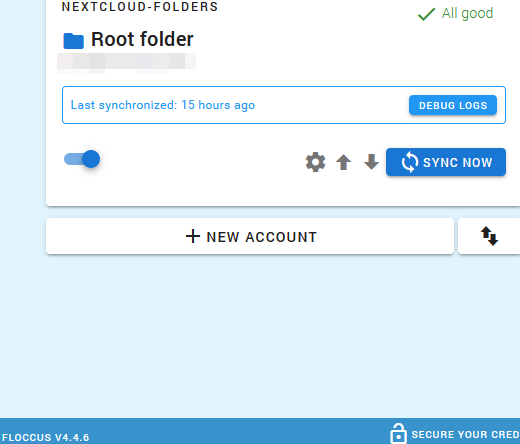
@marcelklehr I reinstallad both Floccus and NC Bookmarks and I use it for some days, looks all good. Thanks your hard work! I think you can close it.
Have a nice day! 🌞
 junpet
on 8 Nov 2020
junpet
on 8 Nov 2020
Related issues
 nemihome
·
5Comments
nemihome
·
5Comments
 jochen-01
·
4Comments
jochen-01
·
4Comments
 gerroon
·
4Comments
gerroon
·
4Comments
 enoch85
·
7Comments
gerroon
·
4Comments
enoch85
·
7Comments
gerroon
·
4Comments
Most helpful comment
A full sync "from scratch" has helped in my case, too.
But I guess you will need to fix that so that not every user will have to do this after upgrading to 4.4.1.