Floccus: database disk image is malformed
Describe the bug
sync stopped working. I believe after the upgrade from nextcloud 17.0.10 to 18.0.10.
The bookmarks app works however. I can see all bookmarks properly.
Unfortunately I can't even set Trigger sync from scratch and then sync, because I get the same error.
To Reproduce
Steps to reproduce the behavior:
- Try to sync
Expected behavior
It should sync as always
Screenshots

Desktop (please complete the following information):
- OS: macOS
- Browser [e.g. chrome, safari]: I tried Firefox, Waterfox, Chrome - irrelevant
- Browser Version [e.g. 22]: Various - irrelevant
- Floccus version: 4.3.0
- Floccus sync method: nextcloud folders
Server (please complete the following information):
- OS: Linux
- Nextcloud version: 18.0.10
- Bookmarks app version: 3.4.3
Note: Please write down the actual version numbers instead of writing 'latest'.
Debug log
2020-10-15T22:44:58.244Z Syncing failed with Error(s) encountered during statement execution: database disk image is malformed
Those are the only entries.
- [ ] Debug log provided
Additional context
Add any other context about the problem here.
 tessus
All 26 comments
I think this is a client-side error. It appears your browser's sqlite database was corrupted for some reason.
 marcelklehr
on 16 Oct 2020
marcelklehr
on 16 Oct 2020
Hmm, this might be a problem. I can't just delete the database. It holds all bookmarks and whatnot. So how do I fix this?
I imagine something like this: Export stuff in floccus. Close browser. Connect to database. Delete floccus tables. Start browser. Import floccus settings.
But what I find rather strange is that the debug log does not tell me anything. Not the statement, not what the real issue is, nothing. This is not a debug log, but a standard app log with a - sorry to say - useless message. Also, how can this db get corrupted, if nothing but the browser is accessing it? Very mysterious.
tessus
on 16 Oct 2020
Also, how can this db get corrupted, if nothing but the browser is accessing it? Very mysterious.
I agree, I haven't seen that error before.
I tried Firefox, Waterfox, Chrome - irrelevant
Are you using sqlite on the server?
This is very peculiar.
marcelklehr
on 16 Oct 2020
Are you using sqlite on the server?
If not, it seems like the user data of all your browsers got corrupted?
marcelklehr
on 16 Oct 2020
No, I use mysql on the server. I don't think Nextcloud does even support sqlite and I wouldn't use it anyway, since concurrency doesn't really work with sqlite.
So how can I fix this? Any ideas?
If not, it seems like the user data of all your browsers got corrupted?
This also doesn't make sense, because everything else works in those browsers. Let's concentrate on one: Waterfox (which is basically a Firefox clone). For all intents and purposes we can treat is as Firefox.
Where exactly is that data stored? There are many sqlite database in the profile dir. I'm more than happy to drop the floccus tables.
tessus
on 16 Oct 2020
This also doesn't make sense, because everything else works in those browsers. [...] Where exactly is that data stored? [...] I'm more than happy to drop the floccus tables.
Floccus doesn't even use SQLite or any kind of SQL database. The error you see is generated by the browser. I don't know which SQLite file is corrupt.
So facts are: 1) Something internal to the browser is broken. 2) Floccus doesn't function anymore because of this.
Possible options I see are:
- re-installing floccus
- creating a new browser profile
- re-installing the browser
marcelklehr
on 16 Oct 2020
Creating a new profile is out of the question, because I will lose everything.
Re-installing floccus / browser did not work. Can you please add better debug messages so that we know what the problem is? Component, database, table, stacktrace....
tessus
on 16 Oct 2020
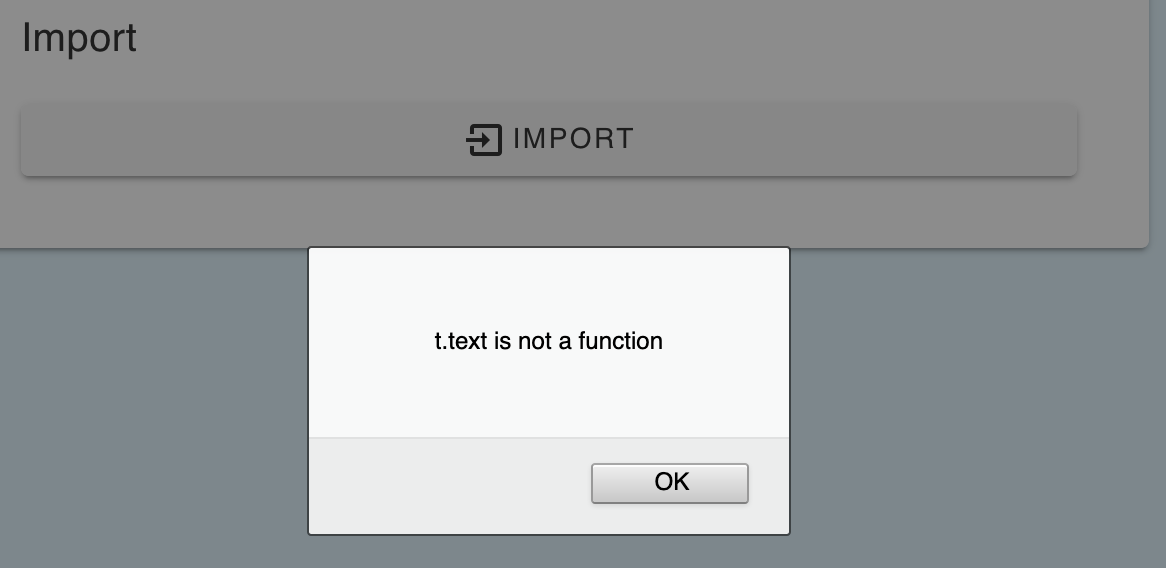
Oh wait. Removing floccus and quitting the browser did something. But I can't import my exported json file:
tessus
on 16 Oct 2020
How can I import the exported settings? Btw, I exported the settings with the same version of floccus.
tessus
on 17 Oct 2020
Can you please add better debug messages so that we know what the problem is?
Firefox
- Go to
about:debugging - click on
debugbutton next to floccus entry - trigger a sync by clicking on
sync nowfor the account of your choice. - go back to the inspector window and copy the logs after waiting for the sync to finish
Chrome
- Go to
chrome://extensions - enable
Developer mode - click on
dist/html/background.htmlbutton in floccus' entry next to "Inspect views: " - trigger a sync by clicking on
sync nowfor the account of your choice - go back to the inspector window and copy the logs after waiting for the sync to finish
marcelklehr
on 18 Oct 2020
But I can't import my exported json file
mmh, do you have secured your credentials with a passphrase?
marcelklehr
on 18 Oct 2020
mmh, do you have secured your credentials with a passphrase?
Nope.
Go to about:debugging
Unfortunately my floccus has no accounts anymore, so I can't debug anything.
tessus
on 18 Oct 2020
t.text is not a function
is this in Waterfox?
marcelklehr
on 18 Oct 2020
Yes. Waterfox 2020.08.
tessus
on 18 Oct 2020
I'll be away from my computer for a few hours. Ttyl.
tessus
on 18 Oct 2020
Can you try the normal firefox, or chrome?
marcelklehr
on 18 Oct 2020
Nope, I usually don't use Firefox or Chrome very often and wiped all their settings and add-ons. So now all my browsers have a blank floccus setup.
I've tried to import the settings into Chrome and I get the following message:

I really have to go now, but I'll try Firefox later as well. But even if that worked, it would not be very helpful, because I have to import those settings in Waterfox.
tessus
on 18 Oct 2020
In Firefox I get the following:
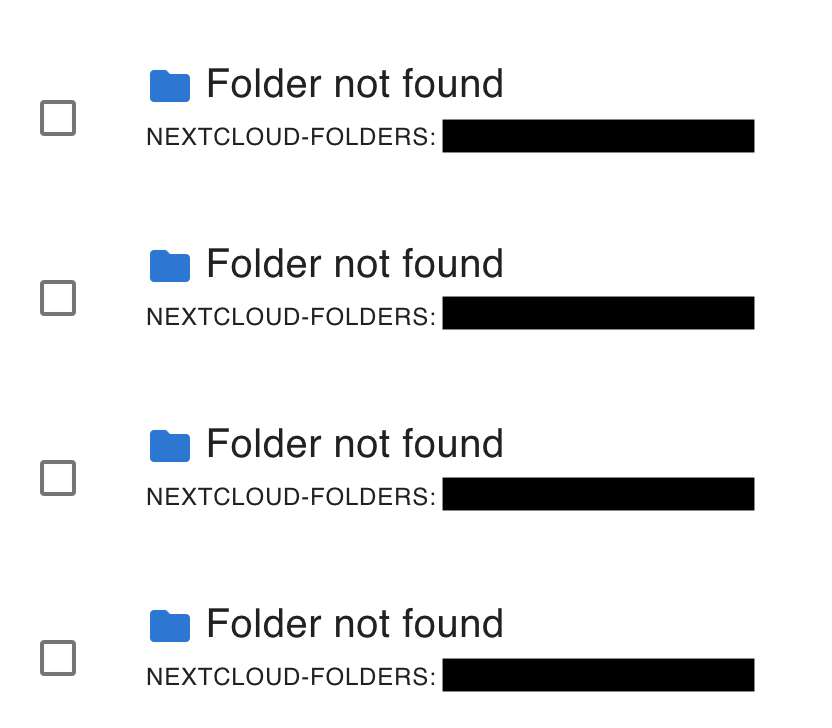
Unfortunately this doesn't help me very much. I thought that Waterfox and Firefox use the same backend, so this is kind of disheartening.
tessus
on 18 Oct 2020
Waterfox probably uses an older version of firefox as its base.
marcelklehr
on 18 Oct 2020
Hmm, it might be a bit behind, but it's not an ancient version. But what is really puzzling is that everything else works, or at least I always thought it did. Now I'm not so sure. Why would everything work, but import?
I'm really reluctant to use Firefox/Chrome, because both of them are rather invasive and almost impossible to decouple from their respective sync features. One little mistake and all your data is compromised.
tessus
on 18 Oct 2020
Ok, so what does that mean? Import just won't work on Waterfox and that's it? In that case we can close this issue, since I doubt you'll fix the t.text is not a function.
tessus
on 19 Oct 2020
Why would everything work, but import?
Import uses new language / HTML features that Waterfox apparently doesn't support yet.
Import just won't work on Waterfox and that's it?
I guess so. I'm not too inclined to come up with fixes for fringe browsers, atm. I'm happy to accept pull requests, though, as long as normal browsers continue to work.
marcelklehr
on 19 Oct 2020
How can I revert to a previous version of floccus?
4.4.0 broke even the selection of the local folder:

tessus
on 19 Oct 2020
Never mind. I tried all versions down to 4.2.0. None work anymore for some reason.
This really sucks, since I now don't have a working floccus installation anymore.
Which means I can either use a browser that steals my data or not use floccus. This is just awesome.
tessus
on 19 Oct 2020
I think for some reason your browser setup is broken. You could try exporting your bookmarks and all your goodies from waterfox and create a new profile / reinstall waterfox.
FWIW, I think firefox at least asks before they take your data, and you're not required to use their sync mechanism.
marcelklehr
on 19 Oct 2020
FWIW, I think firefox at least asks before they take your data, and you're not required to use their sync mechanism
Yes and no. You can deactivate telemetry via the UI, but they still collect data. So the UI settings are a lie. Currently it is still possible to turn it off properly via config:about or user.js. The question is for how long.
I'll try to export all my data and goodies and start over. I guess that my only option.
Thanks again for your help - and sorry for my ranting.
tessus
on 19 Oct 2020
Related issues
 ratermir
·
4Comments
ratermir
·
4Comments
 enoch85
·
7Comments
enoch85
·
7Comments
 gerroon
·
4Comments
marcelklehr
·
5Comments
gerroon
·
4Comments
marcelklehr
·
5Comments
 nemihome
·
5Comments
nemihome
·
5Comments