Floccus: 2 Errors E020: Could not parse server response. AND Trying to insert an already existing item into OrderTracker
Describe the bug
A clear and concise description of what the bug is.
When I sync Firefox toolbar with /xyz folder on server, I get error message:
"E020: Could not parse server response. Is the bookmarks app installed on your server? JSON.parse: unexpected character at line 1 column 1 of the JSON data E020: Could not parse server response. Is the bookmarks app installed on your server? JSON.parse: unexpected character at line 1 column 1 of the JSON data E020: Could not parse server response. Is the bookmarks app installed on your server? JSON.parse: unexpected character at line 1 column 1 of the JSON data E020: Could not parse server response. Is the bookmarks app installed on your server? JSON.parse: unexpected character at line 1 column 1 of the JSON data E020: Could not parse server response. Is the bookmarks app installed on your server? JSON.parse: unexpected character at line 1 column 1 of the JSON data "
I DELETED account and folder from Nextcloud (to flush ALL changes from server), then added account again but this time as follows:
When I sync Firefox bookmarks (ROOT) with /xyz folder on server, I get error message: Trying to insert an already existing item into OrderTracker: bookmark:1nEHKoutQMqH
To Reproduce
Steps to reproduce the behavior:
- Go to 'add new account, map local folder "Bookmarks Toolbar" to server folder "/XYZ".'
- Click on '.SYNC NOW'
- Scroll down to '....' - NOT APPLICABLE
- See error
E020: Could not parse server response. Is the bookmarks app installed on your server? JSON.parse: unexpected character at line 1 column 1 of the JSON data E020: Could not parse server response. Is the bookmarks app installed on your server? JSON.parse: unexpected character at line 1 column 1 of the JSON data E020: Could not parse server response. Is the bookmarks app installed on your server? JSON.parse: unexpected character at line 1 column 1 of the JSON data E020: Could not parse server response. Is the bookmarks app installed on your server? JSON.parse: unexpected character at line 1 column 1 of the JSON data E020: Could not parse server response. Is the bookmarks app installed on your server? JSON.parse: unexpected character at line 1 column 1 of the JSON data
To Reproduce - ACTION 2
Steps to reproduce the behavior:
- Go to 'add new account, map local ROOT (!!!) folder "Untitled Folder" to server folder "/XYZ".'
- Click on '.SYNC NOW'
- Scroll down to '....' - NOT APPLICABLE
- See error
Trying to insert an already existing item into OrderTracker: bookmark:1nEHKoutQMqH
Expected behavior
Completed sync without errors
Screenshots
If applicable, add screenshots to help explain your problem.
Desktop (please complete the following information):
- OS: iOS
- Browser - firefox
- Browser Version - 79.0
- Floccus version: 4.2.6
- Floccus sync method: nextcloud folders
Server (please complete the following information):
- OS: ---
- Nextcloud version: 17.0.1
- Bookmarks app version: ---
Note: Please write down the actual version numbers instead of writing 'latest'.
Debug log
It is often useful to provide a debug log file along with the issue. You can obtain a debug log of the most recent sync runs by clicking 'Debug log' in the bottom right corner of the floccus panel in your browser.
Note: As your debug log usually contains large parts of your bookmark data, instead of attaching it publicly to the issue here, I recommend uploading it privately at the following URL https://klehranlage.net/index.php/s/7nn82NSBsfQKdsJ
- [ ] Debug log provided
Additional context
Add any other context about the problem here.
 tchap2
All 21 comments
I'm not sure what happened on the first try, but the second try is probably an incarnation of #598 which will be fixed with the next release. I'll leave this open till then.
 marcelklehr
on 24 Aug 2020
marcelklehr
on 24 Aug 2020
@tchap2 Do you still experience this issue?
marcelklehr
on 1 Sep 2020
(The first error could actually be due to nextcloud brute force protection kicking in)
marcelklehr
on 1 Sep 2020
I am not sure if this is directly helpful but I am going to post in case it's useful to someone else who is a bit dense like me and searches for it.
Also got e020 on new install. Content of the logs was basically
Starting sync process for account [email protected]
Using normal strategy
Fetching bookmarks
Syncing failed with E020: Could not parse server response. Is the bookmarks app installed on your server?
JSON.parse: unexpected character at line 1 column 1 of the JSON data
The solution:
In the field labeled nextcloud URL you put the URL of the nextcloud, not the webDAV URL
https://nextcloud.host.com/ not https://nextcloud.host.com/remote.php/dav/files/user/
floccus is clever enough to figure out the rest.
 CouldBeThis
on 9 Sep 2020
CouldBeThis
on 9 Sep 2020
Thanks for all your feedback, folks! I'm currently working on a new iteration of the sync algorithm that should fix this: #651
marcelklehr
on 18 Sep 2020
I've since rewritten the sync algorithm to avoid this kind of problems. Head over to https://github.com/marcelklehr/floccus/issues/666 if you'd like to help test the new version.
marcelklehr
on 5 Oct 2020
This bug still present on 4.4.6, tested with url (not webdav link) nextcloud 20.0.1, Firefox 82.0.2
E020: Impossible de lire la réponse du serveur. L'application de marque-pages est elle installée sur votre serveur? JSON.parse: unexpected character at line 1 column 1 of the JSON data
 fredbcode
on 11 Nov 2020
fredbcode
on 11 Nov 2020
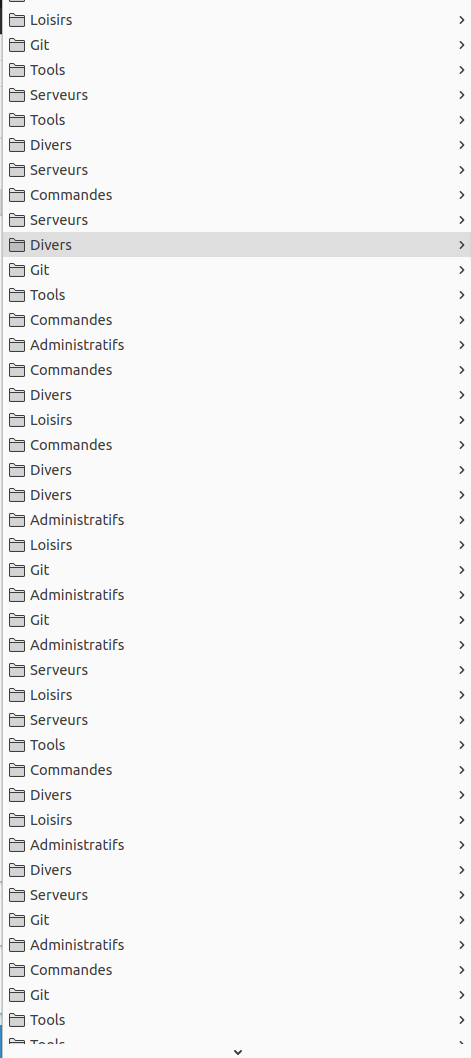
Right now I also note that sub directories are duplicated at each synchronization
fredbcode
on 11 Nov 2020
@tchap2 Do you still experience this issue?
Hello, YES! The issue is still there.
After not using Floccus for ~6 months, I again downloaded the addon to Firefox, set up the account (to root folder), and I again received error (below is verbatim from debug logs, the addon shows a shorter version of that error) - this is the only error:
_2020-11-13T16:17:27.039Z { [Error: 1 errors]
list:
[ [Error: E020: Could not parse server response. Is the bookmarks app installed on your server?
JSON.parse: unexpected character at line 1 column 1 of the JSON data] ] }
2020-11-13T16:17:27.040Z [Error: E020: Could not parse server response. Is the bookmarks app installed on your server?
JSON.parse: unexpected character at line 1 column 1 of the JSON data]
2020-11-13T16:17:27.041Z Syncing failed with E020: Could not parse server response. Is the bookmarks app installed on your server?
JSON.parse: unexpected character at line 1 column 1 of the JSON data_
Where is this JSON file located (firefox browser, one of my bookmarks http address, nexcloud server?) What is the unexpected character?
I do see that some boomarks where synced, because bookmarks folder on nextcloud server shows these. Log file shows that all bookmarks have been processed and assigned an ID starting with "-#" and also ending with "parentId"
I also tried setting up account as "Nextcloud Bookmarks (legacy)" and when I select radio button and click on "Add Account" nothing happens! I cannot proceed at all. Why? (my firefox is on auto-update, so whatever the latest firefox version is, that version is on my desktop).
All of above problems started happening I believe in Feb/March this year when completely redesigned version of Floccus was released.
BTW, when I set up floccus on Brave browser I get error
Nextcloud API error: {"status":"error","data":"Could not find folder"} Trying to insert an already existing item into OrderTracker: bookmark:1937 E020: Could not parse server response. Is the bookmarks app installed on your server? Unexpected token < in JSON at position 0
tchap2
on 13 Nov 2020
I am not sure if this is directly helpful but I am going to post in case it's useful to someone else who is a bit dense like me and searches for it.
Also got e020 on new install. Content of the logs was basically
Starting sync process for account [email protected]
Using normal strategy
Fetching bookmarks
Syncing failed with E020: Could not parse server response. Is the bookmarks app installed on your server?
JSON.parse: unexpected character at line 1 column 1 of the JSON data
The solution:
In the field labeled
nextcloud URLyou put the URL of the nextcloud, _not_ the webDAV URL
https://nextcloud.host.com/nothttps://nextcloud.host.com/remote.php/dav/files/user/floccus is clever enough to figure out the rest.
This is exactly what was done. This does not change the issue nor this ticket.
tchap2
on 13 Nov 2020
I also have this issue with Nextcloud 20.0.2 , Bookmarks 4.0.5 and floccus 4.4.6
2020-11-23T09:25:12.003Z Syncing failed with E020: Antwort des Servers konnte nicht gelesen werden. Ist die Bookmarks App auf Ihrem Server installiert?
JSON.parse: unexpected character at line 1 column 1 of the JSON data
I tried this https://github.com/marcelklehr/floccus/issues/666#issuecomment-704172666
- Deduplicate shared bookmark folders
- Removed 0 duplicate shares
- Remove superfluous shared bookmark folders
- Removed 0 superfluous shares
- Remove orphaned bookmark shares
- Removed 0 orphaned shares
- Removed 0 orphaned public links
- Remove orphaned bookmark tree items
- Removed 228 orphaned bookmarks entries
- Removed 0 orphaned folders entries
- Removed 42 orphaned children entries
- Removed 0 orphaned bookmark folders
- Removed 0 orphaned bookmarks
- Update bookmark group shares
- Removed 0 users and added 0 users to 0 groups
- Removed 0 shares
But still receive this error.
 marcohald
on 23 Nov 2020
marcohald
on 23 Nov 2020
I debugged it via about:debugging and saw that a bad response from our Reverse Proxy was cached fro the URL index.php/apps/bookmarks/public/rest/v2/folder?root=-1&layers=0
I right clicked my Nextcloud Site on the Firefox history and deleted it via forget this site.
Now it works again.
marcohald
on 23 Nov 2020
No reverse here and floccus is unfortunately unusable in my case
Do you have directories in your bookmarks ? Maybe ( https://github.com/marcelklehr/floccus/issues/641#issuecomment-725541654 ) is a glue about this issue ?
fredbcode
on 27 Nov 2020
I was having this issue as well, following @marcohald 's comment I deleted the site from my firefox history, then removed the account from floccus, then recreated it. When I first recreated it I used the 'nextcloud flow' method, and this didn't work. I went into my nextcloud settings and created a new app password for floccus, put this password into the account settings in floccus, and now it's syncing.
 pcwilcox
on 7 Dec 2020
pcwilcox
on 7 Dec 2020
I'm sorry for the delay. I've just released v4.4.7 for firefox with a lot of new fixes, hopefully this will some of your issues. A few issues remain, but I'm confident I'll be able to tackle those soon. Feedback is appreciated.
marcelklehr
on 5 Jan 2021
Same happens here:
Nextcloud Bookmarks Version: 4.0.5
I get this output in my Nextcloud log:
Exception: Argument 1 passed to OCA\Bookmarks\Db\TreeMapper::getSubFolders() must be of the type int, null given, called in /srv/www/htdocs/nextcloud/apps/bookmarks/lib/Controller/FoldersController.php on line 444

    /srv/www/htdocs/nextcloud/lib/private/AppFramework/App.php - line 152:

    OC\AppFramework\Http\Dispatcher->dispatch(OCA\Bookmark ... {}, "getFolders")

    /srv/www/htdocs/nextcloud/lib/private/Route/Router.php - line 308:

    OC\AppFramework\App::main("OCA\\Bookma ... r", "getFolders", OC\AppFramew ... {}, { action: nu ... "})

    /srv/www/htdocs/nextcloud/lib/base.php - line 1008:

    OC\Route\Router->match("/apps/bookm ... r")

    /srv/www/htdocs/nextcloud/index.php - line 37:

    OC::handleRequest()

Verursacht durchTypeError: Argument 1 passed to OCA\Bookmarks\Db\TreeMapper::getSubFolders() must be of the type int, null given, called in /srv/www/htdocs/nextcloud/apps/bookmarks/lib/Controller/FoldersController.php on line 444

    /srv/www/htdocs/nextcloud/apps/bookmarks/lib/Controller/FoldersController.php - line 444:

    OCA\Bookmarks\Db\TreeMapper->getSubFolders(null, -1)

    /srv/www/htdocs/nextcloud/lib/private/AppFramework/Http/Dispatcher.php - line 169:

    OCA\Bookmarks\Controller\FoldersController->getFolders(-1, -1)

    /srv/www/htdocs/nextcloud/lib/private/AppFramework/Http/Dispatcher.php - line 100:

    OC\AppFramework\Http\Dispatcher->executeController(OCA\Bookmark ... {}, "getFolders")

    /srv/www/htdocs/nextcloud/lib/private/AppFramework/App.php - line 152:

    OC\AppFramework\Http\Dispatcher->dispatch(OCA\Bookmark ... {}, "getFolders")

    /srv/www/htdocs/nextcloud/lib/private/Route/Router.php - line 308:

    OC\AppFramework\App::main("OCA\\Bookma ... r", "getFolders", OC\AppFramew ... {}, { action: nu ... "})

    /srv/www/htdocs/nextcloud/lib/base.php - line 1008:

    OC\Route\Router->match("/apps/bookm ... r")

    /srv/www/htdocs/nextcloud/index.php - line 37:

    OC::handleRequest()
I hope this helps resolving this issue.
 KaratekHD
on 16 Jan 2021
KaratekHD
on 16 Jan 2021
I'm seeing this error:
E020: Could not parse server response. Is the bookmarks app installed on your server? JSON.parse: unexpected end of data at line 1 column 1 of the JSON data
On the server logs, I see:
  Error    PHP                Allowed memory size of 2021-01-16T15:35:58+00:00
                              536870912 bytes
                              exhausted (tried to
                              allocate 268435464
                              bytes) at
                              /var/www/html/apps/bookmarks/lib/Db/BookmarkWithTagsAndParent.php#48
I could try and increase the PHP limit, but I wonder if this is sensible: does syncing bookmarks really need 500MB?
Versions:
- Nextcloud 18.0.13
- Bookmarks App 3.4.9
- Floccus 4.4.7
- Firefox 84.0.2
 wu-lee
on 16 Jan 2021
wu-lee
on 16 Jan 2021
@KaratekHD You likely have two root folders for that user in the database. The fix would be to remove the one that doesn't contain any other folders.
Short guide for that:
The table oc_bookmarks_root_folders maps a user_id to a folder_id. In oc_bookmarks_tree you can find entries that have that folder_id as their parent_folder to see what is in that root folder. You can drop the entry in oc_bookmarks_root_folders that has no children in oc_bookmarks_tree.
marcelklehr
on 16 Jan 2021
@wu-lee Oof, I have not analyzed the memory footprint of the app so far, but that looks like a bit too much indeed. I'll create a new issue on the bookmarks app to track this, but for now the quick fix would indeed be to increase the memory limit maybe by a hundred or two hundred mb. :S
marcelklehr
on 16 Jan 2021
@KaratekHD You likely have two root folders for that user in the database. The fix would be to remove the one that doesn't contain any other folders.
Short guide for that:
The table
oc_bookmarks_root_foldersmaps a user_id to a folder_id. Inoc_bookmarks_treeyou can find entries that have that folder_id as their parent_folder to see what is in that root folder. You can drop the entry in oc_bookmarks_root_folders that has no children in oc_bookmarks_tree.
Thank you, this worked!
KaratekHD
on 19 Jan 2021
I'm sorry for the delay. I've just released v4.4.7 for firefox with a lot of new fixes, hopefully this will some of your issues. A few issues remain, but I'm confident I'll be able to tackle those soon. Feedback is appreciated.
v4.4.8 is out now with more fixes. I'm closing this now, feel free to open a new issue if you continue to experience problems.
marcelklehr
on 21 Jan 2021
Related issues
 gerroon
·
6Comments
gerroon
·
6Comments
 enoch85
·
7Comments
enoch85
·
7Comments
 ozboss
·
3Comments
gerroon
·
6Comments
ozboss
·
3Comments
gerroon
·
6Comments
 ratermir
·
4Comments
ratermir
·
4Comments