Floccus: New account setup renders first account as [email protected]
Installing for the first time v4.2.2
Click on the Floccus icon, click the PLUS sign to add an account
Enter your server name
Enter your user name
Click on the NC Flow button to authenticate via the browser.
Authenticate and close the browser tab
Set Server path
Set Local bookmarks path
Set Sync behavior to overwrite local (first time)
Set Dangerous tasks to First time sync
Click Save
Close the tab in the browser
Click on the Sync Now button
Experience the error below.
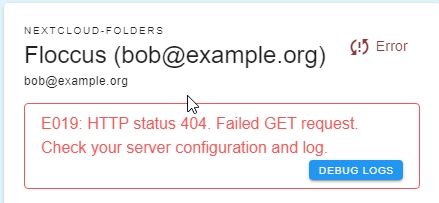
Windows 10 Pro
SRWare (Chromium) Version 81.0.4200.0
Floccus 4.2.2
Sync to NC Bookmarks
NC 18.0.6
Bookmarks 3.1.1
[X] Debug log provided: floccus-4.2.2-2020-06-10.log
This issue started with 4.2.0. If you add your account again it seems to be fine just the first attempt is messed up.
 dsiminiuk
All 8 comments
 Tank-Missile
on 11 Jun 2020
Tank-Missile
on 11 Jun 2020
Same here floccus 4.2.2 LoFloccus 1.1.2 in Waterfox 2020.6
Works with old Floccus 3.5.1 in Waterfox Classic 2020.6 with same server.
 r4taw2mg
on 11 Jun 2020
r4taw2mg
on 11 Jun 2020
Have the same issue. As described in #561
Additional testing has also shown that on creating the second account (actual) account for me, even if I select the Root (/) as the Bookmarks location (folder mapping), it usually defaults to entering _/Bookmarks Bar/floccus ([email protected])_ as the actual mapping. I then have to go and reset it to point to the Root (/). Maybe related to a default setting somewhere?
 nunnsby
on 11 Jun 2020
nunnsby
on 11 Jun 2020
@marcelklehr 4.2.3 works much better! Easy addition of the account.
Thank you
dsiminiuk
on 11 Jun 2020
Not so fast. On a different PC.
Removed v4.2.2
Installed 4.2.3
Setup account in the usual way.
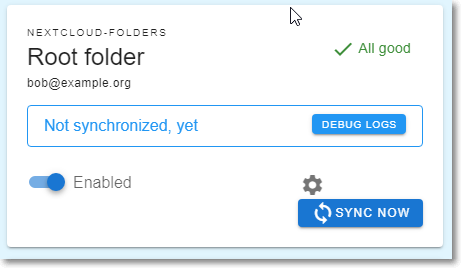
If I click the gear icon none of the settings I just saved are there.
Another hint. If I set the configuration page as desired, click the SAVE button.
If I refresh the page, the values revert to the default [email protected].
dsiminiuk
on 12 Jun 2020
I tried again and used the username password method of authentication to avoid the NC Flow method and it worked.
I have another PC I need to update and I'll try that first time and let you know what happens.
dsiminiuk
on 12 Jun 2020
Adding with proper user/pass (not Flow) on the 2nd PC avoided this issue. lLl is good.
Will try on another laptop.
dsiminiuk
on 12 Jun 2020
Deploying v4.2.4 over top of v4.2.3 in chrome://extensions (dev mode), closing the browser, syncing, all works well and does not corrupt any accounts.
On another browser, uninstalled v.4.2.3, closed the browser. Installed v.4.2.4 in chrome://extensions (dev mode), added a new account with NextCloud Flow authentication, synced, all works well.
Thanks @marcelklehr
dsiminiuk
on 12 Jun 2020
Related issues
 efelon
·
7Comments
efelon
·
7Comments
 sunjam
·
4Comments
sunjam
·
4Comments
 gerroon
·
6Comments
gerroon
·
6Comments
 lightlike
·
4Comments
lightlike
·
4Comments
 nemihome
·
5Comments
nemihome
·
5Comments
Most helpful comment
@marcelklehr 4.2.3 works much better! Easy addition of the account.
Thank you