Floccus: XBEL not picking up new folders
Software versions
OS: ubuntu 18.04 lts
- Browser: firefox quantum
- Nextcloud: 14
- Nextcloud Bookmarks app: 1.1.1
- Floccus: 3.3.2
- Floccus sync method: XBEL/webdav
Steps to reproduce
- added new folder to root of bookmarks toolbar with bookmarks in it.
2.
Expected outcome
after multiple syncs, expected it to show up on other synced machines.
...
Actual outcome
after multiple syncs, expected it did not show up on other synced machines.
...
Debug log
- [ ] Debug log provided
 xelcho
All 19 comments
Mh. I cannot reproduce this. Does the folder end up in the xbel file?
 marcelklehr
on 10 Aug 2019
marcelklehr
on 10 Aug 2019
Sorry for the delay!
I am not able to find the folder in the xbel file.
xelcho
on 15 Aug 2019
Which folder did you select to be synced?
marcelklehr
on 19 Aug 2019
I added a new folder to Firefox (on client machine) and expected it to be picked up by floccus and replicated to other client machines. This has been the pattern that has worked in the past, and I don't recall changing anything in the mean time.
Does that answer your question?
xelcho
on 19 Aug 2019
Did you try syncing manually? You may also want to try the new beta, to see if this has been fixed by any chance: #338
marcelklehr
on 19 Aug 2019
For my understanding: Manually Sync is clicking on "Sync now" button in the extension?
I will give the beta a try.
xelcho
on 19 Aug 2019
For my understanding: Manually Sync is clicking on "Sync now" button in the extension?
Yes. But I assume you tried that already.
marcelklehr
on 19 Aug 2019
Yes. But I assume you tried that already.
You know, I think so. Let's table this until I am home and can do so for certain!
Thanks!
xelcho
on 19 Aug 2019
It seems that the client is hanging on sync, regardless if it is automatic or manually initiated. It gets hung at...
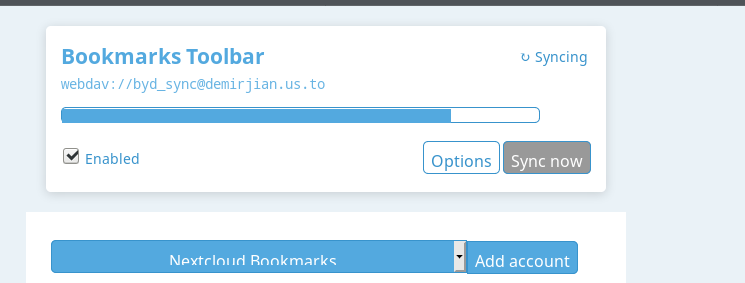
If I "mess" with it, I get issues with file locking.
If I delete the lock file, it hangs at the same spot.
I am not sure what I should be looking for in the debug log on client, the following are the last 2 lines:
Syncing failed with E023: Unable to clear lock file, consider deleting bm/bookmarks.xbel.lock manually.
onSyncFail
xelcho
on 21 Aug 2019
Can you check the debug log, when it hangs?
marcelklehr
on 22 Aug 2019
Client debug log:
I am not sure what I should be looking for in the debug log on client, the following are the last 2 lines:
Syncing failed with E023: Unable to clear lock file, consider deleting bm/bookmarks.xbel.lock manually.
onSyncFail
It is working, for now, by renaming the xbel file and creating a new one. Let's see if the other clients behave. :)
xelcho
on 22 Aug 2019
I am experiencing periodically the same behaviour and I need quite often to
delete the lock file and sometimes the xbel file. There is something
corrupting the process and I think that the locking mechanism need to be
reviewed. In particular, if a sync process is stopped for various reasons
including closing the browser, the lock file is not removed. Also,it
happens one in a while that I get duplicates, sometimes folders sometimes
duplicates inside the folder. It is so random that it is hard if not
impossible to catch.
I don't know how can I help to fix these issues.
Bogdan
ᐧ
On Thu, 22 Aug 2019 at 06:32, xelcho notifications@github.com wrote:
Client debug log:
I am not sure what I should be looking for in the debug log on client, the
following are the last 2 lines:Syncing failed with E023: Unable to clear lock file, consider deleting
bm/bookmarks.xbel.lock manually.
onSyncFailIt is working, for now, by renaming the xbel file and creating a new one.
Let's see if the other clients behave. :)—
You are receiving this because you are subscribed to this thread.
Reply to this email directly, view it on GitHub
https://github.com/marcelklehr/floccus/issues/347?email_source=notifications&email_token=AABMRXTUPBZYJSZ4B7R24Z3QFZTMFA5CNFSM4IKJRT5KYY3PNVWWK3TUL52HS4DFVREXG43VMVBW63LNMVXHJKTDN5WW2ZLOORPWSZGOD44UOCY#issuecomment-523847435,
or mute the thread
https://github.com/notifications/unsubscribe-auth/AABMRXQINM6E537EGKMHNDDQFZTMFANCNFSM4IKJRT5A
.
 bhlevca
on 22 Aug 2019
bhlevca
on 22 Aug 2019
So on my windows 10 firefox quantum client, the sync can not complete the debug log:
Bookmark unchanged
Syncing failed with E011: Item in folder ordering is not an actual child: {"id":813,"type":"bookmark"}
E011: Item in folder ordering is not an actual child: {"id":1353,"type":"bookmark"}
E012: Folder ordering is missing some of the folder's children
E012: Folder ordering is missing some of the folder's children
E011: Item in folder ordering is not an actual child: {"id":1333,"type":"bookmark"}
onSyncFail
Please advise, thx.
xelcho
on 22 Aug 2019
@xelcho uh,oh. These errors suggest an inconsistency occurring somewhere in the sync algorithm. Are you using the new beta for this? Did you enable a different syncing strategy?
marcelklehr
on 24 Aug 2019
Hi,
I don't use the beta version and I get occasionally the same errors.
Bogdan
On Fri, Aug 23, 2019, 19:00 Marcel Klehr, notifications@github.com wrote:
@xelcho https://github.com/xelcho uh,oh. These errors suggest an
inconsistency occurring somewhere in the sync algorithm. Are you using the
new beta for this? Did you enable a different syncing strategy?—
You are receiving this because you commented.
Reply to this email directly, view it on GitHub
https://github.com/marcelklehr/floccus/issues/347?email_source=notifications&email_token=AABMRXT6EWEYYSAFOW64SMLQGBTZ7A5CNFSM4IKJRT5KYY3PNVWWK3TUL52HS4DFVREXG43VMVBW63LNMVXHJKTDN5WW2ZLOORPWSZGOD5BQUZQ#issuecomment-524487270,
or mute the thread
https://github.com/notifications/unsubscribe-auth/AABMRXWDGLWGCZPWER7UL2DQGBTZ7ANCNFSM4IKJRT5A
.
bhlevca
on 24 Aug 2019
@marcelklehr So I am not using the beta, same version from start of this post (3.3.2)
Current situation:
Home Client (Ubuntu) works fine, I can add bookmarks and folders and it syncs as it should.
My work Client (Windoz 10) with firefox is the machine having fits.
Please advise.
I'm considering download the bookmarks from my work machine, wipe them and rebuild from sync.
xelcho
on 25 Aug 2019
I've just released v3.4.0. You can now easily run the latest code.
marcelklehr
on 26 Aug 2019
Thanks!
I ran it with the new release on the windows client and it hung, same issue (E011...) . So I carried through with my plan to backup, then delete all book marks and then sync.
Seems good for now.
The result is a clean sync, now I have to do a diff on the backup and current book marks. :)
xelcho
on 26 Aug 2019
@bhlevca Feel free to open a separate issue with your errors
marcelklehr
on 2 Sep 2019
Related issues
 jochen-01
·
4Comments
jochen-01
·
4Comments
 aliher1911
·
6Comments
aliher1911
·
6Comments
 fermat2a
·
3Comments
fermat2a
·
3Comments
 ozboss
·
3Comments
ozboss
·
3Comments
 gerroon
·
6Comments
gerroon
·
6Comments
Most helpful comment
Thanks!
I ran it with the new release on the windows client and it hung, same issue (E011...) . So I carried through with my plan to backup, then delete all book marks and then sync.
Seems good for now.
The result is a clean sync, now I have to do a diff on the backup and current book marks. :)