Flipper: Flipper doesn't build with Xcode 12.5 RC
🐛 Bug Report
Flipper in a React Native project fails to build with the following error:
~/MyProject/ios/Pods/Headers/Private/Flipper-Folly/folly/synchronization/DistributedMutex-inl.h:1051:5: 'atomic_notify_one<unsigned long>' is unavailable
Build log
[... TRUNCATED ...][]

In file included from ~/MyProject/ios/Pods/Flipper-Folly/folly/synchronization/DistributedMutex.cpp:17:
In file included from ~/MyProject/ios/Pods/Headers/Private/Flipper-Folly/folly/synchronization/DistributedMutex.h:344:
~/MyProject/ios/Pods/Headers/Private/Flipper-Folly/folly/synchronization/DistributedMutex-inl.h:1051:5: error: 'atomic_notify_one<unsigned long>' is unavailable
    atomic_notify_one(state);
    ^
~/MyProject/ios/Pods/Headers/Private/Flipper-Folly/folly/synchronization/DistributedMutex-inl.h:1573:5: note: in instantiation of function template specialization 'folly::detail::distributed_mutex::wakeTimedWaiters<std::__1::atomic<unsigned long>>' requested here
    wakeTimedWaiters(&state_, proxy.timedWaiters_);
    ^
In file included from ~/MyProject/ios/Pods/Flipper-Folly/folly/synchronization/DistributedMutex.cpp:17:
In file included from ~/MyProject/ios/Pods/Headers/Private/Flipper-Folly/folly/synchronization/DistributedMutex.h:19:
In file included from ~/MyProject/ios/Pods/Headers/Private/Flipper-Folly/folly/Optional.h:58:
In file included from /Applications/Xcode.app/Contents/Developer/Platforms/iPhoneSimulator.platform/Developer/SDKs/iPhoneSimulator14.5.sdk/usr/include/c++/v1/functional:504:
In file included from /Applications/Xcode.app/Contents/Developer/Platforms/iPhoneSimulator.platform/Developer/SDKs/iPhoneSimulator14.5.sdk/usr/include/c++/v1/memory:681:
/Applications/Xcode.app/Contents/Developer/Platforms/iPhoneSimulator.platform/Developer/SDKs/iPhoneSimulator14.5.sdk/usr/include/c++/v1/atomic:2140:6: note: 'atomic_notify_one<unsigned long>' has been explicitly marked unavailable here
void atomic_notify_one(atomic<_Tp>* __o) _NOEXCEPT
     ^
1 error generated.

[... TRUNCATED ...]

Build failed    21.4.2021, 11.51    34.5 seconds
Cleaning the Xcode build folder didn't help, nor does updating Flipper and Flipper-Folly to the latest versions.
To Reproduce
- Install Xcode 12.5 RC from Apple
- Open a React Native project with Flipper enabled
- Try to build that project
- The build fails
Environment
- Xcode 12.5 RC
- React Native 0.63.4
- Pods:
- Flipper (0.85.0)
- Flipper-DoubleConversion (1.1.7)
- Flipper-Folly (2.5.1)
- Flipper-Glog (0.3.6)
- Flipper-PeerTalk (0.0.4)
- Flipper-RSocket (1.3.1)
- FlipperKit (0.85.0)
 matiaskorhonen
All 78 comments
I'm getting the same error in our React Native app. Here's some related issues I was able to dig up:
https://github.com/facebook/folly/issues/1527
https://github.com/facebook/react-native/issues/31179
Looks like the underlying issue was resolved (here: https://github.com/facebook/folly/commit/8477e25603f131c0400b6964609c76b438826788), but it hasn't been published to cocoapods yet.
 avery-pierce
on 21 Apr 2021
avery-pierce
on 21 Apr 2021
Same as you. I feel no hope right now.
after tried every each solution, issue is still fucking there.
 OceanFlooor
on 25 Apr 2021
OceanFlooor
on 25 Apr 2021
xCode 12.5 has released yesterday, this error still here. I hope we will be resolve the error for the next version
 baveku
on 27 Apr 2021
baveku
on 27 Apr 2021
Same issue by updating Xcode and my devices. Try many solutions but no one work.
 jonathanroze
on 27 Apr 2021
jonathanroze
on 27 Apr 2021
Same issue by updating Xcode and my devices. Try many solutions but no one work.
I read facebook/folly@8477e25, the issue has resolved but flipper does not update yet
baveku
on 27 Apr 2021
same issue but why even I still disabled flipper on ios and I'm still getting a build error?
 naicky-whiterain
on 27 Apr 2021
naicky-whiterain
on 27 Apr 2021
Now, i just need update this file and it run normally. Hope it will be resolve in the next version.
This file in:
{project-name}/ios/Pods/Flipper-Folly/folly/synchronization/DistributedMutex-inl.h

https://github.com/facebook/folly/commit/8477e25603f131c0400b6964609c76b438826788#diff-65ad309ca9c636ba81eb7953fce06e6963c51296a60dc25eb4a5b1463482c6da
 j2teamlbh
on 27 Apr 2021
j2teamlbh
on 27 Apr 2021
same issue but why even I still disabled flipper on ios and I'm still getting a build error?
Me too - I get the following:
CompileC /Users/alex.hooper/Library/Developer/Xcode/DerivedData/Espresso-brgntaoyjolqyfdzcsunjlqtzzum/Build/Intermediates.noindex/Espresso.build/Debug-iphoneos/Espresso.build/Objects-normal/arm64/AppDelegate.o /Users/alex.hooper/Documents/figloo-bank-mobile/ios/Espresso/AppDelegate.m normal arm64 objective-c com.apple.compilers.llvm.clang.1_0.compiler
 AlexHooperDev
on 27 Apr 2021
AlexHooperDev
on 27 Apr 2021
Anyways, I was able to fix this by downgrading to XCode Version 12.4. It seems the issue for me happens when I updated my Xcode to the latest 12.5 version. until there's a patch to fix this, i will continue using 12.4 version
naicky-whiterain
on 27 Apr 2021
This disables Flipper, but it's a quick workaround if you (like me) need the project working again.
1) Podfile, comment Flipper:
#   use_flipper!()
#   post_install do |installer|
#     react_native_post_install(installer)
#   end
2) cd ios and delete the 'Pods folder' folder and 'Podfile.lock'
3) pod install
 chrisid
on 27 Apr 2021
chrisid
on 27 Apr 2021
This disables Flipper, but it's a quick workaround if you (like me) need the project working again.
- Podfile, comment Flipper:
#   use_flipper!()
#   post_install do |installer|
#     react_native_post_install(installer)
#   end
- cd ios and delete the 'Pods folder' folder and 'Podfile.lock'
- pod install
However this ain't working, tried numerous times there's still a build error. :(
naicky-whiterain
on 27 Apr 2021
Managed to use the temporary code fix above posted by j2teamlbh, what made it finally work was ensuring that in the podfile you specify that you're using use_flipper!({ 'Flipper-Folly' => '2.3.0' })
AlexHooperDev
on 27 Apr 2021
Sucks.
 blueberry6401
on 28 Apr 2021
blueberry6401
on 28 Apr 2021
Managed to use the temporary code fix above posted by j2teamlbh, what made it finally work was ensuring that in the podfile you specify that you're using
use_flipper!({ 'Flipper-Folly' => '2.3.0' })
@AlexHooperDev you wouldn't happen to know where I would put that change in my Podfile would you? I'm using using react native 62
platform :ios, '10.0'
require_relative '../node_modules/@react-native-community/cli-platform-ios/native_modules'

target 'foobarbazapp' do
  # Pods for foobarbazapp
  pod 'FBLazyVector', :path => "../node_modules/react-native/Libraries/FBLazyVector"
  pod 'FBReactNativeSpec', :path => "../node_modules/react-native/Libraries/FBReactNativeSpec"
  pod 'RCTRequired', :path => "../node_modules/react-native/Libraries/RCTRequired"
  pod 'RCTTypeSafety', :path => "../node_modules/react-native/Libraries/TypeSafety"
  pod 'React', :path => '../node_modules/react-native/'
  pod 'React-Core', :path => '../node_modules/react-native/'
  pod 'React-CoreModules', :path => '../node_modules/react-native/React/CoreModules'
  pod 'React-Core/DevSupport', :path => '../node_modules/react-native/'
  pod 'React-RCTActionSheet', :path => '../node_modules/react-native/Libraries/ActionSheetIOS'
  pod 'React-RCTAnimation', :path => '../node_modules/react-native/Libraries/NativeAnimation'
  pod 'React-RCTBlob', :path => '../node_modules/react-native/Libraries/Blob'
  pod 'React-RCTImage', :path => '../node_modules/react-native/Libraries/Image'
  pod 'React-RCTLinking', :path => '../node_modules/react-native/Libraries/LinkingIOS'
  pod 'React-RCTNetwork', :path => '../node_modules/react-native/Libraries/Network'
  pod 'React-RCTSettings', :path => '../node_modules/react-native/Libraries/Settings'
  pod 'React-RCTText', :path => '../node_modules/react-native/Libraries/Text'
  pod 'React-RCTVibration', :path => '../node_modules/react-native/Libraries/Vibration'
  pod 'React-Core/RCTWebSocket', :path => '../node_modules/react-native/'

  pod 'React-cxxreact', :path => '../node_modules/react-native/ReactCommon/cxxreact'
  pod 'React-jsi', :path => '../node_modules/react-native/ReactCommon/jsi'
  pod 'React-jsiexecutor', :path => '../node_modules/react-native/ReactCommon/jsiexecutor'
  pod 'React-jsinspector', :path => '../node_modules/react-native/ReactCommon/jsinspector'
  pod 'ReactCommon/callinvoker', :path => "../node_modules/react-native/ReactCommon"
  pod 'ReactCommon/turbomodule/core', :path => "../node_modules/react-native/ReactCommon"
  pod 'Yoga', :path => '../node_modules/react-native/ReactCommon/yoga'

  pod 'DoubleConversion', :podspec => '../node_modules/react-native/third-party-podspecs/DoubleConversion.podspec'
  pod 'glog', :podspec => '../node_modules/react-native/third-party-podspecs/glog.podspec'
  pod 'Folly', :podspec => '../node_modules/react-native/third-party-podspecs/Folly.podspec'


  pod 'Firebase/Messaging', '~> 6.13.0'
  pod 'Firebase/Core', '~> 6.13.0'
  pod 'Firebase/DynamicLinks', '~> 6.13.0'


  rn_maps_path = '../node_modules/react-native-maps'
  pod 'react-native-google-maps', :path => rn_maps_path
  pod 'GoogleMaps'
  pod 'Google-Maps-iOS-Utils'

  pod 'react-native-geolocation', path: '../node_modules/@react-native-community/geolocation'

  pod 'TrustKit', '~> 1.5.3'
  pod 'RNAzureNotificationHub', :podspec => '../node_modules/react-native-azurenotificationhub/RNAzureNotificationHub.podspec'


  target 'foobarbazappTests' do
    inherit! :search_paths
    # Pods for testing
  end

  use_native_modules!
end

target 'foobarbazapp-tvOS' do
  # Pods for foobarbazapp-tvOS

  target 'foobarbazapp-tvOSTests' do
    inherit! :search_paths
    # Pods for testing
  end

end
 olie-chan
on 28 Apr 2021
olie-chan
on 28 Apr 2021
Managed to use the temporary code fix above posted by j2teamlbh, what made it finally work was ensuring that in the podfile you specify that you're using
use_flipper!({ 'Flipper-Folly' => '2.3.0' })@AlexHooperDev you wouldn't happen to know where I would put that change in my Podfile would you? I'm using using react native 62
platform :ios, '10.0'
require_relative '../node_modules/@react-native-community/cli-platform-ios/native_modules'

target 'foobarbazapp' do
  # Pods for foobarbazapp
  pod 'FBLazyVector', :path => "../node_modules/react-native/Libraries/FBLazyVector"
  pod 'FBReactNativeSpec', :path => "../node_modules/react-native/Libraries/FBReactNativeSpec"
  pod 'RCTRequired', :path => "../node_modules/react-native/Libraries/RCTRequired"
  pod 'RCTTypeSafety', :path => "../node_modules/react-native/Libraries/TypeSafety"
  pod 'React', :path => '../node_modules/react-native/'
  pod 'React-Core', :path => '../node_modules/react-native/'
  pod 'React-CoreModules', :path => '../node_modules/react-native/React/CoreModules'
  pod 'React-Core/DevSupport', :path => '../node_modules/react-native/'
  pod 'React-RCTActionSheet', :path => '../node_modules/react-native/Libraries/ActionSheetIOS'
  pod 'React-RCTAnimation', :path => '../node_modules/react-native/Libraries/NativeAnimation'
  pod 'React-RCTBlob', :path => '../node_modules/react-native/Libraries/Blob'
  pod 'React-RCTImage', :path => '../node_modules/react-native/Libraries/Image'
  pod 'React-RCTLinking', :path => '../node_modules/react-native/Libraries/LinkingIOS'
  pod 'React-RCTNetwork', :path => '../node_modules/react-native/Libraries/Network'
  pod 'React-RCTSettings', :path => '../node_modules/react-native/Libraries/Settings'
  pod 'React-RCTText', :path => '../node_modules/react-native/Libraries/Text'
  pod 'React-RCTVibration', :path => '../node_modules/react-native/Libraries/Vibration'
  pod 'React-Core/RCTWebSocket', :path => '../node_modules/react-native/'

  pod 'React-cxxreact', :path => '../node_modules/react-native/ReactCommon/cxxreact'
  pod 'React-jsi', :path => '../node_modules/react-native/ReactCommon/jsi'
  pod 'React-jsiexecutor', :path => '../node_modules/react-native/ReactCommon/jsiexecutor'
  pod 'React-jsinspector', :path => '../node_modules/react-native/ReactCommon/jsinspector'
  pod 'ReactCommon/callinvoker', :path => "../node_modules/react-native/ReactCommon"
  pod 'ReactCommon/turbomodule/core', :path => "../node_modules/react-native/ReactCommon"
  pod 'Yoga', :path => '../node_modules/react-native/ReactCommon/yoga'

  pod 'DoubleConversion', :podspec => '../node_modules/react-native/third-party-podspecs/DoubleConversion.podspec'
  pod 'glog', :podspec => '../node_modules/react-native/third-party-podspecs/glog.podspec'
  pod 'Folly', :podspec => '../node_modules/react-native/third-party-podspecs/Folly.podspec'


  pod 'Firebase/Messaging', '~> 6.13.0'
  pod 'Firebase/Core', '~> 6.13.0'
  pod 'Firebase/DynamicLinks', '~> 6.13.0'


  rn_maps_path = '../node_modules/react-native-maps'
  pod 'react-native-google-maps', :path => rn_maps_path
  pod 'GoogleMaps'
  pod 'Google-Maps-iOS-Utils'

  pod 'react-native-geolocation', path: '../node_modules/@react-native-community/geolocation'

  pod 'TrustKit', '~> 1.5.3'
  pod 'RNAzureNotificationHub', :podspec => '../node_modules/react-native-azurenotificationhub/RNAzureNotificationHub.podspec'


  target 'foobarbazappTests' do
    inherit! :search_paths
    # Pods for testing
  end

  use_native_modules!
end

target 'foobarbazapp-tvOS' do
  # Pods for foobarbazapp-tvOS

  target 'foobarbazapp-tvOSTests' do
    inherit! :search_paths
    # Pods for testing
  end

end
It's up to you but I would put it below use_native_modules!
end then run pod install
AlexHooperDev
on 28 Apr 2021
I will take a look at this by today or tomorrow and will release a new Flipper-Folly version.
 priteshrnandgaonkar
on 28 Apr 2021
priteshrnandgaonkar
on 28 Apr 2021
The newer version of Folly depends on new dependency called fmt. So we will have to add a cocoapod dependency for that as well. Right now I am stuck at an issue from fmt where the xcode is not able to find the definition of the compile function.
The changes related to flipper-folly pod and fmt pod can be found here.
When I run pod spec lint Flipper-Folly.podspec --use-libraries --allow-warnings --verbose --skip-import-validation --sources=https://github.com/CocoaPods/Specs It gives me the following error
- ERROR | [iOS] xcodebuild: Headers/Public/Flipper-Fmt/fmt/compile.h:904:29: error: no matching function for call to 'compile'
Any idea how can I solve this ?
priteshrnandgaonkar
on 28 Apr 2021
I have solved the above error. Now fixing the other errors.
priteshrnandgaonkar
on 28 Apr 2021
I have released a new Flipper-Folly version of 2.5.2. Give it a try. It points to the latest Folly release. The latest folly release also depends on a fmt library, the pod of which is also published as Flipper-Fmt.
Do try using Flipper-Folly version of 2.5.2 and let me know if it fixes the issue.
priteshrnandgaonkar
on 28 Apr 2021
[!] CocoaPods could not find compatible versions for pod "Flipper-Folly":
  In Podfile:
    Flipper-Folly (= 2.5.2)

None of your spec sources contain a spec satisfying the dependency: `Flipper-Folly (= 2.5.2)`.

You have either:
 * mistyped the name or version.
 * not added the source repo that hosts the Podspec to your Podfile.
How are we to update Flipper-Folly?
 shamilovtim
on 28 Apr 2021
shamilovtim
on 28 Apr 2021
Run pod repo update and then run pod install.
priteshrnandgaonkar
on 28 Apr 2021
tried but still same error
 esinanturan
on 28 Apr 2021
esinanturan
on 28 Apr 2021
@priteshrnandgaonkar deleted the podfile-lock and folder, those commands still led me to install 2.5.1
 my-name-is-nheo
on 28 Apr 2021
my-name-is-nheo
on 28 Apr 2021
I seem to get 2.5.1 no matter what, and I don't have a hash in the lockfile locking it to that version
shamilovtim
on 28 Apr 2021
I'm the only person on my team still advocating for flipper as a debug tool, but man... this crap just completely blocks my team.
 osikes
on 28 Apr 2021
osikes
on 28 Apr 2021
It might take some time for the cdn trunk to update, not sure if there is way to make pod install refer https://github.com/CocoaPods/Specs.
Its worth to add source 'https://github.com/CocoaPods/Specs' at the top of your podfile and then try.
priteshrnandgaonkar
on 28 Apr 2021
It's working for me now! (I initially got the 2.5.2 not found error – cocoapods probably just needed a minute to propagate the update, or something)
avery-pierce
on 28 Apr 2021
Same, works here. Thx!
 nicholasc
on 28 Apr 2021
nicholasc
on 28 Apr 2021
FYI you can also pod repo add Flipper https://github.com/facebook/flipper.git
shamilovtim
on 28 Apr 2021
It might take some time if we use https://github.com/CocoaPods/Specs as it syncs from the github specs repo which is huge. Thats why cocoapods had implemented cdn trunk which is quite fast, but not sure how quickly it updates.
@my-name-is-nheo, for how long it is stuck there ?
priteshrnandgaonkar
on 28 Apr 2021
Installation of version 2.5.2 works for me, but now I get this error:
/Users/<...>/Pods/Headers/Public/Flipper-Folly/folly/portability/Time.h:52:17: Typedef redefinition with different types ('uint8_t' (aka 'unsigned char') vs 'enum clockid_t')
 naftalibeder
on 28 Apr 2021
naftalibeder
on 28 Apr 2021
It might be because the same files are also included by RCT-Folly. :(
Maybe RN folks can help here.
It will be better if RN uses Flipper-Folly than RCT-Folly. It will solve this error.
priteshrnandgaonkar
on 28 Apr 2021
@esinanturan does it say where is the previous(first) definition ?
priteshrnandgaonkar
on 28 Apr 2021
@priteshrnandgaonkar on my side it says
/Applications/Xcode.app/Contents/Developer/Platforms/iPhoneSimulator.platform/Developer/SDKs/iPhoneSimulator14.5.sdk/usr/include/time.h:172:3: note: previous definition is here
} clockid_t;
@priteshrnandgaonkar it took a bit but finally was able to install the correct version.
been getting /Users/<...>/Pods/Headers/Public/Flipper-Folly/folly/portability/Time.h:52:17: Typedef redefinition with different types ('uint8_t' (aka 'unsigned char') vs 'enum clockid_t') error message
my-name-is-nheo
on 28 Apr 2021
I am curious how this error can happen, because Flipper-Folly has explicitly set FOLLY_HAVE_CLOCK_GETTIME=1 so that it won't enter that if condition and it will use the one supplied from the sdk.
File ref: https://github.com/facebook/folly/blob/master/folly/portability/Time.h
In your app's compiler flag build settings check if -DFOLLY_HAVE_CLOCK_GETTIME=0, if it is so then set -DFOLLY_HAVE_CLOCK_GETTIME=1
priteshrnandgaonkar
on 28 Apr 2021
where can i find this settings ?
esinanturan
on 28 Apr 2021
I am curious how this error can happen, because Flipper-Folly has explicitly set FOLLY_HAVE_CLOCK_GETTIME=1 so that it won't enter that if condition and it will use the one supplied from the sdk.
File ref: https://github.com/facebook/folly/blob/master/folly/portability/Time.h
In your app's compiler flag build settings check if
-DFOLLY_HAVE_CLOCK_GETTIME=0, if it is so then set-DFOLLY_HAVE_CLOCK_GETTIME=1
That flag would be overwritten by this https://github.com/facebook/folly/blob/master/folly/portability/Time.h#L35-L37 no?
nicholasc
on 28 Apr 2021
My feeling is we never get past this https://github.com/facebook/folly/blob/master/folly/portability/Time.h#L30-L33
And so FOLLY_HAVE_CLOCK_GETTIME is undefined.
nicholasc
on 28 Apr 2021
@nicholasc yea i was wondering if we had to change iOS deployment target
my-name-is-nheo
on 28 Apr 2021
@priteshrnandgaonkar this is what time.h looks like right now.
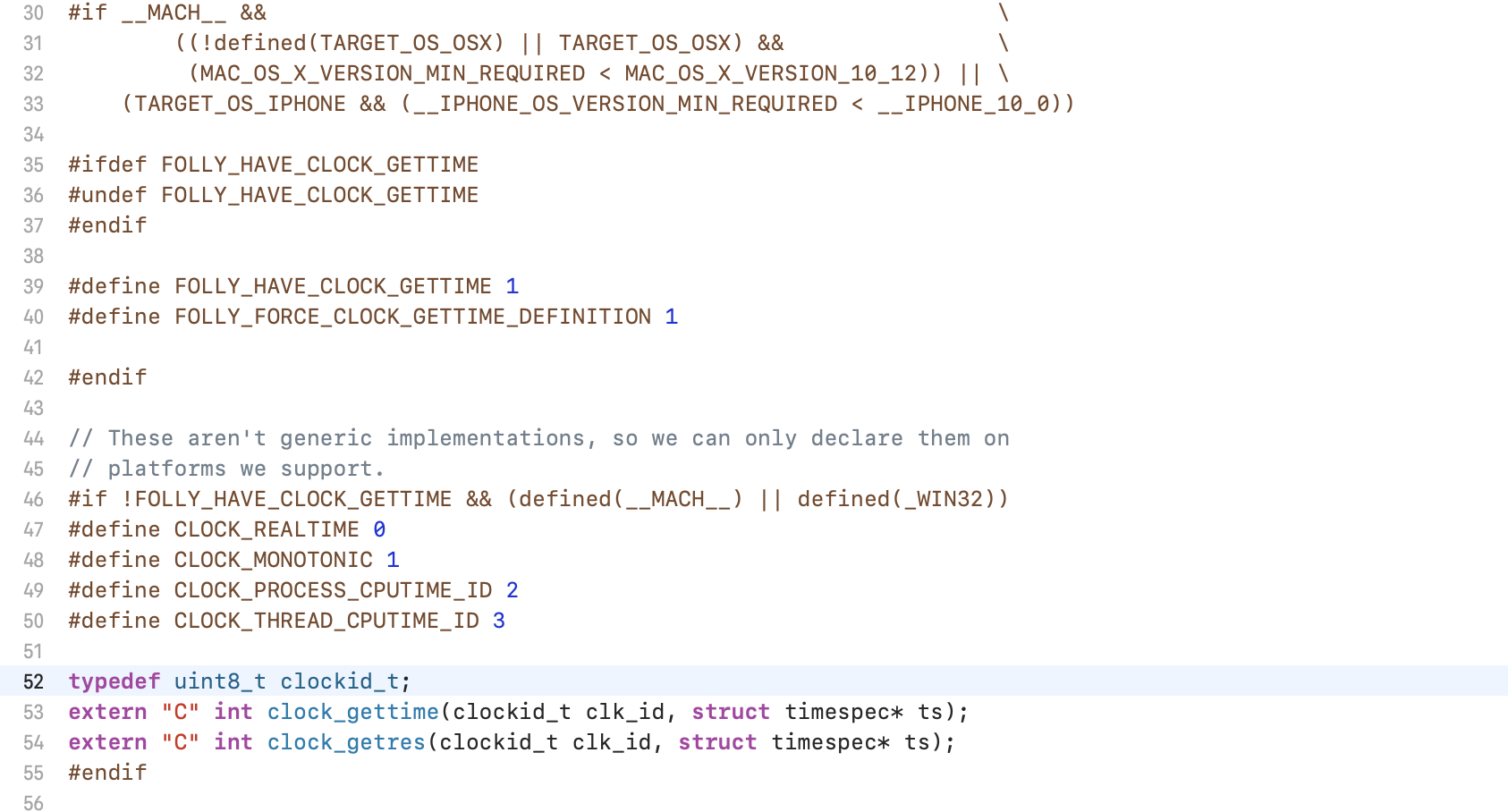
my-name-is-nheo
on 28 Apr 2021
Yeah, even if we enter that condition we set FOLLY_HAVE_CLOCK_GETTIME = 1, which should avoid typedef uint8_t clockid_t
priteshrnandgaonkar
on 28 Apr 2021
Yeah, even if we enter that condition we set FOLLY_HAVE_CLOCK_GETTIME = 1, which should avoid
typedef uint8_t clockid_t
Yea, but I just tested and we don't seem to be entering that condition. So FOLLY_HAVE_CLOCK_GETTIME ends up not being defined (it's not a default flag for the Flipper-Folly target either). It's most likely because the new SDK version defines them again. We would probably need a new rule around this.
I tried setting them outside the target os condition to see what would happen and it seems to keep going but I hit another error down the line. This will be a bit trickier than expected I believe.
I would suggest sticking with 2.5.1 and applying this patch for now: https://github.com/facebook/flipper/issues/2215#issuecomment-827422023
nicholasc
on 28 Apr 2021
@nicholasc that worked for you?
my-name-is-nheo
on 28 Apr 2021
@nicholasc that worked for you?
yup
nicholasc
on 28 Apr 2021
Let me see how to tackle that error. Thanks for testing the release.
priteshrnandgaonkar
on 28 Apr 2021
@nicholasc how did you downgrade back to 2.5.1?
my-name-is-nheo
on 28 Apr 2021
@nicholasc how did you downgrade back to 2.5.1?
I reverted the changes on my Podfile.lock and ran pod install
nicholasc
on 28 Apr 2021
We can't downgrade and apply individual patches, that's way too much effort for teams with dozens of members
shamilovtim
on 28 Apr 2021
@my-name-is-nheo I got that issue too, but I was able to resolve it by upgrading Flipper and Flipper-RSocket to the latest versions:
use_flipper!({ 'Flipper-Folly' => '2.5.2', 'Flipper' => '0.87.0', 'Flipper-RSocket' => '1.3.1' })
EDIT: I'm also getting the Typedef redefinition with different types ('uint8_t' (aka 'unsigned char') vs 'enum clockid_t') issue now (mentioned above)
avery-pierce
on 28 Apr 2021
@avery-pierce Yea @nicholasc 's advise on downgrading back to 2.5.1 and following #2215 (comment) did not work for me. I'm trying to get my app on testflight. (product->analyze) hopefully this is the case for some of you
my-name-is-nheo
on 28 Apr 2021
For now I've disabled Flipper on iOS and our project builds now
shamilovtim
on 28 Apr 2021
For now I've disabled Flipper on iOS and our project builds now
What specifically you did for it?
 lParraMediaCurrent
on 28 Apr 2021
lParraMediaCurrent
on 28 Apr 2021
As a hotfix I have patched 2.5.1 with the above mentioned patch in Flipper-Folly 2.5.3
I will follow up with RN folks regarding consolidating Flipper-Folly and RCT-Folly into one and have a consistent workflow of maintaining it.
But for now Flipper-Folly 2.5.3 should unblock.
priteshrnandgaonkar
on 29 Apr 2021
This disables Flipper, but it's a quick workaround if you (like me) need the project working again.
- Podfile, comment Flipper:
#   use_flipper!()
#   post_install do |installer|
#     react_native_post_install(installer)
#   end
- cd ios and delete the 'Pods folder' folder and 'Podfile.lock'
- pod install
However this ain't working, tried numerous times there's still a build error. :(
This worked for me, thanks!
 teajohnson90
on 29 Apr 2021
teajohnson90
on 29 Apr 2021
For now I've disabled Flipper on iOS and our project builds now
What specifically you did for it?
In Podfile comment the following:
//1
#  pod 'react-native-flipper', :path => '../node_modules/react-native-flipper/react-native-flipper.podspec', :configuration => 'Debug'

//2
#  use_flipper!({'Flipper' => '0.87.0', 'Flipper-Folly' => '2.5.2'})

//3
#    flipper_post_install(pi)
Then npx pod-install afterwards
shamilovtim
on 29 Apr 2021
It would be nice if you could get with them and get them to commit to removing Flipper from CRNA and expo init. This package is below 1.0, is woefully slow and plagued by instability and performance variance between different versions and frequently has breaking changes. It doesn't belong in starter templates and it shouldn't be a requirement for getting started with React Native. The amount of downtime, CI slowness, failed and slowed builds it has caused could probably be valued in the hundreds of thousands of $$$, all because someone made the decision to make the RN community guinea pigs for this tool. Reactotron is infinitely better despite being created by a third party, not updated for 2 years and swizzling APIs that Facebook didn't open to it. I have a 2020 MBP and Flipper performs terribly on it. What audience is this tool really intended for if it can't perform on a new MBP, breaks frequently, and slows down people's builds? Now lets say it finally performs like its contemporaries, tools like VSCode or whatever else. Then I'd understand, and I'd probably even use it. But why is it in production now in the state that it is?
shamilovtim
on 29 Apr 2021
This worked for me. On react native 0.63.4
use_flipper!({ 'Flipper-Folly' => '2.5.3', 'Flipper' => '0.87.0', 'Flipper-RSocket' => '1.3.1' })
 smooney211993
on 29 Apr 2021
smooney211993
on 29 Apr 2021
As a hotfix I have patched 2.5.1 with the above mentioned patch in Flipper-Folly 2.5.3
I will follow up with RN folks regarding consolidating Flipper-Folly and RCT-Folly into one and have a consistent workflow of maintaining it.
But for now Flipper-Folly 2.5.3 should unblock.
THANKS
smooney211993
on 29 Apr 2021
This worked for me. On react native 0.63.4
use_flipper!({ 'Flipper-Folly' => '2.5.3', 'Flipper' => '0.87.0', 'Flipper-RSocket' => '1.3.1' })
Trying the above got me past the errors others described, but I'm now running into Unknown type name 'BN_ULONG' which I've (potentially) ran down to a versioning issue on the dependency of OpenSSL-Universal
from the Podfile.lock:
  - Flipper-Folly (2.5.3):
    - boost-for-react-native
    - Flipper-DoubleConversion
    - Flipper-Glog
    - libevent (~> 2.1.12)
    - OpenSSL-Universal (= 1.1.180)
A somewhat recent issue on the subject is here
I'm newish to react-native when it comes to custom managing the versions like this, does anyone have any advice on how I can resolve?
 kkelley-leftbrain
on 29 Apr 2021
kkelley-leftbrain
on 29 Apr 2021
@priteshrnandgaonkar will check it out later. thank you for staying on top of this.
my-name-is-nheo
on 29 Apr 2021
After updating to Flipper-Folly 2.5.3 I'm getting this build error: event2/event-config.h file not found
 debianw
on 29 Apr 2021
debianw
on 29 Apr 2021
@kkelley-leftbrain I got past OpenSSL issues by adding the version of OpenSSL-Universal in the Podfile:
target 'MyApp' do
  ...
  pod 'OpenSSL-Universal', '~>1.1.180'
  ...
  use_flipper!({ 'Flipper-Folly' => '2.5.3', 'Flipper' => '0.87.0', 'Flipper-RSocket' => '1.3.1' })
  post_install do |installer|
    flipper_post_install(installer)
  end
end
In my case it was previously pinned to an older version.
 willgriffiths
on 29 Apr 2021
willgriffiths
on 29 Apr 2021
Still getting the same error after updating and reinstalling pods ?
any workaround you guys did ? my flipper config is already commented in podfile
❌  /Users/shivam/Documents/ReactNative/SQL-Playground/ios/Pods/Headers/Private/RCT-Folly/folly/synchronization/DistributedMutex-inl.h:1051:5: 'atomic_notify_one<unsigned long>' is unavailable

    atomic_notify_one(state);
    ^
 ShivamJoker
on 29 Apr 2021
ShivamJoker
on 29 Apr 2021
Still getting the same error after updating and reinstalling pods ?
any workaround you guys did ? my flipper config is already commented in podfile❌ /Users/shivam/Documents/ReactNative/SQL-Playground/ios/Pods/Headers/Private/RCT-Folly/folly/synchronization/DistributedMutex-inl.h:1051:5: 'atomic_notify_one<unsigned long>' is unavailable atomic_notify_one(state); ^
Yes because they have updated Flipper-folly not RCT-folly,
You will need to add these lines to your podfile
use_flipper!({ 'Flipper-Folly' => '2.5.3', 'Flipper' => '0.87.0', 'Flipper-RSocket' => '1.3.1' })


  # Define find-and-replace function
  def find_and_replace(dir, findstr, replacestr)
    Dir[dir].each do |name|
        text = File.read(name)
        replace = text.gsub(findstr,replacestr)
        replaced = text.index(replacestr)
        if replaced == nil && text != replace
            puts "Fix: " + name
            File.open(name, "w") { |file| file.puts replace }
            STDOUT.flush
        end
    end
    Dir[dir + '*/'].each(&method(:find_and_replace))
  end

  post_install do |installer|
    react_native_post_install(installer)
    installer.pods_project.targets.each do |target|
      target.build_configurations.each do |config|
        config.build_settings['EXCLUDED_ARCHS[sdk=iphonesimulator*]'] = 'arm64'
        end
    end

#     Fix for Flipper-Folly on iOS 14.5
#    These are no longer required as Flipper-folly is updated
#   find_and_replace("Pods/Flipper-Folly/folly/synchronization/DistributedMutex-inl.h",
#                    "atomic_notify_one(state)", "folly::atomic_notify_one(state)")

#   find_and_replace("Pods/Flipper-Folly/folly/synchronization/DistributedMutex-inl.h",
#   "atomic_wait_until(&state, previous | data, deadline)", "folly::atomic_wait_until(&state, previous | data, deadline)")

  find_and_replace("Pods/RCT-Folly/folly/synchronization/DistributedMutex-inl.h",
                   "atomic_notify_one(state)", "folly::atomic_notify_one(state)")

  find_and_replace("Pods/RCT-Folly/folly/synchronization/DistributedMutex-inl.h",
  "atomic_wait_until(&state, previous | data, deadline)", "folly::atomic_wait_until(&state, previous | data, deadline)")


  end
 umang-simform
on 29 Apr 2021
umang-simform
on 29 Apr 2021
This worked for me. On react native 0.63.4
use_flipper!({ 'Flipper-Folly' => '2.5.3', 'Flipper' => '0.87.0', 'Flipper-RSocket' => '1.3.1' })
This works perfectly! Just do pod install --repo-update and everything will be fine! Thank you!
 IronTony
on 29 Apr 2021
IronTony
on 29 Apr 2021
@umang-simform the solution you gave is giving me open ssl error while installing/updating pods.
[!] Error installing OpenSSL-Universal
[!] /usr/bin/git clone https://github.com/krzyzanowskim/OpenSSL.git /var/folders/p8/8d4bmlwn6858cz1x0szgzv940000gn/T/d20210429-20276-18dmikn --template= --single-branch --depth 1 --branch 1.1.180

Cloning into '/var/folders/p8/8d4bmlwn6858cz1x0szgzv940000gn/T/d20210429-20276-18dmikn'...
error: 7467 bytes of body are still expected
fetch-pack: unexpected disconnect while reading sideband packet
fatal: early EOF
fatal: index-pack failed
This worked for me. On react native 0.63.4
use_flipper!({ 'Flipper-Folly' => '2.5.3', 'Flipper' => '0.87.0', 'Flipper-RSocket' => '1.3.1' })
After doing this, I am getting the following error:
Undefined symbols for architecture x86_64:
  "Swift._ArrayBuffer._copyContents(initializing: Swift.UnsafeMutableBufferPointer<A>) -> (Swift.IndexingIterator<Swift._ArrayBuffer<A>>, Swift.Int)", referenced from:
      generic specialization <serialized, Swift._ArrayBuffer<Swift.Int8>> of Swift._copyCollectionToContiguousArray<A where A: Swift.Collection>(A) -> Swift.ContiguousArray<A.Element> in libCharts.a(ChartUtils.o)
ld: symbol(s) not found for architecture x86_64
Any ideas ?
 AlixH
on 29 Apr 2021
AlixH
on 29 Apr 2021
Those getting RCT-Folly errors, please follow https://github.com/facebook/react-native/issues/31179
I am closing this as the issue from Flipper side is resolved.
priteshrnandgaonkar
on 29 Apr 2021
Yes because they have updated Flipper-folly not RCT-folly,
You will need to add these lines to your podfileuse_flipper!({ 'Flipper-Folly' => '2.5.3', 'Flipper' => '0.87.0', 'Flipper-RSocket' => '1.3.1' }) # Define find-and-replace function def find_and_replace(dir, findstr, replacestr) Dir[dir].each do |name| text = File.read(name) replace = text.gsub(findstr,replacestr) replaced = text.index(replacestr) if replaced == nil && text != replace puts "Fix: " + name File.open(name, "w") { |file| file.puts replace } STDOUT.flush end end Dir[dir + '*/'].each(&method(:find_and_replace)) end post_install do |installer| react_native_post_install(installer) installer.pods_project.targets.each do |target| target.build_configurations.each do |config| config.build_settings['EXCLUDED_ARCHS[sdk=iphonesimulator*]'] = 'arm64' end end # Fix for Flipper-Folly on iOS 14.5 # These are no longer required as Flipper-folly is updated # find_and_replace("Pods/Flipper-Folly/folly/synchronization/DistributedMutex-inl.h", # "atomic_notify_one(state)", "folly::atomic_notify_one(state)") # find_and_replace("Pods/Flipper-Folly/folly/synchronization/DistributedMutex-inl.h", # "atomic_wait_until(&state, previous | data, deadline)", "folly::atomic_wait_until(&state, previous | data, deadline)") find_and_replace("Pods/RCT-Folly/folly/synchronization/DistributedMutex-inl.h", "atomic_notify_one(state)", "folly::atomic_notify_one(state)") find_and_replace("Pods/RCT-Folly/folly/synchronization/DistributedMutex-inl.h", "atomic_wait_until(&state, previous | data, deadline)", "folly::atomic_wait_until(&state, previous | data, deadline)") end
Thanks @umang-simform this worked great for our team, we just had to add the following line before calling find_and_replace:
system('chmod +rw Pods/RCT-Folly/folly/synchronization/DistributedMutex-inl.h')
 tomphilbin
on 29 Apr 2021
tomphilbin
on 29 Apr 2021
Hey guys they push a new version.
You just need to edit your code to that
  use_flipper!({ 'Flipper' => '0.87.0' })
  post_install do |installer|
    flipper_post_install(installer)
  end
And run npx pod-install
jonathanroze
on 29 Apr 2021
@AlixH did you find a solution to this? been getting the same error.
my-name-is-nheo
on 29 Apr 2021
@my-name-is-nheo @AlixH I'm having a very similar error. I ended up giving up and just downgraded back to xcode 12.4 😞
 guillewu
on 29 Apr 2021
guillewu
on 29 Apr 2021
Guys please stop asking, read the comments, they already fixed it and they give the solution
 JuanpaG94
on 29 Apr 2021
JuanpaG94
on 29 Apr 2021
@AlixH did you find a solution to this? been getting the same error.
https://github.com/facebook/react-native/issues/31179#issuecomment-829207740
AlixH
on 29 Apr 2021
Guys please stop asking, read the comments, they already fixed it and they give the solution
sorry, but where we can find this final solution? Would be great if someone can pin it for us please.
I updated to Big Sur, so I have now XCode Version 12.5 (12E262), I also updated from 0.63.4 to 0.64.0 but XCode build still fails. Would be great if we can build our app again and ship them to the clients in the very next few days.
Thanks
 azuxx
on 29 Apr 2021
azuxx
on 29 Apr 2021
Hey guys they push a new version.
You just need to edit your code to that
  use_flipper!({ 'Flipper' => '0.87.0' })
  post_install do |installer|
    flipper_post_install(installer)
  end
And
run npx pod-install
@azuxx
jonathanroze
on 29 Apr 2021
Locking now since the original issue is solved. Please see the comment directly above and this one. For RTC-Folly issues please follow up in facebook/react-native#31179. For any new issues open a fresh issue including Podfile & lock file
 mweststrate
on 29 Apr 2021
mweststrate
on 29 Apr 2021
Related issues
 hsavit1
·
3Comments
hsavit1
·
3Comments
 xstable
·
4Comments
xstable
·
4Comments
 paschaldev
·
3Comments
paschaldev
·
3Comments
 bojankoma
·
4Comments
bojankoma
·
4Comments
 keshavamurthy1
·
4Comments
keshavamurthy1
·
4Comments
Most helpful comment
Now, i just need update this file and it run normally. Hope it will be resolve in the next version.
This file in:
{project-name}/ios/Pods/Flipper-Folly/folly/synchronization/DistributedMutex-inl.hhttps://github.com/facebook/folly/commit/8477e25603f131c0400b6964609c76b438826788#diff-65ad309ca9c636ba81eb7953fce06e6963c51296a60dc25eb4a5b1463482c6da