Flipper: Connect real device app failed due to idb failure of pulling certificate
🐛 Bug Report
Connect the device is available,but failed to connect the app,due to failing in transforming the certificate(I think) and the navigator always show "currently connecting".
Does anyone has a solution to use flipper with real physical device?
Primary fail reason
Error: Command failed: /usr/local/bin/idb --log DEBUG file pull --udid c47e109191018678403d909c023e5339306f711d --bundle-id com.fang.qwdqweqweqwwe 'Library/Application Support/sonar/app.csr' '/var/folders/06/69yy2qmx5k5cfbfhqtx78hpc0000gp/T/tmp-72338-X354B56ptFc7/app.csr'
Detail log
Error: Command failed: /usr/local/bin/idb --log DEBUG file pull --udid c47e109191018678403d909c023e5339306f711d --bundle-id com.fang.qwdqweqweqwwe 'Library/Application Support/sonar/app.csr' '/var/folders/06/69yy2qmx5k5cfbfhqtx78hpc0000gp/T/tmp-72338-tb8yqAFMzvuz/app.csr'
2021-03-29 16:01:02,003 [DEBUG] - pull - FSPullCommand command run with: Namespace(bundle_id='com.fang.qwdqweqweqwwe', companion=None, companion_local=False, companion_path='/usr/local/bin/idb_companion', container_type=None, dst='/var/folders/06/69yy2qmx5k5cfbfhqtx78hpc0000gp/T/tmp-72338-tb8yqAFMzvuz/app.csr', file='pull', json=False, log_level='DEBUG', log_level_deprecated=None, prune_dead_companion=True, root_command='file', src=BundleWithPath(bundle_id=None, path='Library/Application Support/sonar/app.csr'), udid='c47e109191018678403d909c023e5339306f711d')

2021-03-29 16:01:02,004 [DEBUG] - idb - FSPullCommand called

2021-03-29 16:01:02,005 [DEBUG] - pull - Got existing companion CompanionInfo(udid='c47e109191018678403d909c023e5339306f711d', is_local=True, address=TCPAddress(host='localhost', port=51565), metadata={})

2021-03-29 16:01:02,012 [DEBUG] - hpack.hpack - Adding (b':method', b'POST') to the header table, sensitive:False, huffman:True

2021-03-29 16:01:02,012 [DEBUG] - hpack.hpack - Encoding 3 with 7 bits

2021-03-29 16:01:02,012 [DEBUG] - hpack.hpack - Adding (b':scheme', b'http') to the header table, sensitive:False, huffman:True

2021-03-29 16:01:02,012 [DEBUG] - hpack.hpack - Encoding 6 with 7 bits

2021-03-29 16:01:02,012 [DEBUG] - hpack.hpack - Adding (b':path', b'/idb.CompanionService/connect') to the header table, sensitive:False, huffman:True

2021-03-29 16:01:02,012 [DEBUG] - hpack.hpack - Encoding 4 with 6 bits

2021-03-29 16:01:02,012 [DEBUG] - hpack.hpack - Encoding 21 with 7 bits

2021-03-29 16:01:02,012 [DEBUG] - hpack.hpack - Adding (b':authority', b'localhost:51565') to the header table, sensitive:False, huffman:True

2021-03-29 16:01:02,012 [DEBUG] - hpack.hpack - Encoding 1 with 6 bits

2021-03-29 16:01:02,012 [DEBUG] - hpack.hpack - Encoding 11 with 7 bits

2021-03-29 16:01:02,012 [DEBUG] - hpack.hpack - Adding (b'te', b'trailers') to the header table, sensitive:False, huffman:True

2021-03-29 16:01:02,013 [DEBUG] - hpack.hpack - Encoding 2 with 7 bits

2021-03-29 16:01:02,013 [DEBUG] - hpack.hpack - Encoding 6 with 7 bits

2021-03-29 16:01:02,013 [DEBUG] - hpack.hpack - Adding (b'content-type', b'application/grpc') to the header table, sensitive:False, huffman:True

2021-03-29 16:01:02,013 [DEBUG] - hpack.hpack - Encoding 31 with 6 bits

2021-03-29 16:01:02,013 [DEBUG] - hpack.hpack - Encoding 11 with 7 bits

2021-03-29 16:01:02,013 [DEBUG] - hpack.hpack - Adding (b'user-agent', b'grpc-python-grpclib/0.4.1 (darwin; cpython/3.8.2)') to the header table, sensitive:False, huffman:True

2021-03-29 16:01:02,013 [DEBUG] - hpack.hpack - Encoding 58 with 6 bits

2021-03-29 16:01:02,013 [DEBUG] - hpack.hpack - Encoding 37 with 7 bits

2021-03-29 16:01:02,013 [DEBUG] - hpack.hpack - Encoded header block to b'\x83\x86D\x95`\xd2F\xbd\xe3\xd3X\xea1\xea\xdc[;\x98\x85`\x87\xaa\xa2\x91?A\x8b\xa0\xe4\x1d\x13\x9d\t\xb8\xd8[q\xbf@\x82I\x7f\x86M\x835\x05\xb1\x1f_\x8b\x1du\xd0b\r&=LMedz\xa5\x9a\xca\xc8\xb5~\x939\xeaZk+%\x06\x8d\x80.\xd2\xe1S\xfa\x90vx5_j\x12\xbfI\x9c\xf50\xca\xef./\xef'

2021-03-29 16:01:02,013 [DEBUG] - hpack.hpack - Decoding b'\x88@\x0ccontent-type\x10application/grpc@\x14grpc-accept-encoding\x15identity,deflate,gzip@\x0faccept-encoding\ridentity,gzip'

2021-03-29 16:01:02,014 [DEBUG] - hpack.hpack - Decoded 8, consumed 1 bytes

2021-03-29 16:01:02,014 [DEBUG] - hpack.hpack - Decoded (b':status', b'200'), consumed 1

2021-03-29 16:01:02,014 [DEBUG] - hpack.hpack - Decoded 12, consumed 1 bytes

2021-03-29 16:01:02,014 [DEBUG] - hpack.hpack - Decoded 16, consumed 1 bytes

2021-03-29 16:01:02,014 [DEBUG] - hpack.hpack - Decoded (<memory at 0x109811c40>, <memory at 0x109811b80>), total consumed 31 bytes, indexed True

2021-03-29 16:01:02,014 [DEBUG] - hpack.hpack - Decoded 20, consumed 1 bytes

2021-03-29 16:01:02,014 [DEBUG] - hpack.hpack - Decoded 21, consumed 1 bytes

2021-03-29 16:01:02,014 [DEBUG] - hpack.hpack - Decoded (<memory at 0x109811dc0>, <memory at 0x109811d00>), total consumed 44 bytes, indexed True

2021-03-29 16:01:02,014 [DEBUG] - hpack.hpack - Decoded 15, consumed 1 bytes

2021-03-29 16:01:02,014 [DEBUG] - hpack.hpack - Decoded 13, consumed 1 bytes

2021-03-29 16:01:02,014 [DEBUG] - hpack.hpack - Decoded (<memory at 0x109811f40>, <memory at 0x109811e80>), total consumed 31 bytes, indexed True

2021-03-29 16:01:02,014 [DEBUG] - hpack.hpack - Decoding b'@\x0bgrpc-status\x010'

2021-03-29 16:01:02,014 [DEBUG] - hpack.hpack - Decoded 11, consumed 1 bytes

2021-03-29 16:01:02,014 [DEBUG] - hpack.hpack - Decoded 1, consumed 1 bytes

2021-03-29 16:01:02,014 [DEBUG] - hpack.hpack - Decoded (<memory at 0x109b99100>, <memory at 0x109b99040>), total consumed 15 bytes, indexed True

2021-03-29 16:01:02,015 [DEBUG] - pull - Constructed client for companion c47e109191018678403d909c023e5339306f711d

2021-03-29 16:01:02,015 [DEBUG] - idb - pull called

2021-03-29 16:01:02,015 [DEBUG] - hpack.hpack - Adding (b':method', b'POST') to the header table, sensitive:False, huffman:True

2021-03-29 16:01:02,015 [DEBUG] - hpack.hpack - Encoding 3 with 7 bits

2021-03-29 16:01:02,015 [DEBUG] - hpack.hpack - Adding (b':scheme', b'http') to the header table, sensitive:False, huffman:True

2021-03-29 16:01:02,015 [DEBUG] - hpack.hpack - Encoding 6 with 7 bits

2021-03-29 16:01:02,015 [DEBUG] - hpack.hpack - Adding (b':path', b'/idb.CompanionService/pull') to the header table, sensitive:False, huffman:True

2021-03-29 16:01:02,015 [DEBUG] - hpack.hpack - Encoding 4 with 6 bits

2021-03-29 16:01:02,015 [DEBUG] - hpack.hpack - Encoding 19 with 7 bits

2021-03-29 16:01:02,016 [DEBUG] - hpack.hpack - Adding (b':authority', b'localhost:51565') to the header table, sensitive:False, huffman:True

2021-03-29 16:01:02,016 [DEBUG] - hpack.hpack - Encoding 66 with 7 bits

2021-03-29 16:01:02,016 [DEBUG] - hpack.hpack - Adding (b'te', b'trailers') to the header table, sensitive:False, huffman:True

2021-03-29 16:01:02,016 [DEBUG] - hpack.hpack - Encoding 65 with 7 bits

2021-03-29 16:01:02,016 [DEBUG] - hpack.hpack - Adding (b'content-type', b'application/grpc') to the header table, sensitive:False, huffman:True

2021-03-29 16:01:02,016 [DEBUG] - hpack.hpack - Encoding 64 with 7 bits

2021-03-29 16:01:02,016 [DEBUG] - hpack.hpack - Adding (b'user-agent', b'grpc-python-grpclib/0.4.1 (darwin; cpython/3.8.2)') to the header table, sensitive:False, huffman:True

2021-03-29 16:01:02,016 [DEBUG] - hpack.hpack - Encoding 63 with 7 bits

2021-03-29 16:01:02,016 [DEBUG] - hpack.hpack - Encoded header block to b'\x83\x86D\x93`\xd2F\xbd\xe3\xd3X\xea1\xea\xdc[;\x98\x85b\xbbh\xa3\xc2\xc1\xc0\xbf'

2021-03-29 16:01:02,019 [DEBUG] - hpack.hpack - Decoding b'\x88\xc1\x0f/\x0213@\x0cgrpc-messageBFailed to connect to device. (This device is no longer connected.)'

2021-03-29 16:01:02,019 [DEBUG] - hpack.hpack - Decoded 8, consumed 1 bytes

2021-03-29 16:01:02,019 [DEBUG] - hpack.hpack - Decoded (b':status', b'200'), consumed 1

2021-03-29 16:01:02,019 [DEBUG] - hpack.hpack - Decoded 65, consumed 1 bytes

2021-03-29 16:01:02,019 [DEBUG] - hpack.hpack - Decoded (<memory at 0x109811c40>, <memory at 0x109811b80>), consumed 1

2021-03-29 16:01:02,019 [DEBUG] - hpack.hpack - Decoded 62, consumed 2 bytes

2021-03-29 16:01:02,019 [DEBUG] - hpack.hpack - Decoded 2, consumed 1 bytes

2021-03-29 16:01:02,019 [DEBUG] - hpack.hpack - Decoded (<memory at 0x109b99100>, <memory at 0x109b99280>), total consumed 5 bytes, indexed False

2021-03-29 16:01:02,019 [DEBUG] - hpack.hpack - Decoded 12, consumed 1 bytes

2021-03-29 16:01:02,019 [DEBUG] - hpack.hpack - Decoded 66, consumed 1 bytes

2021-03-29 16:01:02,019 [DEBUG] - hpack.hpack - Decoded (<memory at 0x109b99340>, <memory at 0x109b991c0>), total consumed 81 bytes, indexed True

2021-03-29 16:01:02,020 [DEBUG] - idb - pull failed

2021-03-29 16:01:02,020 [DEBUG] - pull - No companion info for c47e109191018678403d909c023e5339306f711d, spawning one...

2021-03-29 16:01:02,021 [DEBUG] - pull - Read targets [{"model":"Apple Watch Series 6 - 40mm","os_version":"watchOS 7.2","udid":"DF78C2B5-95C6-4B08-A4FC-4107FAC80606","architecture":"x86_64","type":"simulator","name":"Apple Watch Series 6 - 40mm","state":"Shutdown"},{"device":{"HardwarePlatform":"t8015","DieID":1153834791141422,"EthernetAddress":"e4:9a:dc:9f:6b:94","PasswordProtected":false,"Uses24HourClock":true,"kCTPostponementInfoServiceProvisioningState":true,"PRIVersion_ReleaseNo":182,"BluetoothAddress":"e4:9a:dc:9f:6b:93","TimeZone":"Asia\/Shanghai","BasebandStatus":"BBInfoAvailable","BrickState":false,"HardwareModel":"D22AP","DeviceName":"iPhone (4)","SoftwareBundleVersion":"","PartitionType":"GUID_partition_scheme","MLBSerialNumber":"F3Y749607L2HP5JB","InternationalMobileEquipmentIdentity":"353050091998334","WiFiAddress":"e4:9a:dc:9f:6b:92","BasebandVersion":"5.70.01","BasebandMasterKeyHash":"8CB15EE4C8002199070D9500BB8FB183B02713A5CA2A6B92DB5E75CE15536182","GID1":"ff","WirelessBoardSerialNumber":"7B67C907FD","TelephonyCapability":true,"UseRaptorCerts":true,"CPUArchitecture":"arm64","ProductVersion":"13.6.1","InternationalMobileSubscriberIdentity":"460011770613473","IntegratedCircuitCardIdentity":"89860114831014767901","ActivationStateAcknowledged":true,"SIMStatus":"kCTSIMSupportSIMStatusReady","PhoneNumber":"+86 186 0177 5103","BoardId":6,"RegionInfo":"CH\/A","GID2":"ff","FusingStatus":3,"HostAttached":true,"ProductionSOC":true,"PRIVersion_Minor":1,"TrustedHostAttached":true,"DeviceClass":"iPhone","ChipID":32789,"SIMTrayStatus":"kCTSIMSupportSIMTrayInsertedWithSIM","PRIVersion_Major":0,"HasSiDP":true,"BasebandChipID":241889,"UniqueDeviceID":"85f79b035c91a256b59fcbfe4655bedc8c0b8106","InternationalMobileSubscriberIdentityOverride":false,"kCTPostponementInfoPRIVersion":"0.1.182","BasebandCertId":2315222105,"FirmwareVersion":"iBoot-5540.140.12","kCTPostponementInfoPRLName":0,"ModelNumber":"MQA92","TimeZoneOffsetFromUTC":28800,"MobileSubscriberNetworkCode":"01","MobileSubscriberCountryCode":"460","UntrustedHostBUID":"2E0C5218-995D-4472-9995-1FE9D04680B0","ProductType":"iPhone10,3","ActivationState":"Activated","DeviceColor":"1","ProtocolVersion":"2","SerialNumber":"F17VVF01JCL7","BasebandActivationTicketVersion":"V2","kCTPostponementStatus":"kCTPostponementStatusActivated","UniqueChipID":1153834791141422,"MobileEquipmentIdentifier":"35305009199833","CertID":2315222105,"TimeIntervalSince1970":1617004754.7676289,"ProductName":"iPhone OS","BuildVersion":"17G80"},"model":"iPhone X","os_version":"iOS 13.6.1","udid":"85f79b035c91a256b59fcbfe4655bedc8c0b8106","architecture":"arm64","type":"device","name":"iPhone (4)","state":"Booted"},{"model":"iPhone 12 mini","os_version":"iOS 14.4","udid":"F3FD2A06-F001-4BA8-8144-AD0F07518BD2","architecture":"x86_64","type":"simulator","name":"iPhone 12 mini","state":"Shutdown"},{"model":"Apple TV","os_version":"tvOS 14.3","udid":"CDA6BDE9-B24B-469D-84E2-6C775F979C93","architecture":"x86_64","type":"simulator","name":"Apple TV","state":"Shutdown"},{"model":"iPad Pro (12.9-inch) (4th generation)","os_version":"iOS 14.4","udid":"221C3EC7-99B2-4589-A20B-AA45C5236F11","architecture":"x86_64","type":"simulator","name":"iPad Pro (12.9-inch) (4th generation)","state":"Shutdown"},{"model":"Apple Watch Series 5 - 44mm","os_version":"watchOS 7.2","udid":"E0D3EE42-BC4C-41DE-9181-658AB51D7D24","architecture":"x86_64","type":"simulator","name":"Apple Watch Series 5 - 44mm","state":"Shutdown"},{"model":"iPhone 12 Pro","os_version":"iOS 14.4","udid":"AC9C1913-BCC4-49ED-9DD8-CF138F95A005","architecture":"x86_64","type":"simulator","name":"iPhone 12 Pro","state":"Shutdown"},{"model":"iPad Pro (11-inch) (2nd generation)","os_version":"iOS 14.4","udid":"943085F3-51CB-4A98-842F-B1F5C5BDE858","architecture":"x86_64","type":"simulator","name":"iPad Pro (11-inch) (2nd generation)","state":"Shutdown"},{"model":"iPhone SE (2nd generation)","os_version":"iOS 14.4","udid":"A4A528A7-55CA-4821-A2D8-8E03B7540E0D","architecture":"x86_64","type":"simulator","name":"iPhone SE (2nd generation)","state":"Shutdown"},{"model":"iPod touch (7th generation)","os_version":"iOS 14.4","udid":"219B383D-0B42-4C8B-A1B1-488534245436","architecture":"x86_64","type":"simulator","name":"iPod touch (7th generation)","state":"Shutdown"},{"model":"Apple TV 4K","os_version":"tvOS 14.3","udid":"C8EC873D-985D-48C9-8FA4-E55D6825CDC8","architecture":"x86_64","type":"simulator","name":"Apple TV 4K","state":"Shutdown"},{"model":"iPad Air (4th generation)","os_version":"iOS 14.4","udid":"23E5E0E0-61E9-4287-8A64-62296E59FD16","architecture":"x86_64","type":"simulator","name":"iPad Air (4th generation)","state":"Shutdown"},{"model":"iPad (8th generation)","os_version":"iOS 14.4","udid":"C0CEC07C-F915-4919-B303-1C1DB4B777B5","architecture":"x86_64","type":"simulator","name":"iPad (8th generation)","state":"Shutdown"},{"model":"iPhone 12","os_version":"iOS 14.4","udid":"93111FA0-6F9C-47DF-A676-4E620E59AD58","architecture":"x86_64","type":"simulator","name":"iPhone 12","state":"Shutdown"},{"model":"iPhone 11","os_version":"iOS 14.4","udid":"17A3E5F8-99F9-4492-8748-56DE3BC264CB","architecture":"x86_64","type":"simulator","name":"iPhone 11","state":"Booted"},{"model":"iPhone 11 Pro","os_version":"iOS 14.4","udid":"852889F6-9DFD-445A-8630-F0B83BEE3124","architecture":"x86_64","type":"simulator","name":"iPhone 11 Pro","state":"Shutdown"},{"model":"iPhone 12 Pro Max","os_version":"iOS 14.4","udid":"69931ED6-414F-441E-ABAF-FE89B0426E2D","architecture":"x86_64","type":"simulator","name":"iPhone 12 Pro Max","state":"Shutdown"},{"model":"Apple Watch Series 5 - 40mm","os_version":"watchOS 7.2","udid":"84F6B999-ACF0-4AFB-BE4B-C4BF6F8FA1D5","architecture":"x86_64","type":"simulator","name":"Apple Watch Series 5 - 40mm","state":"Shutdown"},{"model":"Apple Watch Series 6 - 44mm","os_version":"watchOS 7.2","udid":"77055534-D5E3-4F49-97BB-8D748B2A5E2A","architecture":"x86_64","type":"simulator","name":"Apple Watch Series 6 - 44mm","state":"Shutdown"},{"model":"Apple TV 4K (at 1080p)","os_version":"tvOS 14.3","udid":"4B3FA691-C193-4C7E-953F-8E849F099BE2","architecture":"x86_64","type":"simulator","name":"Apple TV 4K (at 1080p)","state":"Shutdown"},{"model":"iPhone 11 Pro Max","os_version":"iOS 14.4","udid":"104A294E-25AC-4F30-8671-755C3DC38AF2","architecture":"x86_64","type":"simulator","name":"iPhone 11 Pro Max","state":"Shutdown"},{"model":"iPhone 8 Plus","os_version":"iOS 14.4","udid":"1ABC2B83-CB96-4D2A-9C1F-4450BFF70FF7","architecture":"x86_64","type":"simulator","name":"iPhone 8 Plus","state":"Shutdown"},{"model":"iPhone 8","os_version":"iOS 14.4","udid":"BCFCCA06-90EB-49B6-B4DD-E46233F1EB9D","architecture":"x86_64","type":"simulator","name":"iPhone 8","state":"Shutdown"},{"model":"iPad Pro (9.7-inch)","os_version":"iOS 14.4","udid":"8FCB0F28-874F-4912-B909-C06EE3090380","architecture":"x86_64","type":"simulator","name":"iPad Pro (9.7-inch)","state":"Shutdown"}] from /tmp/idb/targets

2021-03-29 16:01:02,021 [DEBUG] - idb - FSPullCommand failed

Failed to connect to device. (This device is no longer connected.)


    at ChildProcess.exithandler (child_process.js:317:12)

    at ChildProcess.emit (events.js:315:20)

    at maybeClose (internal/child_process.js:1048:16)

    at Process.ChildProcess._handle.onexit (internal/child_process.js:288:5)
To Reproduce
- start flipper desktop
- start mobile app with flipper sdk
Environment
iOS:14.0.1
Flipper Desktop:0.82.1
fb-idb:1.0.13
idb-companion:1.0.14
 FFFang
All 25 comments
Are you running a signed debug build from xcode? (see https://reactnative.dev/docs/running-on-device)
 mweststrate
on 29 Mar 2021
mweststrate
on 29 Mar 2021
@mweststrate
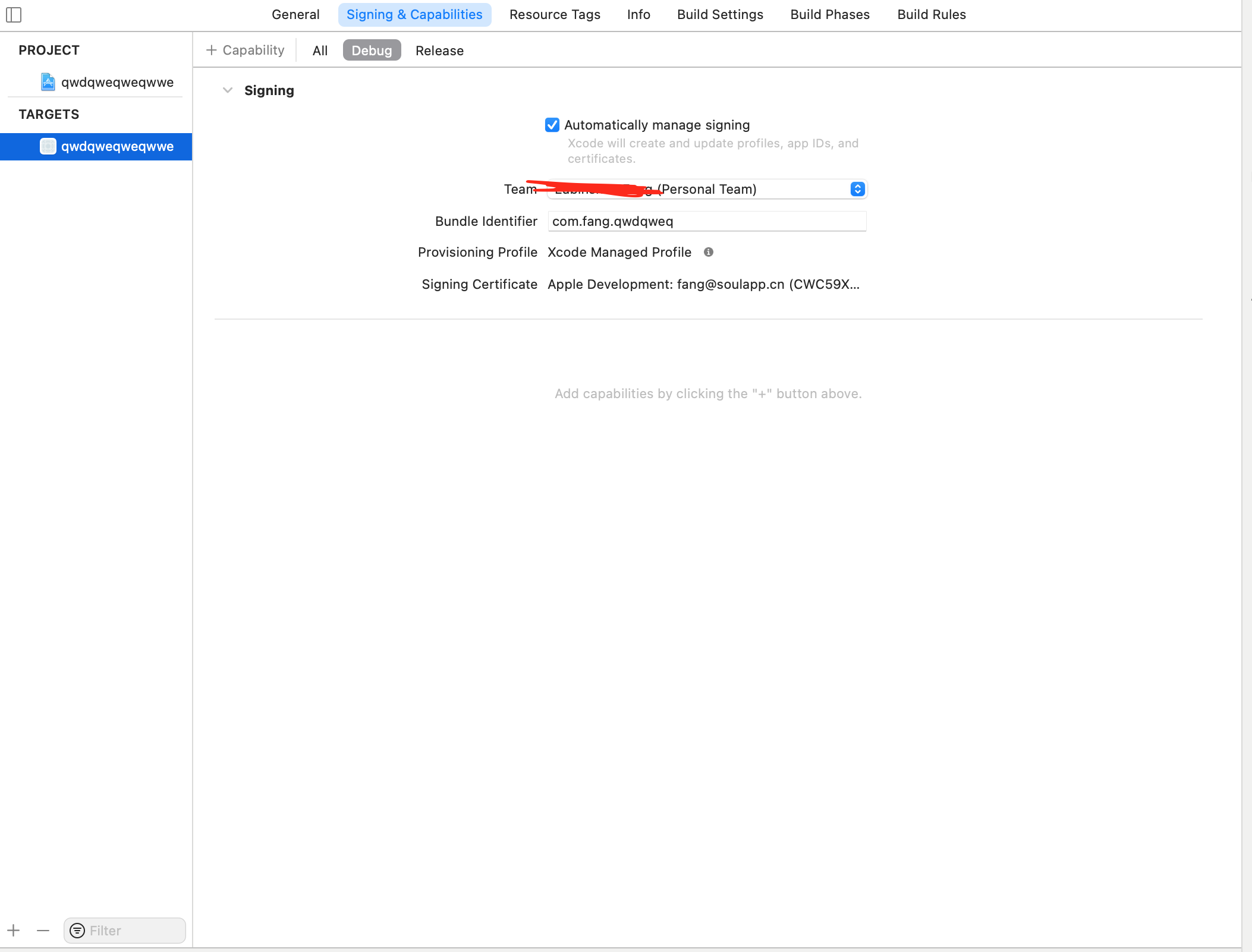
Thank you for your guidance, but my demo is a native application, not react-native.Yes,I use the development certificate to sign the app,I am not very sure which sign method or which developer certificate should be used.
I tried demo in iOS/Sample,iOS/SampleSwift and my own simple sample project.Also,I tried flipper desktop both from source and by dmg.Got the same error.
And this is my signing setting.
FFFang
on 29 Mar 2021
cc @jknoxville / @priteshrnandgaonkar does the above ring a bell. Are additional permissions needed to be able to read / write the csr file?
mweststrate
on 29 Mar 2021
I learned some use of idb,and tried this to list file on my device:
When I use commandidb file list --udid c47e109191018678403d909c023e5339306f711d --bundle-id com.facebook.flipper /
It shows
Books
Photos
var
Recordings
Library
Radio
DCIM
general_storage
iTunes_Control
MediaAnalysis
PhotoData
PublicStaging
Purchases
AirFair
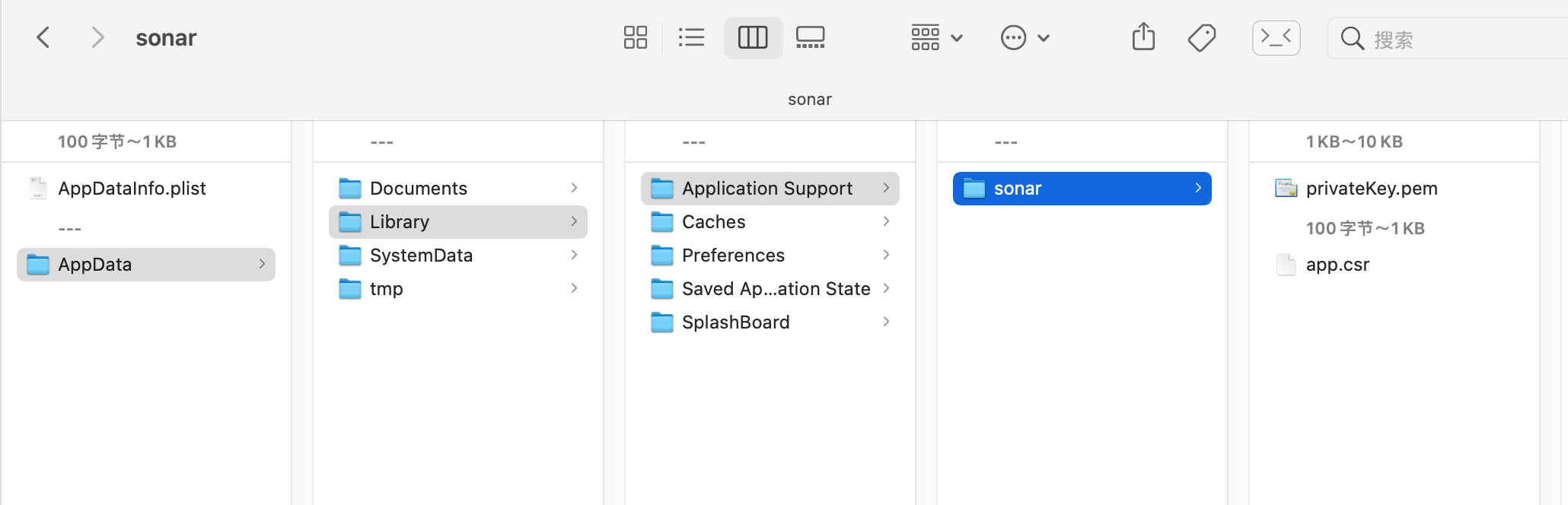
There is nothing in 'Library', so of course, It will fail when we pull the csr out,which is located at 'Library/Application Support/sonar/app.csr'.Maybe there is some mistake between user space and system space or idb version problem?The directory should be like this image below,not a root directory.
FFFang
on 29 Mar 2021
I move app.csr(get it from xcode device tool) into device's root application support forder by using idb push from mac,finally I pull the csr file from device to my mac,the error is missing.But now comes Client Sample with device c47e109191018678403d909c023e5339306f711d took long time to connect back on the trusted channel. Verify if your client is connected to Flipper and verify if there is no error related to idb.
FFFang
on 29 Mar 2021
I met the some problem too.
If you have any founds, plx let me know.
 781jj
on 31 Mar 2021
781jj
on 31 Mar 2021
Thanks for the report.
@FFFang , when you say that "there is nothing in "Library"", have you verified that running idb file list --udid c47e109191018678403d909c023e5339306f711d --bundle-id com.facebook.flipper /Library returns nothing?
The path given to idb is relative to the application container, so in this case "/" refers to the app-relative root, and from your finder screenshot, it looks like "Library" is non-empty, so I don't understand where you're getting that it is.
That said, the above might be a red herring. The error seems to be:
idb - FSPullCommand failed

Failed to connect to device. (This device is no longer connected.)
Have you been able to use any idb file pull command successfully directly on the command line? You should be able to pull the files inside AppData, using the same relative-paths as ued by the idb file list. If this i consistently failing, we'll need to get that part of idb fixed. If it's working, and only failing when flipper tries to use it, then that might point to something else.
 jknoxville
on 31 Mar 2021
jknoxville
on 31 Mar 2021
@jknoxville ,thanks for reply.
In order to avoid interference between devices, I used a new device to illustrate.
When I run idb file ls --udid 00008030-001514E62EE0802E --bundle-id com.facebook.flipper /
It turns out
Downloads
CloudAssets
Books
Photos
Deferred
Recordings
PhotoStreamsData
Radio
DCIM
iTunes_Control
MediaAnalysis
PhotoData
PublicStaging
Purchases
AirFair
It is the device root folder,I can get photos with it.The result intends to an app-relative folder,which should look like this.I get this by Xcode Develop Tool.
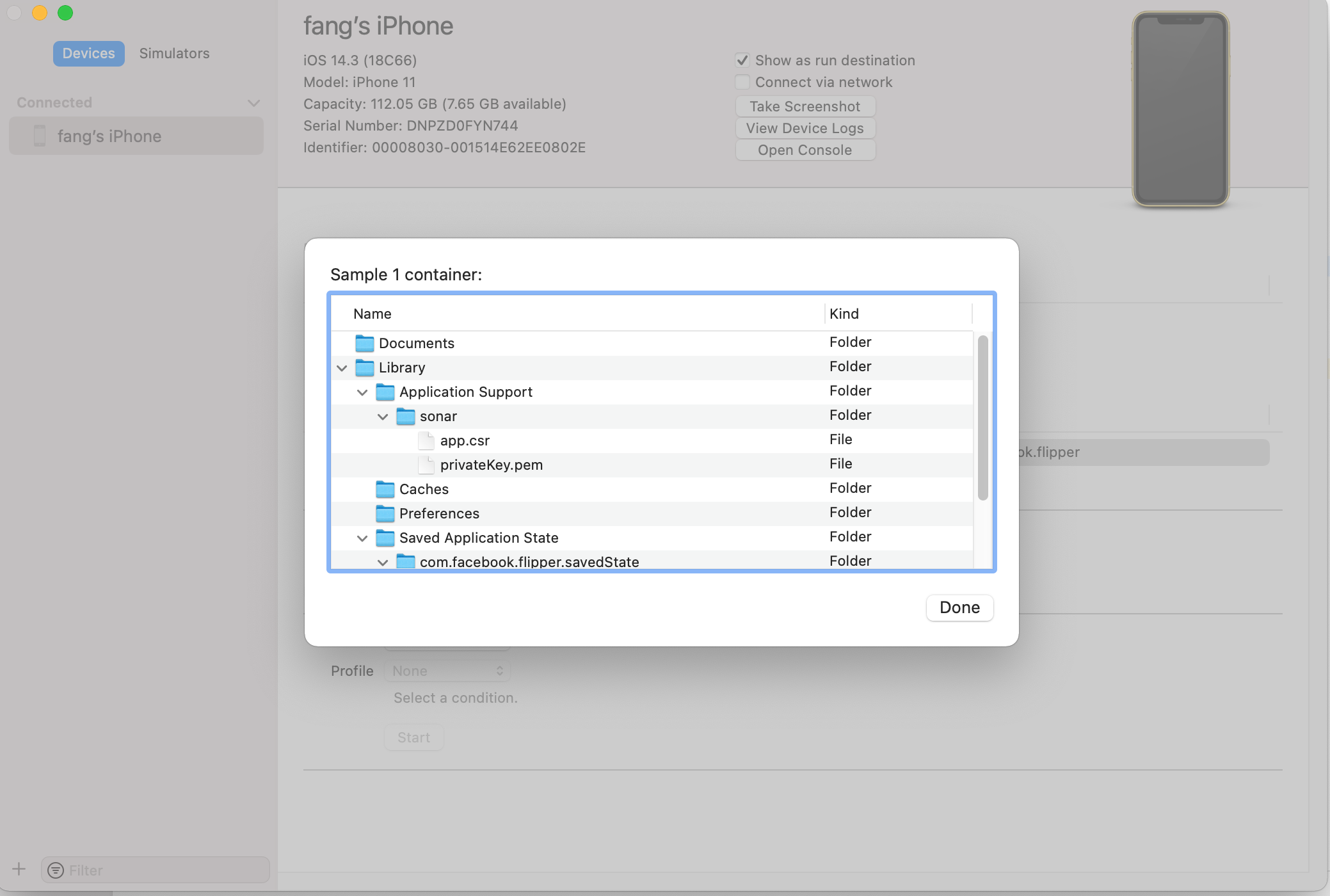
There is no Library or anything about the certificate.I think it is an error within the idb tool(maybe).So I created a Library/sonar folder,and push app.csr and privateKey.pem into it(which I get by Xcode Develop Tool in the com.facebook.flipper folder).Try to do some hardcode to bypass this problem,but still failed.
This is my diagnostic page if I do nothing hardcode.
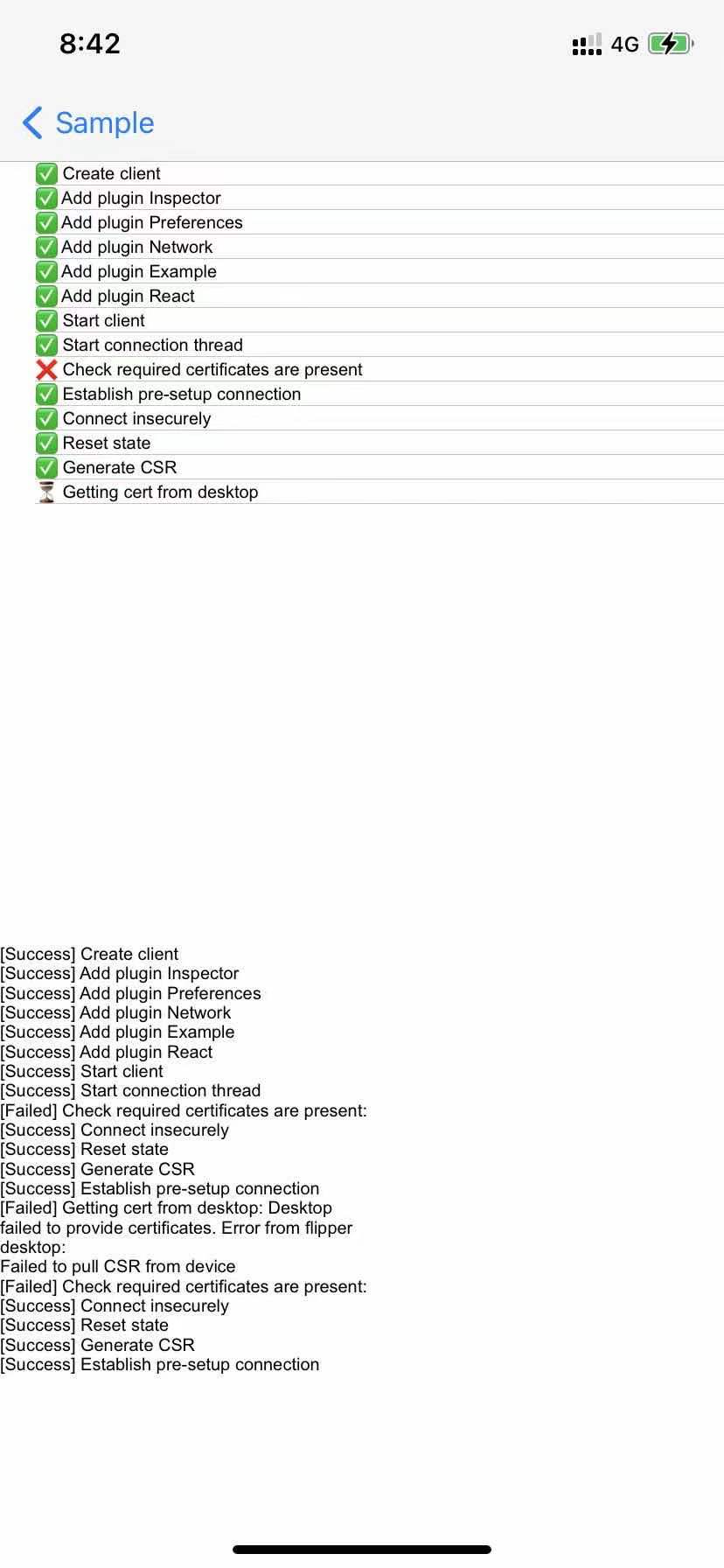
When I hardcode the device udid and push the required folder to /Library/Application Support/sonar(which is still the root folder).It will tell me took long time to connect back on the trusted channel.
Furthermore,At first I consider it's a OS system difference and tried working on both BigSur and Catalina,but both get the same results.
FFFang
on 31 Mar 2021
Thanks @FFFang , I understand now what you meant about it pointing to the root. If that's the case then it does appear to be a bug in idb.
This is my diagnostic page if I do nothing hardcode.
Sorry if it wasn't clear, I was hoping to see the diagnostic screen when you do hardcode it, to see what is failing after that step.
jknoxville
on 31 Mar 2021
ok @jknoxville
Here is my step to hardcode:
- extract app data from device through Xcode Dev Tool.
- run
idb file push Library /to push needed files into device root directory.Here I didn't use params--bundle-idor--udidbeacause it's the same result. - hardcode here with
return "c47e109191018678403d909c023e5339306f711d";to connect my device directly.Because the code here can not pass.Here is my relative question.The third picture shows that the two certificates cannot be equal.That's why I hardcode my device. - Now I have done the hardcode,and this is my diagnostic page and log of flipper desktop.I also add some log info on my flipper desktop,so it might look complex.
- Additionally,It goes all right when I use a iOS simulator,only failed on iOS real device.
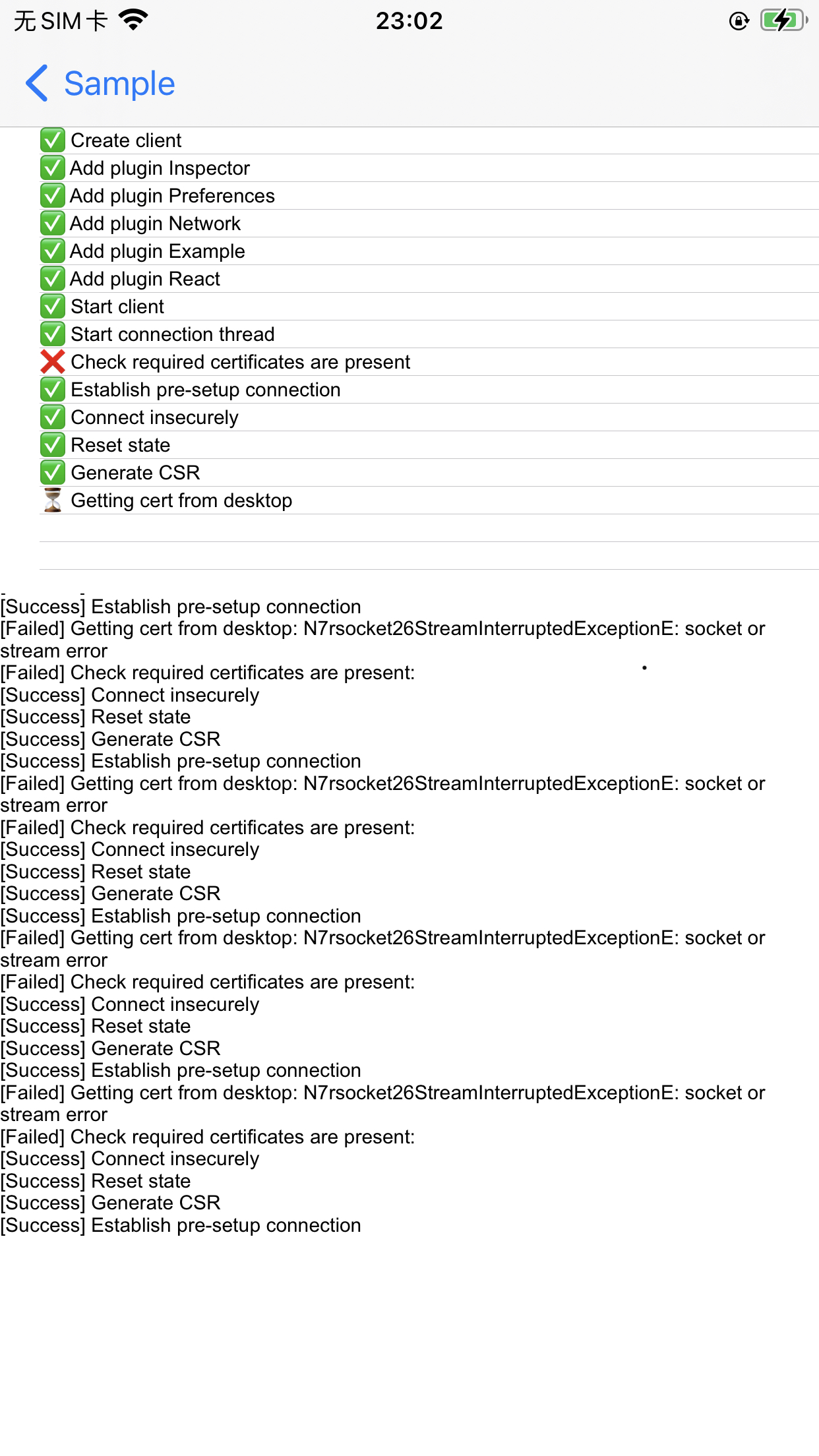
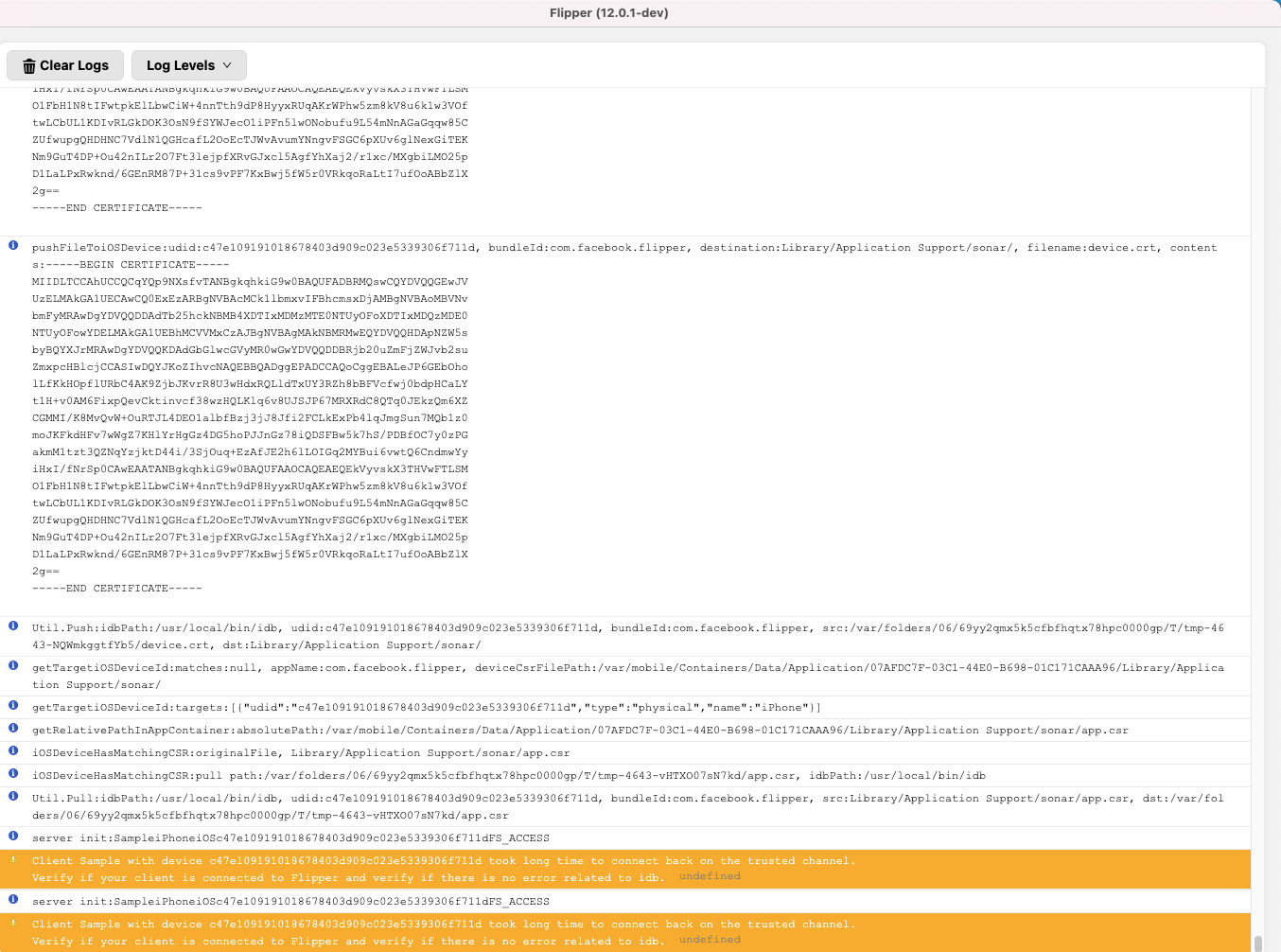

FFFang
on 31 Mar 2021
Pushing the files to the device root isn't going to work, as the mobile app code expects to find these files in the app's own storage.
So instead of copying the app-private files into the root, you want to copy those files from the root (sonarCA.crt and device.crt) into the com.facebook.flipper folder, like idb was supposed to do.
When all the required files are present in the mobile apps private folder, then it should be able to connect without any more use of idb.
jknoxville
on 31 Mar 2021
Pushing the files to the device root isn't going to work, as the mobile app code expects to find these files in the app's own storage.
So instead of copying the app-private files into the root, you want to copy those files from the root (sonarCA.crt and device.crt) into the com.facebook.flipper folder, like idb was supposed to do.When all the required files are present in the mobile apps private folder, then it should be able to connect without any more use of idb.
Hi. I'm new to using IDB and Flipper on a device. I have used Flipper quite a lot on simulator just fine. I can't connect Flipper v0.83 running on Catalina on my iOS device. I get a "Failed to pull CSR" notification from Flipper when I launch it.
If I were to follow your above directions to resolve this issue, where do I: a) get theses sonarCA.crt and device.crt files from? b) what steps do I need to take to copy these files "into the com.facebook.flipper folder"? (I don't have the files or this folder. Let us say my app's bundle ID is com.foo.bar, for example.)
p.s. is "com.facebook.flipper" an actual iOS app's bundle ID? Where do I get this app? Do I need this app? Or, is it just an example of a bundle ID?
 jkoutavas
on 1 Apr 2021
jkoutavas
on 1 Apr 2021
Pushing the files to the device root isn't going to work, as the mobile app code expects to find these files in the app's own storage.
So instead of copying the app-private files into the root, you want to copy those files from the root (sonarCA.crt and device.crt) into the com.facebook.flipper folder, like idb was supposed to do.
When all the required files are present in the mobile apps private folder, then it should be able to connect without any more use of idb.Hi. I'm new to using IDB and Flipper on a device. I have used Flipper quite a lot on simulator just fine. I can't connect Flipper v0.83 running on Catalina on my iOS device. I get a "Failed to pull CSR" notification from Flipper when I launch it.
If I were to follow your above directions to resolve this issue, where do I: a) get theses sonarCA.crt and device.crt files from? b) what steps do I need to take to copy these files "into the com.facebook.flipper folder"? (I don't have the files or this folder. Let us say my app's bundle ID is com.foo.bar, for example.)
p.s. is "com.facebook.flipper" an actual iOS app's bundle ID? Where do I get this app? Do I need this app? Or, is it just an example of a bundle ID?
@jkoutavas
It seems the same problem as I met above.
tryidb file ls --udid 00008030-001514E62EE0802E --bundle-id com.facebook.flipper /,remember to exchange your own udid and bundle-id.If you see the same result as what I get,like
Downloads
CloudAssets
Books
Photos
Deferred
Recordings
PhotoStreamsData
Radio
DCIM
iTunes_Control
MediaAnalysis
PhotoData
PublicStaging
Purchases
AirFair
It's the reason why your flipper pull things error.It's the root folder of the device,which is intended to be an app-relative folder.In this condition,flipper can not work properly without transform the certificates within device.
@jknoxville Is there any possibility to fix the idb bug or some workaround?Like storing files in mobile app in advance like the way that 'app.csr' is stored.I am not clear how 'app.csr' and 'privateKey.pem' is stored in app's private folder in advance.I don't see any code about 'app.csr' in the code of mobile app.
FFFang
on 1 Apr 2021
Building idb from sources fixed this issue for me. Installing idb by brew & pip gives outdated version.
 iqqmuT
on 3 Apr 2021
iqqmuT
on 3 Apr 2021
I keep getting this error Idb lacks permissions to exchange certificates. Did you install a source build?
Right now idb is connected to a simulator.
What are the exact steps to get the permissions?
 NathanNovak
on 5 Apr 2021
NathanNovak
on 5 Apr 2021
@iqqmuT Did you successfully debug app with flipper on the real physical device?
FFFang
on 6 Apr 2021
Yes I did!
- App: React Native
- Device: iPhone 6s Plus
- idb: built from sources
- #2152 PR applied
iqqmuT
on 6 Apr 2021
@iqqmuT I tried to build idb from sources but it still not work, did you have another solution for this issue?
 nnphong1904
on 13 Apr 2021
nnphong1904
on 13 Apr 2021
@nnphong1904 Did idb build succeed and did you run idb companion in Xcode?
iqqmuT
on 14 Apr 2021
@iqqmuT I followed as the instructions on of idb install and build success but I'm not sure how to run it on xcode.
nnphong1904
on 16 Apr 2021
A new version of idb was released (1.2.2), would be great if someone could confirm if this solves the problem or that more follow up work is needed!
mweststrate
on 19 Apr 2021
A new version of idb was released (1.2.2), would be great if someone could confirm if this solves the problem or that more follow up work is needed!
Thanks for the reply.
I have tried the latest version of idb(1.1.2),listed on https://pypi.org/search/?q=fb-idb&o=
Still have problem.
Need run idb-companion on source to work properly.
FFFang
on 19 Apr 2021
Yes got the same test result. Looks like facebook/idb#659 is still an open issue in idb release version 1.1.2.
iqqmuT
on 19 Apr 2021
@nnphong1904 I'm not sure how to give you more detailed instructions than these: https://github.com/facebook/idb#building-from-source
Also try to make sure that you are using IDB_COMPANION=localhost:10882 environmental variable before you launch Flipper.
iqqmuT
on 19 Apr 2021
I experienced this issue because I had an outdated fb-idb install that I failed to update because pip install fb-idb doesn't handle updates. I didn't realize it was already installed and I didn't pay enough attention to the output of the pip install command.
Interestingly enough, the issue actually had to do with which Python was running the idb client. I was able to resolve the issue by simply editing the shebang at the top of my idb binary to point to Python 3.9 to Python 3.8. I think this left me with an older IDB client and a newer IDB companion, but they still seemed to work together.
Of course, the proper solution was to reinstall idb with the latest version:
sudo pip3 install --upgrade fb-idb
 Ashoat
on 19 Jul 2021
Ashoat
on 19 Jul 2021
Related issues
 hackaprende
·
4Comments
hackaprende
·
4Comments
 Murtaza-arif
·
3Comments
Murtaza-arif
·
3Comments
 leoafarias
·
3Comments
leoafarias
·
3Comments
 xstable
·
4Comments
xstable
·
4Comments
 keshavamurthy1
·
4Comments
keshavamurthy1
·
4Comments
Most helpful comment
Yes I did!