Flipper: Cannot connect to enterprise app on physical iOS device
🐛 Bug Report
Flipper is able to connect to my phone but not my app.
I'm able to select my physical phone on Flipper, but the application is not selected and it seems Flipper cannot connect to it:
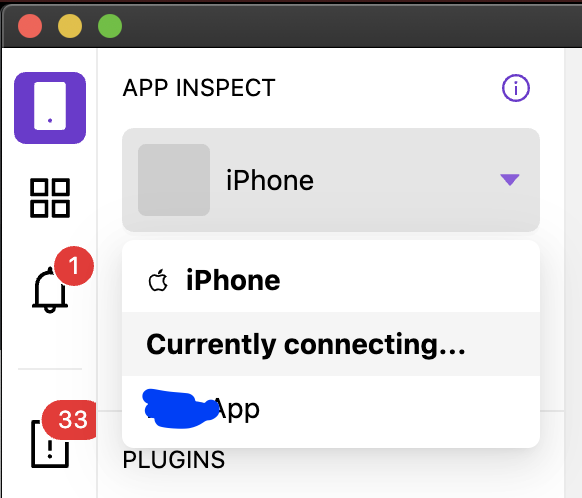

It appears idb is getting stuck in a connection loop. This is from Flipper logs:
Connection loop detected with iOS-iPhone-REDACTED. Connected 4 times within 20s. server
Error: Command failed: /Users/REDACTED/.pyenv/shims/idb --log DEBUG file pull --udid d9cc81fc722fc9f027f461c6b763999d034f58f6 --bundle-id REDACTED 'Library/Application Support/sonar/app.csr' '/var/folders/hb/1b2v3tws5d31nh_pqyzv_xlr0000gn/T/tmp-51951-ZHLeoCjZCIPf/app.csr'
2021-02-19 18:51:50,519 [DEBUG] - pull - FSPullCommand command run with: Namespace(log_level='DEBUG', companion=None, companion_path='/usr/local/bin/idb_companion', companion_local=False, prune_dead_companion=True, root_command='file', file='pull', src=BundleWithPath(bundle_id=None, path='Library/Application Support/sonar/app.csr'), dst='/var/folders/hb/1b2v3tws5d31nh_pqyzv_xlr0000gn/T/tmp-51951-ZHLeoCjZCIPf/app.csr', bundle_id='REDACTED', udid='d9cc81fc722fc9f027f461c6b763999d034f58f6', log_level_deprecated=None, json=False)
2021-02-19 18:51:50,519 [DEBUG] - idb - FSPullCommand called
2021-02-19 18:51:50,522 [DEBUG] - idb - pull called
2021-02-19 18:51:50,536 [DEBUG] - hpack.hpack - Adding (b':method', b'POST') to the header table, sensitive:False, huffman:True
2021-02-19 18:51:50,536 [DEBUG] - hpack.hpack - Encoding 3 with 7 bits
2021-02-19 18:51:50,536 [DEBUG] - hpack.hpack - Adding (b':scheme', b'http') to the header table, sensitive:False, huffman:True
2021-02-19 18:51:50,536 [DEBUG] - hpack.hpack - Encoding 6 with 7 bits
2021-02-19 18:51:50,536 [DEBUG] - hpack.hpack - Adding (b':path', b'/idb.CompanionService/pull') to the header table, sensitive:False, huffman:True
2021-02-19 18:51:50,536 [DEBUG] - hpack.hpack - Encoding 4 with 6 bits
2021-02-19 18:51:50,536 [DEBUG] - hpack.hpack - Encoding 19 with 7 bits
2021-02-19 18:51:50,536 [DEBUG] - hpack.hpack - Adding (b':authority', b'localhost:58889') to the header table, sensitive:False, huffman:True
2021-02-19 18:51:50,536 [DEBUG] - hpack.hpack - Encoding 1 with 6 bits
2021-02-19 18:51:50,536 [DEBUG] - hpack.hpack - Encoding 11 with 7 bits
2021-02-19 18:51:50,536 [DEBUG] - hpack.hpack - Adding (b'te', b'trailers') to the header table, sensitive:False, huffman:True
2021-02-19 18:51:50,536 [DEBUG] - hpack.hpack - Encoding 2 with 7 bits
2021-02-19 18:51:50,536 [DEBUG] - hpack.hpack - Encoding 6 with 7 bits
2021-02-19 18:51:50,537 [DEBUG] - hpack.hpack - Adding (b'content-type', b'application/grpc') to the header table, sensitive:False, huffman:True
2021-02-19 18:51:50,537 [DEBUG] - hpack.hpack - Encoding 31 with 6 bits
2021-02-19 18:51:50,537 [DEBUG] - hpack.hpack - Encoding 11 with 7 bits
2021-02-19 18:51:50,537 [DEBUG] - hpack.hpack - Adding (b'user-agent', b'grpc-python-grpclib/0.4.1 (darwin; cpython/3.9.1)') to the header table, sensitive:False, huffman:True
2021-02-19 18:51:50,537 [DEBUG] - hpack.hpack - Encoding 58 with 6 bits
2021-02-19 18:51:50,537 [DEBUG] - hpack.hpack - Encoding 37 with 7 bits
2021-02-19 18:51:50,537 [DEBUG] - hpack.hpack - Encoded header block to b'\x83\x86D\x93`\xd2F\xbd\xe3\xd3X\xea1\xea\xdc[;\x98\x85b\xbbh\xa3A\x8b\xa0\xe4\x1d\x13\x9d\t\xb8\xdb\xcf<\xff@\x82I\x7f\x86M\x835\x05\xb1\x1f_\x8b\x1du\xd0b\r&=LMedz\xa5\x9a\xca\xc8\xb5~\x939\xeaZk+%\x06\x8d\x80.\xd2\xe1S\xfa\x90vx5_j\x12\xbfI\x9c\xf50\xca\xef\xae\x1f\xef'
2021-02-19 18:51:50,712 [DEBUG] - hpack.hpack - Decoding b'\x88@\x0ccontent-type\x10application/grpc@\x0bgrpc-status\x0213@\x0cgrpc-message\x7f.Bundle Name: REDACTED Staging (Debug) | ID: REDACTED | Install Type user_enterprise | Container (null) is not signed for development, file operations are not possible'
2021-02-19 18:51:50,712 [DEBUG] - hpack.hpack - Decoded 8, consumed 1 bytes
2021-02-19 18:51:50,712 [DEBUG] - hpack.hpack - Decoded (b':status', b'200'), consumed 1
2021-02-19 18:51:50,712 [DEBUG] - hpack.hpack - Decoded 12, consumed 1 bytes
2021-02-19 18:51:50,712 [DEBUG] - hpack.hpack - Decoded 16, consumed 1 bytes
2021-02-19 18:51:50,712 [DEBUG] - hpack.hpack - Decoded (<memory at 0x10e30d340>, <memory at 0x10e30d640>), total consumed 31 bytes, indexed True
2021-02-19 18:51:50,712 [DEBUG] - hpack.hpack - Decoded 11, consumed 1 bytes
2021-02-19 18:51:50,713 [DEBUG] - hpack.hpack - Decoded 2, consumed 1 bytes
2021-02-19 18:51:50,713 [DEBUG] - hpack.hpack - Decoded (<memory at 0x10e30d7c0>, <memory at 0x10e30d700>), total consumed 16 bytes, indexed True
2021-02-19 18:51:50,713 [DEBUG] - hpack.hpack - Decoded 12, consumed 1 bytes
2021-02-19 18:51:50,713 [DEBUG] - hpack.hpack - Decoded 173, consumed 2 bytes
2021-02-19 18:51:50,713 [DEBUG] - hpack.hpack - Decoded (<memory at 0x10e30d940>, <memory at 0x10e30d880>), total consumed 189 bytes, indexed True
2021-02-19 18:51:50,714 [DEBUG] - idb - pull failed
2021-02-19 18:51:50,714 [DEBUG] - idb - FSPullCommand failed
Bundle Name: REDACTED Staging (Debug) | ID: REDACTED | Install Type user_enterprise | Container (null) is not signed for development, file operations are not possible

    at ChildProcess.exithandler (child_process.js:312:12)
    at ChildProcess.emit (events.js:315:20)
    at maybeClose (internal/child_process.js:1021:16)
    at Process.ChildProcess._handle.onexit (internal/child_process.js:286:5)
Connection to 'REDACTEDApp' on 'iPhone' failed Failed to start client connection
Error: A problem with idb has ocurred. Please run `sudo rm -rf /tmp/idb*` and `sudo yum install -y fb-idb` to update it, if that doesn't fix it, post in Flipper Support.
To Reproduce
- Install Flipper 0.76.0
- Install idb:
brew tap facebook/fb,brew install idb-companion,pip3.6 install fb-idbaccording to https://github.com/facebook/idb/#quick-start - Build app and install to phone via XCode
- Check logs on Flipper
Environment
Flipper 0.76.0
iPhone 6s Plus, iOS 14.2
React Native 0.63.4
 sypl
sypl
All 7 comments
Seems very similar to https://github.com/facebook/flipper/issues/948, which was closed off without resolution.
sypl
on 19 Feb 2021
cc @jknoxville
 mweststrate
on 24 Feb 2021
mweststrate
on 24 Feb 2021
Hi @sypl
I think the issue here is Bundle Name: REDACTED Staging (Debug) | ID: REDACTED | Install Type user_enterprise | Container (null) is not signed for development, file operations are not possible
On physical iOS devices, Flipper only supports development builds out of the box, not enterprise-signed ones.
@priteshrnandgaonkar made it possible to use with enterprise builds last year, but in order to do this, it requires some integration. In particular you have to define your own FlipperKitCertificateProvider and then provide it to the Flipper Client here or in the FlipperClient constructor.
Flipper will attempt to upload certificates for the current usere here, so you'd need to override that function to store them somewhere.
Then your FlipperKitCertificateProvider would be responsible for obtaining those certs and giving them to the Flipper Client.
The reason this is all necessary is because writing to the file system is not permitted in enterprise builds, so we need an alternate mechanism to transfer them from flipper desktop to the mobile app.
 jknoxville
on 24 Feb 2021
jknoxville
on 24 Feb 2021
Just provide one solution which might help.
Flipper can connect my device but not our app. I also saw "NO APPLICATION SELECTED".
After struggling for several hours, the final working solution for me is actually very simple, deleting the app in the simulator and rebuild by Xcode. Then Flipper succeed listing my app.
Hopefully it can help some future people who meet same issue.
 Hongbo-Miao
on 3 Mar 2021
Hongbo-Miao
on 3 Mar 2021
I think the right resolution here is better error messaging, to explain that:
- The current app is an enterprise build.
- Flipper by default only supports development builds.
- Use with enterprise apps requires special integration, and link to instructions.
jknoxville
on 12 Mar 2021
@jknoxville Thanks for this. I agree that better messaging would help, and instructions on how to integrate. Is @priteshrnandgaonkar able to write up steps about how to go about getting it to work on device?
sypl
on 15 Mar 2021
@jknoxville are you sure flipper support physical iOS device?The document says it doesn’t.Would you show us how to support it?
 FFFang
on 28 Mar 2021
FFFang
on 28 Mar 2021
Related issues
 richardtop
·
3Comments
richardtop
·
3Comments
 abaker
·
3Comments
abaker
·
3Comments
 leoafarias
·
3Comments
leoafarias
·
3Comments
 xstable
·
4Comments
xstable
·
4Comments
 Murtaza-arif
·
3Comments
Murtaza-arif
·
3Comments