Flipper: Right Side-panel content displaying in main content space & unscrollable. After Flipper 0.63 upgrade
🐛 Bug Report
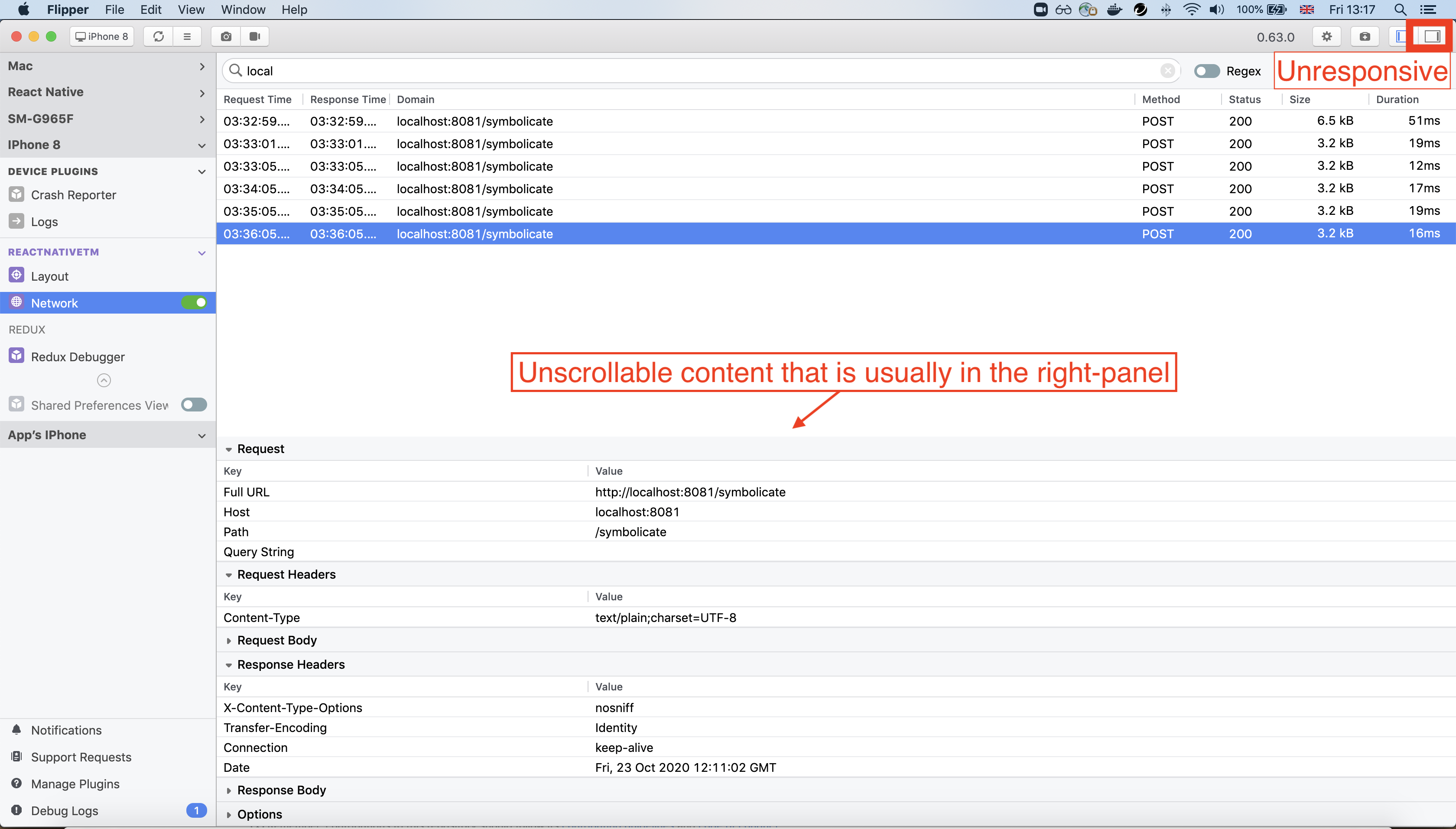
Content that usually displays in the right-side panel is now displaying in the main panel, covering the content in the main panel, and is unscrollable (so mostly can't be used). The right-panel button is unresponsive and doesn't open the panel. This is the case for most plugins (e.g. Network and Redux Debugger)
To workaround this issue, switch to the Layout plugin, which has the right-panel open, and then switch back to another plugin. The content should now display in the right panel.
To Reproduce
Upgrade Flipper to 0.63. Inspect the Network plugin and click a network request, or inspect the redux-debugger plugin and click an action item.
Environment
Flipper desktop 0.63.0
react-native 0.63.2
react-native-flipper 0.62.0
redux-flipper 1.4.0
MacOS 10.14.6 & 10.15.6
 tdoran
All 3 comments
Yes, apologies for this one! I introduced a subtle race condition when converting from class to hook component :/. A fix landed yesterday, but some infra issues hinders pushing out a new release straight away. So I recommend to stick to 0.62 for now as work around.
 mweststrate
on 23 Oct 2020
mweststrate
on 23 Oct 2020
mweststrate
on 23 Oct 2020
mweststrate
on 23 Oct 2020
Closing this as the fix is landed in master and we have a temporary workaround until the 0.64 is out. :)
 passy
on 23 Oct 2020
passy
on 23 Oct 2020
Related issues
 justintuchek
·
3Comments
justintuchek
·
3Comments
 xstable
·
4Comments
xstable
·
4Comments
 keshavamurthy1
·
4Comments
keshavamurthy1
·
4Comments
 usrbowe
·
3Comments
usrbowe
·
3Comments
 orlandobustamantep
·
3Comments
orlandobustamantep
·
3Comments
Most helpful comment
https://github.com/facebook/flipper/releases/tag/v0.62.0