Flipper: The native module for Flipper seems unavailable. Please verify that `react-native-flipper` is installed
🐛 Bug Report
I have updated React Native from v0.61.4 to v0.62.2 to try and use Flipper.
When I build and run the app The Metro Bundler throws the warning:
The native module for Flipper seems unavailable. Please verify that
react-native-flipperis installed as yarn dependency to your project and, for iOS, thatpod installis run in theiosdirectory.
I have installed it using npm.
My package.json looks like this:
  "dependencies": {
    "react": "16.13.1",
    "react-native": "0.62.2",
    "react-native-flipper": "^0.45.0",
    "react-redux": "^7.1.3",
    "redux": "^4.0.4",
    "redux-flipper": "^1.2.0",
    "redux-thunk": "^2.3.0",
 ...
In Flipper, React DevTools can connect to the app but when I try to use the Hermes Debugger or plugins they cannot be used:


When I run this:
adb shell am start -n com.app/com.facebook.flipper.android.diagnostics.FlipperDiagnosticActivity
I get this error:
Error type 3
Error: Activity class {com.app/com.facebook.flipper.android.diagnostics.FlipperDiagnosticActivity} does not exist.
What could be the reason for the modules not installing correctly?
To Reproduce
Environment
"react": "16.13.1",
"react-native": "0.62.2",
"react-native-flipper": "^0.45.0",
Mac OSX 10.14
Android 10, physical Pixel 2XL
Update
So I created a new React Native app just to see if I could get Flipper working and I could but without the redux-flipper plug-in. I also got Hermes debugger working. If I remove all reference and use of the redux-flipper plug in, I don't get the warning anymore saying that is can't find the package because I am not using this code in the redux store anymore:
// if (__DEV__) {
//   const createDebugger = require('redux-flipper').default;
//   middlewares.push(createDebugger());
// }
I do however get this error in Flipper developer tools console opened from the view menu:
Error: Feature not implemented
    at getUser (bundle.js:597)
    at e.default (bundle.js:2281)
    at bundle.js:1577
    at Array.map (<anonymous>)
    at _default (bundle.js:1577)
    at bundle.js:3
    at Object.rehydrate (bundle.js:707)
    at _rehydrate (bundle.js:699)
    at bundle.js:699
I also don't get any of these options in the left hand side of Flipper (databases, images etc):

I am not using devTools v3 and a I keep having to do adb reverse.
Flipper still only connects to the device, not the app.
 whenmoon
All 20 comments
@whenmoon did you also run pod install as instructed? Note that the Hermes debugger will only be available if Hermes engine is enabled. https://reactnative.dev/docs/hermes. The getUser warning is unrelated and can be ignored.
I also don't get any of these options in the left hand side of Flipper (databases, images etc):
I don't git this one, those are visible in your screenshot? Note that there are two kinds of plugins, the ones that connect to the Metro bundler (on top) and the ones that connect directly to the running app (myanlearn).
For your original app, it sounds like Flipper hasn't been setup properly. Did you follow the react native upgrade helper? Just bumping the dependencies is not enough when upgrading a React Native project. https://react-native-community.github.io/upgrade-helper/?from=0.61.4&to=0.62.2
 mweststrate
on 15 Jun 2020
mweststrate
on 15 Jun 2020
We've just published a trouble shooting guide: https://fbflipper.com/docs/troubleshooting#react-native. Would you mind following it and report back on any specific issues that fail?
mweststrate
on 15 Jun 2020
@mweststrate Not the OP and not seeing _all_ the issues he mentioned (so I can create a separate issue if that's preferred?), but I _am_ trying to troubleshoot the error in the title, specifically for Android. iOS is fine. I've gone through the troubleshooting and other documentation but I have not found any mention of this error, except in the case of iOS pods which of course does not apply.
As he mentioned, this is when trying to use any plugin that relies on react-native-flipper. With plugins removed I no longer get the error but then I'm sad because I can't use the plugins (and they work great on iOS!).
I attempted to use the diagnostic command here: https://fbflipper.com/docs/troubleshooting/#android
But it crashes with this error (thanks to the Flipper Crash Reporter, which at least still works):
java.lang.RuntimeException: Unable to start activity ComponentInfo{com.myApp/com.facebook.flipper.android.diagnostics.FlipperDiagnosticActivity}: java.lang.NullPointerException: Attempt to invoke interface method 'void com.facebook.flipper.core.FlipperClient.subscribeForUpdates(com.facebook.flipper.core.FlipperStateUpdateListener)' on a null object reference
 TheAlmightyBob
on 24 Jun 2020
TheAlmightyBob
on 24 Jun 2020
@TheAlmightyBob yeah please open a separate issue. same symptoms !== same issue. Since the things mentioned here doesn't apply to you, it is definitely a different issue. In your issue please include your package.json, and the gradle build files (in android and android/app) folder. Also include a screenshot of flipper to see what things do connect, and the output of yarn why react-native-flipper. Given the error, I suspect your gradle build files deviate and do not include Flipper properly, or that you are running a non-debug build, in which case Flipper is correctly absent. (This might happen if react-native-flipper is required without putting it behind a __DEV__ check)
mweststrate
on 24 Jun 2020
Hi, I have the same issue as author. When trying to run the Flipper diagnostic activity a new screen shows up a with just two lines.
Create client
Success create client
and doesn't progress any further. Is this intended or not working properly?
I have react-native-flipper in dependencies. Should I also import it in App.tsx? The documentation is not very clear on this under manual setup.
 Epick362
on 24 Jun 2020
Epick362
on 24 Jun 2020
@Epick362 please provide more details. What are you trying to achieve? (what do you need react-native-flipper for, for example). What device are you running on, what kind of build, etc... etc.... Also make sure to check this page first, and describe what steps failed afterwards: https://fbflipper.com/docs/troubleshooting/#react-native
mweststrate
on 24 Jun 2020
I upgraded my android app to 0.62.2 according to upgrade helper. I can see my device (Huawei Y9 2019) and React Native dev tools but no other plugins and I get this warning in the console:
The native module for Flipper seems unavailable. Please verify that `react-native-flipper` is installed as yarn dependency to your project and, for iOS, that `pod install` is run in the `ios` directory.
build.grade excerpt
    debugImplementation("com.facebook.flipper:flipper:${FLIPPER_VERSION}") {
      exclude group:'com.facebook.fbjni'
    }
    debugImplementation("com.facebook.flipper:flipper-network-plugin:${FLIPPER_VERSION}") {
        exclude group:'com.facebook.flipper'
    }
    debugImplementation("com.facebook.flipper:flipper-fresco-plugin:${FLIPPER_VERSION}") {
        exclude group:'com.facebook.flipper'
    }
MainApplication.java excerpt
  @Override
  public void onCreate() {
    super.onCreate();
    SoLoader.init(this, /* native exopackage */ false);
    initializeFlipper(this, getReactNativeHost().getReactInstanceManager());
  }

  /**
   * Loads Flipper in React Native templates. Call this in the onCreate method with something like
   * initializeFlipper(this, getReactNativeHost().getReactInstanceManager());
   *
   * @param context
   * @param reactInstanceManager
   */
  private static void initializeFlipper(
      Context context, ReactInstanceManager reactInstanceManager) {
    if (BuildConfig.DEBUG) {
      try {
        /*
         We use reflection here to pick up the class that initializes Flipper,
        since Flipper library is not available in release mode
        */
        Class<?> aClass = Class.forName("com.edocu.pris.ReactNativeFlipper");
        aClass
            .getMethod("initializeFlipper", Context.class, ReactInstanceManager.class)
            .invoke(null, context, reactInstanceManager);
      } catch (ClassNotFoundException e) {
        e.printStackTrace();
      } catch (NoSuchMethodException e) {
        e.printStackTrace();
      } catch (IllegalAccessException e) {
        e.printStackTrace();
      } catch (InvocationTargetException e) {
        e.printStackTrace();
      }
    }

Epick362
on 25 Jun 2020
@Epick362 / @TheAlmightyBob, ok, it looks that Flipper isn't actually initialized on your app, the warning you get is a sympton of that, but probably not the original cause. Could you verify that the class com.edocu.pris.ReactNativeFlipper indeed does exist and whether there are any errors logged in the device logs?
@Epick362 / @TheAlmightyBob just to verify, you did run cd android && ./gradlew clean after finishing the upgrade?
@passy / @jknoxville any further input on this? There are now several reports than on Android specifically the Flipper client doesn't connect, any further ideas? At least the diagnostic utility seems to crash in both cases as well.
mweststrate
on 25 Jun 2020
Edit, sorry, responding in the wrong thread. Let's continue the Android issues here: https://github.com/facebook/flipper/issues/1293
@Epick362 could you verify that the solution in #1293 fixes your case as well?
mweststrate
on 25 Jun 2020
@mweststrate I will try it (also re-running gradlew clean etc.) and report back later today.
Epick362
on 26 Jun 2020
I found the culprit. Package identifier in ReactNativeFlipper.java was com.rndiffapp and I didn't notice it. Everything works now, thank you for the help :)
Epick362
on 26 Jun 2020
I had the same problem, for me, directory structure in debug folder wasn't the same as in the main folder so it couldn't find it, check your folder structure and check this line:
Class<?> aClass = Class.forName("YOUR_PACKAGE_NAME.ReactNativeFlipper");
I am just dropping this reply if somebody has the same problem :)
 redbluenat
on 24 Jul 2020
redbluenat
on 24 Jul 2020
For me, I had misread the path of ReactNativeFlipper.java when upgrading React Native and put it into src/ instead. That worked perfectly until I had to make release builds. Thanks for the tip @redbluenat, it lead me here.
 andrioid
on 6 Aug 2020
andrioid
on 6 Aug 2020
Closing as the issue was solved https://github.com/facebook/flipper/issues/1253#issuecomment-650134944
mweststrate
on 24 Aug 2020
I also accidentally placed ReactNativeFlipper.java into main android folder, not debug (android/app/src/debug/java/com/rndiffapp/ReactNativeFlipper.java).
 NeliHarbuzava
on 9 Oct 2020
NeliHarbuzava
on 9 Oct 2020
Hi, I just tried Flipper on my 0.63.4 react native app which is Flipper automatically enabled on this version.
But, I always get The native module for Flipper seems unavailable. Please verify thatreact-native-flipperis installed as yarn dependency to your project and, for iOS, thatpod installis run in theiosdirectory..
And I cannot manage Flipper plugin.

I've checked what @redbluenat mention on this comment. I think it was true (?)
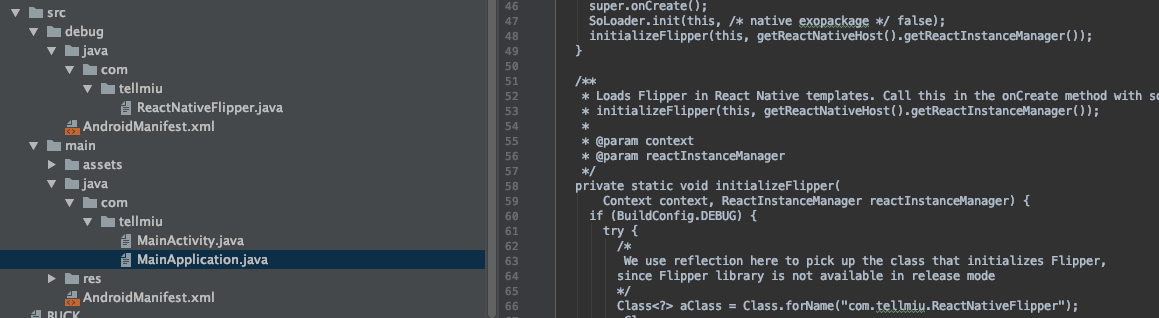
I've also checked connection diagnostic on https://fbflipper.com/docs/troubleshooting/#connection-issues. The result is all of my connection was succeed.
Anyone has a clue?
 abdullahizzuddiin
on 1 Jan 2021
abdullahizzuddiin
on 1 Jan 2021
@abdullahizzuddiin this issue was closed and resolved, so please open a fresh issue instead.
mweststrate
on 4 Jan 2021
I just came back to Flipper and tried to get it working using 0.73.0 having been on 0.46.1 when originally writing this issue.
Unfortunately I was not able to get the app to build using the current Flipper set up instructions - my experience is that if you have an old app (mine is almost 2 years old but running RN 0.63.3) there's just so many things that can go wrong that it just makes it not worth the time investment (considering I use RN for side projects only).
I won't go in to the list of problems I encountered by trying to set up Flipper as it is long, but one question I have if I have time to come back to this is what is the file ReactNativeFlipper.java that I see a lot of people mention?
I don't even have this directory: android/app/src/debug, let alone: android/app/src/debug/java/com/rndiffapp/ReactNativeFlipper.java. I only have android/app/src/main.
whenmoon
on 1 Feb 2021
@whenmoon to verify that your setup is correct, please check the following resources:
- Make sure to always follow the upgrade-helpers when updating your React Native version (don't just bump the dependency).
rndiffapphas to be substituted with your application name in all the examples. Following these changes is pretty important, as other libraries like Flipper will assume you've made them. - At any point you can compare your application against our reference project, and copy whatever you are missing. Again make sure to substitute application name where applicable in file paths and code. Here you can find ReactNativeFlipper for example.
Since this issue is closed, please open a new issue for follow up questions.
mweststrate
on 2 Feb 2021
Installing react-native-flipper as a dev dependency removed the warning for me. (Android)
Any good solution let me know, please
 Kailash23
on 27 Mar 2021
Kailash23
on 27 Mar 2021
Related issues
 paschaldev
·
3Comments
paschaldev
·
3Comments
 aleclarson
·
3Comments
aleclarson
·
3Comments
 hackaprende
·
4Comments
hackaprende
·
4Comments
 usrbowe
·
4Comments
usrbowe
·
4Comments
 abaker
·
3Comments
abaker
·
3Comments
Most helpful comment
I found the culprit. Package identifier in ReactNativeFlipper.java was com.rndiffapp and I didn't notice it. Everything works now, thank you for the help :)