Flipper: React Dev Tools does not connect the device
🐛 Bug Report
I click the React DevTools and then the retry button several times, and always get this message.

To Reproduce
Run the flipper app, run the app, click React DevTools
Environment
React Native 0.62
Linux Mint Cinammon 19.3
Flipper version 0.36.0
 RenanRicoldi
All 45 comments
Same here on Android on macOS. Using Flipper 0.37.0 and RN 0.62.2
I can open the debugger menu on the app via Flipper but don't get it to connect with DevTools
 JohannesKlauss
on 10 Apr 2020
JohannesKlauss
on 10 Apr 2020
same issue
 TheEhsanSarshar
on 12 Apr 2020
TheEhsanSarshar
on 12 Apr 2020
Exactly the same on React Native 0.62 and flipper 0.36
 dayze
on 12 Apr 2020
dayze
on 12 Apr 2020
Same issue, devtools appear completely broken on RN 0.62
 AndrewMorsillo
on 13 Apr 2020
AndrewMorsillo
on 13 Apr 2020
When I click Retry, my app restarts, but still the error. I don't have any other devtools installed. If I open the development menu and click Debug, Chrome is started (and it does not have the devtools extension).
 tapz
on 14 Apr 2020
tapz
on 14 Apr 2020
same here with React Native 0.62.2 and Flipper 0.37.0
 jk-gan
on 16 Apr 2020
jk-gan
on 16 Apr 2020
Same error! Latest RN and Flipper versions.
 Bohmaster
on 17 Apr 2020
Bohmaster
on 17 Apr 2020
Could you share the output in the terminal running metro as well? Any errors shown over there?
 mweststrate
on 17 Apr 2020
mweststrate
on 17 Apr 2020
No error is shown for me.
JohannesKlauss
on 17 Apr 2020
If you press reload / dev menu in the toolbar, does that get picked up by
the device?
On Fri, Apr 17, 2020 at 11:56 AM Johannes Klauss notifications@github.com
wrote:
No error is shown for me.
—
You are receiving this because you commented.
Reply to this email directly, view it on GitHub
https://github.com/facebook/flipper/issues/1000#issuecomment-615181862,
or unsubscribe
https://github.com/notifications/unsubscribe-auth/AAN4NBDBQQ76B7HEX5FBZOTRNAYUHANCNFSM4ME6IAQQ
.
mweststrate
on 17 Apr 2020
Yes. I can reload and open the dev menu via Flipper. At least for Android, don't know about iOS
JohannesKlauss
on 17 Apr 2020
Opposite happening for me. Brand new RN Project, update Flipper to 37 along with all the required dependencies 37 relies on. Works fine on Android with no issue but there's no feedback from Flipper apart from the RN console logging into it.
 nonewcode
on 18 Apr 2020
nonewcode
on 18 Apr 2020
Just some thought, it would be good to also share device/simulator type. (@JohannesKlauss, @RenanRicoldi,..)
For example if using Android device, we need to set port forwarding for React DevTools:
adb reverse tcp:8097 tcp:8097
Quick check
- Do not turn ON
Debug / Remote JS Debugging🚫 - Run
npx react-devtoolsto verify if React Devtools can connect without Flipper - Do not install
React Devtools v3if you have React Native >=0.61 - Close any other React Devtools (standalone,...)
 usrbowe
on 22 Apr 2020
usrbowe
on 22 Apr 2020
port forwarding did the trick for me
thanks!
 robbienohra
on 29 Apr 2020
robbienohra
on 29 Apr 2020
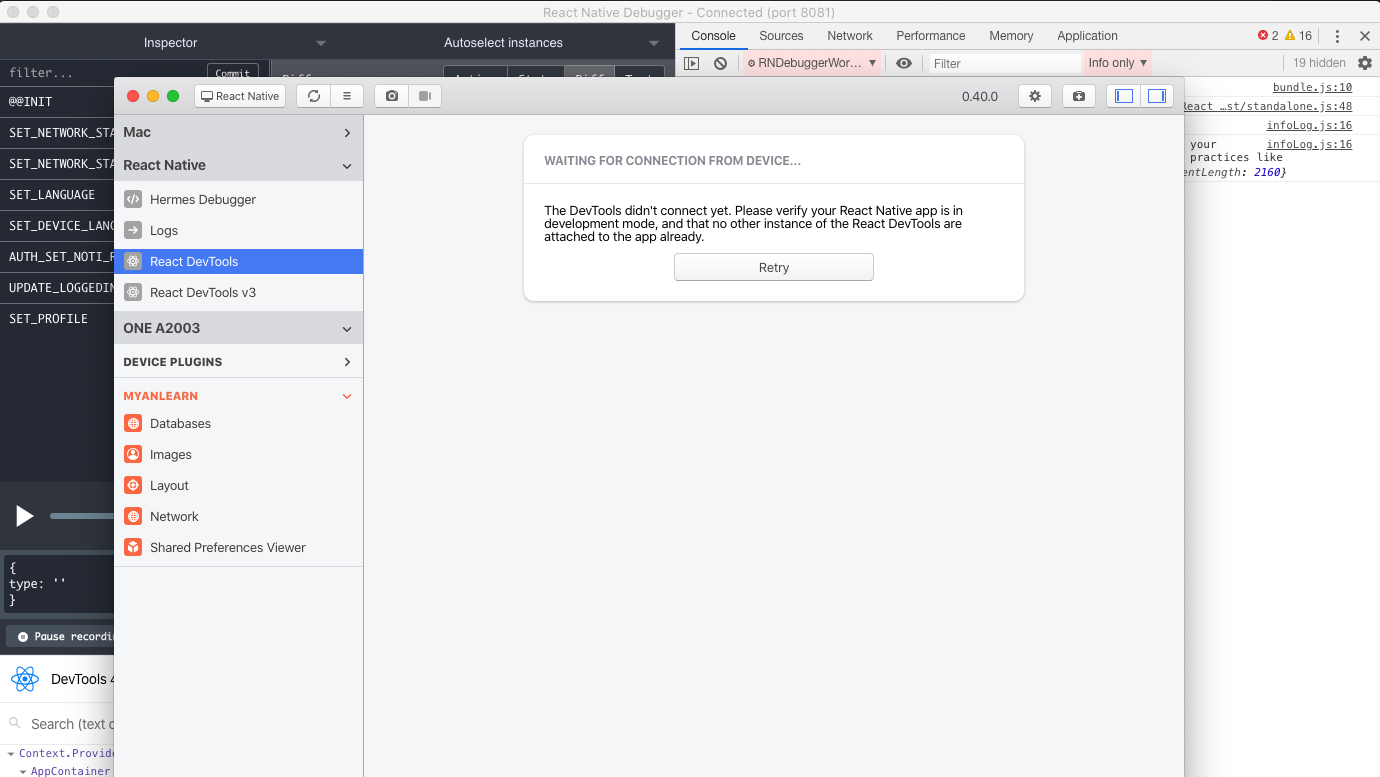
I have a standalone React Native Debugger and it is connecting fine. My app is running on 8081 port. However, my Flipper is not connecting and it is listening to port 56111 .. Any tips? :D
 Aung-Myint-Thein
on 2 May 2020
Aung-Myint-Thein
on 2 May 2020
Port forwarding did not worked for me.
Bohmaster
on 4 May 2020
@Aung-Myint-Thein please note that you can run only one of them at the same time, if RN debugger is already connected, Flipper can't, and vice versa. Please note that Flipper currently only supports devTools if the tools are listening to port 8097.
@Bohmaster please note that we need more info for your issue to make it actionable, flipper version, RN version, OS, the status of port 8097 etc.
mweststrate
on 4 May 2020
@Aung-Myint-Thein please note that you can run only one of them at the same time, if RN debugger is already connected, Flipper can't, and vice versa. Please note that Flipper currently only supports devTools if the tools are listening to port
8097.@Bohmaster please note that we need more info for your issue to make it actionable, flipper version, RN version, OS, the status of port
8097etc.
Hi @mweststrate, thank you for your response.
This is my environment:
OS: MacOS HighSierra 10.136
Flipper: 0.37.0
RN: 0.62.2
Node: 12.16.1
Port status: Flipper 17570 rtrovant 29u IPv6 0x1b2c81c78ff3e951 0t0 TCP *:8097 (LISTEN)
When I go to react devtools in Flipper it says: WAITING FOR CONNECTION FROM DEVICE
If I press retry it opens this http://localhost:8081/debugger-ui/.
If I open RN Debugger it works just fine. But I really wanto to give Flipper a try.
Bohmaster
on 7 May 2020
@Bohmaster @Aung-Myint-Thein can refer to Quick check section https://github.com/facebook/flipper/issues/1000#issuecomment-617512233
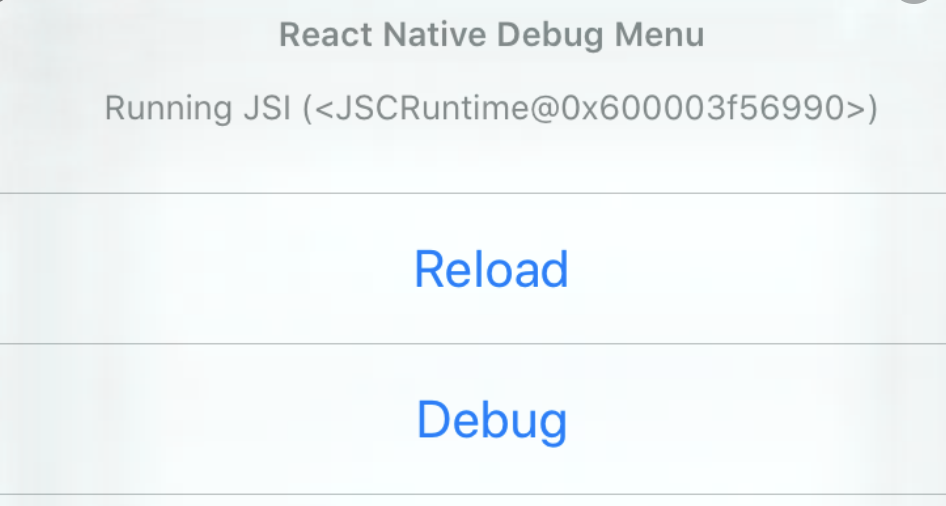
I believe the issue is that you have Remote debugging -> ON, which should be turned off for Flipper.
usrbowe
on 11 May 2020
@usrbowe where do you turn this setting on/off? I can't find it anywhere on Flipper.
 tomcastro
on 11 May 2020
tomcastro
on 11 May 2020
@tomcastro it's in dev menu (iOS example)
usrbowe
on 12 May 2020
After taking some hurdles, it works for me.
- First you have to deactivate Remote-Debugging in your App
- then do the adb reverse command
adb reverse tcp:8097 tcp:8097 - then stop Flipper and restart it
- make sure you choose your "usb-device" and not the pre-selected
Running Emulators ⇒ React Native Emulatorin the Dropdown in Flipper
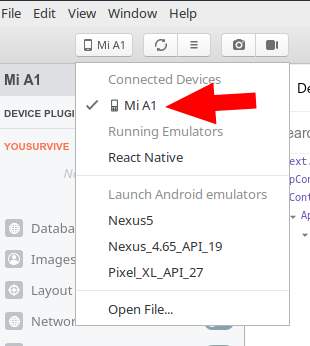
That way it work for me. Thanks a lot for this great Debug-Software!
 xstable
on 12 May 2020
xstable
on 12 May 2020
I don't get this error anymore now following these steps in order:
1) Be sure to not be in remote debug mode
2) adb reverse tcp:8097 tcp:8097
But now I'm getting this:
While Flipper was able to connect to your device, it wasn't able to connect to the app you are running on your device. For this reason, app-specific plugins will not show up...
I can see the logs and and React Dev Tools but I can't use any plugin (I've installed redux debugger)
Bohmaster
on 12 May 2020
@Bohmaster are you running on iOS or Android? (previous post was about iOS but adb is for Android). Note that for iOS we only support running on the emulator. If you are running on both, please make sure to have focus on one only first and close the other one. Could you screenshot your current flipper state, metro console and device just to have some more context?
Can you confirm that the reload and dev menu buttons from Flipper do work when selecting the RN device?
mweststrate
on 12 May 2020
@mweststrate They are not working. They worked before but I was not able to use React dev tools. Now that React dev tools works I can't use reload and dev menu buttons.
Bohmaster
on 12 May 2020
Can you provide the mentioned screenshots, I'm especially interested in the metro logs. What version of @react-native-community/cli do you have installed?
mweststrate
on 12 May 2020
@mweststrate I've restarted flipper and re-built my app and now I can use developer tools and I use reload and dev buttons.
This error keeps showing so I can't use any plugin:
While Flipper was able to connect to your device, it wasn't able to connect to the app you are running on your device. For this reason, app-specific plugins will not show up...
On hermes debugger says:
Metro is connected but no Hermes apps were found.
METRO LOGS:
12:40:17.300 client_log Require cycle: src/navigation/AppNavigator.js -> src/navigation/MainPatientTabNavigator.js -> src/screens/HomeScreen.js -> src/components/appointments/appointment.js -> src/navigation/AppNavigator.js
Require cycles are allowed, but can result in uninitialized values. Consider refactoring to remove the need for a cycle.
12:40:17.303 client_log DEV!
12:40:17.304 client_log Running "Umir" with {"rootTag":41}
I don't have @react-native-community/cli installed. Is it mandatory?
Also I'm running Android on a connected device via USB.
PD: What do you mean by a screenshot of "Flipper state"?
Bohmaster
on 12 May 2020
cc @passy is there any additional trickery needed to connect to Android physical devices on Linux? It sounds like the SDK doesn't connect.
@Bohmaster double checking, you are running a debug build on the device? What is your adb devices output?
mweststrate
on 12 May 2020
ADB output:
List of devices attached
5200c7ce5a2cc4cb device
I'm running this on my device:
npx react-native run-android
Bohmaster
on 12 May 2020
I'm having the same issue as @Bohmaster - newly upgraded to 0.62 and trying to use Flipper instead of react-native-debugger particularly to avoid bugs in inspecting network.
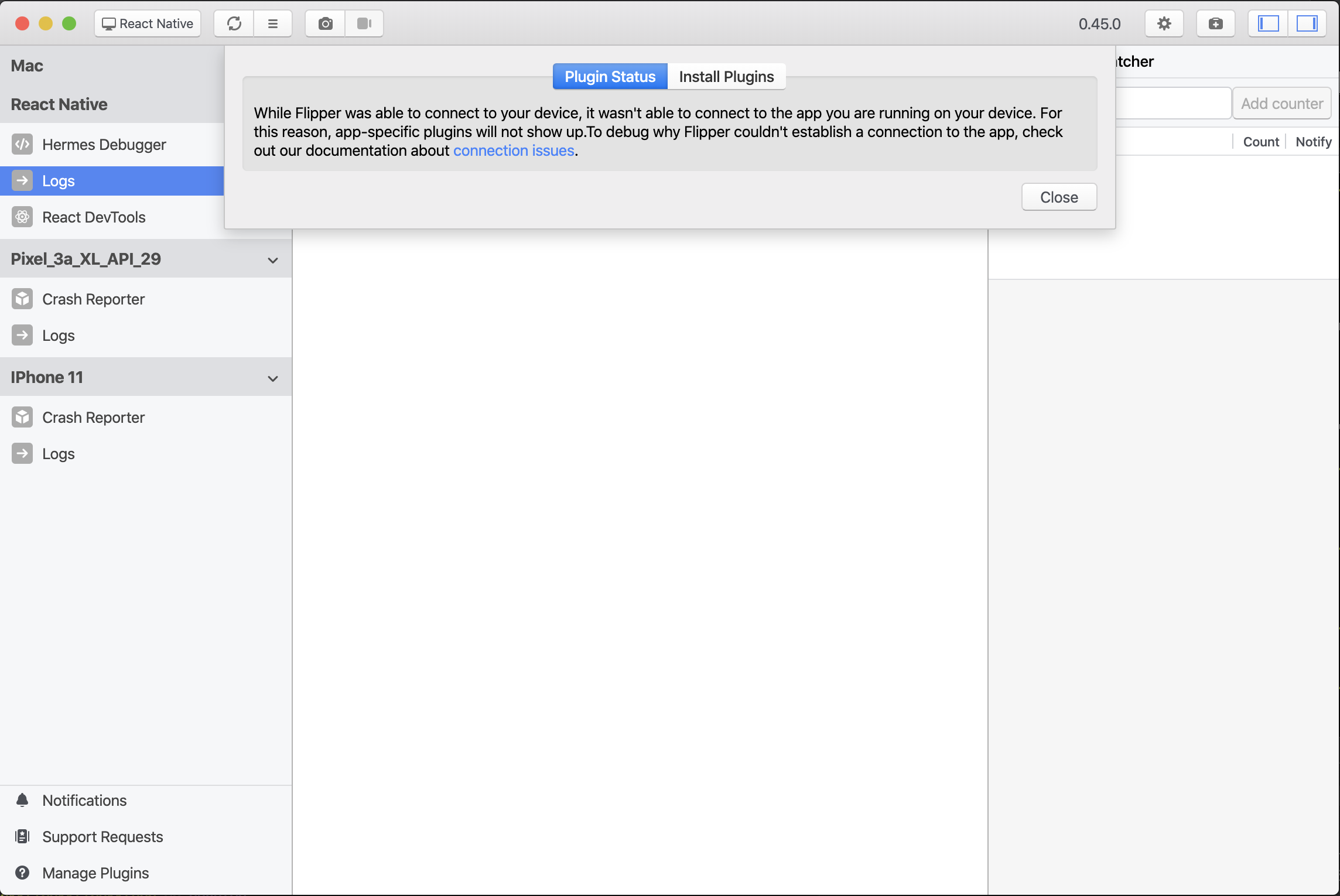
It recommends this connection debug page, but the Android command closes the app and does nothing else, and I'm not sure what to do with the iOS instructions.
 spsaucier-bakkt
on 4 Jun 2020
spsaucier-bakkt
on 4 Jun 2020
@spsaucier-bakkt are you using a debug build of your app?
mweststrate
on 4 Jun 2020
@mweststrate Yes, it's a debug build, though Debug mode (on the in-app developer menu) is not on.
Further, tapping the Open the Debug menu on the React Native Device does not work on iOS but does on Android.
spsaucier-bakkt
on 4 Jun 2020
This works for me
After taking some hurdles, it works for me.
- First you have to deactivate Remote-Debugging in your App
- then do the adb reverse command
adb reverse tcp:8097 tcp:8097- then stop Flipper and restart it
- make sure you choose your "usb-device" and not the pre-selected
Running Emulators ⇒ React Native Emulatorin the Dropdown in Flipper
That way it work for me. Thanks a lot for this great Debug-Software!
 CristianFonseca03
on 5 Jun 2020
CristianFonseca03
on 5 Jun 2020
I've the same problem as show in the reports screenshot. Debugging works with other tools like devtools plugin in chromium or with rn-debugger.
Metro always opens chromium when I tap "Debug" in the app menu. Usually I use rn-debugger instead... but suddenly Flipper could connect...
Is it intended behavior that an instance of chromium+devtools has to be running such that Flipper could connect to the app?? I expected that the devtools are running by or within Flipper.
 voxspox
on 8 Jun 2020
voxspox
on 8 Jun 2020
@voxspox they should actually not be running :)
mweststrate
on 15 Jun 2020
We added a trouble shooting guide here: https://fbflipper.com/docs/troubleshooting#q-the-react-devtools-dont-seem-to-connect
Suggestions to add any other points are welcome!
mweststrate
on 15 Jun 2020
The user should be notified to turn off debug mode, and have "adb reverse tcp:8097 tcp:8097" run..
It's very counter-intuitive that you have to turn off debug mode to be able to connect.
I just kept trying to turn off chrome after hitting the retry button, as metro server would open web debugging ui in chrome (or firefox after I uninstalled chrome in desperation lol).
 sparcbr
on 19 Jun 2020
sparcbr
on 19 Jun 2020
I'm having the same issue as @spsaucier-bakkt on iOS. The Flipper app doesn't show any plugins (network inspector, ....). When I tap on the Manage Plugins, it shows the same popup, but I really don't know how to follow the phrase
You'll need to manually add this ViewController to your app to see the in-app diagnostics.
 nenjamin2405
on 22 Jun 2020
nenjamin2405
on 22 Jun 2020
I fixed it, it turns out that I added the variable FB_SONARKIT_ENABLED=1 in the wrong place. @spsaucier-bakkt you can try to follow these steps:
- Go to the Build Settings of your project
- Search for preprocessor macros
- Double click on the right area of Debug section (don't tap the + icon with a circle on that line, I misclicked that icon and add the variable in the wrong place)
- It will show a popup with a list of existing variables: DEBUG=1, $(inherited)
- Click the small plus icon in the bottom left the popup
- Add
FB_SONARKIT_ENABLED=1
Hope that help
nenjamin2405
on 22 Jun 2020
If anybody has good ideas how to make the messaging in the plugin more clear, or some checks that we could execute to be more certain about the state you are currently in, PR's are welcome!
(for example the reverse port mapping should normally not needed as Flipper does that as well when initializing the device, so it is a bit unclear to me why some still need to do this manually. Might relate to multiple connected device (or debug tools), but not sure). .
mweststrate
on 22 Jun 2020
Flipper can connect to my device but cannot connect to my app.
I'm using Windows 10, Flipper 0.46.0, RN 0.62...
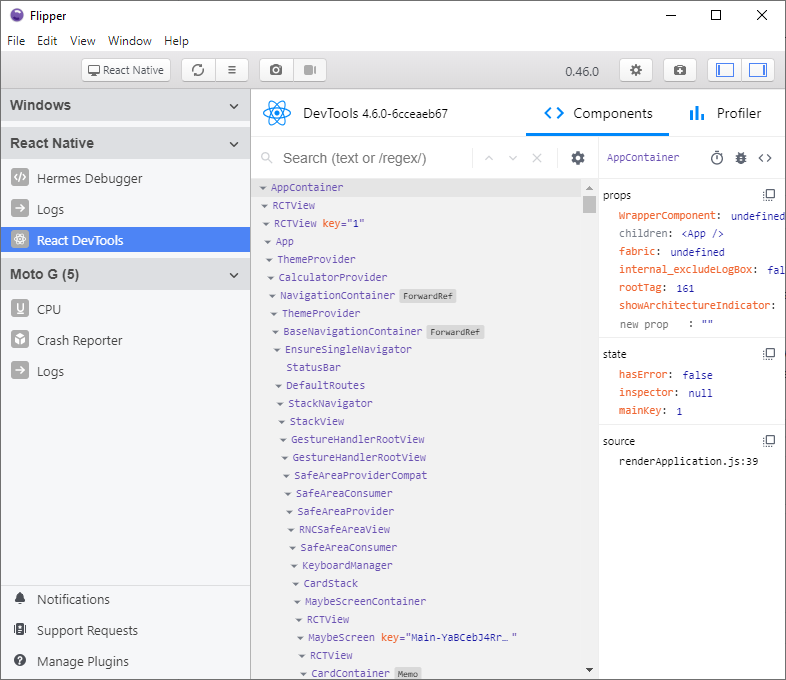
 AlcantaraRW
on 23 Jun 2020
AlcantaraRW
on 23 Jun 2020
@AlcantaraRW that is a different issue than discussed here; your React DevTools clearly do connect. Please keep issues a bit focused otherwise it becomes impossible to make any sense of them over time. Please open a new issue, assuming you did follow the trouble shooting guide already: https://fbflipper.com/docs/troubleshooting#q-i-see-my-device--emulator-but-i-cant-see-the-app
mweststrate
on 23 Jun 2020
Sorry @mweststrate, I thought it could be treated here as well.
AlcantaraRW
on 23 Jun 2020
Just some thought, it would be good to also share device/simulator type. (@JohannesKlauss, @RenanRicoldi,..)
For example if using Android device, we need to set port forwarding for React DevTools:
adb reverse tcp:8097 tcp:8097Quick check
- Do not turn ON
Debug / Remote JS Debugging🚫- Run
npx react-devtoolsto verify if React Devtools can connect without Flipper- Do not install
React Devtools v3if you have React Native >=0.61- Close any other React Devtools (standalone,...)
Port forwarding work for me 👍😁
 leo-nezes
on 14 Jul 2020
leo-nezes
on 14 Jul 2020
Closing since the thread forks in to many directions and is inactive. If you run into this problem in the future, make sure to follow this check list https://github.com/facebook/flipper/issues/1000#issuecomment-617512233, the general RN troubleshooting guide https://fbflipper.com/docs/troubleshooting#react-native, and open a _new_ issue.
mweststrate
on 24 Aug 2020
Related issues
 hsavit1
·
3Comments
hsavit1
·
3Comments
 bojankoma
·
4Comments
xstable
·
4Comments
bojankoma
·
4Comments
xstable
·
4Comments
 mune0903
·
4Comments
mune0903
·
4Comments
 keshavamurthy1
·
4Comments
keshavamurthy1
·
4Comments
Most helpful comment
Just some thought, it would be good to also share device/simulator type. (@JohannesKlauss, @RenanRicoldi,..)
For example if using Android device, we need to set port forwarding for React DevTools:
Quick check
Debug / Remote JS Debugging🚫npx react-devtoolsto verify if React Devtools can connect without FlipperReact Devtools v3if you have React Native >=0.61