Flipper: Discussion: Add diagram of Flipper architecture
flipper-architecture.excalidraw.zip
Recently when I started playing around with Flipper, it was helpful to build small diagram about Flipper architecture. To see how the communication flows and to debunk some common questions as to: "Do we need Flipper on native side as well?", "Is Flipper just as Reactotron?".
This nicely shows what is all part of the Flipper communication (although might not be that accurate, since it's from my observation):
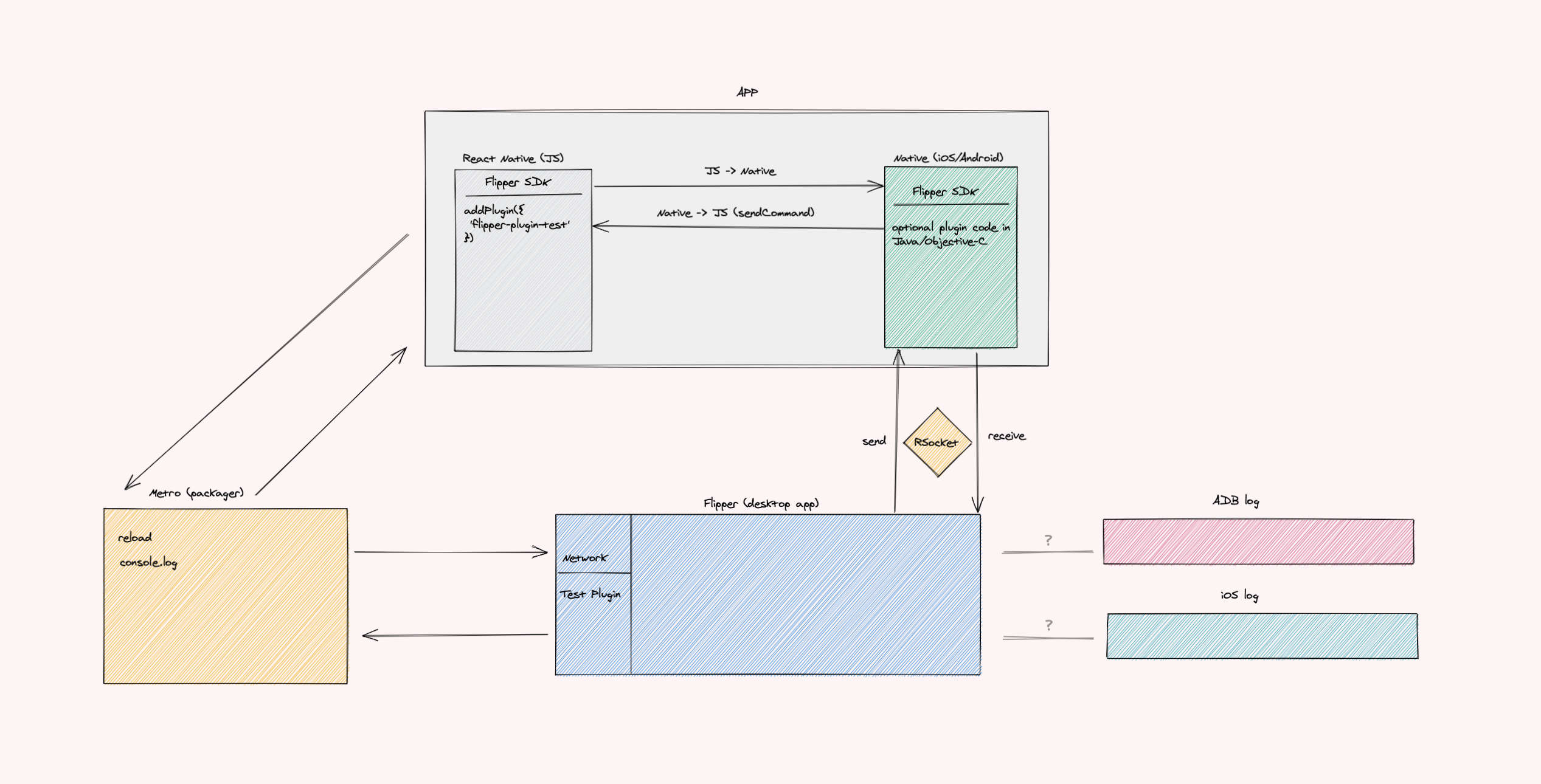
Attached ZIP with excalidraw file, if this seems as useful.
 usrbowe
All 6 comments
This looks awesome! I'll let @mweststrate (who's built this) confirm that this is accurate. :)
 passy
on 3 Apr 2020
passy
on 3 Apr 2020
Super cool! Let me fill you in with some missing details: Some plugins communicate with Metro, some with the Flipper SDK directly. Roughly speaking, the once listed as 'device' plugins talk to Metro over websocket, the other ones talk over the RSocket to the Flipper SDK (the ones listed under the app itself)
Talking to Metro over websocket:
- Reload & Show Dev Menu actions
- Logs (under device React Native). This is a combination of the console.logs coming from the device and Metros own logging statements (such as build status)
Hermes Debugger and React DevTools both manage their own (websocket) connection on their own ports, but effectively this port is provided by Metro as well, and forwarded to the RN app (afaik).
Because all the above mentioned plugins connect to a local running port, they actually don't know what app they are specifically talking to, so that is why they are listed as 'device' plugins under React Native.
The Logs as listed under your device (the emulator / physical device) are being connected over adb / idb.
Since 0.62 RN apps in dev mode will ship with the Flipper SDK. All 'native' plugins talk to this SDK over RSocket: Layout, Networking, Preferences, Database, etc. These plugins all have a platform specific implementation and run as native code only.
Custom JS flipper plugins, such as the TicTacToe example mentioned in the docs, talk over the RSocket to a native plugin as well, but those calls are forwarded into the JS world as this plugin is generic and basically just delegates the calls to actual plugins living in JS. So roughly for custom plugins the flow goes like: (JS) addPlugin -> calls react-native-flipper (JS) -> calls native generic plugin (iOS or Android) -> calls Flipper SDKs -> connects over RSocket to Flipper -> calls the Flipper desktop plugin (JS)
 mweststrate
on 3 Apr 2020
mweststrate
on 3 Apr 2020
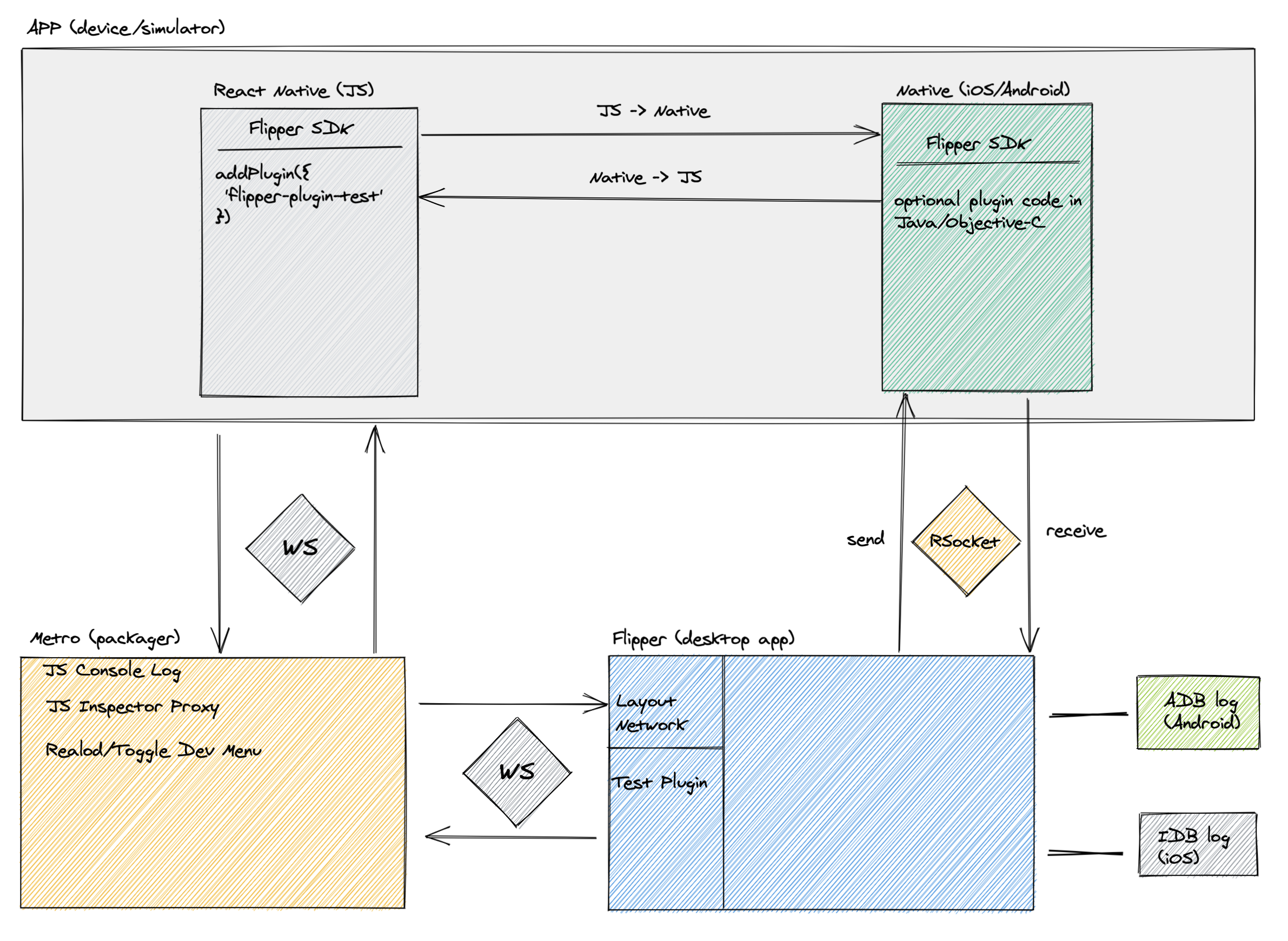
I feel, if I include all this in diagram, it would be hard to understand. There is lot of things happening under the hood :D. But it's good to be aware of the connection flow and types of plugins.
I did dig bit into hermes debugger, so it heavily relies on metro-inspector-proxy. To create a /json endpoint for Chrome to discover inspectable RN apps. Later on it just provides mapping between active pages in app and devices. Since multiple devices can be connected to one metro packager.
Maybe just simplified like this
usrbowe
on 7 Apr 2020
@usrbowe sorry, missed the notifications, but this diagram looks great! Would you be interested in putting it in the docs with a PR? Probably fits well into https://fbflipper.com/docs/extending/arch.html
mweststrate
on 24 Apr 2020
Hey there, it looks like there has been no activity on this issue recently. Has the issue been fixed, or does it still require the community's attention? This issue may be closed if no further activity occurs. You may also label this issue as a "Discussion" or add it to the "Backlog" and I will leave it open. Thank you for your contributions.
![stale[bot] picture](https://avatars.githubusercontent.com/in/1724?v=4&s=40) stale[bot]
on 25 Jul 2020
stale[bot]
on 25 Jul 2020
Closing this issue after a prolonged period of inactivity. If this issue is still present in the latest release, please feel free to create a new issue with up-to-date information.
stale[bot]
on 8 Aug 2020
Related issues
 aleclarson
·
3Comments
usrbowe
·
3Comments
aleclarson
·
3Comments
usrbowe
·
3Comments
 xstable
·
4Comments
xstable
·
4Comments
 vkotovv
·
3Comments
vkotovv
·
3Comments
 mune0903
·
4Comments
mune0903
·
4Comments
Most helpful comment
Super cool! Let me fill you in with some missing details: Some plugins communicate with Metro, some with the Flipper SDK directly. Roughly speaking, the once listed as 'device' plugins talk to Metro over websocket, the other ones talk over the RSocket to the Flipper SDK (the ones listed under the app itself)
Talking to Metro over websocket:
Hermes Debugger and React DevTools both manage their own (websocket) connection on their own ports, but effectively this port is provided by Metro as well, and forwarded to the RN app (afaik).
Because all the above mentioned plugins connect to a local running port, they actually don't know what app they are specifically talking to, so that is why they are listed as 'device' plugins under React Native.
The Logs as listed under your device (the emulator / physical device) are being connected over
adb/idb.Since 0.62 RN apps in dev mode will ship with the Flipper SDK. All 'native' plugins talk to this SDK over RSocket: Layout, Networking, Preferences, Database, etc. These plugins all have a platform specific implementation and run as native code only.
Custom JS flipper plugins, such as the TicTacToe example mentioned in the docs, talk over the RSocket to a native plugin as well, but those calls are forwarded into the JS world as this plugin is generic and basically just delegates the calls to actual plugins living in JS. So roughly for custom plugins the flow goes like:
(JS) addPlugin -> calls react-native-flipper (JS) -> calls native generic plugin (iOS or Android) -> calls Flipper SDKs -> connects over RSocket to Flipper -> calls the Flipper desktop plugin (JS)