Flipper: Question: Flipper connects to device but not application
Hey, I am using Flipper v0.35.0 on Mac with react-native 0.62 (just migrated from 0.61.5 following here https://react-native-community.github.io/upgrade-helper/?from=0.61.5&to=0.62.0) and am having trouble getting my application to connect to the Flipper desktop app.
In the dev console in Flipper.
AutoUpdateVersion.tsx:47 Error: Could not call remote method 'setFeedURL'. Check that the method signature is correct. Underlying error: Could not get code signature for running application

Underlying stack: Error: Could not get code signature for running application
    at electron/js2c/browser_init.js:6702:67
    at IpcMainImpl.<anonymous> (electron/js2c/browser_init.js:6567:27)
    at IpcMainImpl.emit (events.js:210:5)
    at WebContents.<anonymous> (electron/js2c/browser_init.js:3861:23)
    at WebContents.emit (events.js:210:5)
    at electron/js2c/browser_init.js:6705:21
    at IpcMainImpl.<anonymous> (electron/js2c/browser_init.js:6567:27)
    at IpcMainImpl.emit (events.js:210:5)
    at WebContents.<anonymous> (electron/js2c/browser_init.js:3861:23)
    at WebContents.emit (events.js:210:5)


user.tsx:22 Error: Feature not implemented
    at getUser (user.tsx:13)
    at _default (user.tsx:16)
    at index.tsx:51
    at Array.map (<anonymous>)
    at _default (index.tsx:51)
    at init.tsx:109
    at Object.rehydrate (persistStore.js:82)
    at _rehydrate (persistReducer.js:61)
    at persistReducer.js:90


IOSDevice.tsx:119 Error from getpwuid_r: 102 (Operation not supported on socket)


(123 times) server.tsx:527 Connection loop detected with iOS-iPhone Simulator-MyApp. Connected 4 times within 20s. server
And under the left pane, I see the following sections.
React Native
- Logs
- React DevTools
iPhone 11
- Crash Reporter
- Logs
Connecting...
- MyApp (with a loading spinner)
It looks like the connection to the application is just not happening. Any advice on how to fix this?
 ShawnCholeva
All 23 comments
Hey @ShawnCholeva! Thanks for getting in touch. Could you click on the "Manage Plugins" button to see if there's any additional information there and check out our Troubleshooting page?
 passy
on 31 Mar 2020
passy
on 31 Mar 2020
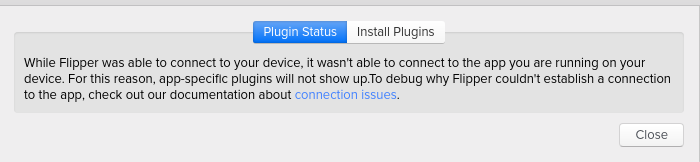
I've got the same issue. The Plugin status says
 romanakash
on 31 Mar 2020
romanakash
on 31 Mar 2020
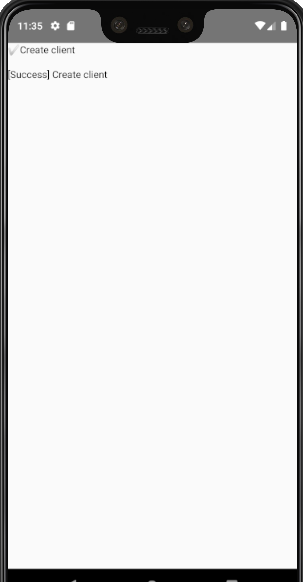
@passy Np glad to help, but ya I'm seeing the same thing as @romanakash , I followed the connection issues for android and ran adb shell am start -n com.myapp/com.facebook.flipper.android.diagnostics.FlipperDiagnosticActivity
This displayed a screen on the android emulator like so:
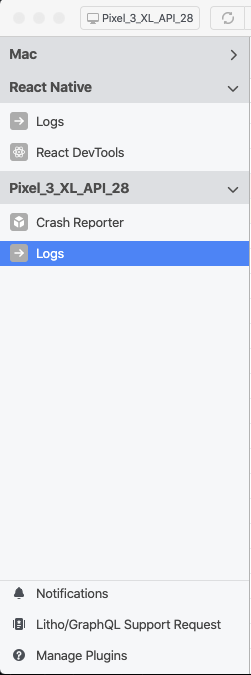
For Android, I don't see the loading spinner next to my application name as if it's trying to connect.
ShawnCholeva
on 31 Mar 2020
@ShawnCholeva I would expect things to be different between Android and iOS. Is there something in the logs when you try to connect to the Android emulator?
passy
on 3 Apr 2020
Thanks for the report @ShawnCholeva
On the android side, you should see an entry in that diagnostic screen for Start connection thread, when the flipper client is started. That is, right after the line containing client.start() in the upgrade-helper diff you have linked.
Can you confirm with a debugger, or other, whether that line is being executed? From there it should call into some C++ code that will eventually log here: https://github.com/facebook/flipper/blob/master/xplat/Flipper/FlipperConnectionManagerImpl.cpp#L100
If we can see how far it's getting, that will shed some light on the problem.
On the iOS side, it does appear to be a different issue. You can enable the the same diagnostic screen by displaying this native view in your app, if you're able to. https://github.com/facebook/flipper/blob/master/iOS/FlipperKit/FlipperDiagnosticsViewController.m
 jknoxville
on 3 Apr 2020
jknoxville
on 3 Apr 2020
If you are using swift in react native, the flipper doc has some issues:
- Missing flags https://github.com/facebook/flipper/issues/341 which makes flipper totally ignored so that it can not connect
initializeFlipperfunction also has 2 wrong lines. Need to comment them out to pass the build.
 sunnylqm
on 14 Apr 2020
sunnylqm
on 14 Apr 2020

Same issue Also Flipper causing different issues like builds complaining about 'yogakit' and other such things.
Edit: after upgrading to version 0.41, I can now reload my app, but all other problems persist and I cannot access developer menus. Flipper still says 'No hermes apps were found'
React Native version 0.62
 stephanoparaskeva
on 2 May 2020
stephanoparaskeva
on 2 May 2020
same here
 jonathanmachado
on 12 May 2020
jonathanmachado
on 12 May 2020
On 0.43, getting the same unable to connect to device issue as @romanakash and @stephanoparaskeva. I can see the React DevTools, it's just that I cannot use any plugins such as network.
 SuhairZain
on 26 May 2020
SuhairZain
on 26 May 2020
@romanakash @stephanoparaskeva Turns out that since I have debug and release variants, I had to add the .debug suffix to the package name in ReactNativeFlipper.java file. Also had to add it to the class name in the line in MainApplication.java where it uses reflection to find the ReactNativeFlipper class.
SuhairZain
on 26 May 2020
@SuhairZain I'm having the same issue as you but on iOS, did you resolve this on iOS? :(
 nenjamin2405
on 22 Jun 2020
nenjamin2405
on 22 Jun 2020
@nenjamin2405 Sorry. I do not remember having this issue on iOS.
SuhairZain
on 22 Jun 2020
@SuhairZain Ah I fixed it, it turns out that I put the FB_SONARKIT_ENABLED=1 in the wrong place. Thanks a lot
nenjamin2405
on 22 Jun 2020
I'm using Windows 10 and I have the same problem with Android here.
Don't know what else I could do!
 AlcantaraRW
on 23 Jun 2020
AlcantaraRW
on 23 Jun 2020
Same issue here! Logs are in react native section is working fine.But plugins are not working.

 sjonchhe
on 8 Jul 2020
sjonchhe
on 8 Jul 2020
same problem with [email protected] android
 TheEhsanSarshar
on 29 Jul 2020
TheEhsanSarshar
on 29 Jul 2020
@spawncholeva, just wondering, is your device clock in sync with your computer? Otherwise the secured handshake won't work. We saw this causing issues for others, in the device logs a message like
flipper: AsyncSocketException: error:1416F086:lib(20):func(367):reason(134), type = SSL error Make sure the date and time of your device is up to date.
In android this can be fixed by running. I can imagine something similar exists for iOS.
adb shell "su 0 toybox date `TZ=UTC date +%m%d%H%M%Y.%S`"
For others, please note that messages like "doesn't work" and "same!" are completely in-actionable for us, as there are no two RN apps with the same build setup. We can't look at your machine, so if you want help, details need to be provided. Currently completely different issues are being reported in this thread, hermes engine not connecting, yogakit build errors, etc. It will make it impossible for anybody else reading to make sense of this thread.
Please follow the troubleshooting guide https://fbflipper.com/docs/troubleshooting#react-native and report in detail at which step things failed, and in include relevant build files, errors from device logs, etc etc.
Finally, if you found a solution to your problem, please do contribute with a PR to the troubleshooting guide if applicable, and otherwise at least report in the thread how your issue was solved. Inside FB the RN projects are a bit more consistent in build setup, so we don't experience all errors reported first-hand. So please don't be just a consumer of information 🙂
 mweststrate
on 29 Jul 2020
mweststrate
on 29 Jul 2020
I just experienced this with [email protected]. The funny thing is that I have this working on our "master" branch, but not on my current one. As with all the other ppl here, I can see the device and the react-native part of Flipper. But the app is missing, as is the connection to the plugin status.
The only difference, AFAIK between these two branches is that I removed expo-unimodules in this one.
 andrioid
on 6 Aug 2020
andrioid
on 6 Aug 2020
@stephanoparaskeva facing same issue with Android whats the solution....
 dubeyvivek57
on 31 Aug 2020
dubeyvivek57
on 31 Aug 2020
Hi, I'm facing the same issue with a physical android device ( Pixel 3 ).
- I can see react native logs.
- react-native version 0.62.2.
- My app is ejected from expo.
 zeabdelkhalek
on 23 Sep 2020
zeabdelkhalek
on 23 Sep 2020
Closing the issue as the original question is quite dated, and new occurrences of the problems should have some reproduction info or at least detail errors to be actionable.
mweststrate
on 16 Oct 2020
@mweststrate
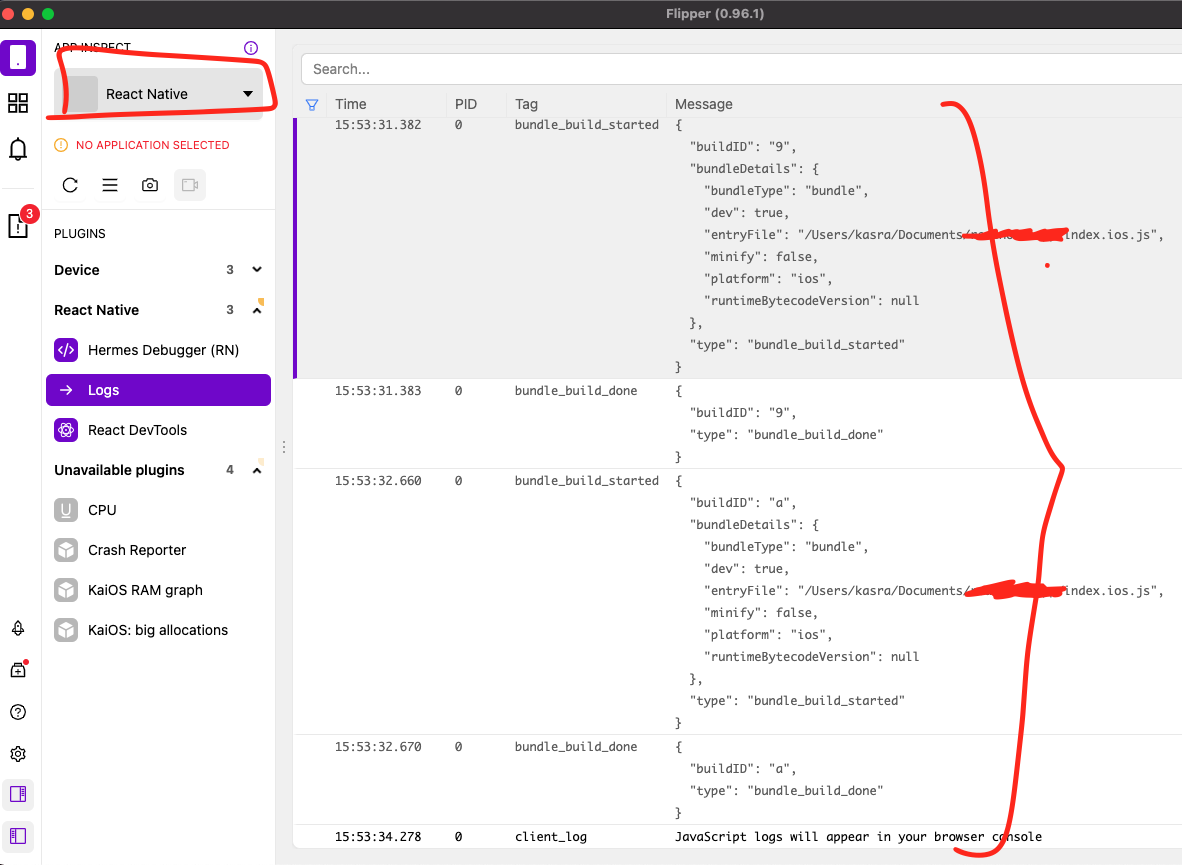
I have the same issue on Flipper 0.96.1:
System:
    OS: macOS 11.4
    CPU: (4) x64 Intel(R) Core(TM) i5-8210Y CPU @ 1.60GHz
    Memory: 137.91 MB / 8.00 GB
    Shell: 5.8 - /bin/zsh
  Binaries:
    Node: 16.0.0 - /usr/local/bin/node
    Yarn: 1.22.10 - /usr/local/bin/yarn
    npm: 6.14.13 - ~/Documents/realnote_app/node_modules/.bin/npm
    Watchman: 4.9.0 - /usr/local/bin/watchman
  Managers:
    CocoaPods: 1.10.1 - /usr/local/bin/pod
  SDKs:
    iOS SDK:
      Platforms: iOS 14.5, DriverKit 20.4, macOS 11.3, tvOS 14.5, watchOS 7.4
    Android SDK:
      API Levels: 29, 30
      Build Tools: 29.0.2, 29.0.3, 30.0.3
      System Images: android-29 | Intel x86 Atom_64, android-29 | Google APIs Intel x86 Atom, android-29 | Google Play Intel x86 Atom, android-30 | Google APIs Intel x86 Atom
      Android NDK: Not Found
  IDEs:
    Android Studio: 4.2 AI-202.7660.26.42.7322048
    Xcode: 12.5.1/12E507 - /usr/bin/xcodebuild
  Languages:
    Java: 1.8.0_292 - /usr/bin/javac
  npmPackages:
    @react-native-community/cli: Not Found
    react: 17.0.1 => 17.0.1
    react-native: 0.64.1 => 0.64.1
Should I create a new issue for this?
 ghasemikasra39
on 8 Jul 2021
ghasemikasra39
on 8 Jul 2021
yes
mweststrate
on 8 Jul 2021
Related issues
 aleclarson
·
3Comments
aleclarson
·
3Comments
 paschaldev
·
3Comments
paschaldev
·
3Comments
 richardtop
·
3Comments
richardtop
·
3Comments
 hackaprende
·
4Comments
hackaprende
·
4Comments
 justintuchek
·
3Comments
justintuchek
·
3Comments
Most helpful comment
Same issue here! Logs are in react native section is working fine.But plugins are not working.
