Flipper: Unable to get certificates from desktop
🐛 Bug Report
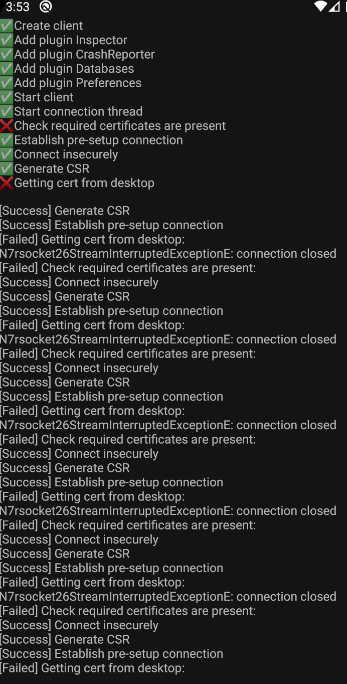
Flipper shows that no clients are connected, however every log and crash report does work. .flipper/certs are empty.
I have tried to delete .flipper folder.

Here's image from desktop client's console. I have tried to manually create D:/tmp/flipper.
Expected Behavior
Flipper to show plugins
Environment
Android 10 on Android Emulator
Flipper 0.28.0 on Windows (Pre-built, non yarn version)
 hexlay
All 10 comments
Thanks for the report, I will to repro this.
 cekkaewnumchai
on 17 Nov 2019
cekkaewnumchai
on 17 Nov 2019
@hexlay Do you have OpenSsl on your Windows?
cekkaewnumchai
on 17 Nov 2019
@hexlay Do you have OpenSsl on your Windows?
Sorry for late reply, after installing and properly configuring OpenSSL it started working, thanks ! I'm closing this issue.
hexlay
on 18 Nov 2019
@hexlay how did you configure openssl ? I have put openssl on the PATH. What else needs to be done?
I am facing the same issue on windows.
 chetnashah
on 20 Dec 2019
chetnashah
on 20 Dec 2019
I need to know how do this too.
How to add openssl to PATH on Windows?
 danilo-vieira
on 17 Jun 2020
danilo-vieira
on 17 Jun 2020
I need to know how do this too.
How to add openssl to PATH on Windows?
https://answers.unity.com/questions/616484/open-ssl-not-found.html
Not a Windows user but Google has a bunch of answers for this.
 passy
on 17 Jun 2020
passy
on 17 Jun 2020
I need to know how do this too.
How to add openssl to PATH on Windows?https://answers.unity.com/questions/616484/open-ssl-not-found.html
Not a Windows user but Google has a bunch of answers for this.
Thank you. I found the solution and wrote a guide about it: https://dev.to/danilovieira/installing-openssl-on-windows-and-adding-to-path-3mbf
danilo-vieira
on 17 Jun 2020
Having the same issue here with Flipper 0.45.0.
I have OpenSSL installed and added to PATH (Windows 10) and I'm still facing those certificate issues.
 AlcantaraRW
on 20 Jun 2020
AlcantaraRW
on 20 Jun 2020
I had the same issue on Windows 10. Fixed by running Flipper as administrator once, seems openssl needs some extra permissions to generate the certificate.
 Kianoni
on 22 Jul 2020
Kianoni
on 22 Jul 2020
I had the same issue on Windows 10. Fixed by running Flipper as administrator once, seems openssl needs some extra permissions to generate the certificate.
Yeah! anyway, if you get this error again, you can read my guide on dev.to. I teach how install openssl on Windows. 😊
Link here.
danilo-vieira
on 22 Jul 2020
Related issues
 justintuchek
·
3Comments
justintuchek
·
3Comments
 Murtaza-arif
·
3Comments
Murtaza-arif
·
3Comments
 davidmcraejr
·
4Comments
davidmcraejr
·
4Comments
 usrbowe
·
4Comments
usrbowe
·
4Comments
 abaker
·
3Comments
abaker
·
3Comments
Most helpful comment
@hexlay how did you configure openssl ? I have put openssl on the PATH. What else needs to be done?
I am facing the same issue on windows.