🐛 Bug Report
Running flipper on my debug build results using a X86 emulator, no plugins showing but the diagnostic screen shows ticks everywhere

Environment
Android: API Pixel 2 28 emulator (x86)
Flipper version: 0.23.4
OS: MacOS 10.14.5 (18F203)
gradle version:
 flipper     : [
                    flipper : "com.facebook.flipper:flipper:0.23.4",
                    soloader: "com.facebook.soloader:soloader:0.5.1"
            ],
 martynhaigh
All 15 comments
That's odd. Could you check if the logs in the DevTools (View -> Toggle Developer Tools) show anything?
 passy
on 8 Aug 2019
passy
on 8 Aug 2019
It does!

EDIT: updated with details
martynhaigh
on 8 Aug 2019
Any ideas on this one?
martynhaigh
on 12 Aug 2019
@martynhaigh There doesn't seem to be a version of adb that Flipper can use. Can you check if you have $ANDROID_HOME set to the directory where you have the SDK installed and run Flipper again with it in place?
passy
on 12 Aug 2019
Opening from the CLI results in the same behaviour:

martynhaigh
on 14 Aug 2019
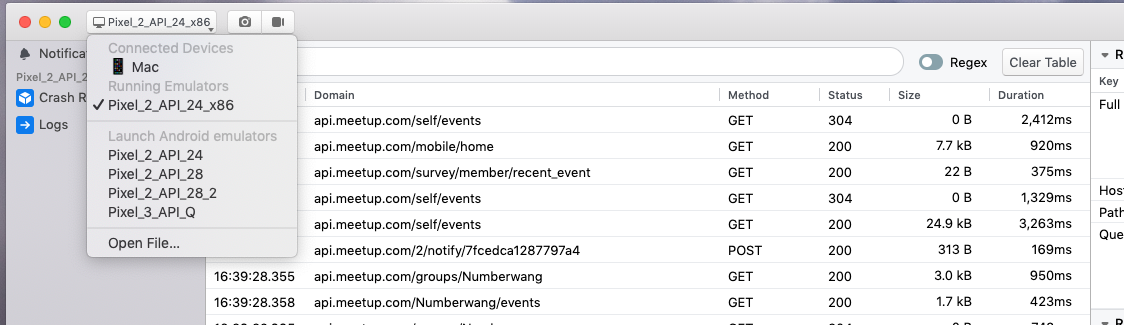
What's weird is that I'm still getting alerts for things like failed network requests. Clicking on the "Open in Network" CTA takes me to the Network panel which sees to be working fine but there is no debuggable app, nor any plugins showing:
martynhaigh
on 14 Aug 2019
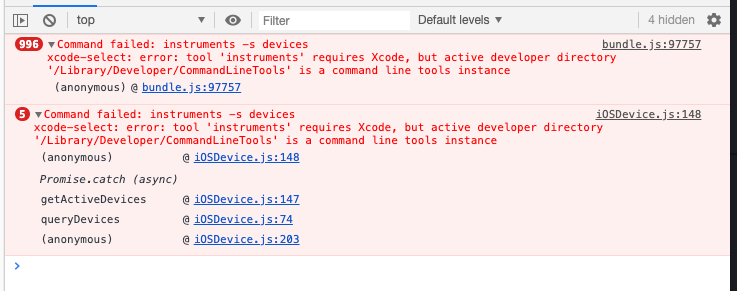
Wow, that's pretty strange. Do you still see something in the devtools console?
passy
on 14 Aug 2019
Nothing much, tbh:
martynhaigh
on 15 Aug 2019
Hey @martynhaigh ,
Thanks for bearing with us. To rule out whether this is a known issue, can you run the following and reply with the output?
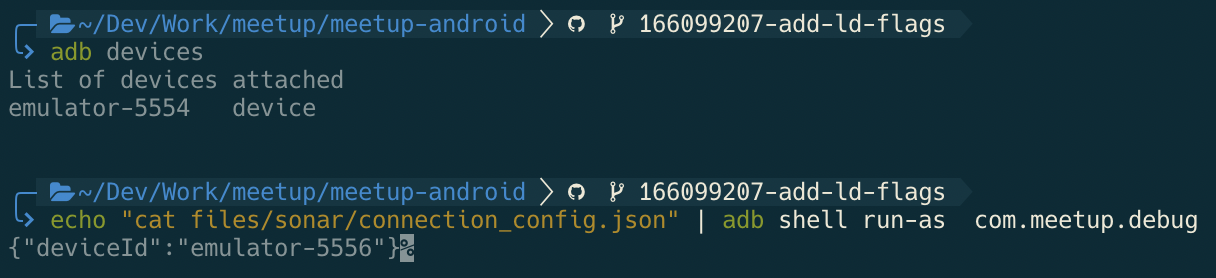
What is the serial of the emulator you're using?
adb devices
What does the sonar sdk within your app think the serial is? (replace the package name with your app's)
echo "cat files/sonar/connection_config.json" | adb shell run-as com.your.apppackage
These should match up, but we've seen some cases where they don't - and in those cases, you'd get what you're seeing. This should help us narrow down the problem.
 jknoxville
on 15 Aug 2019
jknoxville
on 15 Aug 2019
Oh, good shout - I'm getting different outputs. These are both (5554, 5556) emulator ids that I run at different times.
martynhaigh
on 15 Aug 2019
Interesting, my current hypothesis for how this occurs is that the serial
number of an emulator is not fixed and can sometimes get swapped, meaning
that the file containing this id becomes incorrect.
I don't know for sure if that is what's happening, but I'm working on a way
to solve this problem regardless.
In the mean time, you can fix it by running rm -r ~/.flipper/certs and
restarting flipper to force all apps to re-handshake.
Thanks for confirming that 👍
Edit: changed flipper to .flipper in path
On Thu, 15 Aug 2019, 11:17 am Martyn Haigh, notifications@github.com
wrote:
Oh, good shout - I'm getting different outputs. These are both (5554,
5556) emulator ids that I run at different times.[image: image]
https://user-images.githubusercontent.com/155352/63088920-33449e00-bf4e-11e9-928c-66c70c3f108e.png—
You are receiving this because you commented.
Reply to this email directly, view it on GitHub
https://github.com/facebook/flipper/issues/510?email_source=notifications&email_token=AAFI6K2XL4J5WRLKGZVNXM3QEUUMJA5CNFSM4IKKQ3DKYY3PNVWWK3TUL52HS4DFVREXG43VMVBW63LNMVXHJKTDN5WW2ZLOORPWSZGOD4LOAFY#issuecomment-521592855,
or mute the thread
https://github.com/notifications/unsubscribe-auth/AAFI6K6OO7L6BRJUKZ7JVCDQEUUMJANCNFSM4IKKQ3DA
.
jknoxville
on 15 Aug 2019
It would also be interesting to see the contents of that file in the other emulator (emulator-5556).
If you can make sure flipper is NOT running, and then boot up the other emulator and run this again, that might shed some light on whether the serials got swapped, or if they both now have the same value:
echo "cat files/sonar/connection_config.json" | adb -s emulator-5556 shell run-as com.your.apppackage
It's important flipper isn't running while that one gets booted up, because after you've wiped the desktop certs, flipper will re-initialise it and overwrite that file we're trying to read.
jknoxville
on 15 Aug 2019
Think I've got it.
I've got two emulators (let's call them *1 and *2), both show up at 5554 if I load them individually, with both showing 5554 in the sonar connection config
If I boot both up in the order *1 then *2, then *2 switches id to 5556, and the sonar connection config shows 5554 and 5556, as expected. Closing them in any order, then opening *2 again shows it as having an id of 5554, but the sonar connection config still shows 5556
martynhaigh
on 15 Aug 2019
Thanks so much @martynhaigh I've just repro'd the same thing.
We're using serial number as a unique and stable identifier for a device. This works fine for physical devices, but clearly for emulators this is not at all the right approach.
Will have a fix for this coming soon. In the mean time, just to re-iterate for anyone else having this problem, the temporary workaround is to run:
rm -r ~/.flipper/certs and then restart flipper
jknoxville
on 15 Aug 2019
Thank you @martynhaigh for reporting us the issue. It's fixed in the recent release. Please make sure to update client side to get the update in both side.
 cekkaewnumchai
on 25 Sep 2019
cekkaewnumchai
on 25 Sep 2019
Related issues
 davidmcraejr
·
4Comments
davidmcraejr
·
4Comments
 abaker
·
3Comments
abaker
·
3Comments
 orlandobustamantep
·
3Comments
orlandobustamantep
·
3Comments
 keshavamurthy1
·
4Comments
keshavamurthy1
·
4Comments
 aleclarson
·
3Comments
aleclarson
·
3Comments
Most helpful comment
Thanks so much @martynhaigh I've just repro'd the same thing.
We're using serial number as a unique and stable identifier for a device. This works fine for physical devices, but clearly for emulators this is not at all the right approach.
Will have a fix for this coming soon. In the mean time, just to re-iterate for anyone else having this problem, the temporary workaround is to run:
rm -r ~/.flipper/certsand then restart flipper