Flipper: Android app running on Android Q emulator doesn't show up in Flipper
Android app running on Android Q emulator doesn't show up in Flipper.
I have this errors in Console:
Failed to create adb client using shell adb command. Trying with adbkit.
Error: Command failed: /opt/android_sdk/platform-tools/adb start-server
/bin/sh: /opt/android_sdk/platform-tools/adb: No such file or directory

Error: Command failed: /opt/android_sdk/tools/emulator -list-avds
/bin/sh: /opt/android_sdk/tools/emulator: No such file or directory

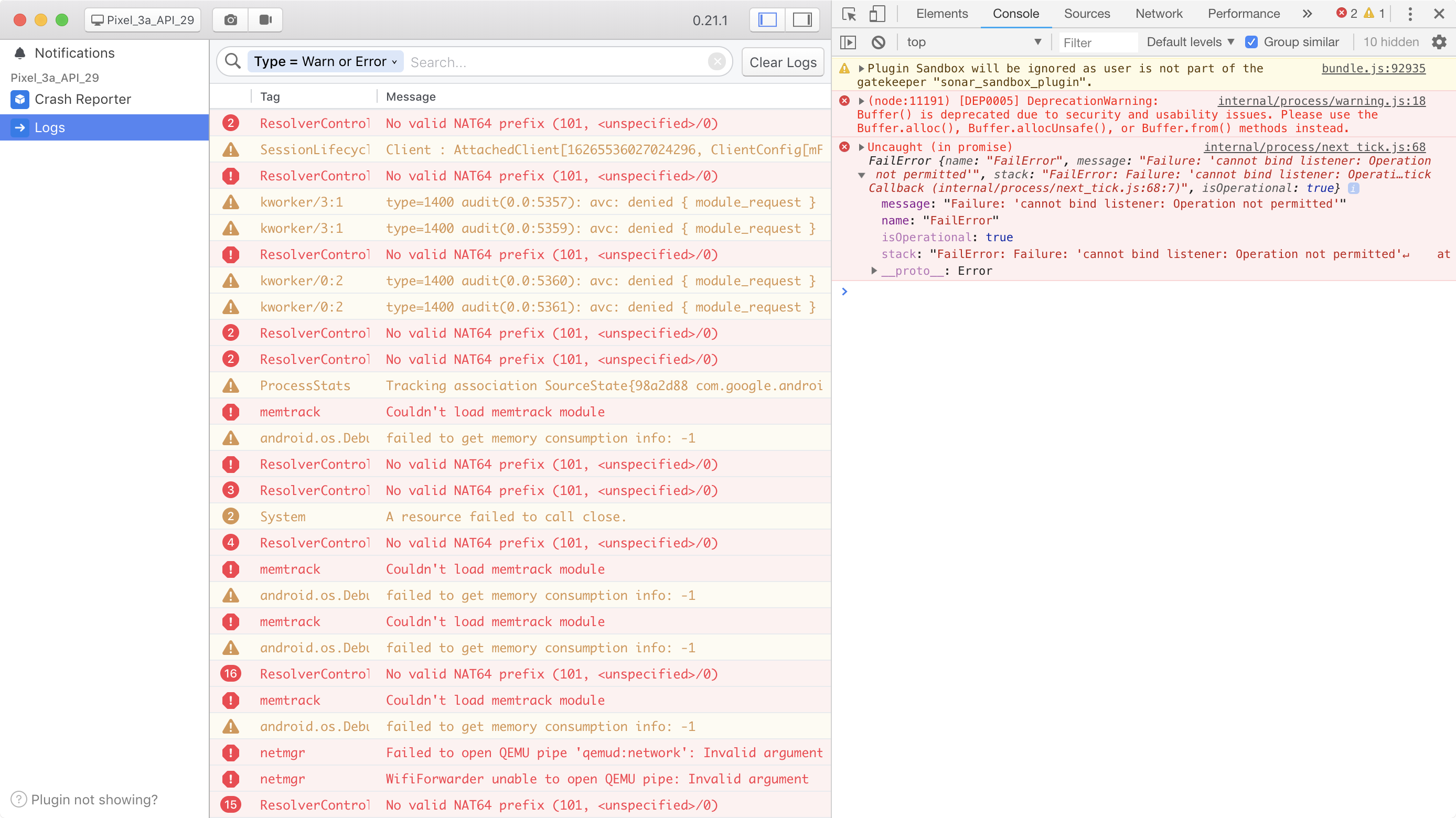
"FailError: Failure: 'cannot bind listener: Operation not permitted'
    at file:///Applications/Flipper.app/Contents/Resources/app/bundle.js:59600:31
    at tryCatcher (file:///Applications/Flipper.app/Contents/Resources/app/bundle.js:58596:27)
    at Promise._settlePromiseFromHandler (file:///Applications/Flipper.app/Contents/Resources/app/bundle.js:56591:37)
    at Promise._settlePromiseAt (file:///Applications/Flipper.app/Contents/Resources/app/bundle.js:56674:22)
    at Async._drainQueue (file:///Applications/Flipper.app/Contents/Resources/app/bundle.js:53969:16)
    at Async._drainQueues (file:///Applications/Flipper.app/Contents/Resources/app/bundle.js:53974:16)
    at MutationObserver.Async.drainQueues (file:///Applications/Flipper.app/Contents/Resources/app/bundle.js:53841:18)
    at process._tickCallback (internal/process/next_tick.js:68:7)"
Flipper 0.21.0
 technoir42
All 6 comments
I don't think that's related to the emulator version. It seems that you don't have a full SDK installation. We should provide a better error message for this, but you need to have at least adb installed on your machine.
 passy
on 10 Jun 2019
passy
on 10 Jun 2019
I think this is probably due to Flipper not currently having a good way to deal with custom android sdk installation locations. It looks for an ANDROID_HOME env variable, and falls back to /opt/android_sdk/.
However, env variables set in .bashrc files and similar aren't loaded for GUI applications, unless you launch them from the terminal.
One way to workaround this would be to either move your android_sdk to /opt/ (though expect to have to update android studio and any other tools that know where it currently is), or symlink it (ln -s /path/to/your/sdk /opt/android_sdk)
 jknoxville
on 10 Jun 2019
jknoxville
on 10 Jun 2019
@jknoxville you are right, I've set $ANDROID_HOME and $PATH in .bash_profile only but it's not the real culprit.
I've tried opening Flipper using open -a Flipper and also symlinking Android SDK to /opt/android_sdk then opening normally. While in both cases the first two errors disappeared Flipper still doesn't see my app on Q. There is no such issue with API 28 emulator.
technoir42
on 10 Jun 2019
Thanks for that @technoir42
Does expanding that error in the console provide a helpful stack trace?
If I had to guess I'd say this might be happening during the adb reverse command we run, which sets up a tunnel from the emulator to the host computer.
If you run adb reverse tcp:8088 tcp:8088 and adb reverse tcp:8089 tcp:8089 that may shed some light on the problem - if that fails then there seems to be a problem with the emulator setup.
Perhaps this will help: https://stackoverflow.com/questions/56350954/adb-reverse-failing-with-operation-not-permitted-error
jknoxville
on 11 Jun 2019
That's exactly what happens. adb reverse actually fails with Q Google Play image:
$ adb reverse tcp:8088 tcp:8088
adb: error: cannot bind listener: Operation not permitted
I also tested with Q non-Google Play image and adb reverse succeeds there.
I've found this issue https://issuetracker.google.com/issues/133771463. Sadly there is no answer whether the change is intentional or a bug.
technoir42
on 11 Jun 2019
I'm cleaning up some old issues and this one hasn't seen updates in a long time. Please let me know if this is still a problem and we can reopen it. Thanks!
passy
on 25 Sep 2019
Related issues
 jhsware
·
3Comments
jhsware
·
3Comments
 paschaldev
·
3Comments
paschaldev
·
3Comments
 leoafarias
·
3Comments
leoafarias
·
3Comments
 richardtop
·
3Comments
richardtop
·
3Comments
 usrbowe
·
3Comments
usrbowe
·
3Comments
Most helpful comment
I think this is probably due to Flipper not currently having a good way to deal with custom android sdk installation locations. It looks for an ANDROID_HOME env variable, and falls back to
/opt/android_sdk/.However, env variables set in .bashrc files and similar aren't loaded for GUI applications, unless you launch them from the terminal.
One way to workaround this would be to either move your android_sdk to /opt/ (though expect to have to update android studio and any other tools that know where it currently is), or symlink it (
ln -s /path/to/your/sdk /opt/android_sdk)