Flex-layout: property:flex parsing incorrect value `1e-09px;`
property:flex parsing incorrect value 1e-09px;
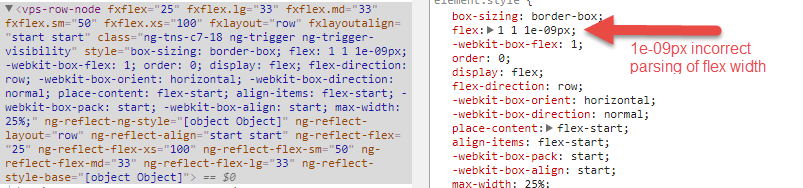
Googling 1e-09 seems to be some kind of scientific notation, and can be see as a % , / in some code out there.
1 n  1E-09
1 µ  1E-06
1 m  1E-03
1    1
1 k  1E+03
1 M  1E+06
1 G  1E+09
 mcwebdev
All 13 comments
1e-09px is shorthand for 0.000000001px and I believe it's a hack for IE: https://github.com/angular/flex-layout/blob/bc0c90070a49dfccaa63300bba6c8fdf1a1d3879/src/lib/flexbox/api/flex.spec.ts#L68
 intellix
on 11 Jul 2017
intellix
on 11 Jul 2017
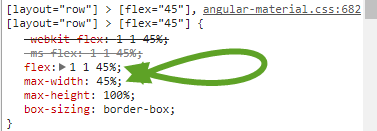
Many Thanks @intellix . If that is the case it certainly should not be rendering like that in chrome. If the element.style property max-width:25% then in chrome it should reflect flex: 1 1 25%
mcwebdev
on 11 Jul 2017
mcwebdev
on 11 Jul 2017
@mcwebdev - Can you provide insight/examples where this generic workaround creates a problem for non-IE browsers?
 ThomasBurleson
on 18 Jul 2017
ThomasBurleson
on 18 Jul 2017
I don't think hacks should be in the package, they should probably be in a polyfill shim and added by people that need deprecated support for outdated IE clients. In the latest IE the flex property is working fine flex: 1 1 45%. I unfortunately don't have any insight into how or why chrome would use the IE scientific notation as the value of the flex property, perhaps the angular browser detection is not correctly executing. Also the code 1e-09px that is referenced above is in a automated test function. Do you know where 1e-09px exists in the actual src?
mcwebdev
on 19 Jul 2017
I have the same issue when using it with angular material 2. Example: https://github.com/EladBezalel/material2-start
When you resize chrome window to small size, right hand side "md-card" moves to bottom, and "1e-09px" appears.

 UncleJimmy
on 5 Aug 2017
UncleJimmy
on 5 Aug 2017
Something I just recently discovered is that it seems to only instantiate the 1e-09px; for the fxFlex property. fxFlex.xs, fxFlex.sm, ... all work correctly. fxFlex is the default directive. On my monitor it is painted on a screen with a resolution of 1920px.
mcwebdev
on 10 Aug 2017
I usually get the issue when I specify a different flex value other than the non default 100. For examplefxFlex.gt-sm etc.. I usually get around it by adding fxFlex="100" as the fallback.
 najibla
on 6 Oct 2017
najibla
on 6 Oct 2017
My chrome version (61.0.3163.100) on mac doesnt like the flex value of 1 1 1e-09px either.
I just apply a bunch of rows with<div fxFlex> in a fxLayout="column" and then they are all stacked on top of each other:

When I change the 1e-09px to 100% it looks fine.
I can of course change it to fxFlex="100" which works fine.
 mattiLeBlanc
on 10 Nov 2017
mattiLeBlanc
on 10 Nov 2017
i notice this issue where the column flex layout gets compressed happens especially on Chrome in DevTools Mobile view.
I have been having trouble dealing with sticky footer and desktop/mobile view. Adding a min-height: 100vh to my wrapper fixed a lot, however I still have to overwrite the 1e-09px with 100% to not loose vertical height on my elements.
mattiLeBlanc
on 20 Nov 2017
Should this issue be reopened @ThomasBurleson, @CaerusKaru?
Correct me if I am wrong, but it looks like this bug is reintroduced in 6.0.0-beta.16 while fixing issue https://github.com/angular/flex-layout/issues/739.
It appears that expression 1e-09px still gets inserted. I can reproduce on Chrome https://stackblitz.com/edit/angular-jejoob
 netkovedar
on 17 Sep 2018
netkovedar
on 17 Sep 2018
@netkovedar This was done to revert a change that was too drastic for the community which had relied on 1e-09px for a while. If you want the new behavior, you can use FlexLayoutModule.withConfig({useColumnBasisZero: true}) as documented here
 CaerusKaru
on 17 Sep 2018
CaerusKaru
on 17 Sep 2018
Thank you @CaerusKaru
netkovedar
on 19 Sep 2018
Related issues
 Mufasa
·
3Comments
Mufasa
·
3Comments
 Kizmar
·
4Comments
Kizmar
·
4Comments
 Pikachews
·
4Comments
Pikachews
·
4Comments
 spottedmahn
·
5Comments
spottedmahn
·
5Comments
 nueko
·
5Comments
nueko
·
5Comments