Flatpickr: Feature Request: Months and Years only picker
Check out datetime picker that offers method for picking only month or only year: http://t1m0n.name/air-datepicker/docs/#example-months.
It would be great to have something like that available in Flatpickr.
Milan
 dev4press
All 38 comments
Hello,
To be honest, I don't find this a necessary, or even very usable to be worth the effort of implementing.
Also, a lot of clicking there, and no options of direct input.
A couple of selects would be much easier to use
 chmln
on 16 Sep 2016
chmln
on 16 Sep 2016
+1 for this feature. May suggest the implementation of year range selection as well. For eg; Jan 2001 - Dec 2010
 thejae
on 28 Mar 2017
thejae
on 28 Mar 2017
- 1
 Guoxweii
on 13 Jul 2017
Guoxweii
on 13 Jul 2017
+1
 heyange2002
on 24 Jul 2017
heyange2002
on 24 Jul 2017
+1 Seems like a nice usability improvement in cases where you're working with months and selecting a day wouldn't make sense.
 RedShift1
on 14 Nov 2017
RedShift1
on 14 Nov 2017
A couple of selects would be much easier to use
@chmln
We've just started using this at a bank, and choosing by month is something we do a lot.
It's a perfectly valid use case, especially when we only want to rely on a single configurable date-picker component.
 davestewart
on 15 Aug 2018
davestewart
on 15 Aug 2018
Now that scrolling is removed, let's make this happen :)
chmln
on 15 Aug 2018
That's great news! The team is stoked 😁
davestewart
on 15 Aug 2018
@chmln - of course, we're interested to track the progress of any work on this.
Is there an ETA, or some way for us to do this?
I'd be happy to work on this myself, though my knowledge of Flatpickr is minimal.
Just checking out the docs, it seems that in the first instance, the time picker JS and UI could be repurposed.
{
    enableTime: true,
    noCalendar: true,
    dateFormat: "H:i",
}
I might get one of our guys to look at this next week...
davestewart
on 28 Aug 2018
@chmln Is there a timeline for this or is it already implemented? I couldn't find any option or mention on documentation.
 ngstwr
on 3 Oct 2018
ngstwr
on 3 Oct 2018
Hey all, I wish I could provide an ETA but I can't at the moment. It will be as soon as I can get some chunk of free time, within a month or two. Extremely busy at the moment in my final year at university.
If anyone wants to work on this - please go ahead, but keep it plugin-based as flatpickr core should not get any larger.
Thank you all for patience. :)
chmln
on 3 Oct 2018
+1 for this user make the Month and Year Select/Dropdown for easy navigation, rather than clicking multiple times just to navigate
 paolog22
on 20 Nov 2018
paolog22
on 20 Nov 2018
+1
 emotec1
on 23 Nov 2018
emotec1
on 23 Nov 2018
+1
 gr8tushar
on 28 Dec 2018
gr8tushar
on 28 Dec 2018
+1
 torlokken
on 3 Jan 2019
torlokken
on 3 Jan 2019
+1
 mordekasg
on 14 Jan 2019
mordekasg
on 14 Jan 2019
+1
 stebrl
on 23 Jan 2019
stebrl
on 23 Jan 2019
@chmln Any news on this?
 DarkMikey
on 24 Jan 2019
DarkMikey
on 24 Jan 2019
+1
 dzfiqar
on 1 Mar 2019
dzfiqar
on 1 Mar 2019
Now that scrolling is removed, let's make this happen :)
Anything happened since then ? Kind of a crucial aspect if you consider this library as a multi-tool for dates and time (like I do)
 rafalolszewski94
on 11 Mar 2019
rafalolszewski94
on 11 Mar 2019
Kind of a crucial aspect if you consider this library as a multi-tool for dates and time (like I do)
Just to put how critical this is into context, we moved on to the very capable Element UI date picker in the end:
- https://element.eleme.io/#/en-US/component/date-picker#other-measurements
davestewart
on 11 Mar 2019
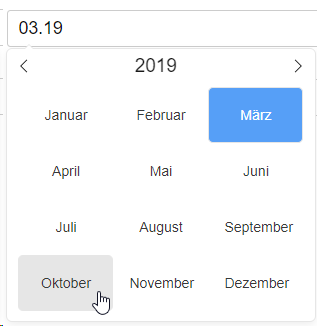
Just wanted to write a small update about the months selector, since so many people are waiting for the feature: work is under way and this will soon be available as a separate plugin.
Here's a small preview of the current progress:
 viorelsfetea
on 14 Mar 2019
viorelsfetea
on 14 Mar 2019
Hi, @viorelsfetea!
I've seen that you removed the label "will-implement", but reading the pull request https://github.com/flatpickr/flatpickr/pull/1699, it's just about month selection and not is about year selection.
The year picker will be implemented? :thinking:
 fernahh
on 16 Apr 2019
fernahh
on 16 Apr 2019
Hi @fernahh,
That is correct. Flatpickr comes with its own type of year selector and, at this point, we feel that it offers a better UX and it's more intuitive than clicking on the year to show a list of other years
viorelsfetea
on 17 Apr 2019
That is correct. Flatpickr comes with its own type of year selector and, at this point, we feel that it offers a better UX and it's more intuitive than clicking on the year to show a list of other years
Hi @viorelsfetea,
I'm looking forward to playing w/ the new picker, but noticed it wasn't released yet: https://github.com/flatpickr/flatpickr/releases
When to expect the release? Also, is there a way/link/playground to see how this month/year picker works?
Thanks!
 catalinred
on 17 Apr 2019
catalinred
on 17 Apr 2019
After spending hours playing with other options for a simple month + year selector, I am getting desperate. I'm already using flatpickr for normal date selections, and this will be a massive timesaver for me. Looking forward to testing this out!
 croane
on 7 May 2019
croane
on 7 May 2019
+1 please save my life!!!
 peyobr
on 13 May 2019
peyobr
on 13 May 2019
+1
 kmluc
on 16 May 2019
kmluc
on 16 May 2019
Guys, v4.6 is out and includes a basic month selector. A fancier version (what most of you expect, I think) will be in the next release :)
chmln
on 3 Jun 2019
I can't seem to get this to work. I used the code that was included in the pull request and included the index.js plugin file, but it can't find the JS class monthSelect. How can I get this working?
croane
on 4 Jun 2019
I can't seem to get this to work. I used the code that was included in the pull request and included the index.js plugin file, but it can't find the JS class
monthSelect. How can I get this working?
Use: monthSelectPlugin.
mordekasg
on 4 Jun 2019
Thanks, @mordekasg! This config worked:
{
  static: true,
  altInput: true,
  plugins: [new monthSelectPlugin({shorthand: false, dateFormat: "Y-m-d", altFormat: "M Y"})]
}
@chmln : Is there any option available to disable this monthSelect? coz I dont want this functionality by default.
 Kinjalbagaria
on 5 Jun 2019
Kinjalbagaria
on 5 Jun 2019
@chmln I agree with @Kinjalbagaria. Please, make new functionality disabled by default. I want a simple text, not ugly <select>.
 abriginets
on 15 Jun 2019
abriginets
on 15 Jun 2019
@Kinjalbagaria @JamesJGoodwin
I think this thread is about the month select plugin which is different to the <SELECT> month function which was added recently. As you have found out <SELECT> doesnt look great in a lot of browsers and cant be styled.
I think you are looking for this issue
 mikes-gh
on 17 Jun 2019
mikes-gh
on 17 Jun 2019
Thanks, @mordekasg! This config worked:
{
  static: true,
  altInput: true,
  plugins: [new monthSelectPlugin({shorthand: false, dateFormat: "Y-m-d", altFormat: "M Y"})]
}
Should I need to import the monthSelectPlugin on the component? I see this error "Uncaught ReferenceError: monthSelectPlugin is not defined". If some can help please.
 el-mark
on 20 Jun 2019
el-mark
on 20 Jun 2019
You need
<link rel="stylesheet" href="https://cdn.jsdelivr.net/npm/flatpickr@latest/dist/plugins/monthSelect/style.css">
in your HEAD section
and
<script src="https://cdn.jsdelivr.net/npm/flatpickr@latest/dist/plugins/monthSelect/index.js"></script>
in your scripts section
mikes-gh
on 20 Jun 2019
If anyone struggling with it, here's how to load that plugin in Rails' webpacker
import flatpickr from 'flatpickr'
require("flatpickr/dist/flatpickr.css")

import monthSelectPlugin from 'flatpickr/dist/plugins/monthSelect'
require('flatpickr/dist/plugins/monthSelect/style.css')
 artur79
on 11 Mar 2021
artur79
on 11 Mar 2021
Related issues
 CorentinMic
·
3Comments
CorentinMic
·
3Comments
 719media
·
3Comments
719media
·
3Comments
 mchaves-ciandt
·
3Comments
mchaves-ciandt
·
3Comments
 titiyoyo
·
3Comments
titiyoyo
·
3Comments
 mgohin
·
4Comments
mgohin
·
4Comments
Most helpful comment
+1 for this feature. May suggest the implementation of year range selection as well. For eg; Jan 2001 - Dec 2010