Flask: Input stream not automatically drained at teardown.
I'm not sure if this is intended behaviour and maybe I should know better, but I spent ages trying to figure out why I was getting a code 400, message Bad request syntax error and it turned out to be because I was not consuming the data associated with a request when raising an Unauthorized exception.
This seems to be a massive hole because if you are not expecting data with a request and so don't read anything then that data is left in the input stream (assuming keep-alive) and so forms the start of the next request. In fact I have even tried sending a request with another request in the data and Flask processes that data as if it were the next request and sends that in response to the following request.
I have resolved this issue by copying the body of the finally clause in the wrapper function inside exhaust_stream from formparser.py in pallets/werkzeug and having this new function decorated with @app.teardown_request. This ensures that the input stream is always drained after every request and so left over data is not mis-interpreted as the start of the next request.
Anyway, if I am expected to handle this situation manually as I have done can something be added to the documentation (or if it's already there can you point it out to me, somehow I couldn't find it). Otherwise, I think Flask should drain the input stream so that subsequent requests are always correctly aligned.
 Parakleta
All 19 comments
Please add a minimal example that demonstrates the issue.
 davidism
on 20 Feb 2017
davidism
on 20 Feb 2017
from flask import Flask
from werkzeug.serving import WSGIRequestHandler

WSGIRequestHandler.protocol_version = "HTTP/1.1"
app = Flask(__name__)

@app.route("/")
    return "Hello World!\n"

if __name__ == "__main__":
    app.run()
Then run on the command line in bash or zsh:
curl -X GET --data-binary $'GET /index.html HTTP/1.1\r\n' http://localhost:5000/ http://localhost:5000/
The output from Flask where it is running is:
 * Running on http://127.0.0.1:5000/ (Press CTRL+C to quit)
127.0.0.1 - - [20/Feb/2017 16:46:47] "GET / HTTP/1.1" 200 -
127.0.0.1 - - [20/Feb/2017 16:46:47] "GET /index.html HTTP/1.1" 404 -
127.0.0.1 - - [20/Feb/2017 16:46:47] code 400, message Bad HTTP/0.9 request type ('Host:')
127.0.0.1 - - [20/Feb/2017 16:46:47] "Host: localhost:5000" 400 -
The error here is slightly different to what I was getting in my full application, but from the same section of code (I had code 400, message Bad request syntax).
Parakleta
on 20 Feb 2017
having issues with Flask not responding after Chrome receiving 404 - may be related to this issue.
just posted on SO:
http://stackoverflow.com/questions/42519629/flask-not-processing-other-http-requests-after-chrome-browser-receives-404-respo
 aradnaev
on 28 Feb 2017
aradnaev
on 28 Feb 2017
@aradnaev Your issue is not related. The protocol version must be manually set to HTTP/1.1 or else keep-alive headers manually added to cause this bug, neither of which you are doing. Your issue seems to be that Chrome is holding the connection when it shouldn't.
Parakleta
on 28 Feb 2017
We can't replicate this.
davidism
on 23 May 2017
Sorry, but did you try the example I provided? Because I still have the problem with Python 2.7.13 and Flask 0.13-dev. There was a missing line in my sample, between the @app.route and return there should be a def hello():.
In the linked issue #2205 @brianrusso says that he cannot replicate the curl behaviour, but his post shows a similar Flask error showing that Flask is misbehaving.
Can you please post the result of running the example I provided.
Parakleta
on 23 May 2017
Yes, we tried your example, with multiple different clients making requests, without encountering the error you had.
davidism
on 23 May 2017
I tried your example, but doing a 'GET / HTTP/1.1' did not result in any error.
brian@engel:~/flask-test$ nc localhost 5000
GET / HTTP/1.1

HTTP/1.1 200 OK
Content-Type: text/html; charset=utf-8
Content-Length: 13
Server: Werkzeug/0.12.2 Python/2.7.12
Date: Tue, 23 May 2017 01:39:16 GMT

Hello World!
127.0.0.1 - - [22/May/2017 18:39:16] "GET / HTTP/1.1" 200 -
Am I missing something when replicating?
 brianrusso
on 23 May 2017
brianrusso
on 23 May 2017
Thanks. The curl line that I gave actually does 3 things. It chains two GET requests one after the other (thus making use of keep-alive), but then also sends additional data with the get request, specifically being the carefully crafted string "GET /index.html HTTP/1.1\r\n". The idea is to create a stream of data that looks like a regular GET request, followed by my crafted one, and then have the second GET request return the results of the crafted one.
Parakleta
on 23 May 2017
Okay thanks I understand a bit more now. So your thought is that the werkzeug caching is not exhausting the pipeline, which then could result in some type of injection situation?
brianrusso
on 23 May 2017
Whoever is responsible (flask or werkzeug) for draining the pipeline is not doing it. I'm not sure who should control that behaviour.
Regarding the consequences, the injection was just the easiest way to show it. I don't think there is really an attack vector there anymore than a malformed Content-Length header would provide, the issue is more that a valid (i.e. well-formed) request can cause the failure of a subsequent request.
Parakleta
on 23 May 2017
Okay. Thanks for the clarification. I had misunderstood the issue. I will look into it some more.
brianrusso
on 23 May 2017
Okay I agree there is definitely something odd going on here.
@Parakleta This is the issue, correct?
from flask import Flask, request
from werkzeug.serving import WSGIRequestHandler

#WSGIRequestHandler.protocol_version = "HTTP/1.1"
app = Flask(__name__)

@app.route("/fudge")
def fudge():
  return "Fudge\n"

@app.route("/taffy")
def taffy():
  return "Taffy\n"

if __name__ == "__main__":
    app.run()
With protocol_version commented
brian@engel:~/flask-test$ curl -X GET --data-binary $'GET /fudge HTTP/1.1\r\n' http://localhost:5000/taffy http://localhost:5000/taffy localhost:5000/taffy localhost:5000/taffy
Taffy
Taffy
Taffy
Taffy
protocol_version set to HTTP/1.1
brian@engel:~/flask-test$ curl -X GET --data-binary $'GET /fudge HTTP/1.1\r\n' http://localhost:5000/taffy http://localhost:5000/taffy localhost:5000/taffy localhost:5000/taffy
Taffy
Fudge
Fudge
Fudge
@davidism please re-open this issue.
brianrusso
on 23 May 2017
Yes, that is exactly the issue.
Parakleta
on 23 May 2017
@brianrusso you mentioned at the sprint that you had an idea for this. Do you still have time to make a PR or at least write some notes?
davidism
on 28 May 2017
Running the app with Gunicorn does not have this issue.
This happens even with a basic http.server.SimpleHTTPRequestHandler from the standard library, which is what WSGIRequestHandler is based off. This should probably be reported to Python as well.
It's definitely not a Flask issue, if we were to fix it, it would be in Werkzeug.
davidism
on 10 Jul 2017
Closing this, please reopen against Werkzeug if it's still an issue for you. However, do remember that the dev server is only for development, and production servers already drain the input.
davidism
on 24 Feb 2018
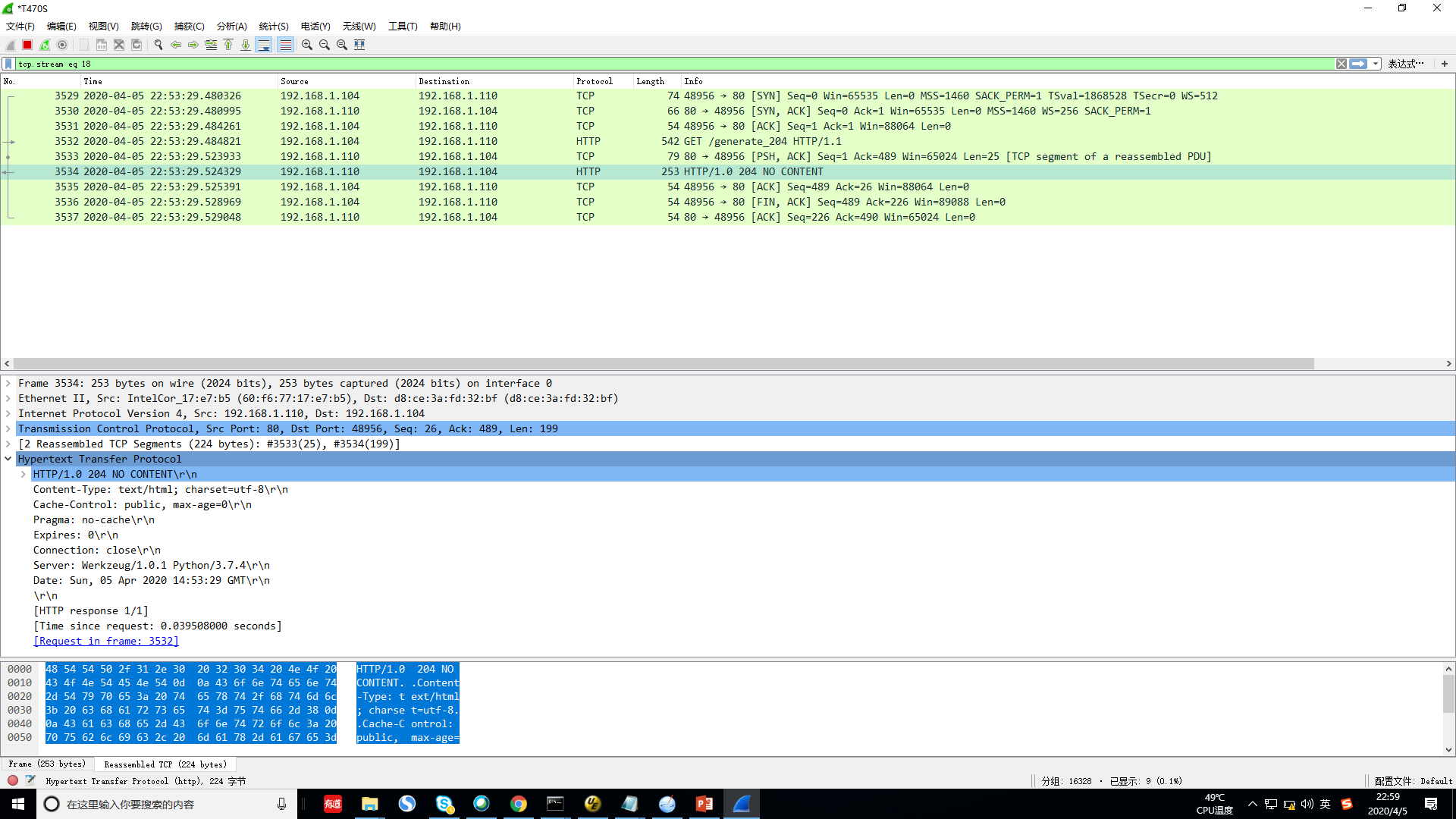
hi, i meet the same issue.
When i use wireshark to capture packet, i see HTTP brower is send TCP FIN to close TCP connection, while Flask not send FIN. and TCP is not close.
 panxy2013
on 5 Apr 2020
panxy2013
on 5 Apr 2020
The original report is correct. This is a spec violation though WSGI is unclear if the server or app should handle it.
From my experience this is the responsibility of the app which is why werkzeug's form parser drains.
However if nobody triggers parsing then it's still buggy.
I ran into this again today and would prefer we fix this in Flask itself.
@davidism your call.
 mitsuhiko
on 13 Jul 2020
mitsuhiko
on 13 Jul 2020
Related issues
 maangulo12
·
4Comments
maangulo12
·
4Comments
 jab
·
4Comments
jab
·
4Comments
 xliiv
·
3Comments
davidism
·
3Comments
xliiv
·
3Comments
davidism
·
3Comments
 davidhariri
·
3Comments
davidhariri
·
3Comments