Flask-socketio: Not upgrading to Websockets (nginx, uwsgi, gevent production setup)
Your question
I am setting up my production environment and whilst everything works, I don't think requests are being upgraded from long-polling to websocket. Every time I send a message from the client, a new POST request and a subsequent GET request are sent.
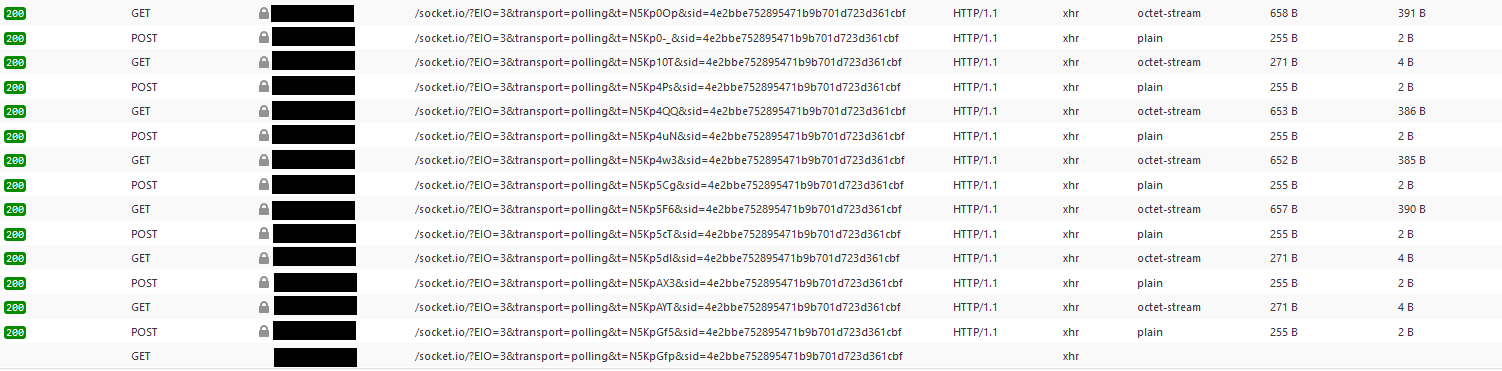
I am running on a (single instance) Ubuntu 18.04. I have setup NGINX as a reverse proxy. Server is uWSGI with gevent. I have a separate Redis instance for the message queue.
The client is a website using the Javascript SocketIO library.
My setup
myapp/__init__.py
from gevent import monkey
monkey.patch_all()

# ...

def create_app():
    app = Flask(__name__)
    socketio.init_app(app,
        message_queue=app.config.get('REDIS_ENDPOINT'),
        async_mode='gevent',
    cors_allowed_origins=[app.config.get('FRONTEND_ORIGIN')])

    # ...
application.py
from myapp import create_app, socketio

application = app = create_app()

if __name__ == '__main__':
    socketio.run(application, host=application.config.get('APP_HOST'), log_output=application.config.get('LOGGING', False))
nginx config
server {
    server_name mydomain.com;

    location / {
        include uwsgi_params;
        uwsgi_pass unix:/home/ubuntu/myapp/myapp.sock;
    }

    listen 443 ssl; # managed by Certbot
    ssl_certificate /etc/letsencrypt/live/mydomain.com/fullchain.pem; # managed by Certbot
    ssl_certificate_key /etc/letsencrypt/live/mydomain.com/privkey.pem; # managed by Certbot
    include /etc/letsencrypt/options-ssl-nginx.conf; # managed by Certbot
    ssl_dhparam /etc/letsencrypt/ssl-dhparams.pem; # managed by Certbot

}
server {
    if ($host = mydomain.com) {
        return 301 https://$server_name$request_uri;
    } # managed by Certbot


    listen 80;
    server_name mydomain.com;
    return 404; # managed by Certbot


}
server {
    location /socket.io/ {
        proxy_http_version 1.1;
        proxy_set_header Upgrade $http_upgrade;
        proxy_set_header Connection "upgrade";
        proxy_pass http://unix:/home/ubuntu/myapp/myapp.sock;
    }
}
myapp.ini
[uwsgi]
module = application:app
logto = /var/log/uwsgi/myapp.log

master = true
gevent = 1000
http-websockets = true
socket = myapp.sock
chmod-socket = 660
vacuum = true
die-on-term = true
client setup
let socket = io.connect(wss://mydomain.com/privatenamespace);
I am not sure what the issue is - I assume something in my NGINX or uWSGI config? There are no error messages as you can see (I have also checked the NGINX and uWSGI logs and they don't seem to be outputting any errors).
 petargyurov
All 15 comments
I believe the socket.io location block should be inside the server section for port 443. Why did you put it in a completely separate server block?
 miguelgrinberg
on 7 Apr 2020
miguelgrinberg
on 7 Apr 2020
I believe the socket.io location block should be inside the server section for port 443. Why did you put it in a completely separate server block?
@miguelgrinberg I'm new at this, so when I saw that certbot created its own block I assumed that it's a convention.
I moved it as per your instructions and I am now getting 502s. I need a moment to investigate.
petargyurov
on 7 Apr 2020
Looking at your nginx config again, here is another mistake:
proxy_pass http://unix:/home/ubuntu/myapp/myapp.sock;
This should be:
proxy_pass http://unix:/home/ubuntu/myapp/myapp.sock:/socket.io;
@miguelgrinberg Ok, I have fixed that. Still getting 502. The logs are outputting the following:
/var/log/nginx/error.log
2020/04/07 15:45:49 [error] 27850#27850: *1 upstream prematurely closed connection while reading response header from upstream, client: 77.98.167.224, server: mydomain.com, request: "GET /socket.io/?EIO=3&transport=polling&t=N5LKREm HTTP/1.1", upstream: "http://unix:/home/ubuntu/myapp/myapp.sock:/socket.io?EIO=3&transport=polling&t=N5LKREm", host: "mydomain.com", referrer: "https://myfrontend.com/client/messages/bdbc4817-fcf7-4bbd-83d0-4c94e8b57235/11ffd364-e5c2-4191-97e0-86bf70885ceb"
/var/log/uwsgi/myapp.log
invalid request block size: 21573 (max 4096)...skip
I'm investigating what this means...
petargyurov
on 7 Apr 2020
I tried increasing the buffer size but that just resulted in the initial HTTP request hanging and eventually resulting in a 502.
Then I found this, from https://uwsgi-docs.readthedocs.io/en/latest/ThingsToKnow.html
If you receive ‘21573’ as the request block size in your logs, it could mean you are using the HTTP protocol to speak with an instance speaking the uwsgi protocol. Don’t do this.
I am not sure how to interpret that.
I wonder if it's because my app is serving both HTTP and websocket requests? Or at least that's what I am trying to do... my app consists of normal HTTP endpoints and a few message handlers.
petargyurov
on 7 Apr 2020
Oh wait. You are running your uWSGI as a uwsgi server instead of HTTP. I don't think the uwsgi mode supports websocket. I might be wrong, but every time I used uWSGI I've put it in HTTP mode so that websocket is available. So in nginx you would use proxy_pass instead of uwsgi_pass in all your location blocks. Give that a try.
miguelgrinberg
on 7 Apr 2020
Alright, I made the changes but the requests are now returning a 404. Given that I might have made some mistakes, here is the new configuration:
nginx config
server {
    server_name mydomain.com;

    location / {
        proxy_http_version 1.1;
        proxy_pass http://0.0.0.0:5000;
    }

    location /socket.io/ {
        proxy_http_version 1.1;
        proxy_set_header Upgrade $http_upgrade;
        proxy_set_header Connection "upgrade";
        proxy_pass http://0.0.0.0:5000/socket.io;
    }

    listen 443 ssl; # managed by Certbot
    ssl_certificate /etc/letsencrypt/live/mydomain.com/fullchain.pem; # managed by Certbot
    ssl_certificate_key /etc/letsencrypt/live/mydomain.com/privkey.pem; # managed by Certbot
    include /etc/letsencrypt/options-ssl-nginx.conf; # managed by Certbot
    ssl_dhparam /etc/letsencrypt/ssl-dhparams.pem; # managed by Certbot

}
server {
    if ($host = mydomain.com) {
        return 301 https://$server_name$request_uri;
    } # managed by Certbot


    listen 80;
    server_name mydomain.com;
    return 404; # managed by Certbot


}
myapp.ini
[uwsgi]
module = application:app
logto = /var/log/uwsgi/myapp.log

processes = 1
protocol = http
master = true
gevent = 1000
http-websockets = true
http-socket = 0.0.0.0:5000
chmod-socket = 660
vacuum = true
die-on-term = true
Does that look right?
Do I have to update my client code to this:
let socket = io.connect(https://mydomain.com/privatenamespace);?
petargyurov
on 7 Apr 2020
The only thing I see is that you have a trailing slash in the /socket.io/ location. This should be /socket.io to match the path in the proxy_pass directive.
miguelgrinberg
on 8 Apr 2020
Good eye. That fixed the 404s but now I'm back to square one: still stuck on long-polling. I updated the host to 127.0.0.1 instead of 0.0.0.0 as a sanity check but no change.
Logs don't seem to be showing anything out of the ordinary. The only thing I can see is potentially this, in the uwsgi logs:
a4cbfb4476d4483c9b88941635947047: Received packet PING data None
a4cbfb4476d4483c9b88941635947047: Sending packet PONG data None
[pid: 30149|app: 0|req: 256/255] 127.0.0.1 () {52 vars in 1865 bytes} [Wed Apr  8 08:16:01 2020] POST /socket.io/?EIO=3&transport=polling&t=N5Ot3wV&sid=a4cbfb4476d4483c9b88941635947047 => generated 2 bytes in 0 msecs (HTTP/1.1 200) 3 headers in 133 bytes (3 switches on core 999)
[pid: 30149|app: 0|req: 256/256] 127.0.0.1 () {48 vars in 1805 bytes} [Wed Apr  8 08:15:36 2020] GET /socket.io/?EIO=3&transport=polling&t=N5Oszpq&sid=a4cbfb4476d4483c9b88941635947047 => generated 4 bytes in 25000 msecs (HTTP/1.1 200) 3 headers in 147 bytes (3 switches on core 997)
Bit stumped. Could it be an SSL issue?
petargyurov
on 8 Apr 2020
Can you show me a complete log, from the start of the server and with it running for a few seconds?
miguelgrinberg
on 8 Apr 2020
Sure. I recompiled nginx with debugging enabled for the error log. It's a lot of info so I've pasted a portion of it here:
nginx error.log
https://pastebin.com/Ke9cV2tN
nginx access.log
https://pastebin.com/WZg5h6F1
uwsgi myapp.log
https://pastebin.com/JNN5HWmg
Let me know if I can do anything else to assist.
petargyurov
on 8 Apr 2020
The only thing I needed was the application log, but you haven't provided it from the start of the server, this is just a section of logs from the middle of a session. Could you restart your uwsgi server so that a start is capture in the logs?
miguelgrinberg
on 8 Apr 2020
My bad. Here is the start of the server:
*** Starting uWSGI 2.0.18 (64bit) on [Wed Apr  8 11:22:26 2020] ***
compiled with version: 7.5.0 on 06 April 2020 13:38:01
os: Linux-4.15.0-1065-aws #69-Ubuntu SMP Thu Mar 26 02:17:29 UTC 2020
nodename: ip-172-31-18-208
machine: x86_64
clock source: unix
pcre jit disabled
detected number of CPU cores: 1
current working directory: /home/ubuntu/myapp
detected binary path: /home/ubuntu/myapp/venv/bin/uwsgi
your processes number limit is 3839
your memory page size is 4096 bytes
detected max file descriptor number: 1024
- async cores set to 1000 - fd table size: 1024
lock engine: pthread robust mutexes
thunder lock: disabled (you can enable it with --thunder-lock)
uwsgi socket 0 bound to TCP address 127.0.0.1:5000 fd 3
Python version: 3.6.9 (default, Nov  7 2019, 10:44:02)  [GCC 8.3.0]
Python main interpreter initialized at 0x55db06e63200
python threads support enabled
your server socket listen backlog is limited to 100 connections
your mercy for graceful operations on workers is 60 seconds
mapped 21036928 bytes (20543 KB) for 1000 cores
*** Operational MODE: async ***
Server initialized for gevent.
WSGI app 0 (mountpoint='') ready in 1 seconds on interpreter 0x55db06e63200 pid: 5351 (default app)
*** uWSGI is running in multiple interpreter mode ***
spawned uWSGI master process (pid: 5351)
spawned uWSGI worker 1 (pid: 5372, cores: 1000)
*** running gevent loop engine [addr:0x55db052e8410] ***
Okay, great. I should have noticed this above when you showed the Python code, but I missed it then. You are using the gevent async mode. In general it is best to not set the async mode option, as it automatically finds the best mode based on how you are running the application. In this case the correct async mode is gevent_uwsgi, which would have been selected for you had you not forced the gevent mode in your code.
In case you wonder, gevent is for standalone gevent and gevent-websocket, while gevent_uwsgi is for the uWSGI embedded gevent and the native uWSGI websockets. Give that a try.
miguelgrinberg
on 8 Apr 2020
That worked!

Thank you for all the help Miguel! I learned a lot from all this!
petargyurov
on 8 Apr 2020
Related issues
 blstdmi
·
3Comments
blstdmi
·
3Comments
 lnunno
·
4Comments
lnunno
·
4Comments
 nayebare
·
4Comments
nayebare
·
4Comments
 EndenDragon
·
3Comments
EndenDragon
·
3Comments
 hrmon
·
5Comments
hrmon
·
5Comments
Most helpful comment
That worked!
Thank you for all the help Miguel! I learned a lot from all this!