Flask-socketio: [ImportError] ModuleNotFoundError: No module named 'socketio.exceptions'
Your question
When I want to run my flask server with socketio ImportError is raised. Do you have any idea what could be wrong? Thank you so much.
Project structure:
wsgi.py
from application import create_app

app = create_app()

if __name__ == "__main__":
    app.run(host=app.config['SERVER_HOST'])
application.py
from flask import Flask
from core.models.abstract.base_model import db
from mqtt.client import MqttClient
from socketio.client import SocketIOClient

mqtt_client = MqttClient()
socketio_client = SocketIOClient()


def create_app():
    """Construct the core application."""
    app = Flask(__name__, instance_relative_config=False)

    # Application Configuration
    app.config.from_object('settings.development.DevelopmentConfig')

    with app.app_context():
        # Import parts of our application
        from api import routes
        from core.handlers.db_handler import init_logger
        # Create routes
        app.register_blueprint(routes.blueprint)

        db.init_app(app)
        mqtt_client.init(app)
        socketio_client.init(app)

        # Create tables for our models
        db.create_all()

        # Initializing logger
        init_logger()

        mqtt_client.connect()
        socketio_client.run()

    return app
client.py
import logging
from random import random
from threading import Thread, Event
from time import sleep
from flask_socketio import SocketIO

socketio = None
thread = Thread()
thread_stop_event = Event()


class SocketIOClient(object):
    def __init__(self):
        self.app = None
        self.connected_clients = {}

    def init(self, app):
        global socketio

        self.app = app
        socketio = SocketIO(app)

    def run(self):
        socketio.run(self.app)

    @socketio.on('connect', namespace='/test')
    def on_connect(self, **kwargs):
        global thread
        logging.info(f'Client successfully connected.')

        if not thread.is_alive():
            thread = RandomThread()
            thread.start()

    @socketio.on('disconnect')
    def on_disconnect(self, **kwargs):
        logging.info(f'Client successfully disconnected.')


class RandomThread(Thread):
    def __init__(self):
        self.delay = 1
        super(RandomThread, self).__init__()

    def random_number_generator(self):
        logging.info(f'Making random numbers...')

        while not thread_stop_event.is_set():
            number = round(random() * 10, 3)
            socketio.emit('new_number',  {'number': number}, namespace='/test')
            sleep(self.delay)

    def run(self):
        self.random_number_generator()
When I want to run my flask server an Import error is raised. I wanted to find error via debugger, but this Exception is raised before starting my flask server. It is raised directly in wsgi.py.
Exception:
Usage: python -m flask run [OPTIONS]

Error: While importing "wsgi", an ImportError was raised:

Traceback (most recent call last):
  File "C:\Users\zurek\.virtualenvs\brewmaster-backend-pQW14IcK\lib\site-packages\flask\cli.py", line 240, in locate_app
    __import__(module_name)
  File "Project\wsgi.py", line 2, in <module>
    from application import create_app
  File "Project\application.py", line 4, in <module>
    from socketio.client import SocketIOClient
  File "Project\socketio\client.py", line 5, in <module>
    from flask_socketio import SocketIO
  File "\.virtualenvs\brewmaster-backend-pQW14IcK\lib\site-packages\flask_socketio\__init__.py", line 22, in <module>
    from socketio.exceptions import ConnectionRefusedError
ModuleNotFoundError: No module named 'socketio.exceptions'
 zurek11
All 7 comments
Do you have a socketio package in your project with a client.py module inside? If you do, these are shadowing a package and module of the same name in the python-socketio package. You may want to try renaming thing to something else.
 miguelgrinberg
on 17 Nov 2019
miguelgrinberg
on 17 Nov 2019
Try pip uninstall flask-socketio, to uninstall, then pip install flask-socketio to reinstall. It worked for me 💯
 bolorundurovj
on 10 Dec 2019
bolorundurovj
on 10 Dec 2019
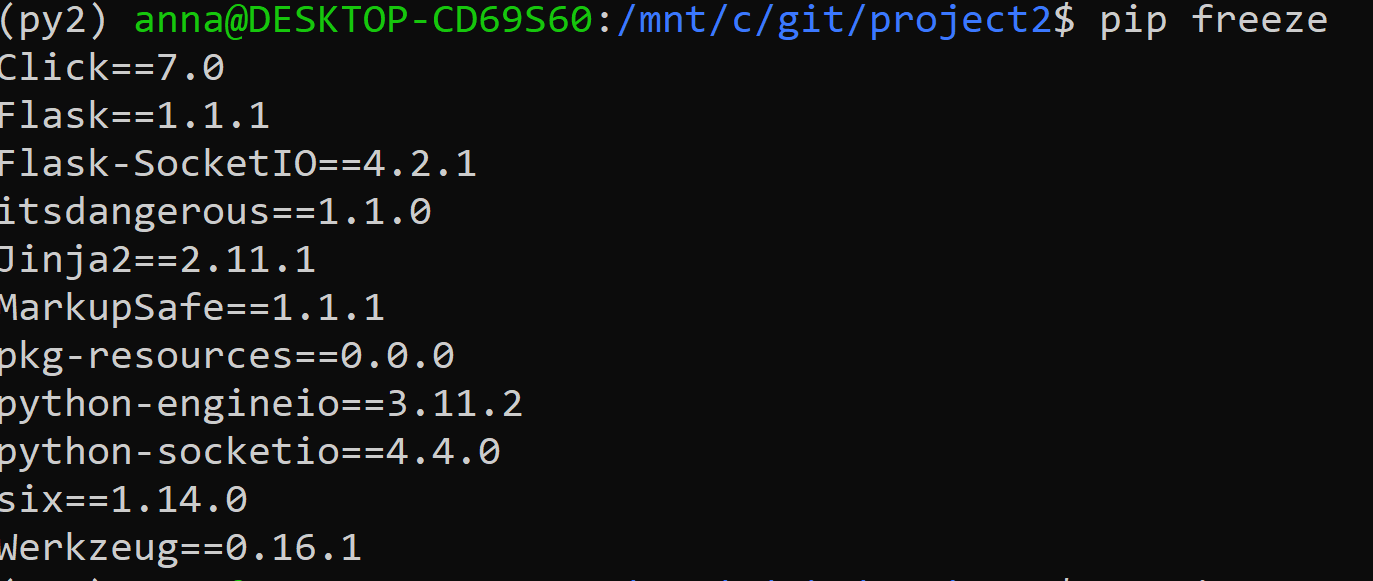
I have problems installing flask_socketio (when running flask, I get "ModuleNotFoundError: No module named 'flask_socketio'"). I tried setting FLASK_DEBUG=0 (apparently that worked for someone I read) and tried uninstalling and re-installing (re-installing when installed just gives me a bunch of "Requirement already satisfied"). I set up a brand new virtual environment and if it helps below is my pip freeze. Am using python version 3.6.8. (Apologies- I'm a beginner,so maybe there is too much or incomplete info..) Thanks in advance!
 annamartinez212
on 1 Feb 2020
annamartinez212
on 1 Feb 2020
@annamartinez21284 What is the complete error that you are getting? Including the stack trace please.
miguelgrinberg
on 1 Feb 2020

Here you go
annamartinez212
on 2 Feb 2020
I don't see anything wrong. I suggest you trash your virtualenv and make a new one, maybe something is not right there.
miguelgrinberg
on 2 Feb 2020
It had to be that - works now - thanks!
annamartinez212
on 3 Feb 2020
Related issues
 Qinusty
·
3Comments
Qinusty
·
3Comments
 denisb411
·
4Comments
denisb411
·
4Comments
 benjaminturley
·
4Comments
benjaminturley
·
4Comments
 nh916
·
3Comments
nh916
·
3Comments
 ypperlig
·
5Comments
ypperlig
·
5Comments
Most helpful comment
Try pip uninstall flask-socketio, to uninstall, then pip install flask-socketio to reinstall. It worked for me 💯