Flask-socketio: message_queue isn't working
Hey
When adding message_queue="redis://" to socketio, client's on method is never fired.
I tried embedded, gunicon and uwsgi deployment.
Same when num of workers is 1.
server
app = Flask(__name__)
socketio = SocketIO(app, message_queue='redis://') # tried redis://localhost:6379/2 too but it isn't working
client (socketio-client)
session = io('/', {
    reconnection: true,
    reconnectionDelay: 500,
    reconnectionAttempts: 10
});

session.on('connect', () => {
    alert('connected');
})
And another question :)
I'm running flask-socketio over gunicron with 1 worker.
My app is using only rooms and I never send a message to a single user, should it be ok to use gunicron and not uwsgi with load balancer?
 ericman93
All 14 comments
Any error messages in the server's log? Please enable verbose logging by adding logger=True, engineio_logger=True to your SocketIO constructor.
 miguelgrinberg
on 30 Dec 2018
miguelgrinberg
on 30 Dec 2018
No error messages in server logs, and no logs after changing constructor's parameters
app = Flask(__name__)
socketio = SocketIO(app, message_queue='redis://', logger=True, engineio_logger=True)
socketio.run(app, host="0.0.0.0", port=1337, debug=True)
That's really not possible, once you enable logging you should see some new stuff in the terminal. Can you show me what you see right after you start the server?
miguelgrinberg
on 31 Dec 2018
those are the log right after I start the server
DEBUG:passlib.registry:registered 'pbkdf2_sha256' handler: <class 'passlib.handlers.pbkdf2.pbkdf2_sha256'>
INFO:werkzeug: * Restarting with stat
pydev debugger: process 5582 is connecting

DEBUG:passlib.registry:registered 'pbkdf2_sha256' handler: <class 'passlib.handlers.pbkdf2.pbkdf2_sha256'>
WARNING:werkzeug: * Debugger is active!
INFO:werkzeug: * Debugger PIN: 111-760-464
(5582) wsgi starting up on http://0.0.0.0:1337
(5582) accepted ('127.0.0.1', 59805)
I just updated the version from 2.9.3 to the newest one
When adding message_queue all requests to the server got stuck and after a while I'm getting
Error occured while trying to proxy to: localhost:8080/user
I'm working with webpack and this is how the proxy look like
proxy: {
      '/api/': {
        target: 'http://127.0.0.1:1337',
        pathRewrite: { '^/api': '' }
      },
      '/socket.io/': {
        target: 'http://127.0.0.1:1337',
        ws: true
      }
    }
There must be something else that prevents the logs from showing. Without the logs it is really going to be hard to figure out what's going on.
miguelgrinberg
on 31 Dec 2018
Just noticed that I disabled those specific logs
where no message queue:
INFO:engineio.server:Server initialized for eventlet.
INFO:engineio.server:fc012f910e504d4682b0d695d982791c: Sending packet OPEN data {'sid': 'fc012f910e504d4682b0d695d982791c', 'upgrades': [], 'pingTimeout': 60000, 'pingInterval': 25000}
INFO:engineio.server:fc012f910e504d4682b0d695d982791c: Sending packet MESSAGE data 0
INFO:engineio.server:fc012f910e504d4682b0d695d982791c: Received request to upgrade to websocket
INFO:engineio.server:fc012f910e504d4682b0d695d982791c: Upgrade to websocket successful
INFO:engineio.server:fc012f910e504d4682b0d695d982791c: Received packet MESSAGE data 2["join","project@8433cc887e944de58497b3e57d4a02ac"]
when the message queue is given only when log appeare and then the server stuck, and donsen't responds
INFO:engineio.server:Server initialized for eventlet.
INFO:engineio.server:c77e2ddce1eb4f78bb866ec10d131467: Sending packet OPEN data {'sid': 'c77e2ddce1eb4f78bb866ec10d131467', 'upgrades': [], 'pingTimeout': 60000, 'pingInterval': 25000}
Did you check from Redis if a connection is being made? All seems to indicate your are not running Redis in localhost:6379. Are you?
miguelgrinberg
on 31 Dec 2018
running redis in docker

and celery is able to connect to celery without any problems via
redis://localhost:6379/0
Did you monkey patch the Python standard library? Eventlet does not support Redis natively, you have to monkey patch.
miguelgrinberg
on 31 Dec 2018
I didn't, server is up and running now, Thanks!
Although I have now exception from SqlAlchemy and postgress
ERROR:sqlalchemy.pool.QueuePool:Error closing
psycopg2.ProgrammingError: close cannot be used while an asynchronous query is underway
 cursor
seems that I need to work with aiopg, but I need to find a way to intergrate it with flask-sqlalchemy
ericman93
on 1 Jan 2019
That is a postgres error. You need to make sure each thread uses a different session. Flask-SQLAlchemy's db.session makes it easy, if you are managing your own sessions it is harder to do, but necessary in a multi-threaded application.
miguelgrinberg
on 1 Jan 2019
I have a problem with consent. It really can't be solved.
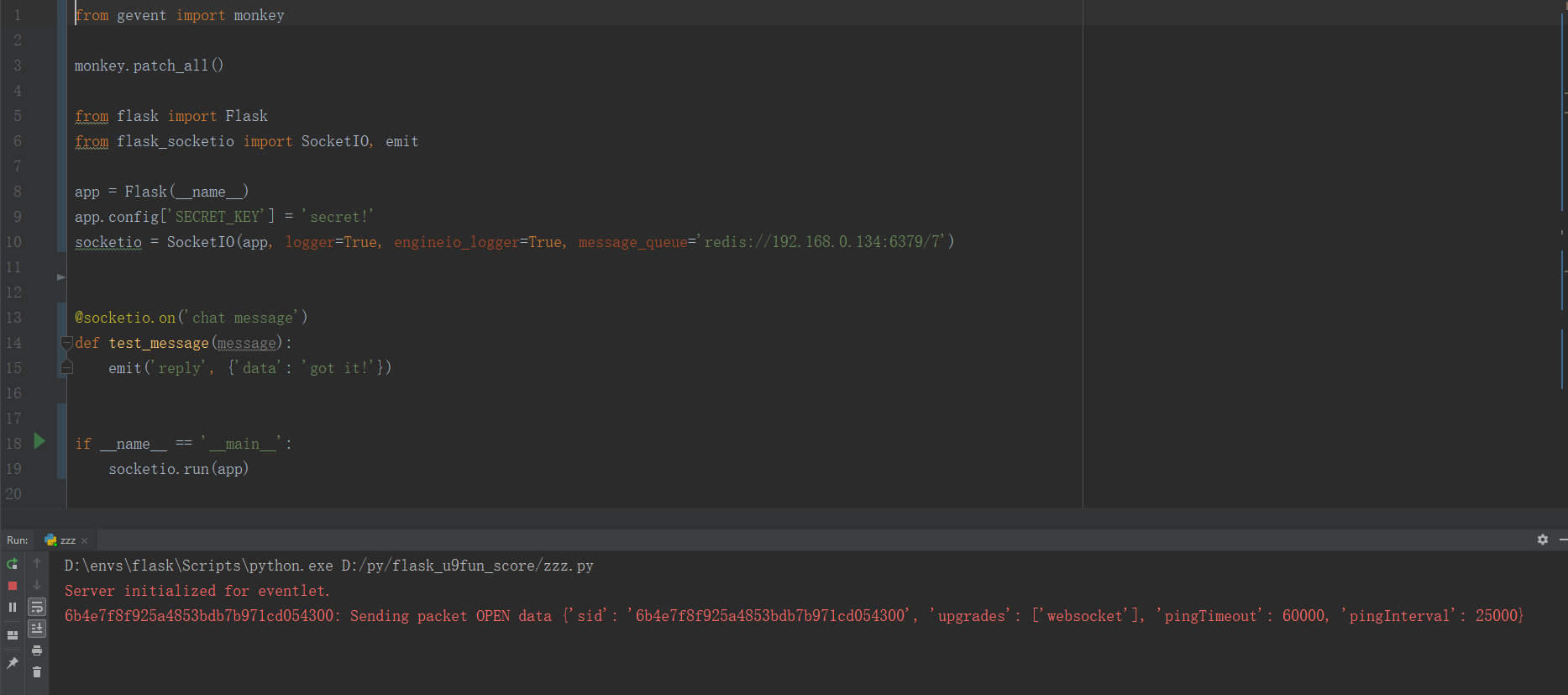
As long as the use of redis the entire site has been blocked.
I spent two days trying to find a solution.I'm about to break down.
 eshao731
on 19 Mar 2019
eshao731
on 19 Mar 2019
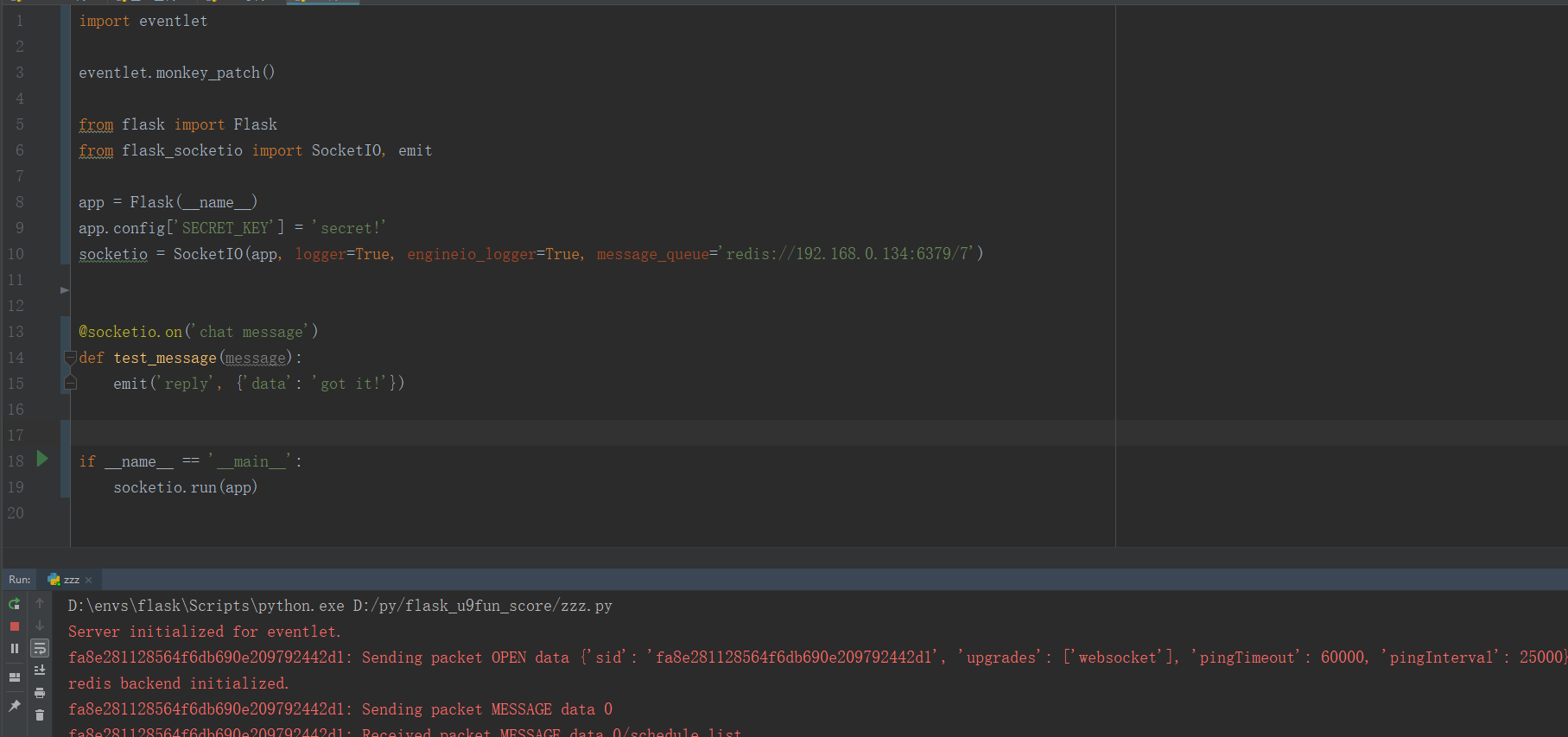
@eshao731 you are monkey patching for gevent, yet you are using the eventlet web server. You may want to uninstall eventlet from your virtualenv, or else force the use of gevent by doing SocketIO(async_mode='gevent').
miguelgrinberg
on 19 Mar 2019
@miguelgrinberg Thank you for your answer. It work now!
Because I'm not familiar with eventlet or gevent . I wasted a lot of time looking for this solution. Thank you.
eshao731
on 19 Mar 2019
Related issues
 piyush121
·
3Comments
piyush121
·
3Comments
 nh916
·
3Comments
nh916
·
3Comments
 novice79
·
3Comments
novice79
·
3Comments
 dlernz
·
4Comments
dlernz
·
4Comments
 denisb411
·
4Comments
denisb411
·
4Comments