Flask-socketio: Greenlet error (timeout: timed out)
This problem appeared suddenly, getting all production stuck for days. We are developing a Flask-SocketIO server using gevent.
Things already tried:
- Monkey patch:
#!/usr/bin/env python2
import gevent
from gevent import monkey
gevent.monkey.patch_all()
- Updating everything:
`Flask==1.0.2
Flask-SocketIO==3.1.1
Jinja2==2.10
MarkupSafe==0.23
Werkzeug==0.14
gevent==1.3.7
python-socketio==2.1.1
gevent-websocket==0.10.1
greenlet==0.4.14
itsdangerous==0.24
requests_unixsocket==0.1.5
`
- Using gevent.sleep() or socketio.sleep() to release CPU from long running threads
-Setting ping_timeout and ping_interval variables to many different values:
socketio = SocketIO(app, ping_interval=10000,ping_timeout=5000) - Setting debug to true/false
- Pretty much every other 'fix' from all forums and Github Issues
Complete error message:
`-- Traceback (most recent call last):
--   File "/snap/itron-web-dm/x42/lib/python2.7/site-packages/gevent/pywsgi.py", line 976, in handle_one_response
--     self.run_application()
--   File "/snap/itron-web-dm/x42/lib/python2.7/site-packages/geventwebsocket/handler.py", line 87, in run_application
--     return super(WebSocketHandler, self).run_application()
--   File "/snap/itron-web-dm/x42/lib/python2.7/site-packages/gevent/pywsgi.py", line 924, in run_application
--     self.process_result()
--   File "/snap/itron-web-dm/x42/lib/python2.7/site-packages/gevent/pywsgi.py", line 910, in process_result
--     self.write(data)
--   File "/snap/itron-web-dm/x42/lib/python2.7/site-packages/gevent/pywsgi.py", line 753, in write
--     self._write(data)
--   File "/snap/itron-web-dm/x42/lib/python2.7/site-packages/gevent/pywsgi.py", line 742, in _write
--     self._sendall(data)
--   File "/snap/itron-web-dm/x42/lib/python2.7/site-packages/gevent/pywsgi.py", line 704, in _sendall
--     self.socket.sendall(data)
--   File "/snap/itron-web-dm/x42/lib/python2.7/site-packages/gevent/_socket2.py", line 354, in sendall
--     return _socketcommon._sendall(self, data_memory, flags)
--   File "/snap/itron-web-dm/x42/lib/python2.7/site-packages/gevent/_socketcommon.py", line 355, in _sendall
--     timeleft = __send_chunk(socket, chunk, flags, timeleft, end)
--   File "/snap/itron-web-dm/x42/lib/python2.7/site-packages/gevent/_socketcommon.py", line 295, in __send_chunk
--     data_sent += socket.send(chunk, flags, timeout=timeleft)
--   File "/snap/itron-web-dm/x42/lib/python2.7/site-packages/gevent/_socket2.py", line 340, in send
--     self._wait(self._write_event)
--   File "src/gevent/_hub_primitives.py", line 265, in gevent.__hub_primitives.wait_on_socket
--   File "src/gevent/_hub_primitives.py", line 266, in gevent.__hub_primitives.wait_on_socket
--   File "src/gevent/_hub_primitives.py", line 261, in gevent.__hub_primitives._primitive_wait
--   File "src/gevent/_hub_primitives.py", line 262, in gevent.__hub_primitives._primitive_wait
--   File "src/gevent/_hub_primitives.py", line 46, in gevent.__hub_primitives.WaitOperationsGreenlet.wait
--   File "src/gevent/_hub_primitives.py", line 46, in gevent.__hub_primitives.WaitOperationsGreenlet.wait
--   File "src/gevent/_hub_primitives.py", line 55, in gevent.__hub_primitives.WaitOperationsGreenlet.wait
--   File "src/gevent/_waiter.py", line 151, in gevent.__waiter.Waiter.get
--   File "src/gevent/_greenlet_primitives.py", line 59, in gevent.__greenlet_primitives.SwitchOutGreenletWithLoop.switch
--   File "src/gevent/_greenlet_primitives.py", line 59, in gevent.__greenlet_primitives.SwitchOutGreenletWithLoop.switch
--   File "src/gevent/_greenlet_primitives.py", line 63, in gevent.__greenlet_primitives.SwitchOutGreenletWithLoop.switch
--   File "src/gevent/__greenlet_primitives.pxd", line 35, in gevent.__greenlet_primitives._greenlet_switch
-- timeout: timed out
`
The server start call:
socketio.run(app, host='', port=80,debug=True)
Please ask me for more details if needed. Thank you.
 tiganeteaclaudiu
All 8 comments
It's best to leave the ping interval and timeout values at their defaults values, those are unrelated to your problem. The interval needs to be less than the timeout, in any case.
What was the request that caused the timeout and the stack trace that you copied above? Is it doing anything potentially expensive in terms of CPU?
 miguelgrinberg
on 10 Dec 2018
miguelgrinberg
on 10 Dec 2018
Hello, and sorry for the delay.
It actually happens when loading the page initially. I think we managed to find the core issue causing this: the server is served locally on a device, and clients are connected through ethernet cable. But it turns out some changes caused the interface bridge to be REALLY slow. We think this causes the timeout, as we tried running a basic 'hello world' Flask server that had a 3mb js file import in the index.html. Making it 1mb does not trigger the timeout.
If this persists I'll come back with more info. Thank you so much for your time, I am a huge fan of your work. Have a nice one! :)
tiganeteaclaudiu
on 10 Dec 2018
Soooo I don't think that was it. We used various network diagnosis tools and we came up with nothing relevant. No packet loss, and the latency is fine now after some changes:
mtr diagnosis output:
~$ mtr -rw -c 50 --port 80 192.168.16.1
Start: 2018-12-11T12:11:24+0200
HOST: user@user Loss%   Snt   Last   Avg  Best  Wrst StDev
  1.|-- _gateway                   0.0%    50    1.0   1.0   0.8   1.2   0.1
So the average latency is fine and no packets are lost. Sending a lot of big packets caused no issue either.
Another thing we did is actually transform the Flask-SocketIO app into a simple Flask one. Still no results.
We downgraded the server to this:
main.py:
#!/usr/bin/env python2

from flask import Flask, render_template, url_for, copy_current_request_context, redirect, request, session, send_file, make_response, flash
import os

app = Flask(name, template_folder="/snap/web-dm/current/src/templates/", \
            static_folder="/snap/web-dm/current/src/static", \
            static_url_path="/snap/web-dm/current/src/static")

basedir = os.path.abspath(os.path.dirname(file))

app.config.update(
    SECRET_KEY = 'you-will-never-guess',
)
# Index route
@app.route("/")
@app.route('/home')
def index():
        response = render_template("index.html")
        return response

# Starts the app listening to port 80
if name == "main":
    app.run(host='192.168.16.1',port=80, threaded=True)
index.html:
<!DOCTYPE html>
<html>
    <head>
        <meta charset="UTF-8" />
        <meta name="viewport" content="width=device-width, initial-scale=1.0">
        <meta http-equiv="X-UA-Compatible" content="IE=edge">

        <title>Broken server</title>

    </head>

    <body>

        <h5> HELLO WORLD!</h5>
        <p>This is the server talking</p>
        <p>I am currently sick but I'll be fine soon :)</p>
        <img src=" url_for('static', filename='images/a.jpg') "></img>
        <img src=" url_for('static', filename='images/b.jpg') "></img>
        <img src=" url_for('static', filename='images/c.jpg') "></img>
        <img src=" url_for('static', filename='images/d.jpg') "></img>
        <img src=" url_for('static', filename='images/e.jpg') "></img>


        </script>
    </body>

</html>
As you can see, it imports 5 static files, each aprox 2.5mb. This is the network tab output:
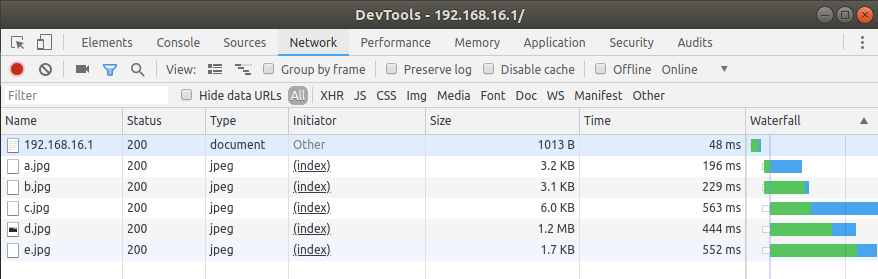
So instead of loading the images, it only loads some data. This is weird because, in apparently random fashion, one of the images will sometimes load entirely, while the others won't. Loading a 4mb static JS file will have the same result.
This issue is frustrating because right now we cannot run the most basic server on our devices.
================================ Other probably not relevant data
-Network interface hosting the server:
br0       Link encap:Ethernet  HWaddr d2:92:42:33:4a:e7
          inet addr:192.168.16.1  Bcast:192.168.16.255  Mask:255.255.255.0
          inet6 addr: fe80::d092:42ff:fe33:4ae7/64 Scope:Link
          UP BROADCAST RUNNING MULTICAST  MTU:1500  Metric:1
          RX packets:685546 errors:0 dropped:0 overruns:0 frame:0
          TX packets:163690 errors:0 dropped:0 overruns:0 carrier:0
          collisions:0 txqueuelen:1000
          RX bytes:772564451 (772.5 MB)  TX bytes:184398481 (184.3 MB)
==============================
What are some tools we can use to diagnose the server? The core of this issue seems to be the server not wanting to send static files completely.
tiganeteaclaudiu
on 11 Dec 2018
Well, if I had to guess I would say that the problem is in the networking drivers in your device. What device is this? Something esoteric or something like a Raspberry Pi?
miguelgrinberg
on 11 Dec 2018
Something like a Raspberry Pi. It's an IoT device. We still have a lot of digging to find the bottom of this. I'll keep you update if this turns out to be Flask related. Thanks again for the answer :)
tiganeteaclaudiu
on 11 Dec 2018
Please reopen if you have more information regarding this issue.
miguelgrinberg
on 7 Apr 2019
Was a solution for this ever discovered? I am having a similar issue when trying to create a KafkaClient in a thread in my Flask app. Seems to be some issue with eventlet and monkey patching hasn't solved anything. Would love an update, thanks!
 grantbrewster
on 22 Jul 2019
grantbrewster
on 22 Jul 2019
Not really. It never got figured out.
lun., 22 iul. 2019, 17:52 grantbrewster notifications@github.com a scris:
Was a solution for this ever discovered? I am having a similar issue when
trying to create a KafkaClient in a thread in my Flask app. Seems to be
some issue with eventlet and monkey patching hasn't solved anything. Would
love an update, thanks!—
You are receiving this because you authored the thread.
Reply to this email directly, view it on GitHub
https://github.com/miguelgrinberg/Flask-SocketIO/issues/853?email_source=notifications&email_token=AI2VJ4HFEFEMX6ANSW5HARLQAXCTRA5CNFSM4GJMUIM2YY3PNVWWK3TUL52HS4DFVREXG43VMVBW63LNMVXHJKTDN5WW2ZLOORPWSZGOD2QFX5A#issuecomment-513825780,
or mute the thread
https://github.com/notifications/unsubscribe-auth/AI2VJ4APRSQWXIXG3QRKKMTQAXCTRANCNFSM4GJMUIMQ
.
tiganeteaclaudiu
on 23 Jul 2019
Related issues
 chaitanyavolkaji
·
3Comments
chaitanyavolkaji
·
3Comments
 hrmon
·
5Comments
hrmon
·
5Comments
 blstdmi
·
3Comments
blstdmi
·
3Comments
 ypperlig
·
5Comments
ypperlig
·
5Comments
 lnunno
·
4Comments
lnunno
·
4Comments
Most helpful comment
Well, if I had to guess I would say that the problem is in the networking drivers in your device. What device is this? Something esoteric or something like a Raspberry Pi?