Flask-socketio: React Native: unable to establish the socket connection
The problem
I'm trying to connect to a Flast socket.io server through React Native and the connection does not get established.
The library versions I use
- React Version: 16.3.1
- React Native Version: 0.55.3
- Socket.io-client Version: 2.1.1
Flast socket.io server terminal output
The Flask socket.io server keeps printing the following message to the terminal.

My React-Native socket.io client handler
this.socket = io(`http://localhost:5000`);

this.socket.on('connect', () => {
   console.log('connected')
});
Expected behavior
Print 'connected' to the debugger console.
Actual behavior
Nothing happens, no errors.
Further information
- I'm able to connect to the same Flask socket.io server using an AngularJS app.
- I'm pretty sure that there's no issue with the socket.io client on the React Native app since, I'm able to connect to NodeJS socket.io servers using that library without any issues.
Can someone help me with this issue please?
 gayashanbc
All 24 comments
The client is not passing the correct session id right after the connection is established, note this log message appears right after the server responds to a connection:
Invalid session None
Can you share your client so that I can debug this problem here?
 miguelgrinberg
on 6 Jun 2018
miguelgrinberg
on 6 Jun 2018
@miguelgrinberg Do you mean the code of the client?
gayashanbc
on 6 Jun 2018
Yes, something I can use to reproduce the connection problem.
miguelgrinberg
on 6 Jun 2018
@miguelgrinberg I have created a sample repository here with the following setup guidelines.
- Clone the repo using
git cline --recurse-submodules https://github.com/gayashanbc/react-native-flask-socketio.git - Navigate to the 'server' folder.
- Make sure that you have the reuired libraries installed and run the command
python3 chat.py - Navigate back to the root folder
- Run
yarn installornpm install - Make sure you have React Native CLI installed and run
react-native run-androidorreact-native run-ios
Notice
Based on your device change the host port accordingly in the App.js file.
  constructor(props){
    super(props);
    this.socket = io(`http://10.0.3.2:5000/chat`);

    this.socket.on('connect', () => {
      console.log('connected')
    });
  }
Genymotion
10.0.3.2
Android Studio Emulator
10.0.2.2
External device
obtain the IP of your computer. (Computer and the device should be on the same network)
gayashanbc
on 6 Jun 2018
Thanks for providing the code. I'm not sure exactly why the react native client misbehaves, but it is clear that it isn't working right. Here is a POST request sent by a working client:
127.0.0.1 - - [06/Jun/2018 10:43:54] "POST /socket.io/?EIO=3&transport=polling&t=MFMCgUI&sid=0826e6e4318e4274ab7dd325af5c30fb HTTP/1.1" 200 219 0.000712
And here is the equivalent POST request, sent from the Socket.IO client inside the react native app:
127.0.0.1 - - [06/Jun/2018 10:43:32] "POST /socket.io/?EIO=3&transport=polling&t=MFMCb8g HTTP/1.1" 400 218 0.000664
The key difference is that react native is not sending the sid query string argument. This is what identifies the client in the Socket.IO protocol. The server rightly responds with a 400 error, because the client isn't identifying itself.
I will need to debug this some more to figure out why this client is not following the expected behavior.
miguelgrinberg
on 6 Jun 2018
There is some sort of incompatibility in the long-polling transport. Using WebSocket seems to work though. Change the connection statement to:
this.socket = io(`http://10.0.2.2:5000/chat`, {transports: ['websocket']});
I couldn't find a way to enable logging in the socket.io client, the method that is used when it runs in the browser does not seems to be supported (it involves writing variable in `localStorage'). So I could not find out what's the problem with long-polling.
miguelgrinberg
on 7 Jun 2018
@miguelgrinberg sorry for the delayed response. Thank you for the above solution.
OK, then, this 'localStorage' involvement seems to be the issue as you have mentioned above.
But long poling should come up only, if it fails to make a web-socket connection right?
gayashanbc
on 9 Jun 2018
Long polling will not be used if you specifically request websocket.
miguelgrinberg
on 29 Sep 2018
Hi there, Im having trouble with the connection also, my client code is:
import SocketIOClient from 'socket.io-client';
import { env } from '../config/env';
class SocketService {
constructor(channel){
this.socketChannel = channel;
this.socket = SocketIOClient('http://localhost:5000', {transports: ['websocket']}) ;
this.socket.on('connect' , () => {
console.log('connected')
})
console.log('constructor')
console.log(this.socket);
}
Im having the same problem in the backend with the POST 400, please help
 pabloIO
on 15 Nov 2018
pabloIO
on 15 Nov 2018
Any significant error messages in the server-side log besides the 400?
miguelgrinberg
on 15 Nov 2018
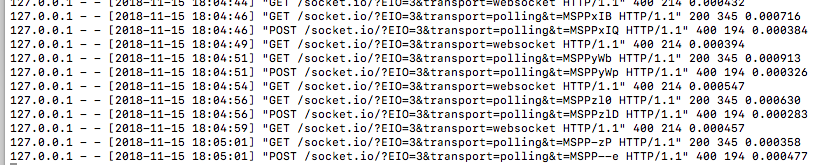
pabloIO
on 15 Nov 2018
The client is asking for the polling transport, which you said was disabled.
miguelgrinberg
on 15 Nov 2018
I got this result from the server side, after putting the { transports: 'websocket' } param
pabloIO
on 15 Nov 2018
The client is asking for the polling transport, which you said was disabled.
so what should I do?
pabloIO
on 15 Nov 2018
I don't know. It's a client-side problem, if you are sure you specified that you wanted only websocket then it is a bug in the client that you are using.
miguelgrinberg
on 15 Nov 2018
what version would you recommend for socket.io-client ?
pabloIO
on 16 Nov 2018
The client that you are using is not the official JS client, as far as I know that client never worked well. If you switch to the official JS client, then use the most up to date version.
miguelgrinberg
on 16 Nov 2018
could you send the link of the official client ? please, because i worked with npm i socket.io-client
pabloIO
on 16 Nov 2018
This issue is for the react native socket.io client. I assumed you were asking about that client. Are you using react native or plain JS? The client that works well is the socket.io-client package for the browser (https://github.com/socketio/socket.io-client).
miguelgrinberg
on 16 Nov 2018
im using react-native, ok thank you I will try this one
pabloIO
on 16 Nov 2018
finally I got the answer, besides installing socket.io and importing it like
import io from 'socket.io-client/dist/socket.io';
I also had to install gevent-websocket, I didn't know it was neccesary, it worked well other times I used it, but with this particular case I had to do it, it may be good to put it on the README file of the repo
pabloIO
on 16 Nov 2018
@pabloIO the requirements are clearly defined in the documentation: https://flask-socketio.readthedocs.io/en/latest/#requirements
miguelgrinberg
on 16 Nov 2018
How can i establish Connection for video call Implementation from mobile client to web client actually my server connection is done but when i implement on mobile app it stucked on login page, I followed this link : http://nobrok.com/react-native-video-calling-app-part-8
 reactnativedeveloper1
on 7 Feb 2020
reactnativedeveloper1
on 7 Feb 2020
Well got the same issue with socket-io-client. However i managed to find a work around using react-websocket. The backend is python-flask served by gunicorn,runnig nginx as a proxy server and eventlet. There seems to be a CORS issue in Chrome which can be solved by Allowing CORs on the server side and installation of CORS everywhere Firefox extension.
 nayebare
on 18 Mar 2020
nayebare
on 18 Mar 2020
Related issues
 dlernz
·
4Comments
dlernz
·
4Comments
 fbussv
·
4Comments
fbussv
·
4Comments
 novice79
·
3Comments
novice79
·
3Comments
 ypperlig
·
5Comments
nayebare
·
4Comments
ypperlig
·
5Comments
nayebare
·
4Comments
Most helpful comment
There is some sort of incompatibility in the long-polling transport. Using WebSocket seems to work though. Change the connection statement to:
I couldn't find a way to enable logging in the socket.io client, the method that is used when it runs in the browser does not seems to be supported (it involves writing variable in `localStorage'). So I could not find out what's the problem with long-polling.