Flask-socketio: socketio.emit didn't work when using background thread
Hello, i need some help in my flask app using socketio. So right now i'm using Blueprint to manage all of my module, and one of them is using socketio because i want to simulate a realtime update to the client.
So what i'm doing right now is trying to send a random number from a background thread to the client using socketio. But the problem is when i run socketio.emit at the background thread after generating a random number, the client didn't receive anything from the server side, and the background thread still running properly (i have used eventlet monkey_patch but still didn't work)
Here is some snapshot of my socketio Module, the Module is called ministry, stored at app/ministry/routes.py
```from flask import abort, render_template
from flask_login import current_user, login_required
from flask_socketio import emit
from random import random
from threading import Lock
from app import socketio
from . import ministry
thread = None
thread_lock = Lock()
def rng_thread():
while True:
socketio.sleep(1)
number = round(random()*10, 3)
print(number)
socketio.emit('newnumber', {'number': number}, namespace='/ministry')
@ministry.route('/ministry/dashboard')
@login_required
def dashboard():
if not current_user.is_ministry:
abort(403)
return render_template('ministry/dashboard.html', title='Ministry Dashboard'
                                                , async_mode=socketio.async_mode)
@socketio.on('connect', namespace='/ministry')
def test_connect():
# need visibility of the global thread object
global thread
print('Client connected')
with thread_lock:
    if thread is None:
        thread = socketio.start_background_task(target=rng_thread)
@socketio.on('disconnect', namespace='/ministry')
def test_disconnect():
print('Client disconnected')
Here is my `app/static/js/ministry.js` code
$(document).ready(function(){
//connect to the socket server.
var socket = io.connect('http://' + document.domain + ':' + location.port + '/ministry');
var numbers_received = [];
//receive details from server
socket.on('newnumber', function(msg) {
    console.log("Received number" + msg.number);
    //maintain a list of ten numbers
    if (numbers_received.length >= 10){
        numbers_received.shift()
    }
    numbers_received.push(msg.number);
    numbers_string = '';
    for (var i = 0; i < numbers_received.length; i++){
        numbers_string = numbers_string + '<p>' + numbers_received[i].toString() + '</p>';
    }
    $('#log').html(numbers_string);
});
});
And this is my `app/__init__.py` code
import eventlet
eventlet.monkey_patch()
from flask import Flask
from flask_bootstrap import Bootstrap
from flask_login import LoginManager
from flask_migrate import Migrate
from flask_sqlalchemy import SQLAlchemy
from flask_socketio import SocketIO
from config import app_config
login_manager = LoginManager()
socketio = SocketIO()
async_mode = None
def create_app(config_name):
app = Flask(__name__, instance_relative_config=True)
app.config.from_object(app_config[config_name])
app.config.from_pyfile('config.py')
Bootstrap(app)

from .models import db, user, hospital, state, role

Migrate(app, db)
db.init_app(app)

login_manager.init_app(app)
login_manager.login_message = "You must be logged in to access this page"
login_manager.login_view = "auth.login"

from .auth import auth as auth_blueprint
app.register_blueprint(auth_blueprint)

from .index import index as index_blueprint
app.register_blueprint(index_blueprint)

from .ministry import ministry as ministry_blueprint
app.register_blueprint(ministry_blueprint)

socketio.init_app(app, async_mode=async_mode)

return app
```
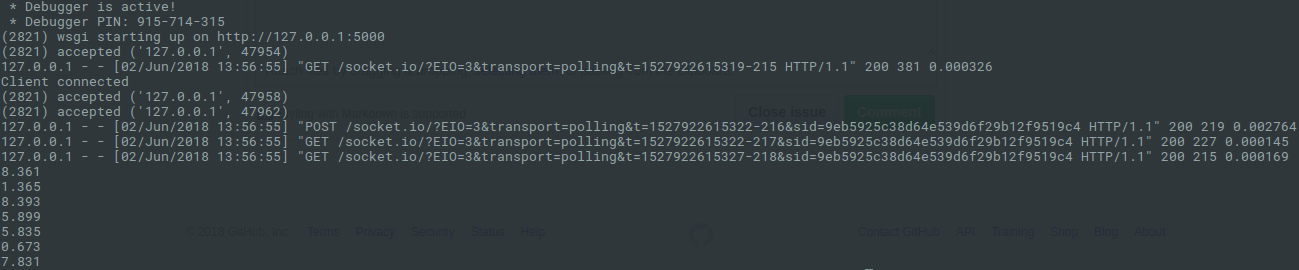
This is screenshot while the background thread keep running and the client connected successfully but the socketio still didn't work
If anybody can help to solve my problem i would be very grateful. Thanks
 faizghifari
All 6 comments
Do you get any errors on the browser side?
 miguelgrinberg
on 2 Jun 2018
miguelgrinberg
on 2 Jun 2018
@miguelgrinberg there's no error on the browser side. the console didn't print anything even from the event handler from ministry.js, just empty.
And actually after i insert the monkey_patch from eventlet, the application is working properly. Before that i saw the background thread are blocking the application so when the random number generator was running the application couldn't move anywhere. But now that is already solved, just the socketio.emit that still doesn't work
faizghifari
on 2 Jun 2018
You may want to add logging in the client to see if the emits are at least making it there. To do that, type the following in the JavaScript console:
localStorage.debug = '*';
@faizghifari did you solve the problem? I have the same problem. As suggested by @miguelgrinberg I typed localStorage.debug = '*'; in the javascript console and get '*' back
 nahidalam
on 8 Jun 2018
nahidalam
on 8 Jun 2018
do you solve this question?you can set async_mode='gevent' and then pip install gevent-websocket in your linux system.that may solve your question,I don't konw why the background thread call emit function can not work.
 yeomanxu
on 14 Jun 2018
yeomanxu
on 14 Jun 2018
@yeomanxu yes I solved it. Actually I needed to clear my browser cache 👍
nahidalam
on 14 Jun 2018
Related issues
 EndenDragon
·
3Comments
EndenDragon
·
3Comments
 zuifengwuchou
·
5Comments
zuifengwuchou
·
5Comments
 nayebare
·
4Comments
nayebare
·
4Comments
 chaitanyavolkaji
·
3Comments
chaitanyavolkaji
·
3Comments
 nh916
·
3Comments
nh916
·
3Comments