Flask-socketio: failed: WebSocket is closed before the connection is established.
I'm having trouble using socket io on one of my server machines. On my server side python code logging info, it shows that the server is emitting messages to the client, but on the client side, the client doesn't seem to receive anything. and it shows the error "failed: WebSocket is closed before the connection is established." in the console followed by a series of "400 (BAD REQUEST)". It also returns "failed: Error during WebSocket handshake: Unexpected response code: 400" sometimes
I tried on my own machine and it only works when I refresh the page (the client page does not receive anything if I close it and open it again, but it does if I refresh it again).
 BoYanSTKO
All 41 comments
I figured the problem was probably with eventlet. When using eventlet, the client page keeps loading for a while and on the server side, it shows that the client keeps connecting and disconnecting for several times and eventually, the client console pops an error "websocket connection failed: Invalid frame header" with a 500 error. Then it starts to work but then continues to connect and disconnect...
But when I uninstalled eventlet and switch to gevent, it works fine. No connection error. It works well with the default Werkzeug
BoYanSTKO
on 3 Aug 2016
You are probably not using websocket after you switched out of eventlet. I doubt eventlet is the problem, I'm guessing something prevents websocket connections to be established.
 miguelgrinberg
on 3 Aug 2016
miguelgrinberg
on 3 Aug 2016
what would that be? I tried on three machines, all having the same issue. Two of them are ubuntu and the other one is a Mac. I also tried different ports
BoYanSTKO
on 3 Aug 2016
do you have anything in between the server and the client? Maybe nginx or another service?
miguelgrinberg
on 4 Aug 2016
I do have Apache HTTP server and tomcat. But I'm running the server directly through python and hosting the html and static files with flask.
BoYanSTKO
on 4 Aug 2016
But the connections go through Apache? Have you configured it to proxy websocket connections in addition to HTTP?
miguelgrinberg
on 4 Aug 2016
I think the connections go through Apache, but I don't think I configured it to proxy websocket connections. There's no "websocket.load" file in "/etc/apache2/mods-enabled/"
BoYanSTKO
on 4 Aug 2016
Well, apache is particularly difficult to get to proxy websocket connections. I don't use it myself, but I have heard many times of people not being able to set it up to work. On the other side, nginx is fairly easy to set up, you can find an example configuration in the documentation.
miguelgrinberg
on 4 Aug 2016
I tried to configure apache, but it sends me the "socket.io.js:3511 GET http://server.domain/socket.io/?EIO=3&transport=polling&t=LPJP8zm 404 (Not Found)" error constantly. I guess I'll just make do with using gevent for now.
BoYanSTKO
on 4 Aug 2016
The /socket.io route is specific to the Socket.IO protocol. If you look at the nginx configuration in the documentation you will see that it is also handled as a specific location. Link: https://flask-socketio.readthedocs.io/en/latest/#using-nginx-as-a-websocket-reverse-proxy.
miguelgrinberg
on 4 Aug 2016
I checked the documentation with nginx. Now there's no 400 error. Here's my Apache conf:
<VirtualHost *:80>
    ServerName my.domain.name

    ProxyPass /dir/path/ http://localhost:7000/
    ProxyPassReverse /dir/path/ http://localhost:7000/

    ProxyPass /socket.io http://localhost:7000/socket.io
    ProxyPassReverse /socket.io http://localhost:7000/socket.io
</VirtualHost>
but it now shows these errors:
failed: Error during WebSocket handshake: Unexpected response code: 200
failed: WebSocket is closed before the connection is established.
500 (Internal Server Error)
net::ERR_INCOMPLETE_CHUNKED_ENCODING
and the page takes a long time to load. The page also reloads itself intermittently.
BoYanSTKO
on 4 Aug 2016
My understanding is that ProxyPass proxies HTTP connections, not websocket. For nginx you have to add additional setting to get the proxying to work on websocket. In this page it appears you also have to use additional configuration for Apache.
miguelgrinberg
on 4 Aug 2016
I tried the configuration here: https://github.com/socketio/socket.io/issues/1696
<VirtualHost *:80>
    ServerName my.domain.name
    RewriteEngine On
    RewriteCond %{QUERY_STRING} transport=polling
    RewriteRule /(.*)$ http://localhost:7000/$1 [P]

    ProxyRequests off
    ProxyPass /socket.io/ ws://localhost:7000/socket.io/
    ProxyPassReverse /socket.io/ ws://localhost:7000/socket.io/

    ProxyPass /dir/path/ http://localhost:7000/
    ProxyPassReverse /dir/path/ http://localhost:7000/
</VirtualHost>
I'm also using Apache 2.4.7
and also the configuration here: http://www.marijnophorst.com/2015/07/19/websockets-with-angular-socket-io-and-apache/
it doesn't work. Gives me the same error "failed: Invalid frame header", "400 (BAD REQUEST)"
BoYanSTKO
on 4 Aug 2016
Unfortunately I can't help you. Is switching to nginx an option? That works very reliably.
miguelgrinberg
on 4 Aug 2016
I'll have to figure out a way to work with nginx along side with apche then, someone else is using apache on the server. If gevent is not using websocket, what is it using? I checked on the server log, found something like this "INFO:socketio:emitting event "XXXX" to all [/]", "INFO:engineio:session-id: Sending packet MESSAGE data 2"
BoYanSTKO
on 4 Aug 2016
gevent does not support websocket natively, so it uses a long polling mechanism based on HTTP requests. If you want to use websocket with gevent you have to install another package called gevent-websocket. Try adding that, I think you will start having connection problems again.
miguelgrinberg
on 4 Aug 2016
I installed gevent-websocket actually, do I need to turn it on explicitly? I can see that it is using gevent when I start the server.
BoYanSTKO
on 4 Aug 2016
Do you see HTTP requests constantly flying in your log? Check the network tab in your browser, when a websocket connection is established there are no more requests sent or received.
miguelgrinberg
on 4 Aug 2016
I don't see HTTP requests in the server log. I only see INFO:socketio and INFO:engineio. I don't see any more requests sent or received in the network after the client page is loaded and while the client page is receiving new messages constantly.
BoYanSTKO
on 4 Aug 2016
I found "ws://my.domain.name:7000/socket.io/?EIO=3&transport=websocket&sid=6f52e52a81ac46f38cf2b89a23a4f750" in the network while the client is loading and the status code is "101 Switching Protocols".
I also see other GET and POST requests while the client is loading, like "http://my.domain.name:7000/socket.io/?EIO=3&transport=polling&t=LPMIeBv&sid=6f52e52a81ac46f38cf2b89a23a4f750" with status code "200 OK".
Other than these, there are no new requests sent or receive and the client is still constantly receiving messages from the server
BoYanSTKO
on 4 Aug 2016
Okay. I did not expect this, but it appears that with gevent your websocket connections are working fine. So basically you are saying that if you uninstall gevent and gevent-websocket, and then install eventlet, websocket stops working? With no other changes?
miguelgrinberg
on 4 Aug 2016
yes, if I install eventlet (without uninstalling gevent and gevent-websocket), I can see flask-socketio uses eventlet and the connection does not work. If I uninstall eventlet, flask-socketio goes back to gevent and every thing works just fine.
BoYanSTKO
on 5 Aug 2016
I assume this is only when Apache is in the mix, correct? Can you get eventlet to connect when you remove Apache?
miguelgrinberg
on 5 Aug 2016
So I just tried on a Windows machine and which does not have Apache, using eventlet and localhost. The same error comes in:
"WebSocket connection to 'ws://localhost:7000/socket.io/?EIO=3&transport=websocket&sid=8dfd28d2785243219b74672134880d9c' failed: Error during WebSocket handshake: Unexpected response code: 400"
"socket.io.js:3511 POST http://localhost:7000/socket.io/?EIO=3&transport=polling&t=LPOHWyF&sid=8dfd28d2785243219b74672134880d9c 400 (BAD REQUEST)"
"WebSocket connection to 'ws://localhost:7000/socket.io/?EIO=3&transport=websocket&sid=e60b66fbb72d484dbb7e0f59de26b74b' failed: WebSocket is closed before the connection is established."
And the client attempts to reconnect constantly

BoYanSTKO
on 5 Aug 2016
Can you show me the connection statement that you use on the client side?
miguelgrinberg
on 5 Aug 2016
        socket = io.connect("http://" + document.domain + ":" + location.port);
        // listen to the event 'connected'
        socket.on("connected", function(data) {
          console.log(data);
          socket.emit("startStream1");
          socket.emit("startStream2");
        });)
socket.on("streamTweets1", function(data) {
     // some other stuff, like getting the tweets
    console.log("listen streamTweets1...")
    // some other stuff
});
on the server side:
# event handler, called when a client is connnected
@socketio.on("connect")
def connectServer():
    global connectedUsers
    logging.info("A client is connected!")
    logging.info("Client ID: " + str(request.sid))
    # add a new client if it does not exist already
    connectedUsers.add(request.sid)
    logging.info("There are " + str(len(connectedUsers)) + " connected clients now!")
    socketio.emit("connected", "A new client is connected!")
I find it strange that a connection is made to a ws:// URL. The normal procedure is that a connection to http:// is made first, once that is going the client requests an upgrade to websocket.
Would you have a moment to test the example application in this repository? Let me know if this application connects successfully or has the same issues.
Edit: oh, actually, the screenshot is not the network tab, it is the console. The connection to http would appear in the network tab.
miguelgrinberg
on 5 Aug 2016
you example works fine with both eventlet and gevent on the linux server with Apache installed. I have no idea. But gevent turned out to have a lower latency on average (20ms vs 40ms) on that linux machine.
The only major difference between my code and your code is that my background thread is calling the twitter streaming api, when the api receives new tweets, it will emit the message to the client. this is the part that is having trouble, because when I check the console, other events and messages can be handled smoothly, but the message from the twitter streaming only randomly comes through with eventlet. But it works fine with gevent.
I also noticed that when I changed the socketio.sleep to a longer time in your example, the latency of eventlet will increase dramatically and eventlet latency is always twice as longer as gevent latency.
BoYanSTKO
on 5 Aug 2016
Hmm. The sleep in the example code is just to pace out the messages going out to clients. I don't see how it can have an effect on latency. It's also odd that in my tests here (on a macbook pro) show lower latencies in general for eventlet than gevent. Weird.
The only major difference between my code and your code is that my background thread is calling the twitter streaming api
Is there any chance there is monkey patching related problem in your application? All the network calls that the twitter api makes need to be monkey patched.
miguelgrinberg
on 5 Aug 2016
I have no idea. I'll just use gevent. It works fine
BoYanSTKO
on 5 Aug 2016
My Flask socket-io is working between ubuntu apache2(2.4) server(real) and javascrip base client.Using socket-io can exchange data but with periodical browser console error.And when I put any port number it will not work at all.
    error 1 : Firefox can’t establish a connection to the server at ws://46.101.32.75/socket.io/?EIO=3&transport=websocket&sid=848934237d114d2b8ec62415bc38e122.

    error 2 : The connection to ws://46.101.32.75/socket.io/?EIO=3&transport=websocket&sid=3669a767b54f48048207fa3217f4a1bf was interrupted while the page was loading.
This two errors are showing periodical every few minute with exchanging data. I already installed on server latest versions of Flask , Socketio and eventlet.
client code
$(document).ready(function(){

var socket = io.connect('http://' + '46.101.32.75' + ':' + '');
socket.on('connect', function() {
    socket.send('user has connected !');
});

socket.on('message', function(msg) {
    console.log(msg);
});

});
</script>
server code
from flask import Flask , render_template
from flask_socketio import SocketIO,send,emit
import sys
import os

app = Flask(__name__ )

app.config['SECRET_KEY'] = 'secret!'

socketio = SocketIO(app)

@socketio.on('message')
def handleMessage(msg):
    send(msg,broadcast=True)

if __name__ == "__main__":
    socketio.run( app , debug = True)
I tried way to many fix this error without changing the server proxy configuration. Any advice ?
apache2 proxy configuration
<VirtualHost *:80>
                ServerName 46.101.32.75
                ServerAdmin [email protected]
                WSGIScriptAlias / /var/www/FlaskApp/FlaskApp.wsgi
                <Directory /var/www/FlaskApp/FlaskApp/>
                        Order allow,deny
                        Allow from all
                </Directory>
                ErrorLog ${APACHE_LOG_DIR}/FlaskApp-error.log
                LogLevel warn
                CustomLog ${APACHE_LOG_DIR}/FlaskApp-access.log combined
</VirtualHost>
Thank You !
 sinhalaBsc
on 29 Jul 2018
sinhalaBsc
on 29 Jul 2018
Apache2/mod_wsgi does not work with Flask-SocketIO. Use nginx.
miguelgrinberg
on 29 Jul 2018
i am having a problem deploying flask-socketio to flex app engine, on http it works fine, but on https websocket connection to url fails, websocket closed before handshake completed,
any suggestion?
thank you
 aktoak
on 20 Mar 2020
aktoak
on 20 Mar 2020
I'm not familiar enough with the app engine platform. Depending on how the WebSocket connection is passed to the application it may or may not work, since this package knows how to manage that connection with a list of specific web servers. Outside of that there is no support until someone builds it.
miguelgrinberg
on 21 Mar 2020
@miguelgrinberg thank you for the quick reply
flask-sockets with flask_socket.worker does indeed work fine on google appengine flex enviroment with both http and https following this simple tutorial provided by google:
https://cloud.google.com/appengine/docs/flexible/python/using-websockets-and-session-affinity
with flask-socketio
i tried several deploying methods:
- socketio.run(app, host='0.0.0.0', port=8080)
- gunicorn -b :$PORT  --worker-class eventlet -w 1 main:app
- gunicorn -b :$PORT  --worker-class gevent-w 1 main:app
and they all work fine on app engine but only when accessing it via HTTP and not with HTTPS.
the exact console error i am getting on HTTPS is:

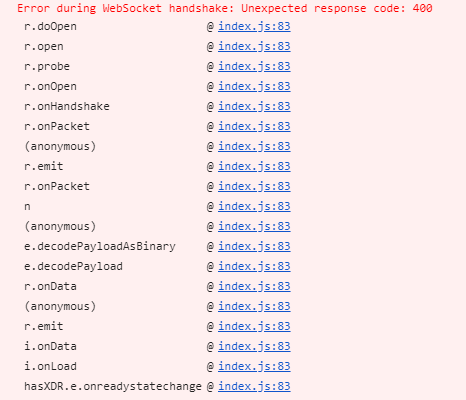
i am thinking it might be a configuration issue since overall its working on HTTP, but i am not sure what is it.
aktoak
on 21 Mar 2020
Do you run your Python web server differently when using https?
miguelgrinberg
on 21 Mar 2020
it is the same web server , i only access the my website after deployment once via http and once via https.
and https it is not working.
aktoak
on 21 Mar 2020
I don't see how the problem can be on the Python side then. Your Python server does not handle the encryption, that must be handled by some other component of app engine before the connection reaches Python.
miguelgrinberg
on 21 Mar 2020
hi guys, i am facing a same issue in my flask/python application
so my websockets are working fine for http, but for https, i am getting "Unexpected response code 400"
i am using google app engine
and eventlet with gunicorn and flask_socketio
i have also tested my app with gunicorn and flask_sockets.worker
i found one solution where i have to pass my ssl certificate files in gunicorn string like
gunicorn --worker-class eventlet -w 1 --certfile cert.pem --keyfile key.pem -b 0.0.0.0:5500 app:app
so i have tested this on my local machine, and now websockets are working fine on https on local
but since my app is on google app engine, i can not give ssl certificates and key files in string like that
please help me
 rkumarchou
on 3 Sep 2020
rkumarchou
on 3 Sep 2020
hi, The solution that worked for me was setting
socketio.init_app(app, cors_allowed_origins='*')
in the init file which solved the problem for app engine.
somehow the default value of cors_allowed_origin which states that only the same origin is allowed did not work.
aktoak
on 3 Sep 2020
@aktoak if you do that you are opening your service to anyone, so it is not a good idea unless you are writing a publicly available API. With a little bit of extra effort you can do this securely, just set cors_allowed_origins to the origin that you want to allow and then your service is protected.
miguelgrinberg
on 3 Sep 2020
Related issues
 piyush121
·
3Comments
piyush121
·
3Comments
 lnunno
·
4Comments
lnunno
·
4Comments
 huangganggui
·
3Comments
huangganggui
·
3Comments
 dlernz
·
4Comments
dlernz
·
4Comments
 hrmon
·
5Comments
hrmon
·
5Comments