Flameshot: after screenshot unable to upload image and get url
Flameshot version
Flamshot v0.8.4
Compiled with Qt 5.12.13
Describe the bug
after screenshot i am trying to upload image but nothing was happened.
To Reproduce
take screenshot and click on upload icon.
Expected behavior
should be uploaded and return url.
System Information
ubuntu 20.4
 zahirimob
All 21 comments
Did you install with snap or apt?
 borgmanJeremy
on 13 Oct 2020
borgmanJeremy
on 13 Oct 2020
Did you install with snap or apt?
using snap
zahirimob
on 13 Oct 2020
Okay I tested the snap on Kubuntu 20.04 and it was okay: https://i.imgur.com/z9oX2Zq.png
Can you try running with "snap run flameshot" to see if you get any errors printed to the console?
borgmanJeremy
on 13 Oct 2020
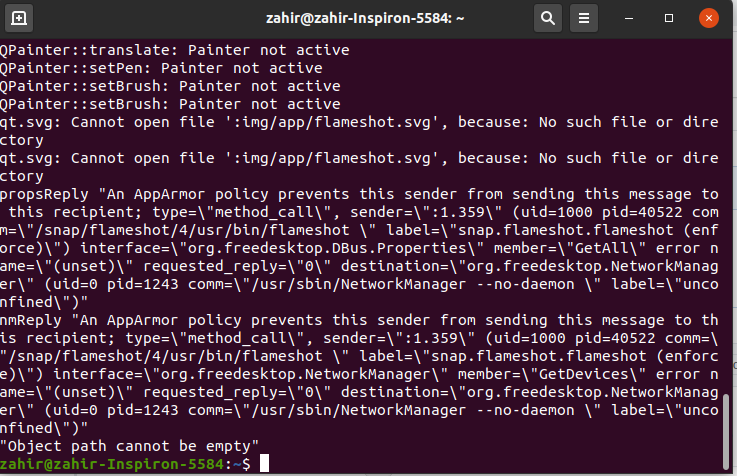
Here is what i get in console when try to upload
zahirimob
on 13 Oct 2020
Great, that will help me figure this out. Looks like a confinement issue.
borgmanJeremy
on 13 Oct 2020
@zahirimob Here are some follow up questions based on some research I did
1. Was this upgrade from 18.04 or potentially 16.04
1. Have you done anything "strange" like installing an alternate kernel or a different version of network manager?
1. What version of snapd are you running
Actually I think those warnings are a red herring. I get them too, I believe I have a solution to solve those warnings but I do not think it is the root cause of the issue.
borgmanJeremy
on 14 Oct 2020
- Was this upgrade from 18.04 or potentially 16.04
It was updated from 18.04 to 20.04
zahirimob
on 14 Oct 2020
Arch Linux
Flameshot v0.8.5
Compiled with Qt 5.15.1
I have the same problem. I have installed it from Arch official repositories.
If I run it in console it doesn't show any error or anything.
It shows me the upload window to imgur but it takes a long time. When it finally says it has uploaded it and copied the URL to the clipboard, there is nothing in it.
 simonbcn
on 17 Oct 2020
simonbcn
on 17 Oct 2020
Maybe this is a locales issue. How are your locales configured.
borgmanJeremy
on 17 Oct 2020
$ locale
LANG=es_ES.UTF-8
LC_CTYPE="es_ES.UTF-8"
LC_NUMERIC="es_ES.UTF-8"
LC_TIME="es_ES.UTF-8"
LC_COLLATE="es_ES.UTF-8"
LC_MONETARY="es_ES.UTF-8"
LC_MESSAGES="es_ES.UTF-8"
LC_PAPER="es_ES.UTF-8"
LC_NAME="es_ES.UTF-8"
LC_ADDRESS="es_ES.UTF-8"
LC_TELEPHONE="es_ES.UTF-8"
LC_MEASUREMENT="es_ES.UTF-8"
LC_IDENTIFICATION="es_ES.UTF-8"
LC_ALL=
The problem is worse, while the uploading window is open the KDE taskbar does not respond to mouse clicks.
simonbcn
on 18 Oct 2020
Linux Mint 19.3 Cinnamon x64
FlameShot 0.8.5 AppImage
$ nslookup api.imgur.com
Server: 127.0.0.53
Address: 127.0.0.53#53
Non-authoritative answer:
api.imgur.com canonical name = ipv4.imgur.map.fastly.net.
Name: ipv4.imgur.map.fastly.net
Address: 151.101.36.193
$ telnet api.imgur.com 443
Trying 151.101.36.193...
Connected to ipv4.imgur.map.fastly.net.
 a-kurau
on 20 Oct 2020
a-kurau
on 20 Oct 2020
Same tests:
$ nslookup api.imgur.com
Server:         127.0.0.1
Address:        127.0.0.1#53

Non-authoritative answer:
api.imgur.com   canonical name = ipv4.imgur.map.fastly.net.
Name:   ipv4.imgur.map.fastly.net
Address: 199.232.40.193

$ telnet api.imgur.com 443
Trying 199.232.40.193...
Connected to api.imgur.com.
Escape character is '^]'.
quit
Connection closed by foreign host.
Setup 1
I tested this on a clean endeavorOS KDE installation with my locales set to es_US. No issues with upload or copying the URL to the clipboard. Installed via pacman.
Setup 2
I tested this on a clean endeavorOS KDE installation with my locales set to es_ES. No issues with upload or copying the URL to the clipboard. Installed via pacman.
Setup 3
I tested this on a clean endeavorOS KDE installation with my locales set to es_US. Then I tried manually changing my locals to es_ES. I did something wrong and started getting locale warnings. At this point imgur uploads were broken.
This leads me to believe something is not quite right on your system. Could you try replicating it in a clean VM or dig into your locale settings?
borgmanJeremy
on 22 Oct 2020
I don't think the problem is the locales. I don't even understand why that would affect the uploading of an image file to a server.
On the other hand, it is difficult to debug something with this program because when it is executed in console, it detaches itself and does not show anything.
I recorded a video of the process.
To be highlighted:
- The entire upload process takes almost 1 minute.
- Locks the taskbar. In the video you can't see it but I click in several applications (_in the taskbar_) and it doesn't do anything until the upload process is over, when all the clicks are executed at the same time.
- It does not show any error. Even the notification that the upload URL has been copied is displayed. But the clipboard contains only one blank line. Except a couple of uploads when these 2 special characters were copied:
^V^B(U+0016 U+0002)
Is all this caused by the _locales_?
On the other hand, the locales are well defined in my system:
$ locale -a
C
en_US.utf8
es_ES@euro
es_ES.iso885915@euro
es_ES.utf8
POSIX

$ localedef --list-archive
en_US.utf8
es_ES.iso885915@euro
es_ES.utf8
es_ES@euro

$ localectl list-locales
en_US.UTF-8
es_ES.UTF-8

$ locale
LANG=es_ES.UTF-8
LC_CTYPE="es_ES.UTF-8"
LC_NUMERIC="es_ES.UTF-8"
LC_TIME="es_ES.UTF-8"
LC_COLLATE="es_ES.UTF-8"
LC_MONETARY="es_ES.UTF-8"
LC_MESSAGES="es_ES.UTF-8"
LC_PAPER="es_ES.UTF-8"
LC_NAME="es_ES.UTF-8"
LC_ADDRESS="es_ES.UTF-8"
LC_TELEPHONE="es_ES.UTF-8"
LC_MEASUREMENT="es_ES.UTF-8"
LC_IDENTIFICATION="es_ES.UTF-8"
LC_ALL=

$ localectl
System Locale: LANG=es_ES.UTF-8
VC Keymap: es
X11 Layout: es

$ cat /etc/locale.conf
LANG=es_ES.UTF-8

$ cat /etc/locale.gen
en_US.UTF-8 UTF-8
es_ES.UTF-8 UTF-8
es_ES@euro ISO-8859-15
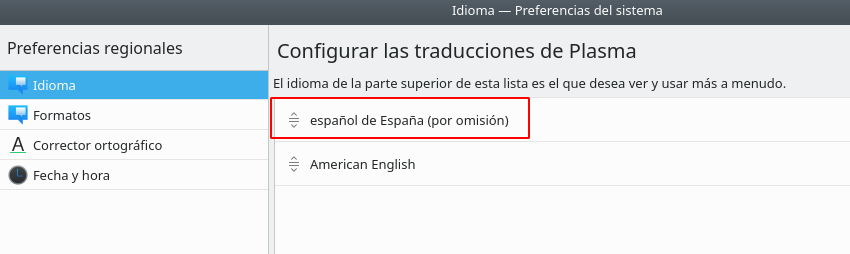
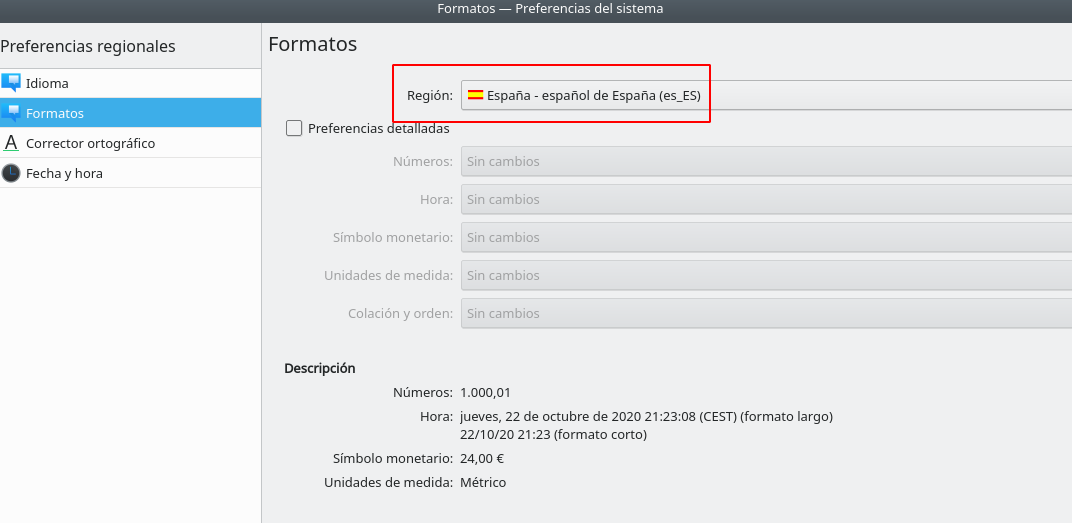
In KDE Plasma is well defined too:
simonbcn
on 22 Oct 2020
Do you have a working notification manager and dbus installation
borgmanJeremy
on 22 Oct 2020
KDE Plasma has its notification daemon and it works. As I said, at the end of the video you can see how the Flameshot notification is displayed in the lower right corner.
Yes, dbus is installed (_as a dependency of systemd_) and running:
$ systemctl status dbus.service
● dbus.service - D-Bus System Message Bus
Loaded: loaded (/usr/lib/systemd/system/dbus.service; static)
Active: active (running) since Thu 2020-10-22 20:15:10 CEST; 1h 43min ago
TriggeredBy: ● dbus.socket
Docs: man:dbus-daemon(1)
Main PID: 1232 (dbus-daemon)
Tasks: 1 (limit: 76967)
Memory: 4.9M
CGroup: /system.slice/dbus.service
└─1232 /usr/bin/dbus-daemon --system --address=systemd: --nofork --nopidfile --systemd-activation --syslog-only
Hmmm two more things
Is ssl installed?
Can you post your config?
borgmanJeremy
on 22 Oct 2020
Okay I found the issue. I will fix it and backport it to the 0.8.x maintenance branch. The bug only manifests if "Copy URL after upload" is select in the config. Thanks for your patience.
borgmanJeremy
on 23 Oct 2020
@simonbcn can you test this branch? Before I go through and do the release I want to make sure it also fixes it for you (local testing seems good).
borgmanJeremy
on 23 Oct 2020
Okay I found the issue. I will fix it and backport it to the 0.8.x maintenance branch. The bug only manifests if "Copy URL after upload" is select in the config. Thanks for your patience.
But if I don't activate "_Copy URL after upload_", how do I know what the URL of the uploaded image is?
@simonbcn can you test this branch? Before I go through and do the release I want to make sure it also fixes it for you (local testing seems good).
Yes, it works but it still has a bug: #1095
simonbcn
on 23 Oct 2020
Ok I think this is okay to close now? The fixes are all merged.
borgmanJeremy
on 1 Nov 2020
Related issues
 ronjouch
·
3Comments
ronjouch
·
3Comments
 thiswillbeyourgithub
·
3Comments
thiswillbeyourgithub
·
3Comments
 makz27
·
4Comments
makz27
·
4Comments
 abba23
·
3Comments
abba23
·
3Comments
 gdude2002
·
4Comments
gdude2002
·
4Comments