Flameshot: [Feature Request] Welcome Screen
Background
A friend of mine tried Flameshot for the first time and the following was the feedback I got:
I'm a bit confused about the installation. At first I thought that nothing happened when I clicked the .exe file (or run it as admin), but then I noticed a small icon where 'remove memory stick' and stuff like that is (no trace of Flameshot in programs, desktop, or start panel). once I found it, it was very straightforward to use.
There is currently no installation and she ran the flameshot.exe and thought it will start an installation process, but nothing happened until later she discovered the tray icon.
Suggestion
Flameshot needs a "welcome page" to explain the basics. There are two strategies we can show the WelcomePage. Either:
- it shows the WelcomePage when it detects it is the first time it is running on this computer (e.g through lacking config file)
- similar to the welcome program in most Linux distros (e.g Ubuntu Budgie), it shows the window every single time until the user marks the "Don't show again" or deactivate it through the config. It does not need to be big, but it seems it is essential for new users and it will help rapid adoption of the software.
The content of this WelcomePage can be basics like:
- key bindings
- link to readme, website, bug report
- how to open config (and change language)
Appendix
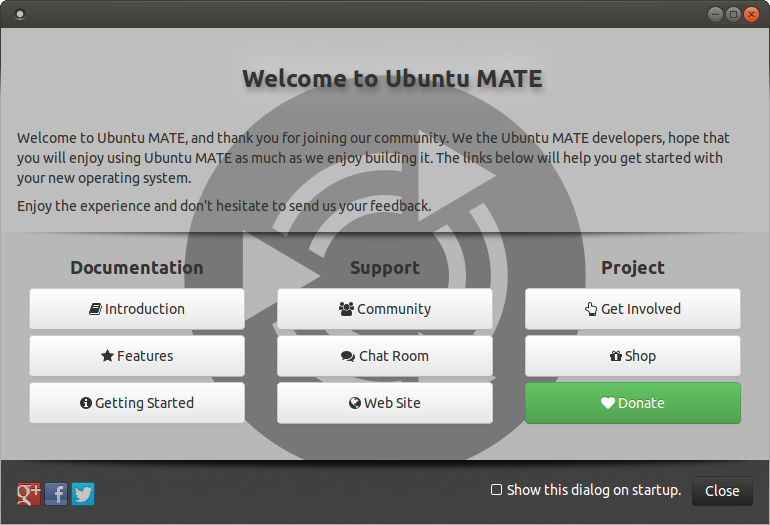
This is how some of these welcome pages look like:
Manjaro

Ubuntu Bundgie

Ubuntu Mate
 mmahmoudian
All 5 comments
We already know that flameshot on windows is nowhere near the release state. The work done on packaging for Windows is literally zero (building a binary is not about packaging; packaging should be providig an installation program like .msi with guided user interface). This will eventually needs to be solved and we can open another issue for it.
That said, showing a welcome window when the user first opens flameshot is possible. This welcome window should shows basic usage as well as link to user documentation. Actually if the user ever read the very first paragraphs of the README.md, she would not have confusion about "nothing have happened besides the tray icon".
 hosiet
on 11 Sep 2020
hosiet
on 11 Sep 2020
Sounds like this has 2 requests in it:
1.) Have a normal installer
2.) Provide a welcome screen
The installer is now part of the windows build. I agree having a welcome screen is a great idea but probably won't make it into the 0.8 build. I will retitle this issue to target the welcome screen and we can discuss it for the next release cycle.
 borgmanJeremy
on 13 Sep 2020
borgmanJeremy
on 13 Sep 2020
@mmahmoudian do you want to mock up a concept for this?
borgmanJeremy
on 20 Sep 2020
@borgmanJeremy is there any limitations I should consider for the design?
mmahmoudian
on 20 Sep 2020
The only thing I can think of is stick to vector graphics so we can easy scale on different screen sizes. The other thing we have gotten feedback on is making sure it is tablet friendly. I am much more of a programmer than designer so others may have additional thoughts :)
borgmanJeremy
on 20 Sep 2020
Related issues
 bingoIsCoder
·
4Comments
bingoIsCoder
·
4Comments
 abba23
·
3Comments
abba23
·
3Comments
 kylewill
·
4Comments
kylewill
·
4Comments
 xahon
·
3Comments
xahon
·
3Comments
 mmesnjak
·
4Comments
mmesnjak
·
4Comments
Most helpful comment
Sounds like this has 2 requests in it:
1.) Have a normal installer
2.) Provide a welcome screen
The installer is now part of the windows build. I agree having a welcome screen is a great idea but probably won't make it into the 0.8 build. I will retitle this issue to target the welcome screen and we can discuss it for the next release cycle.