Flameshot: Pin image on the Desktop issue
Flameshot version
v0.6.0
Describe the bug
If i press pin after creating the screenshot, the pin is fixed to the left of my main monitor and cannot be dragged.
To Reproduce
flameshot gui and select "Pin image on the desktop"
System Information
Fedora 32 - 3.36.5
 Djavano
All 5 comments
Can't confirm on Manjaro 20.0 - Xfce4
Seems to be Fedora related?
Are you using a Gnome or a Fedora spin?
Which displayserver are you using (X.Org / Wayland / ?)
 Martin-Eckleben
on 2 Sep 2020
Martin-Eckleben
on 2 Sep 2020
I disabled wayland and now works properly
Djavano
on 2 Sep 2020
when I click on pin image, the app crashes, and here's the error on terminal...
qt5ct: using qt5ct plugin
qt5ct: D-Bus system tray: yes
qt5ct: custom style sheet is disabled
QPainter::begin: Paint device returned engine == 0, type: 2
QPainter::setRenderHint: Painter must be active to set rendering hints
QPainter::setCompositionMode: Painter not active
QPainter::translate: Painter not active
QPainter::setPen: Painter not active
QPainter::setBrush: Painter not active
QPainter::setBrush: Painter not active
I'm runnig Mint 20.04 Cinnamon
 AlwaysBeCalm
on 12 Sep 2020
AlwaysBeCalm
on 12 Sep 2020
@AlwaysBeCalm Could you please try version 0.8 that was just released?
 borgmanJeremy
on 20 Sep 2020
borgmanJeremy
on 20 Sep 2020
@borgmanJeremy
thanks a lot :rose: :rose:
the new release is amazing, I liked the counter tool, I really need it :+1:
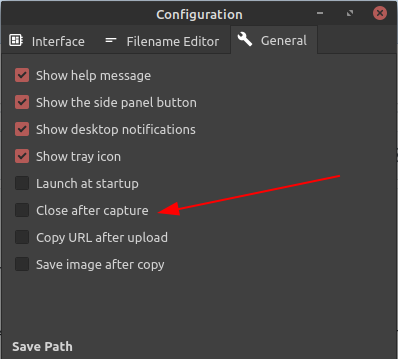
I noticed it's because of this option in the setting
AlwaysBeCalm
on 20 Sep 2020
Related issues
 orschiro
·
3Comments
orschiro
·
3Comments
 soundsbeard
·
4Comments
soundsbeard
·
4Comments
 xstable
·
3Comments
xstable
·
3Comments
 gdude2002
·
4Comments
gdude2002
·
4Comments
 dajare
·
4Comments
dajare
·
4Comments
Most helpful comment
@borgmanJeremy
thanks a lot :rose: :rose:
the new release is amazing, I liked the counter tool, I really need it :+1:
I noticed it's because of this option in the setting
