Flameshot: Heavy glitching when using flameshot gui
Flameshot version
Flameshot 0.6.0+git20190714-1(Debian)
Compiled with Qt 5.12.4
Describe the bug
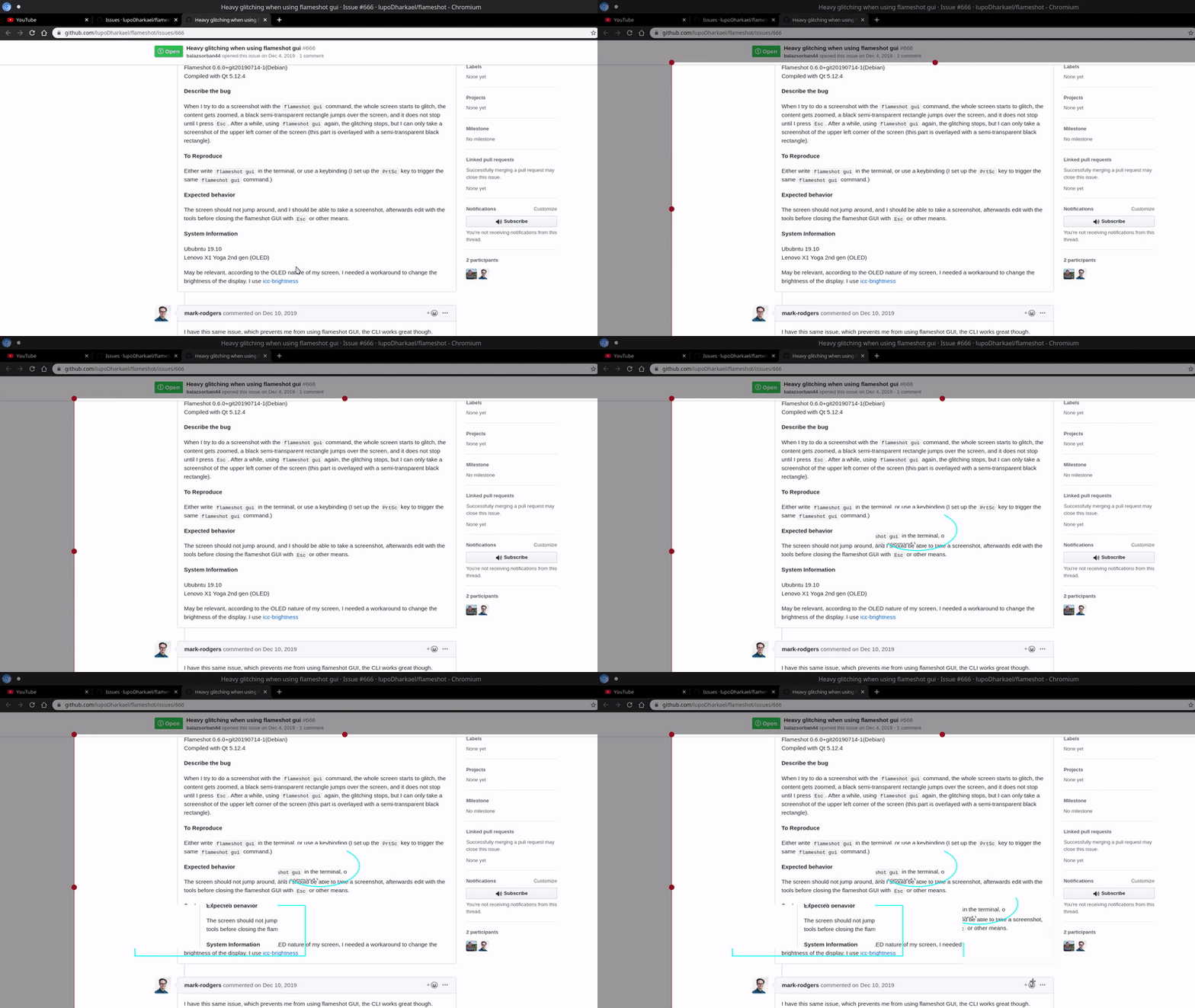
When I try to do a screenshot with the flameshot gui command, the whole screen starts to glitch, the content gets zoomed, a black semi-transparent rectangle jumps over the screen, and it does not stop until I press Esc. After a while, using flameshot gui again, the glitching stops, but I can only take a screenshot of the upper left corner of the screen (this part is overlayed with a semi-transparent black rectangle).
To Reproduce
Either write flameshot gui in the terminal or use a keybinding (I set up the PrtSc key to trigger the same flameshot gui command.)
Expected behavior
The screen should not jump around, and I should be able to take a screenshot, afterward edit with the tools before closing the flameshot GUI with Esc or other means.
System Information
Ubuntu 19.10
Lenovo X1 Yoga 2nd gen (OLED)
echo $XDG_SESSION_TYPE: X11
May be relevant, according to the OLED nature of my screen, I needed a workaround to change the brightness of the display. I use icc-brightness
 balazsorban44
All 12 comments
I have this same issue, which prevents me from using flameshot GUI, the CLI works great though.
OS: Arch Linux x86_64
Kernel: 5.4.2-arch1-1
Resolution: 2880x1800, 3840x2160
CPU: Intel i7-4870HQ (8) @ 3.700GHz [74.0°on]
GPU: AMD ATI Radeon HD 8870M / R9 M270X/M370X
GPU Driver: radeon
 mark-rodgers
on 10 Dec 2019
mark-rodgers
on 10 Dec 2019
Similar problem. When i press ctrl + z image is buggy.
OS: Manjaro 18.1.5 Juhraya
Kernel: x86_64 Linux 5.4.15-2-MANJARO
Resolution: 1920x1080
DE: KDE 5.66.0 / Plasma 5.17.5
WM: KWin
GTK Theme: Adwaita-dark [GTK2], Adwaita [GTK3]
CPU: Intel Core i5-6400 @ 4x 3.3GHz [32.0°C]
GPU: GeForce GTX 970
 c29r3
on 6 Feb 2020
c29r3
on 6 Feb 2020
I'm not sure if it's related but I periodically have my monitors glitch out and show me the flameshot overlay with an old image of my desktop overlaying my actual desktop, even though I've not hit the shortcut. Updating windows will show through the grayed out screen when they update, and if I switch desktops and come back I can once more see my desktop... until it happens again. I believe it may be related to zoom or slack in some way but am not sure. Just seems to happen more on workspaces where i have these open
 Tejeev
on 19 Aug 2020
Tejeev
on 19 Aug 2020
If you are using KDE, it might be related to #760
if you are using wayland it might be related to #748, or #564
Therefore please mention your DE and if you are Xorg or Wayland (using echo $XDG_SESSION_TYPE)
 mmahmoudian
on 18 Sep 2020
mmahmoudian
on 18 Sep 2020
@mmahmoudian Updated the original post, it says X11. Worth mentioning, that since then I upgraded to Ubuntu 20.04, and the issue is still there.
balazsorban44
on 20 Sep 2020
@balazsorban44 would you please confirm if the issue persists with the newly stale release (version 0.8):
https://github.com/flameshot-org/flameshot/releases/
mmahmoudian
on 20 Sep 2020
@mmahmoudian Unfortunately, yes! It is still the same. On a second note though, I did a clean install of Ubuntu 20.04, and echo $XDS_SESSION_TYPE gives an empty line now! (no X11)
balazsorban44
on 20 Sep 2020
@balazsorban44 try either of the following:
loginctl show-session $(loginctl | grep $(whoami) | awk '{print $1}') -p Type
loginctl show-session $(loginctl show-user $(whoami) -p Display --value) -p Type --value
@mmahmoudian Yeah, these do give me x11.
balazsorban44
on 20 Sep 2020
@balazsorban44 Does the Yoga have screen rotation? I wonder if that is somehow involved.
 borgmanJeremy
on 14 Oct 2020
borgmanJeremy
on 14 Oct 2020
Yes, it has.
balazsorban44
on 14 Oct 2020
Mine also reports x11 and I work with 2 horizontal screens and one verticle. I've not seen my problems recently but I've also not turned any monitors off during normal operation (which would result in screen arrangement changing and occassionally leaves my vertical monitor with a horizontal desktop)
Tejeev
on 16 Oct 2020
Related issues
 kylewill
·
4Comments
kylewill
·
4Comments
 mmesnjak
·
4Comments
mmesnjak
·
4Comments
 xahon
·
3Comments
xahon
·
3Comments
 makz27
·
4Comments
makz27
·
4Comments
 dajare
·
4Comments
dajare
·
4Comments