Flameshot: 添加快捷键?How to add shortcuts?
如何添加快捷键?How to add shortcuts
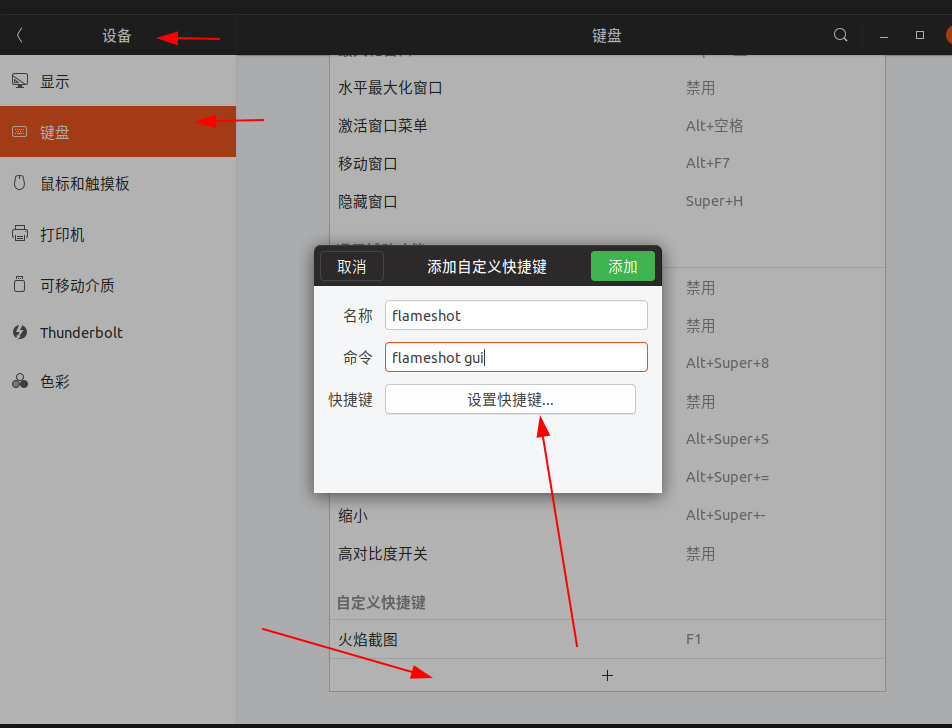
打开 设置> 设备 > 键盘
Open Settings > Devices > Keyboard
 zhedream
All 6 comments
Great, thank you!!!
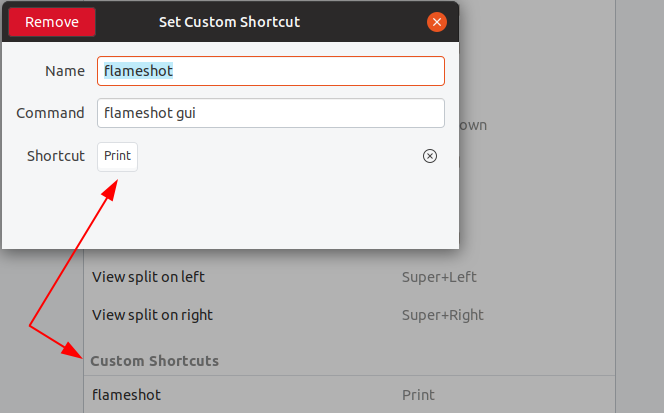
Did the same for Ubuntu 18.10 and mapped to Printscreen
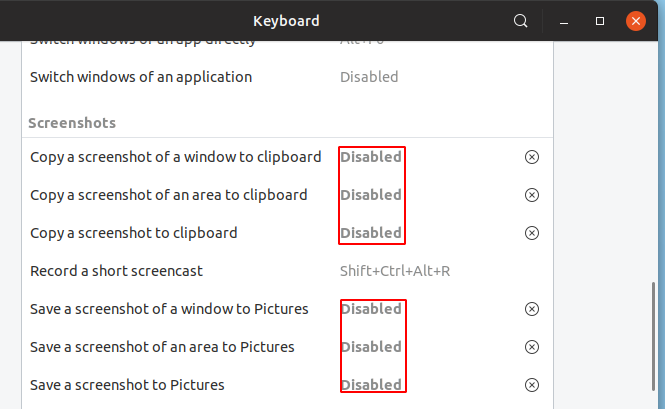
Before this I disabled gnome built-in screeshotter:
 vadbes46
on 10 Jan 2019
vadbes46
on 10 Jan 2019
@lupoDharkael hi, lupoDharkael. Could you tell me how can set copying screenshot automatically to Clipboard after run flameshot gui ? Thank you!
I mean if i run flameshot gui and i double-click my mouse, it can copy automatically to Clipboard?
 CHN-STUDENT
on 26 Aug 2020
CHN-STUDENT
on 26 Aug 2020
@CHN-STUDENT No, you must hit the copy icon.
 borgmanJeremy
on 14 Oct 2020
borgmanJeremy
on 14 Oct 2020
@borgmanJeremy Would you add this function in the future version? Copy to clip-broad by hotkey will be convenient for our users.
CHN-STUDENT
on 14 Oct 2020
@CHN-STUDENT I think the best we will do is add more extensive hot key support so you will be able to hit Ctrl +C and then ESC. We are also working on making hot keys configurable to users.
borgmanJeremy
on 14 Oct 2020
yeah i think so! Thanks for your contributions!
CHN-STUDENT
on 14 Oct 2020
Related issues
 soundsbeard
·
4Comments
soundsbeard
·
4Comments
 makz27
·
4Comments
makz27
·
4Comments
 omkarnathsingh
·
4Comments
omkarnathsingh
·
4Comments
 hosiet
·
4Comments
hosiet
·
4Comments
 mmesnjak
·
4Comments
mmesnjak
·
4Comments
Most helpful comment
Great, thank you!!!
Did the same for Ubuntu 18.10 and mapped to Printscreen

Before this I disabled gnome built-in screeshotter: