Flameshot: Add a delay (Enhancement)
Thank you for creating this application!
One of the nice things in Shutter, which does not run on Wayland, is that it allows a delay between selecting the target area and taking the screenshot. This allows one to draw the area, then do something with the mouse like opening a dropdown.
So, my request is that the configuration support an optional delay between selecting a screenshot aea and grabbing the pixels, during which the user can use their mouse "normally" on the screen.
 sterndata
All 14 comments
Notice that you can do something like
flameshot screen -d 5000
and have a screenshot after 5 seconds delay, or
flameshot gui -d 5000
to be able to select the rectangular zone --- although in that case, you choose the zone _after_ the delay expired (which is quite strange).
Also, a countdown would be nice to have...
 Rmano
on 27 Aug 2018
Rmano
on 27 Aug 2018
Duplicate of #124, I guess.
 AlexWayfer
on 3 Sep 2018
AlexWayfer
on 3 Sep 2018
How that can be done in the GUI??
 mortasoft
on 1 Mar 2019
mortasoft
on 1 Mar 2019
Notice that you can do something like
flameshot screen -d 5000and have a screenshot after 5 seconds delay, or
flameshot gui -d 5000to be able to select the rectangular zone --- although in that case, you choose the zone _after_ the delay expired (which is quite strange).
Also, a countdown would be nice to have...
Typing in terminal --
flameshot screen -d 5000
'screen' is not a valid argument. See 'flameshot --help'.
flameshot gui -d 5000, on the other hand, works fine.
 cipricus
on 22 Jun 2019
cipricus
on 22 Jun 2019
Please reopen this.
This should be available from the context menu of tray icon!
 Mart-Bogdan
on 7 Jul 2019
Mart-Bogdan
on 7 Jul 2019
There is no mention of the -d flag at all in the CLI help: (v0.6.0-63-g19d70110)
$ flameshot --help
Usage: flameshot [flameshot-options] [arguments]

Options:
  -h, --help     Displays this help
  -v, --version  Displays version information

Arguments:
  gui            Start a manual capture in GUI mode.
  screen         Capture a single screen.
  full           Capture the entire desktop.
  launcher       Open the capture launcher.
  config         Configure flameshot.
 luzpaz
on 29 Sep 2019
luzpaz
on 29 Sep 2019
@luzpaz, it's in gui sub-command:
> flameshot gui --help
Usage: flameshot gui [gui-options]

Options:
  -p, --path <path>           Path where the capture will be saved
  -d, --delay <milliseconds>  Delay time in milliseconds
  -r, --raw                   Print raw PNG capture
  -h, --help                  Displays this help
@AlexWayfer thanks. I think that the top level --help flag should list all this subcommand flag. What's the harm ?
luzpaz
on 30 Sep 2019
cli flag is good, but having such option from tray icon would be better.
Flameshot is starting with system anyway, and sits in a tray.
Mart-Bogdan
on 30 Sep 2019
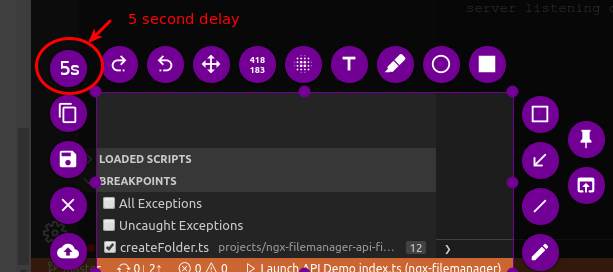
There's so many buttons around the screen capture selection, how about another one?
 benwinding
on 17 Oct 2019
benwinding
on 17 Oct 2019
There's so many buttons around the screen capture selection, how about another one?
Yea I like that. Why there's no delay in the GUI?.
Almost all the screenshot apps had it.
mortasoft
on 17 Oct 2019
Selection size and position can be not obvious before pop-up shows, for example. So, it's better to place delay in something like drop-down menu of top-bar icon.
AlexWayfer
on 17 Oct 2019
@AlexWayfer suggestion sounds really good, could you open this issue again?
 marcosfede
on 22 Jan 2020
marcosfede
on 22 Jan 2020
@AlexWayfer suggestion sounds really good, could you open this issue again?
I'm not a collaborator or author of this issue, so no. Anyway, this issue is a duplicate of #124, how it was mentioned before closing.
AlexWayfer
on 22 Jan 2020
Related issues
 omkarnathsingh
·
4Comments
omkarnathsingh
·
4Comments
 orschiro
·
3Comments
orschiro
·
3Comments
 dajare
·
4Comments
dajare
·
4Comments
 borgmanJeremy
·
3Comments
borgmanJeremy
·
3Comments
 mmesnjak
·
4Comments
mmesnjak
·
4Comments
Most helpful comment
Please reopen this.
This should be available from the context menu of tray icon!