Flameshot: Set default save path
I initially configured my screenshots to just flameshot full but apparently that doesn't work: it needs a -p <path> to work.
It would be nice if I could specify a default save path (~/Pictures/Screenshots) in the config and could then run flameshot full without specifying a path.
 jankatins
All 13 comments
Apparently, there's a config file at ~/.config/Dharkael/flameshot.ini (I'm not sure why it isn't ~/.config/flameshot/flameshot.ini or simply ~/.config/flameshot.ini ... it would've been better right?) in which a savePath variable exists but I still need to mention the path when I try to take a fullscreen shot.
Please consider fixing this issue. It also would be better if there was an option to specify the default save directory in the GUI config window opened using flameshot config.
Thanks for making an awesome tool.
 ghost
on 11 May 2018
ghost
on 11 May 2018
It's not saving anywhere, not even on default "Pictures/Screenshots" folder :(
I'm using Manjaro KDE Plasma.
I've tried just clicking from the system try icon, by using the custom hotkey file and pressing prt scr, or ctrl prt scr or whatever.
I haven't had Pictures/Screenshots initially because of location, but even creating it didn't do the trick. Nor changing .config/Dharkael/flameshot.ini's savePath, nothing. Flameshot doesnt save anywhere. Tried by console to get any debug, with no luck...
Application just shows and works as expected but saving.
Maybe it's a permission's issue?
 Neules
on 4 Aug 2018
Neules
on 4 Aug 2018
Same here!
Works fine but I can´t save the screenshot!
 daviddoji
on 12 Nov 2018
daviddoji
on 12 Nov 2018
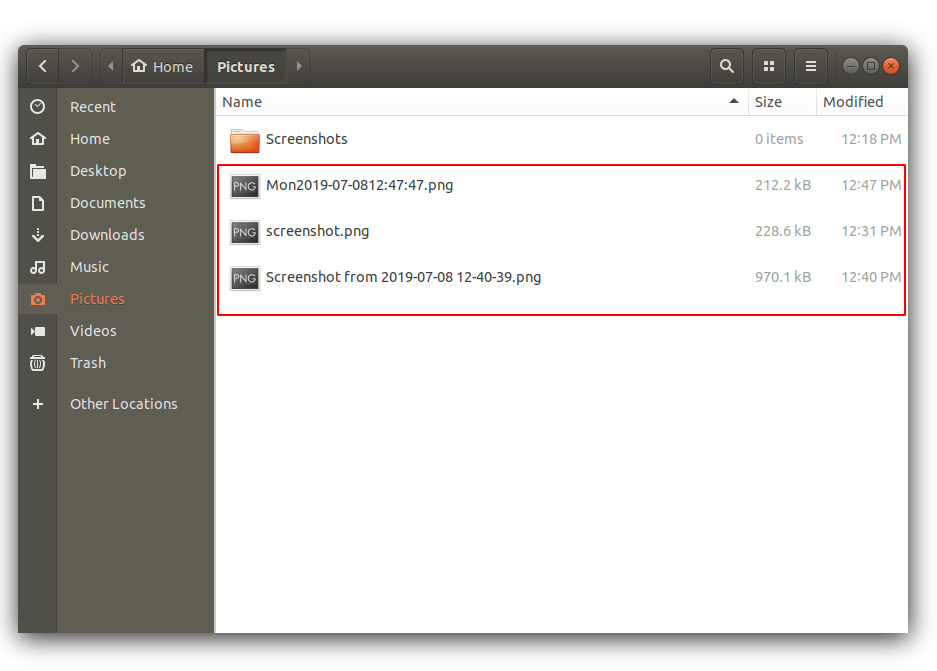
FWIW, on Ubuntu, its saving just fine, only problem is its not going to ~/Pictures/Screenshots as expected when following the tutorial on the site here
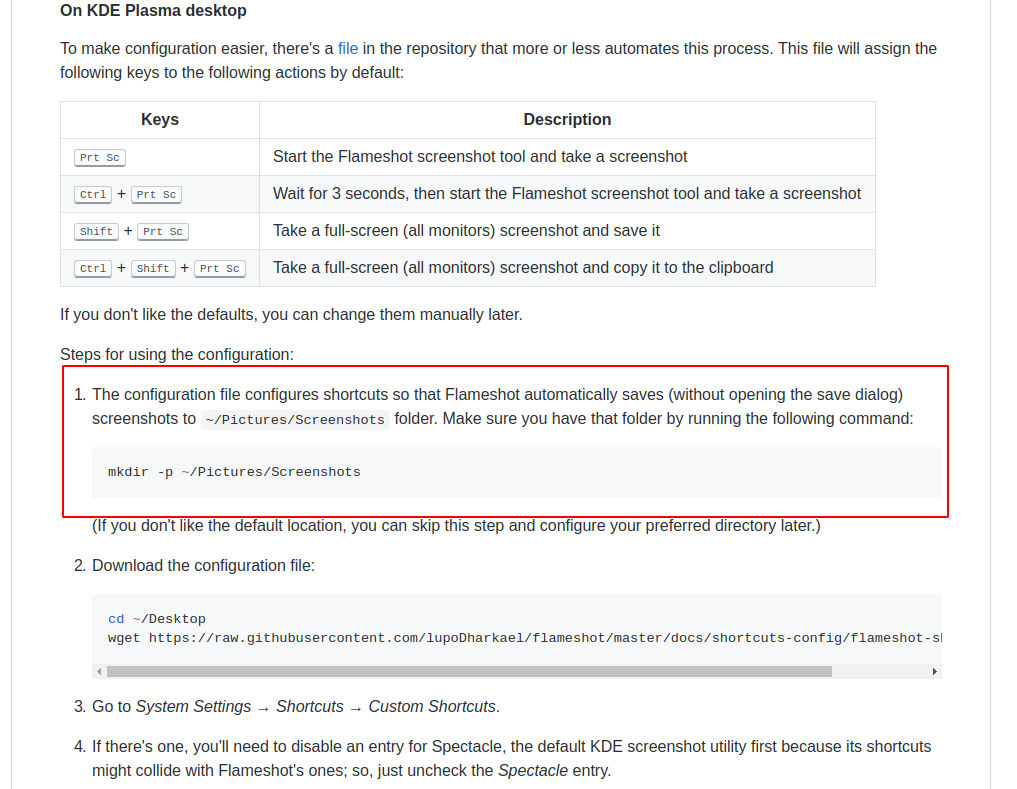
Instead it saves to ~/Pictures as a sibling to the ~/Pictures/Screenshots directory
 traversng
on 8 Jul 2019
traversng
on 8 Jul 2019
I'm using Kubuntu with non-English locale and Flameshot rewrites savePath on startup with:
savePath=/home/username/\xd0\x98\xd0\xb7\xd0\xbe\xd0\xb1\xd1\x80\xd0\xb0\xd0\xb6\xd0\xb5\xd0\xbd\xd0\xb8\xd1\x8f
So I haven't Pictures folder, and so I can't save any shot. Please fix it asap.
 cbagpipe
on 7 Dec 2019
cbagpipe
on 7 Dec 2019
Still not fixed, bump
 sbrki
on 28 Dec 2019
sbrki
on 28 Dec 2019
Any updates here? If I change the save path in .config/Dharkael/flameshot.ini it gets changed back to Pictures/Screenshots I have also tried exporting the config, editing the path and than importing to no avail.
 joeySeal
on 16 Feb 2020
joeySeal
on 16 Feb 2020
Glad to know I'm not alone in this, I'm using Kubuntu 18.04 and all other features work fine except for saving a screenshot to a file. This is the message that I get:
Error trying to save as Pictures/Screenshots/screenshot.png
Even when I have the savePath set to something else, the same error still occurs.
 michaelignacio
on 24 Feb 2020
michaelignacio
on 24 Feb 2020
On KDE neon User Edition 5.18 having same problem. Changed the .config/Dharkael/flameshot.ini without success.
FIXED:
System Settings -> Shortcuts -> Custom Shortcuts -> Flameshot -> Take screenshot -> Action (tab)
in Arguments: change 'Pictures/Screenshots' 0 0
to '/home/username/Pictures/Screenshots' 0 0 Replace _username_ with your username.
Repeat for other shortcuts:
- Take screenshot with delay
- Take full-screen screenshot and save
Now it's working.
Note to developer: This worked correctly when I installed, then started saving to ~/Pictures/ but then stopped working. In-between ~/Pictures and not working, I did reinstall KDE neon with same /home/user but completely wiped /.
First iso: neon-user-20200220-1117.iso
This iso: neon-user-20200312-1118.iso
Hope that helps.
 jctratt
on 17 Mar 2020
jctratt
on 17 Mar 2020
I'm on Garuda which isn't all that much different than Manjaro and when I do a full screen capture Flameshot saves to the clipboard. Problem is trying to copy the screens to any folder either doesn't work or I end up with unusable files. Really need Flameshot to have a proper option for saving the capture rather it's the entire screen or part of the screen to a location of the users choice.
 SecretAgentAgentX
on 24 Aug 2020
SecretAgentAgentX
on 24 Aug 2020
Confirmed on main branch. This would be nice to get into 0.8, ill see if we can get to it in time.
 borgmanJeremy
on 16 Sep 2020
borgmanJeremy
on 16 Sep 2020
@SecretAgentAgentX does garuda let you pull from aur? If so could you please test with flameshot-git? I am actually not able to replicate this now.
borgmanJeremy
on 17 Sep 2020
Mmmh. I can set it now, but it's ignored :-/ (0.8.0 AppImage)
 Moini
on 21 Sep 2020
Moini
on 21 Sep 2020
Related issues
 bingoIsCoder
·
4Comments
borgmanJeremy
·
3Comments
bingoIsCoder
·
4Comments
borgmanJeremy
·
3Comments
 ronjouch
·
3Comments
ronjouch
·
3Comments
 makz27
·
4Comments
makz27
·
4Comments
 soundsbeard
·
4Comments
soundsbeard
·
4Comments
Most helpful comment
Apparently, there's a config file at
~/.config/Dharkael/flameshot.ini(I'm not sure why it isn't~/.config/flameshot/flameshot.inior simply~/.config/flameshot.ini... it would've been better right?) in which asavePathvariable exists but I still need to mention the path when I try to take a fullscreen shot.Please consider fixing this issue. It also would be better if there was an option to specify the default save directory in the GUI config window opened using
flameshot config.Thanks for making an awesome tool.