Flameshot: Take screenshot after x seconds
Sometimes, I need to take a screenshot from a submenu or a hover state in a site. This can be achieved by setting a timer before the screenshot is taken. Based on the amount of time, I would have time enough to move the mouse and interact with the screen.
 Mondane
All 30 comments
You could configure a shortcut as flameshot gui -d 1000( or another value in milliseconds to achieve a delay) from the configuration panel of your desktop environment.
 lupoDharkael
on 22 Feb 2018
lupoDharkael
on 22 Feb 2018
Good to know this workaround. Will you add it as a GUI toolicon too?
Mondane
on 22 Feb 2018
The version 0.6 will have a graphical panel where you will be able to launch screenshots with some controls over configuration similar to the concepto of the widget of Spectacle.
Here is how it looks the panel of Spectacle: 
lupoDharkael
on 22 Feb 2018
Spectacle is what I prefer to use solely for the delay option, if Flameshot adds that then it is likely to become my go to. :)
 MichaelTunnell
on 27 Feb 2018
MichaelTunnell
on 27 Feb 2018
The version 0.6 will have a graphical panel where you will be able to launch screenshots with some controls over configuration similar to the concepto of the widget of Spectacle.
Sorry, but I have version 0.6 and don't see it. Are there any new plans?
 AlexWayfer
on 3 Sep 2018
AlexWayfer
on 3 Sep 2018
The launcher is almost done, you can test it in the branch launcher, there is a problem. When you take the screenshot the panel doesn't hide in time because some desktops use animations.
I could release a new version with the panel not hiding when you take the capture and fix it later.
lupoDharkael
on 3 Sep 2018
any progress on the launcher branch ?
 luzpaz
on 24 Oct 2018
luzpaz
on 24 Oct 2018
I too would like an option for adding a delay. Other screenshot tools have it, and it is essential for some types of screenshot (such as off autohiding panels or docks). Really, it's a deal-breaker.
 ghost
on 26 Oct 2018
ghost
on 26 Oct 2018
GUI delay functionality is really useful feature, this is what keep me using spectacle. Hopefully this will come soon.
 kevinsmia1939
on 6 Nov 2018
kevinsmia1939
on 6 Nov 2018
it would be a great improvement
 danilomagrini
on 14 Jan 2019
danilomagrini
on 14 Jan 2019
I really like Flameshot but the ability to have a delay is very important most of the time. I use Flameshot at this point only if I need to use arrows or quick edits on top just because getting the command is longer than using Spectacle. However, I suppose I could just make a shortcut for the delay but then the time will be locked to whatever I put there. Overall, Flameshot is fantastic but having a easy access delay would be so awesome.
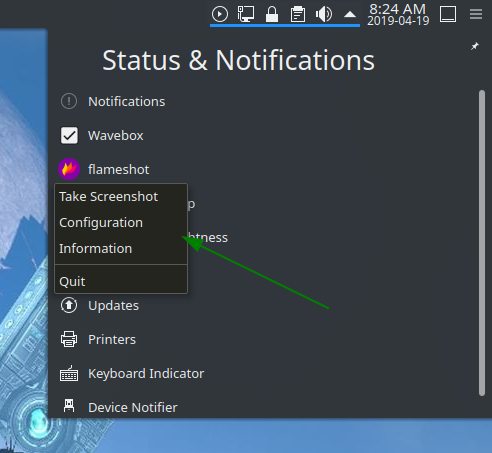
I would be totally happy if the option wasn't in a popup GUI too. It could be in the context menu of the entry in the system tray. If you could configure the time of delay in the settings and then have an entry for that in the context menu that would be perfect! If there were multiple timed options in that it would be even better. :sunglasses:
MichaelTunnell
on 19 Apr 2019
Please add this to the UI
flameshot gui -d 5000 is fine to use but would be nicer to have it in the GUI
 vogella
on 13 Jun 2019
vogella
on 13 Jun 2019
Associating main commands to shortkeys makes Flameshot my choice for screen-shooting:
flameshot gui associated with Print key
flameshot gui -d 7000 associated with Ctrl+Print
flameshot full with Shift+Ctrl+Print
 cipricus
on 11 Mar 2020
cipricus
on 11 Mar 2020
@cipricus
Associating main commands to shortkeys makes Flameshot my choice for screen-shooting
These are what I do as well but the lack of a GUI option is just bad for general usage.
MichaelTunnell
on 27 Mar 2020
@MichaelTunnell as alternative you can try https://github.com/ksnip/ksnip program, that have classic GUI
 MurzNN
on 27 Mar 2020
MurzNN
on 27 Mar 2020
@MichaelTunnell as alternative you can try https://github.com/ksnip/ksnip program, that have classic GUI
That's really nice alternative, thank you.
AlexWayfer
on 27 Mar 2020
Has the branch for the GUI version of flameshot been released? Does it work from tray like other similar programs or how?
 razvan-flavius-panda
on 13 Apr 2020
razvan-flavius-panda
on 13 Apr 2020
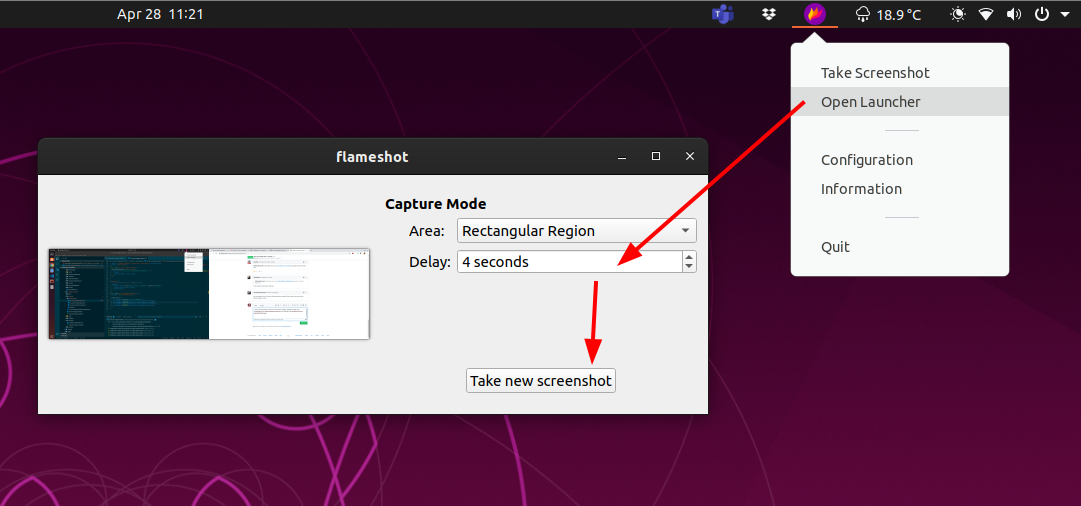
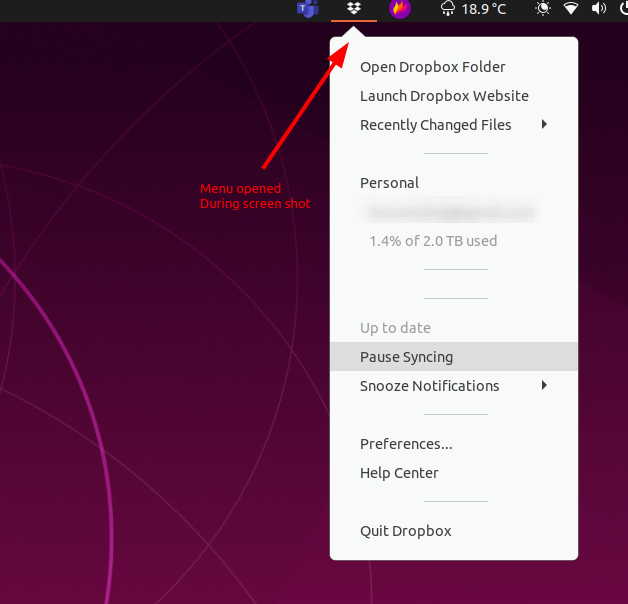
Yay, this is now possible in the UI, just follow these steps
 benwinding
on 28 Apr 2020
benwinding
on 28 Apr 2020
Can confirm! I guess this issue can be closed.
Thank you!
luzpaz
on 28 Apr 2020
Cool - which release will this be in?
 Moini
on 28 Apr 2020
Moini
on 28 Apr 2020
Any reason this can't be available via the sidebar from flameshot gui? So we can always start flameshot with the same shortcut for flameshot gui -p <...>, and then if we want to alter behavior, we then hit space to configure, before taking the shot?
 AndydeCleyre
on 22 Jul 2020
AndydeCleyre
on 22 Jul 2020
The tool gui?
 borgmanJeremy
on 22 Jul 2020
borgmanJeremy
on 22 Jul 2020
The tool gui?
I suppose so, yeah. The help message/instructions that popup when launching with flameshot gui calls it "the side panel" so I didn't realize its scope is really targeted at tools. It is available before taking the screenshot (so before any tools are accessible), so there is potential to use the space for pre-screenshot settings as well.
AndydeCleyre
on 22 Jul 2020
This will be in the 0.8 release this weekend.
borgmanJeremy
on 18 Sep 2020
Could someone explain how I can now do timed screenshots via GUI? I can't seem to find a setting for 'make a shot in x seconds'.
Moini
on 21 Sep 2020
If you right click the icon, hit "open launcher" This brings up a gui that lets you set the delay.
borgmanJeremy
on 21 Sep 2020
If you right click the icon, hit "open launcher" This brings up a gui that lets you set the delay.
Also there is flameshot launcher command for those who interested in CLI or shortcuts.
AlexWayfer
on 21 Sep 2020
Thanks! I think 'open launcher' is maybe not the best way to advertise this feature (I thought the launcher was what I get when I right-click on the icon in the status bar), but I'll find it now.
Moini
on 21 Sep 2020
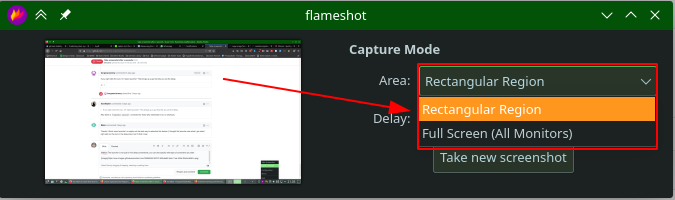
@Moini The launcher is not just for the delay screenshots, you can also specify what type of screenshot you want. Perhaps in future other features will be also added to launcher.
 mmahmoudian
on 24 Sep 2020
mmahmoudian
on 24 Sep 2020
Yes, very useful! I set hotkeys PRTSCR for "flameshot gui" and SHIFT+PRTSCR
for "flameshot launcher".
Stefano Bagnatica
Il gio 24 set 2020, 20:07 Mehrad Mahmoudian notifications@github.com ha
scritto:
@Moini https://github.com/Moini The launcher is not just for the delay
screenshots, you can also specify what type of screenshot you want. Perhaps
in future other features will be also added to launcher.[image: image]
https://user-images.githubusercontent.com/390889/94182548-d5e98300-fea9-11ea-88e3-6dee5b861d00.png—
You are receiving this because you are subscribed to this thread.
Reply to this email directly, view it on GitHub
https://github.com/flameshot-org/flameshot/issues/124#issuecomment-698501746,
or unsubscribe
https://github.com/notifications/unsubscribe-auth/ACC3QTT7G4CMIOLGICPZAO3SHODFLANCNFSM4ER3TPVQ
.
 thepisu
on 24 Sep 2020
thepisu
on 24 Sep 2020
Related issues
 mmesnjak
·
4Comments
mmesnjak
·
4Comments
 ElijahLynn
·
3Comments
ElijahLynn
·
3Comments
 xstable
·
3Comments
xstable
·
3Comments
 kylewill
·
4Comments
kylewill
·
4Comments
 abba23
·
3Comments
abba23
·
3Comments
Most helpful comment
The version 0.6 will have a graphical panel where you will be able to launch screenshots with some controls over configuration similar to the concepto of the widget of Spectacle.
Here is how it looks the panel of Spectacle: