flameshot indicator icon issue
I am using both albert launcher and flameshot in ubuntu 16.04. Both have an indicator, however when i installed flameshot the icon of albert changed to the flameshot icon.

 dhpowrhost
All 48 comments
@dhpowrhost Please say how you install flameshot? And please check out the flameshot and albert desktop files.
 ZetaoYang
on 17 Jan 2018
ZetaoYang
on 17 Jan 2018
I don't think it will have anything to do with the desktopfiles.
Does this happen in every session after you reboot?
Check if you can reproduce the issue with 2 different desktops (your usual desktop and other), if it happens only in one it could be a bug in the system.
 lupoDharkael
on 17 Jan 2018
lupoDharkael
on 17 Jan 2018
I installed flameshot using the provided deb file..
dhpowrhost
on 18 Jan 2018
@dhpowrhost May be the issue of the system/icon theme or system extensions. I can not reproduce this issue. If you don't mind, I hope you can provide more detailed information about your desktop environment and describe the whole process clearly.
ZetaoYang
on 20 Jan 2018
hi, i've got this problem too. compiled and installed from github.
i'm using ubuntu 16.04 with default unity de.

 ranjitc
on 24 Jan 2018
ranjitc
on 24 Jan 2018
Hi all,
Same problem occur here between «flameshot » and « mkchromecast » but with some more detailed information's :
- Starting with the 2 apps closed.
- If I run first « flameshot » and then « mkchromecast », the 2 icons render with the « mkchromecast » icon.
- If I run first « mkchromecast » and then « flameshot », the 2 icons render with the « flameshot » icon.
Look like the last application launched force the use of his own icon.
Also, closing 1 of the 2 applications, the icon of the remaining application is used.
Hope it help ...
PS : added a video with the behavior : flameshot & mkchromecast icon bug
 Creteil
on 12 Feb 2018
Creteil
on 12 Feb 2018
@Creteil the video link is unavailable. Can you upload the video to drop.me again?
ZetaoYang
on 12 Feb 2018
ZetaoYang
Sorry, but I am out for the moment.
What do you mean by « the video link its unavailable » ???
I am playing it properly from my smartphone without any restrictions...
Do you have any restrictions to access video located in France 🇫🇷 ???
Creteil
on 12 Feb 2018
@Creteil I got it via http proxy. And upload to Drop.me flameshot & mkchromecast icon bug
ZetaoYang
on 12 Feb 2018
@Creteil How do you install flameshot? Is it manually compiled and installed?
ZetaoYang
on 12 Feb 2018
@ZetaoYang yes, I have build packages by myself (running Ubuntu 15.10 wily).
Creteil
on 12 Feb 2018
@Creteil You compile the source code is downloaded from Github Release v0.5.0? Or the latest master branch?
ZetaoYang
on 12 Feb 2018
bigbob@bigbob-UX31A:~/tmp/Building/flameshot/flameshot$ git --git-dir .git --work-tree . describe --always --tags
v0.5.0-114-gdb8a483
Creteil
on 12 Feb 2018
https://bugs.launchpad.net/ubuntu/+source/quiterss/+bug/1529957
@Creteil Sorry, whether compiled and installed source code or installed deb directly, I can not reproduce this problem on ubuntu16.04.
But I reproduced this issue :
I am using both albert launcher and flameshot in ubuntu 16.04. Both have an indicator, however when i installed flameshot the icon of albert changed to the flameshot icon.
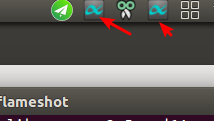
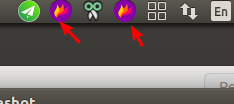
ZetaoYang
on 12 Feb 2018
hi @ZetaoYang was wondering if you have tried this with these two particular sw alftred albert / mkchromecast? if yes, then i guess there is something else on our systems causing this, if not, then maybe these particular sw cause a conflict? or have a common dependency?/
@Creteil sorry to digress from the topic but is the icon in your tray of airdroid? have you managed to get it to work under wine?
ranjitc
on 12 Feb 2018
@ranjitc what do you mean by « is the icon in your tray of airdroid? » what icon ?
Creteil
on 12 Feb 2018
@ZetaoYang what icon appear duplicate if you close « albert launcher » & « flameshot » then start « flameshot » & « albert launcher » in this order...
Creteil
on 12 Feb 2018
@Creteil this icon ...

ranjitc
on 12 Feb 2018
@ranjitc look like this icon come from ZetaoYang screenshot, not mine...
BTW, I think this is the icon of Telegram client.
Creteil
on 12 Feb 2018
@ranjitc I will try in other system.
ZetaoYang
on 12 Feb 2018
@ranjitc @Creteil Linux Mint 18.3 Cinnamon
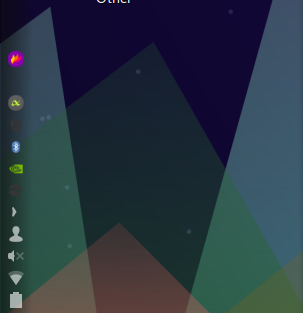

This should be the Ubuntu platform problem. Accurately speaking, it should be a Unity desktop problem.
ZetaoYang
on 12 Feb 2018
@ZetaoYang ok, thanks, I'm trying to find why and fix ...
Creteil
on 12 Feb 2018
@ZetaoYang really strange...
The unity launcher work properly and show right icon per application when opening apps :
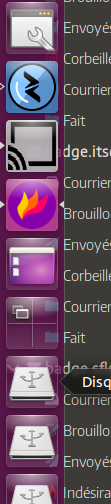
But the indicator icons in the indicator area at top of the screen show duplicate icon of the last opened app :
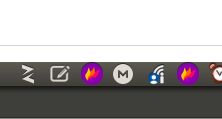
Creteil
on 12 Feb 2018
@Creteil @ranjitc
Ubuntu 17.10 Gnome

What is certain now is Unity desktop problems.
ZetaoYang
on 13 Feb 2018
@ZetaoYang thanks for looking into it !
ranjitc
on 13 Feb 2018
@ranjitc @Creteil For Ubuntu 16.04 users, try to upgrade to Unity 7.4.5 to see if this issue is resolved.
changlog
ZetaoYang
on 17 Feb 2018
@ZetaoYang I am currently trying to backport unity of xenial on my heavily updated wily release...
At least I can « give it a try !!! »
Creteil
on 17 Feb 2018
@ZetaoYang Do you have an idea of why my compilation of unity 7.4 bail out with this error ??? :
bigbob@bigbob-UX31A:~/tmp/Building/unity/unity-7.4.0+16.04.20160415$ LANG=C cd /home/bigbob/tmp/Building/unity/unity-7.4.0+16.04.20160415/obj-x86_64-linux-gnu/unity-shared && /usr/bin/x86_64-linux-gnu-g++   -DUSE_X11 -g -O2 -fstack-protector-strong -Wformat -Werror=format-security -D_FORTIFY_SOURCE=2  -DGNOME_DESKTOP_USE_UNSTABLE_API -std=c++11 -fno-permissive -Werror -Wall -Wcast-align -Wempty-body -Wformat-security -Winit-self -Warray-bounds -Wno-error=unused-local-typedefs -pthread -DGLEW_MX -pthread -I/usr/include/unity/unity -I/usr/include/libappstream-glib -I/usr/include/libdbusmenu-glib-0.4 -I/usr/include/dee-1.0 -I/usr/include/libindicator3-0.4 -I/usr/include/json-glib-1.0 -I/usr/include/libbamf3 -I/usr/lib/x86_64-linux-gnu/libbamf3/include -I/usr/include/gnome-desktop-3.0 -I/usr/include/Nux-4.0 -I/usr/include/GL -I/usr/include/libdrm -I/usr/include/unity-misc -I/usr/include/gtk-3.0 -I/usr/include/at-spi2-atk/2.0 -I/usr/include/at-spi-2.0 -I/usr/include/dbus-1.0 -I/usr/lib/x86_64-linux-gnu/dbus-1.0/include -I/usr/include/gtk-3.0 -I/usr/include/gio-unix-2.0/ -I/usr/include/mirclient -I/usr/include/mircommon -I/usr/include/cairo -I/usr/include/pango-1.0 -I/usr/include/harfbuzz -I/usr/include/pango-1.0 -I/usr/include/atk-1.0 -I/usr/include/cairo -I/usr/include/pixman-1 -I/usr/include/freetype2 -I/usr/include/libpng12 -I/usr/include/gdk-pixbuf-2.0 -I/usr/include/libpng12 -I/usr/include/zeitgeist-2.0 -I/usr/include/libxml2 -I/usr/include/glibmm-2.4 -I/usr/lib/x86_64-linux-gnu/glibmm-2.4/include -I/usr/include/glib-2.0 -I/usr/lib/x86_64-linux-gnu/glib-2.0/include -I/usr/include/sigc++-2.0 -I/usr/lib/x86_64-linux-gnu/sigc++-2.0/include -I/usr/include/startup-notification-1.0 -I/usr/include/compiz -I/usr/include/libxml2 -I/usr/include/glibmm-2.4 -I/usr/lib/x86_64-linux-gnu/glibmm-2.4/include -I/usr/include/glib-2.0 -I/usr/lib/x86_64-linux-gnu/glib-2.0/include -I/usr/include/sigc++-2.0 -I/usr/lib/x86_64-linux-gnu/sigc++-2.0/include -I/usr/include/startup-notification-1.0 -I/usr/include/gsettings-desktop-schemas -pthread -DGLEW_MX -pthread -fPIC -I/home/bigbob/tmp/Building/unity/unity-7.4.0+16.04.20160415/unity-shared/.. -I/home/bigbob/tmp/Building/unity/unity-7.4.0+16.04.20160415/unity-shared/../services -I/home/bigbob/tmp/Building/unity/unity-7.4.0+16.04.20160415/unity-shared/../UnityCore -I/home/bigbob/tmp/Building/unity/unity-7.4.0+16.04.20160415/unity-shared/../plugins/unityshell/src -I/home/bigbob/tmp/Building/unity/unity-7.4.0+16.04.20160415/obj-x86_64-linux-gnu -I/home/bigbob/tmp/Building/unity/unity-7.4.0+16.04.20160415/obj-x86_64-linux-gnu/unity-shared     -include unity-shared_pch.hh  -fpch-preprocess  -Winvalid-pch  -o CMakeFiles/unity-shared.dir/AppStreamApplication.cpp.o -c /home/bigbob/tmp/Building/unity/unity-7.4.0+16.04.20160415/unity-shared/AppStreamApplication.cpp
In file included from /usr/lib/x86_64-linux-gnu/glib-2.0/include/glibconfig.h:9:0,
                 from /usr/include/glib-2.0/glib/gtypes.h:32,
                 from /usr/include/glib-2.0/glib/galloca.h:32,
                 from /usr/include/glib-2.0/glib.h:30,
                 from /usr/include/Nux-4.0/NuxCore/SystemGNU.h:37,
                 from /usr/include/Nux-4.0/NuxCore/NuxCore.h:125,
                 from /usr/include/Nux-4.0/Nux/Nux.h:26,
                 from /home/bigbob/tmp/Building/unity/unity-7.4.0+16.04.20160415/unity-shared/pch/unity-shared_pch.hh:30:
/usr/include/glib-2.0/glib/gmacros.h:260:24: error: expected declaration before ‘}’ token
 #define G_END_DECLS    }
                        ^
/usr/include/libappstream-glib/as-tag.h:156:1: note: in expansion of macro ‘G_END_DECLS’
 G_END_DECLS
 ^
bigbob@bigbob-UX31A:~/tmp/Building/unity/unity-7.4.0+16.04.20160415/obj-x86_64-linux-gnu/unity-shared$
It's hours I am searching how to fix this compilation error without any success (it look like my understanding of this error is limited).
Creteil
on 17 Feb 2018
@Creteil Why do you compile and install from source?
ZetaoYang
on 18 Feb 2018
@ZetaoYang Because I can't upgrade my actual wily to 16.04.3 LTS without start from scratch.
By the way, I am tired of compiling this stuff, so, I am in the process to install the 16.04.3 LTS on another computer to see if every applications and GUI stuff work like I expect and then migrate my principal laptop to 16.04.3 LTS after check tests completed successfully ...
Creteil
on 18 Feb 2018
@ZetaoYang no luck :( problem persists on 7.4.5 ... oh well 18.04 is around the corner
ranjitc
on 18 Feb 2018
@ranjitc @Creteil You can try AppImage, it works well on Ubuntu14.04 when I installed indicator-systemtray-unity.
ZetaoYang
on 18 Feb 2018
@ZetaoYang thanks, will give it a shot
ranjitc
on 18 Feb 2018
@ZetaoYang F*k !!! On a fresh installed 16.04 LTS exactly same problem...
bigbob@bigbob-ThinkPad-X201:~$ lsb_release -a
No LSB modules are available.
Distributor ID: Ubuntu
Description:    Ubuntu 16.04.3 LTS
Release:    16.04
Codename:   xenial
bigbob@bigbob-ThinkPad-X201:~$ dpkg -l unity
Souhait=inconnU/Installé/suppRimé/Purgé/H=à garder
| État=Non/Installé/fichier-Config/dépaqUeté/échec-conFig/H=semi-installé/W=attend-traitement-déclenchements
|/ Err?=(aucune)/besoin Réinstallation (État,Err: majuscule=mauvais)
||/ Nom                           Version             Architecture        Description
+++-=============================-===================-===================-===============================================================
ii  unity                         7.4.5+16.04.2017120 amd64               Interface designed for efficiency of space and interaction.
bigbob@bigbob-ThinkPad-X201:~$
@ranjitc @Creteil
I have a compromise solution:
- For Ubuntu 14.04/16.04, install
indicator-systemtray-unity(Only Unity desktop environment)
Ubuntu 14.04 support is the best, but Ubuntu 16.04, still can be used.
sudo apt-add-repository ppa:fixnix/indicator-systemtray-unity
sudo apt-get update
sudo apt-get install indicator-systemtray-unity
Once installed, log out and log in and Indicator Systemtray Unity should start automatically.
Settings
To change the mode position: press the middle mouse button on the indicator.
The horizontal position can be changed: scrolling the mouse over the indicator.
Settings can be changed in gsettings:/net/launchpad/indicator/systemtray (use dconf-editor).
install dconf-editor
sudo apt-get install dconf-editor
- Be sure to use AppImage for flameshot
AppImage: https://drop.me/o293yD
latest AppImage build can be found in https://travis-ci.org/lupoDharkael/flameshot/jobs/343078928
NOTE! support left-click the flameshot icon to take a screenshot.
Ubuntu16.04 Unity:
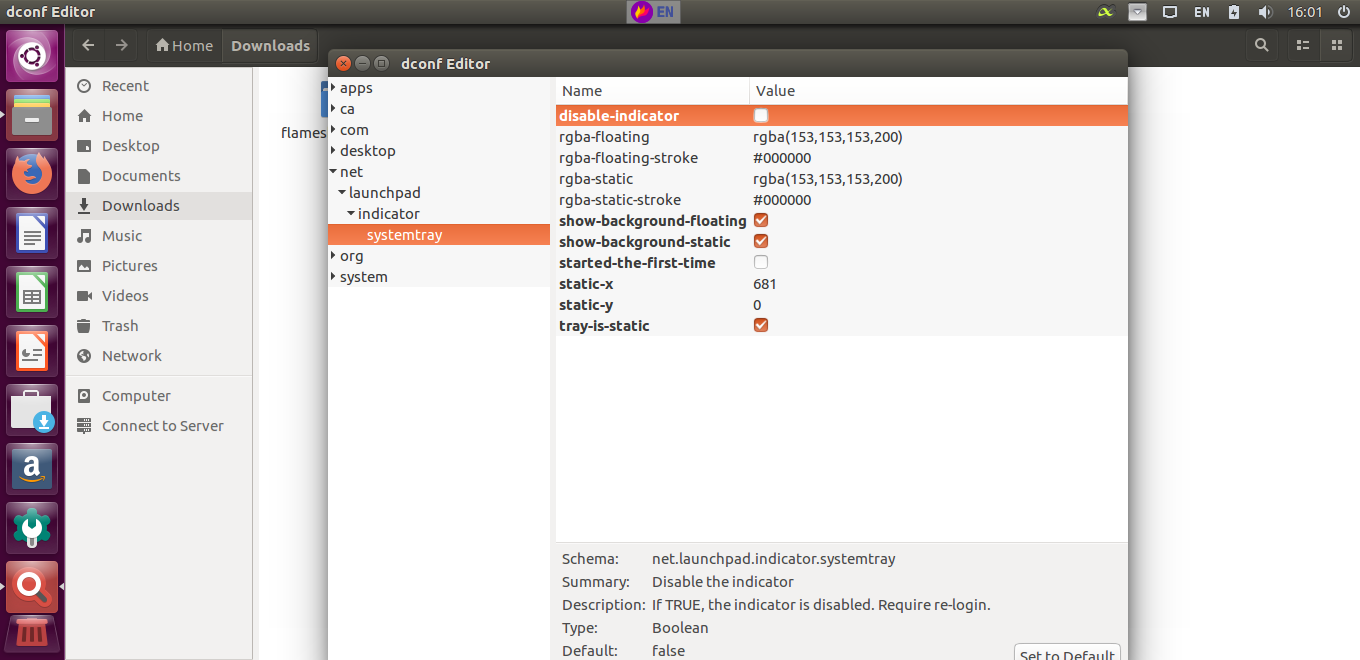
Gif:

ZetaoYang
on 19 Feb 2018
@ZetaoYang I'm probably going to sound stupid for asking this, but how do i download the package from travis-ci? Would like to know so that i can download future builds as well. Thanks
ranjitc
on 19 Feb 2018
@ranjitc

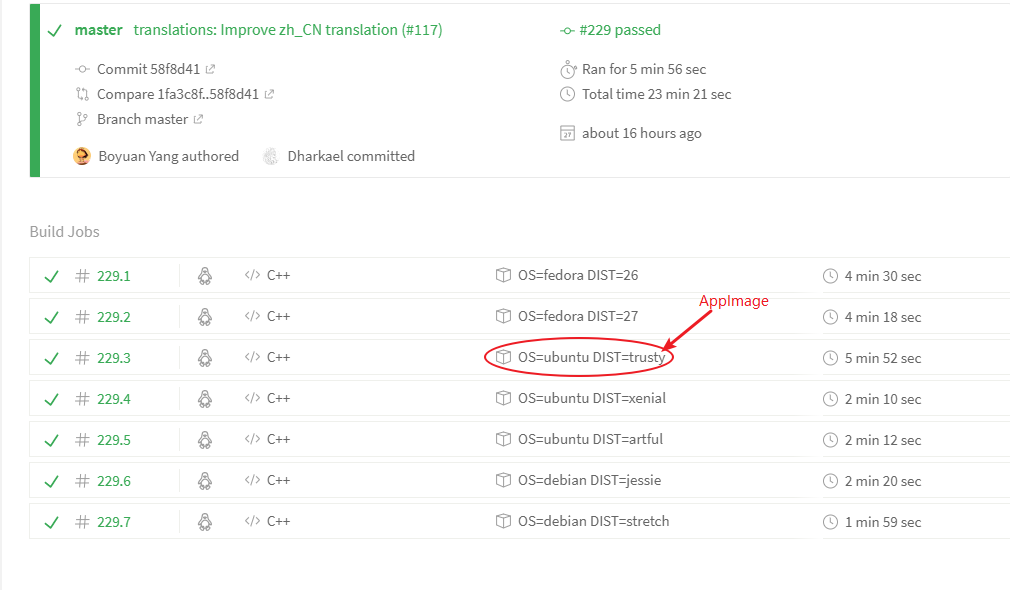
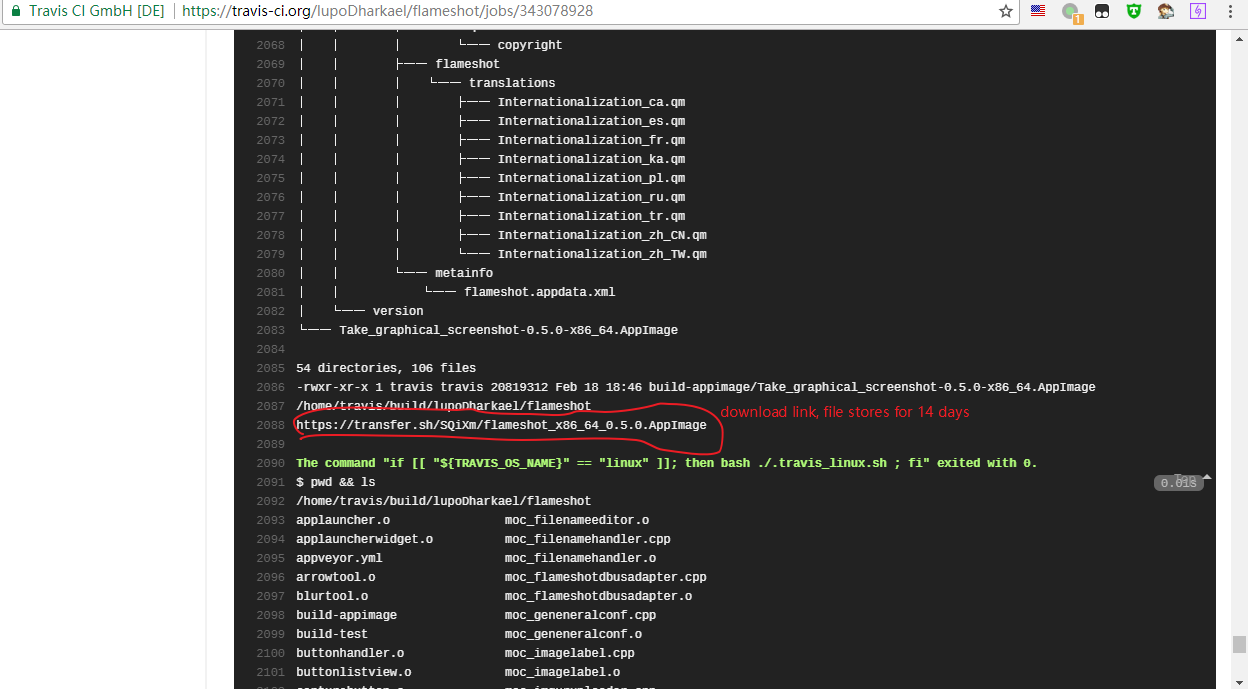
ZetaoYang
on 19 Feb 2018
thanks! i had made it to the xenial link, didnt think of looking in the logs 🤦♂️
ranjitc
on 19 Feb 2018
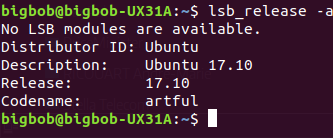
Hi all,
I have migrated to Ubuntu 17.10 + Unity, everything is working fine now, except the autostart of flameshot :-(

Creteil
on 21 Feb 2018
@Creteil Could you try albert?
ZetaoYang
on 22 Feb 2018
@ZetaoYang thanks, but I am not interested...
Creteil
on 22 Feb 2018
@Creteil i think @ZetaoYang meant only to check if the icon problem is solved with albert in 17.10 as the original request was for albert
ranjitc
on 22 Feb 2018
@ranjitc I can check for sure, but there is no debian source package and I don't want to install it from scratch.
Creteil
on 22 Feb 2018
@Creteil ah ok thanks
ranjitc
on 22 Feb 2018
ZetaoYang
on 22 Feb 2018
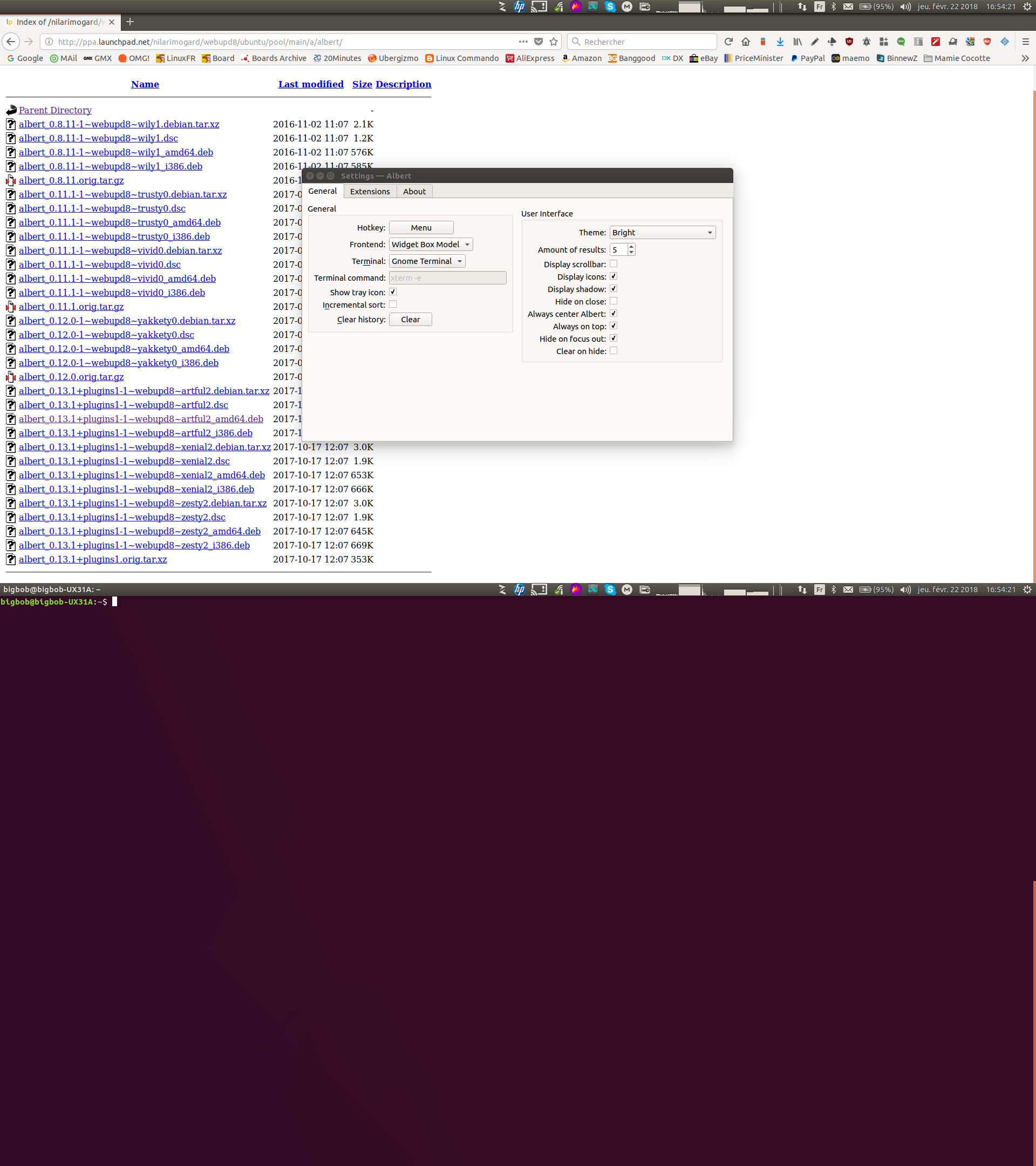
@ZetaoYang installed from : http://ppa.launchpad.net/nilarimogard/webupd8/ubuntu/pool/main/a/albert/
Look good, have a look :
Creteil
on 22 Feb 2018
@Creteil Thank you very much.
ZetaoYang
on 23 Feb 2018
Morning, looking for color invert feature button. Is this even possible right now with flameshot.
 pyhoff
on 9 Jan 2020
pyhoff
on 9 Jan 2020
Related issues
 abba23
·
3Comments
abba23
·
3Comments
 orschiro
·
3Comments
orschiro
·
3Comments
 hosiet
·
4Comments
hosiet
·
4Comments
 mmesnjak
·
4Comments
mmesnjak
·
4Comments
 borgmanJeremy
·
3Comments
borgmanJeremy
·
3Comments
Most helpful comment
@Creteil @ranjitc

Ubuntu 17.10 Gnome
What is certain now is Unity desktop problems.