Flameshot: FlameShot doesn't start, no errors
Hi,
I've installed flameshot on gentoo from the jorgicio overlay. When I type "flameshot" in a term, it just hangs forever. If I try the gui, full or config options, it immediately exits without any output (return code is 0). I tried starting dbus, see if that helps, but no changes.
Is there a debug mode, or something I could try to see what the problem might be ?
 Ulrar
Ulrar
All 82 comments
A friend just notified the same situation. I'll talk with him and see if I can find the problem.
 lupoDharkael
on 16 Jan 2018
lupoDharkael
on 16 Jan 2018
Having the same issues. But calling flameshot gui shows something.
 alexanderadam
on 1 Feb 2018
alexanderadam
on 1 Feb 2018
I've the exact same issue:
flameshotjust idles immediately.flameshot guiexists immediately (exit code0).flameshot configexists immediately (exit code0).
Most importantly, the screenshot is not saved. I'm running ArchLinux, with Xorg/i3wm. I'm using the AUR package.
I'm happy to provide extra information as required.
 WhyNotHugo
on 3 Feb 2018
WhyNotHugo
on 3 Feb 2018
Same issue here. I'm running KDE Neon, and installed Flameshot using the .deb package meant for Ubuntu Xenial (16.04) from Releases.
 zingmars
on 1 Mar 2018
zingmars
on 1 Mar 2018
Use exec dbus-launch i3 instead of exec i3 in ~/.xinitrc works. Get from #168
I use i3wm(4.15)
 tkkcc
on 19 Jun 2018
tkkcc
on 19 Jun 2018
This issue is also happening to me on NixOS in KDE Plasma 5, with Flameshot 0.5.1 (from both the latest release and unstable repositories).
 SapphicCode
on 8 Aug 2018
SapphicCode
on 8 Aug 2018
Worked when I installed it. Now I only get this problem. Just doesn't start, no errors.
 derekwsgray
on 24 Sep 2018
derekwsgray
on 24 Sep 2018
I'm on Ubuntu 18.04. When I press Prt Scr the screenshot is taken but it is taken by native ubuntu screen capture tool, I presume - it is saved in Pictures directory with name such as "Screenshot from 2018-09-25 13-47-09.png". But flametool does nothing. It's icon just sits there in the top bar next to battery indicator.
 polishExperiment
on 25 Sep 2018
polishExperiment
on 25 Sep 2018
Still not working for me on Archlinux, using flameshot 0.6.0:
$ flameshot  # Idles indefinitely
QApplication: invalid style override passed, ignoring it.

$ flameshot gui  # Exists immediately

$ flameshot full
Invalid format, set where to save the content with one of the following flags:
 -p, --path
 -r, --raw
 -c, --clipboard

Usage: flameshot full [full-options]

Options:
  -p, --path <path>           Path where the capture will be saved
  -c, --clipboard             Save the capture to the clipboard
  -d, --delay <milliseconds>  Delay time in milliseconds
  -r, --raw                   Print raw PNG capture
  -h, --help                  Displays this help

$ flameshot config  # Exits immediately
On Manjaro Xfce, Kernel 4.19 no tray-icon.
From terminal
~ >>> flameshot
qt5ct: using qt5ct plugin     - Did not start

~ >>> flameshot gui          - start

~ >>> flameshot full
Invalid format, set where to save the content with one of the following flags:
 -p, --path
 -r, --raw
 -c, --clipboard

Usage: flameshot full [full-options]

Options:
  -p, --path <path>           Path where the capture will be saved
  -c, --clipboard             Save the capture to the clipboard
  -d, --delay <milliseconds>  Delay time in milliseconds
  -r, --raw                   Print raw PNG capture
  -h, --help                  Displays this help

~ >>> flameshot config     - start
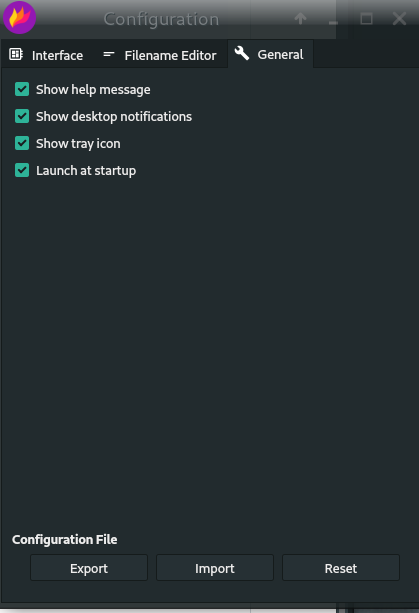
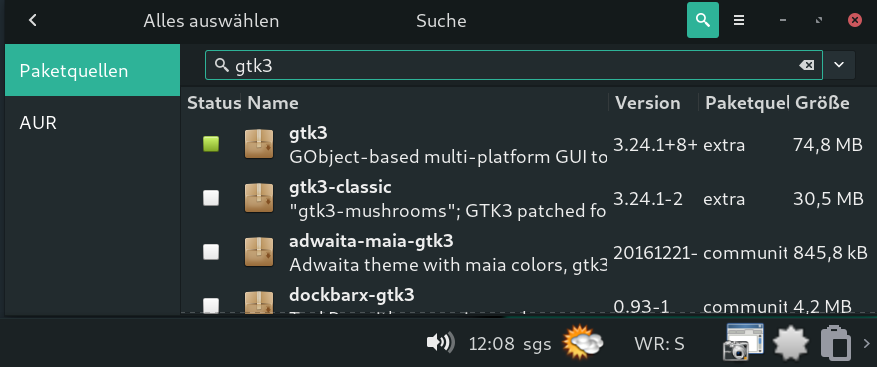
Dos not work with gtk3
 sgse
on 15 Oct 2018
sgse
on 15 Oct 2018
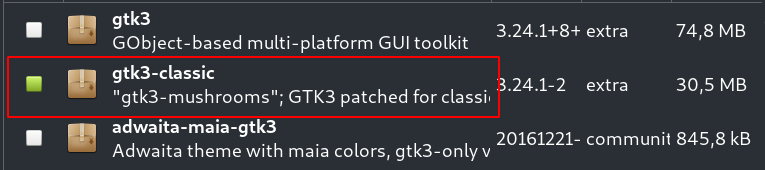
Work with gtk3-classic, Edit: must be more than that, dos not help on other Xfce PC.
sgse
on 15 Oct 2018
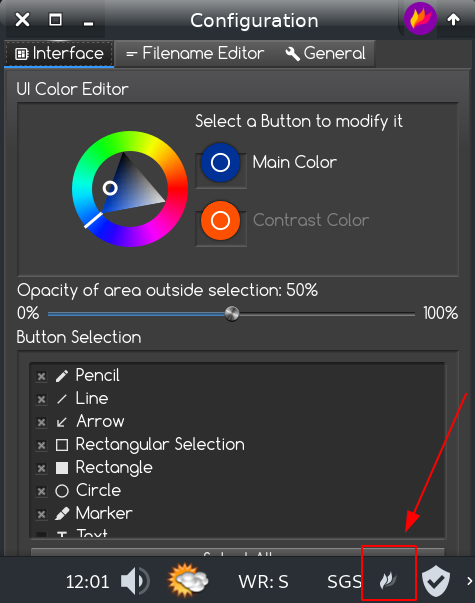
Had the same issue, but when manually adding flameshot to the system tray it worked.
 kylescousin
on 30 Oct 2018
kylescousin
on 30 Oct 2018
Same issue here, I'm running Arch 4.18.5-arch1, with i3 4.16 and Flameshot 0.6.0-1 (via community).
It opens but not showing gui, but the process still running.
Tried XDG_CURRENT_DESKTOP=gnome flameshot gui
 rod-stuchi
on 22 Nov 2018
rod-stuchi
on 22 Nov 2018
I just comment my case in other similar issue.
https://github.com/lupoDharkael/flameshot/issues/403#issuecomment-441126951
 christianmtr
on 22 Nov 2018
christianmtr
on 22 Nov 2018
This is happening to me if I have two X servers running locally. It will show in the wrong one. It's like flameshot is not paying attention to the DISPLAY environment variable
 juancampa
on 8 Jan 2019
juancampa
on 8 Jan 2019
happening to me as well. was working normal since the first install, then couple days ago just doesn't launch. I'm using linux mint 19.1 cinnamon edition
 rubenbarreiro
on 16 Jan 2019
rubenbarreiro
on 16 Jan 2019
Ubunut 18 getting exact behaviour WhyNotHugo saw...
$ flameshot # Idles indefinitely
QApplication: invalid style override passed, ignoring it.
$ flameshot gui # Exists immediately
$ flameshot full
Invalid format, set where to save the content with one of the following flags:
-p, --path
-r, --raw
-c, --clipboard
Usage: flameshot full [full-options]
Options:
-p, --path
-c, --clipboard Save the capture to the clipboard
-d, --delay
-r, --raw Print raw PNG capture
-h, --help Displays this help
$ flameshot config # Exits immediately
 genejr
on 30 Jan 2019
genejr
on 30 Jan 2019
Using Ubuntu 18.04LTS with the 4.19 LTS Kernel and Gnome. Stopped working about a week ago. Same issues as @genejr
 dNvl
on 6 Feb 2019
dNvl
on 6 Feb 2019
Same problem on Manjaro Cinnamon, worked after installation but after a reboot (some 14 days later) it no longer works.
 mitchellkrogza
on 7 Feb 2019
mitchellkrogza
on 7 Feb 2019
Ubuntu Disco Dingo (development branch) default desktop
Started as flameshot just waits for something and no notification icon in system tray.
Started as flameshot gui shows a selection interface and seems to be functional.
So it is possible to continue using it but every time I need to start it as a separate command 8(
 Alexxz
on 7 Feb 2019
Alexxz
on 7 Feb 2019
Under Linux version 4.18.16-gentoo-FC.01 (root@carbon) (gcc version 7.3.1 20180703 (Funtoo 7.3.1-r3)) #1 SMP Sun Nov 4 13:25:44 CET 2018 and i3 (4.14.1):
qt5ct: using qt5ct plugin
qt5ct: D-Bus system tray: no
qt5ct: custom style sheet is disabled
The icon is usable and I can use the tool. The rest, however, do not work. In example:
flameshot gui |echo $?
0
and the same for
flameshot full --path ~
and
flameshot screen --path ~
do nothing.
 NikosAlexandris
on 1 Mar 2019
NikosAlexandris
on 1 Mar 2019
Bumping this report, I encounter the same issue exactly as described above on Debian Buster using KDE Plasma 5.14.1
$ flameshot --version
Flameshot 0.6.0-11(Debian)
Compiled with Qt 5.11.3
SOLVED: I resolved this by resetting my locales _(since my system wasn't able to locate LC_ALL)_ and desktop launch option. Go to: System Settings > Regional Settings > Reset all and then set desktop launcher to Exec=flameshot gui in /usr/share/applications/flameshot.desktop.
 xRiot
on 8 Mar 2019
xRiot
on 8 Mar 2019
The same issue on Manjaro Cinnamon,
The "/usr/bin/flameshot gui" works but just "/usr/bin/flameshot" doesn't work.
 xcme
on 11 Mar 2019
xcme
on 11 Mar 2019
In my case, I had another flameshot instance running in the background without me knowing it (the autostarted flameshot instance). Killed that instance and started it again and now it works.
If you want flameshot to autostart correctly at login, then modify ~/.config/autostart/Flameshot.desktop to contain: Exec=/bin/bash -c "sleep 10; flameshot &" instead of the regular Exec
 mihai-dinu
on 19 Mar 2019
mihai-dinu
on 19 Mar 2019
@mihai-dinu you sir are a genius :clap: this indeed works 100% .... finally I have flameshot back without having to keep triggering it via command line. :clap:
mitchellkrogza
on 19 Mar 2019
Exec=/bin/bash -c "sleep 10; flameshot &"
Which OS? Does not work for me.
NikosAlexandris
on 19 Mar 2019
Edit: I resolved this by resetting my locales _(since my system wasn't able to locate LC_ALL)_ and desktop launch option. Go to:
System Settings > Regional Settings > Reset alland then set desktop launcher toExec=flameshot guiin/usr/share/applications/flameshot.desktop.
How is this important? Here my locales, all set:
LANG=en_US.UTF-8
LC_CTYPE="en_US.utf8"
LC_NUMERIC="en_US.utf8"
LC_TIME="en_US.utf8"
LC_COLLATE="en_US.utf8"
LC_MONETARY="en_US.utf8"
LC_MESSAGES="en_US.utf8"
LC_PAPER="en_US.utf8"
LC_NAME="en_US.utf8"
LC_ADDRESS="en_US.utf8"
LC_TELEPHONE="en_US.utf8"
LC_MEASUREMENT="en_US.utf8"
LC_IDENTIFICATION="en_US.utf8"
LC_ALL=en_US.utf8
If you want flameshot to autostart correctly at login, then modify
~/.config/autostart/Flameshot.desktopto contain:Exec=/bin/bash -c "sleep 10; flameshot &"instead of the regularExec
have the very same issue qt5ct: using qt5ct plugin under wheel user (it runs absolutely fine under root BTW), tried everything.
only that solutions worked for me either! manjaro latest release
 MarvinFS
on 19 Mar 2019
MarvinFS
on 19 Mar 2019
@NikosAlexandris I'm using Solus, but that command should work for any distro. Try the command in a terminal and see if that works. If it does, then it's probably something with the way the ".desktop" files are interpreted for your distro.
mihai-dinu
on 19 Mar 2019
@NikosAlexandris I'm using Solus, but that command should work for any distro. Try the command in a terminal and see if that works. If it does, then it's probably something with the way the ".desktop" files are interpreted for your distro.
@mihai-dinu, I think I misunderstood. Your solution solves the problem of not being able to launch flameshot (gui) at all. The issue(s) I observe is that I cannot run any of:
flameshot gui
and
flameshot full --path ~
and
flameshot screen --path ~
while simply running flameshot does open the GUI. A delay of the execution (i.e. sleep 10) of flameshot is not changing anything here.
NikosAlexandris
on 20 Mar 2019
Did you make sure you commented out the original Exec? @NikosAlexandris @MarvinFS mine is working with this fix on Latest Manjaro Cinnamon ... must reboot after this change.
[Desktop Entry]
Name=flameshot
Icon=flameshot
#Exec=flameshot
Terminal=false
Type=Application
X-GNOME-Autostart-enabled=true
Exec=/bin/bash -c "sleep 10; flameshot &"
Did you make sure you commented out the original Exec? @NikosAlexandris @MarvinFS mine is working with this fix on Latest Manjaro Cinnamon ... must reboot after this change.
[Desktop Entry]
Name=flameshot
Icon=flameshot
#Exec=flameshot
Terminal=false
Type=Application
X-GNOME-Autostart-enabled=true
Exec=/bin/bash -c "sleep 10; flameshot &"
Thank you @mitchellkrogza. Can you please post the output of the three following commands, executed in the command line?
flameshot gui |echo $?
flameshot full --path ~ |echo $?
flameshot screen --path ~ |echo $?
$ flameshot gui |echo $?
0
$ flameshot full --path ~ |echo $?
0
$ flameshot screen --path ~ |echo $?
0
$ flameshot gui |echo $?
0
$ flameshot full --path ~ |echo $?
0
$ flameshot screen --path ~ |echo $?
0
This means that if you do
flameshot full --path ~
there is no screenshot saved in your home directory. Which means, none of the above three work for you either in the command line. Which is the issue. See also posts above from @tkkcc and @WhyNotHugo. Though @tkkcc managed to solve the problem for working under i3 (under which I work too).
NikosAlexandris
on 20 Mar 2019
Use
exec dbus-launch i3instead ofexec i3in~/.xinitrcworks. Get from #168
I use i3wm(4.15)
@tkkcc, is the file /etc/X11/Sessions/i3wm related?
It contains
#!/bin/sh
exec /usr/bin/i3
I edited this by adding thedbus-launch part, but no luck.
NikosAlexandris
on 20 Mar 2019
@NikosAlexandris Sorry, I am now using flameshot without any trick, though I don't know why it broke before. My version is flameshot 0.6.0-3, i3-wm 4.16.1-1, I run startx in my login shell, and has these in xinitrc
flameshot >/dev/null 2>&1&
exec i3
then in i3, run flameshot gui works
tkkcc
on 20 Mar 2019
Interesting, if I do in the command line exactly
flameshot >/dev/null 2>&1&
the following works then too:
flameshot full --path ~
and saves a screenshot as expected under ~.
Perhaps I misunderstood the way it is supposed to work. I am thinking of flameshot as a command line utility (too), which I can use at any given point within from any terminal. Without the need to have it run on the background.
?
NikosAlexandris
on 27 Mar 2019
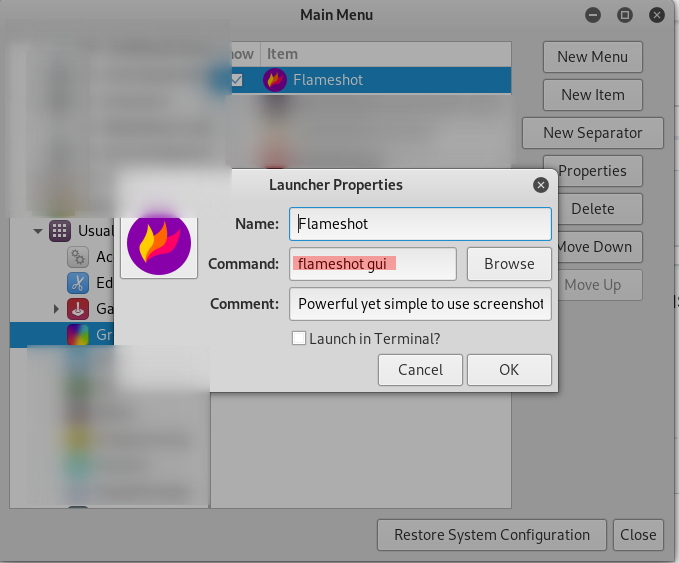
I use flameshot on Gnome Shell and it does not start when I click the icon in Dash to Dock. I installed the main menu package (apt install alacarte), I edited the flameshot icon and I added the gui at the end of the command.
 hugollsouza
on 14 Apr 2019
hugollsouza
on 14 Apr 2019
Same thing it doesn't even launch in either ArchLabs (based on Arch Linux) and Zorin OS (based on Ubuntu) What is going on?
 Raj2032
on 23 Apr 2019
Raj2032
on 23 Apr 2019
@Raj2032 did you try the Exec fix in ~/.config/autostart/Flameshot.desktop ?
[Desktop Entry]
Name=flameshot
Icon=flameshot
Exec=/bin/bash -c "sleep 10; flameshot &"
Terminal=false
Type=Application
X-GNOME-Autostart-enabled=true
It turns out that I am having dependency issues, it for some reason installed in GUI but I tried to launch it nothing happens but using terminal I am getting dependency errors. I am kinda new to the Linux world so I need to understand better how do I fix dependency issues?
I believe I have to type sudo apt-get install -f to fix any broken dependency. then what am I supposed to do next?
Raj2032
on 23 Apr 2019
I am on Linux Mint 19.1.
On initial install everything works and icon sits nicely in Notification try ready to be used.
But after reboot, it is not loaded.
I got some help and several different things were attempted:
dbus-launch flameshot &
and
dbus-launch flameshot gui &
But this above suggestion is what worked for me as well:
In autostart I changed the exec= line to read: Exec=/bin/bash -c "sleep 10; flameshot &"
However, I also noticed 2 other things that seem to make a difference:
- If you toggle the checkbox in the Flameshot config for startup, it puts another entry into autostart which seems to gum things up
- You have to right-click or otherwise set the new entry to Trusted.
zeddock
 zeddock
on 13 May 2019
zeddock
on 13 May 2019
Thanks! That worked for me!
I got some help and several different things were attempted:
dbus-launch flameshot &
But this above suggestion is what worked for me as well:
In autostart I changed the exec= line to read: Exec=/bin/bash -c "sleep 10; flameshot &"
zeddock
derekwsgray
on 14 May 2019
Please do keep in mind that the version available to normal users on Linux Mint 19.1 is still version 5.
I am attempting to update mine now to version 6, and hoping to get that all-desired TEXT tool working with it!
This is a great tool! If you are coming to Linux from Windows, please donate to support this tool. I don't know the creator or any of the fine folks helping to develop and extend it, but if we want a good tool like this to keep going donations speak loudly!
Good luck to you!
zeddock
on 14 May 2019
Same issue here starting flameshot gui results in blank -> starting flameshot prior to flameshot gui fixed the issue -> suggesting error message for this scenario and referencing https://github.com/lupoDharkael/flameshot/issues/168
Thanks @tkkcc from https://github.com/lupoDharkael/flameshot/issues/90#issuecomment-398322771
 Kreyren
on 21 Jun 2019
Kreyren
on 21 Jun 2019
I came across this problem, observing Ubuntu and Fedora 30. What happens is that, in Ubuntu, when you start Flameshot, it starts basically as a minimized icon in Ubuntu's customized GNOME Shell tray, from there, you can take screenshots. I also noticed that Telegram Desktop had its icon being displayed in Ubuntu's notifications tray.
So, we have this situation of GNOME Shell Vanilla not displaying the tray icons for these applications, because I noticed that neither Telegram nor Flameshot would appear in F30, up to date, as of today. Although Telegram will run and appear in the dash and the window will open, Flameshot, as it is designed, needs a small tweak, until GNOME or Flameshot dude works out a way. I read somewhere that GNOME don't want app icons in its tray anymore. Now, I can't remember where I read that -- but coming from GNOME, that is completely believable.
My fix was to edit:
sudo /usr/share/applications/flameshot.desktop
and in
[Desktop Entry]
append the gui to the line of Exec=flameshot
Exec=flameshot
to
Exec=flameshot gui
There are other entires but I don't know how they work.
After saving the file I was able to run Flameshot both in Wayland and Xorg.
 Neasden
on 25 Aug 2019
Neasden
on 25 Aug 2019
Exec=flameshot -> Exec=flameshot gui
Doesn't work on my end since based on provided informations flameshot has to be running for flameshot gui to open a GUI.
Kreyren
on 25 Aug 2019
Okay. I see. Looks like the developer needs to circumvent ways to avoid flameshot to start minimized, plus, I think your case is different. Operating system I tested this were Ubuntu 19.04 and Fedora 30.
Neasden
on 26 Aug 2019
Exec=flameshot -> Exec=flameshot gui
Doesn't work on my end since based on provided informations
flameshothas to be running forflameshot guito open a GUI.
Same here on Ubuntu 18.04
Flameshot 0.5.1-1(Debian)
Compiled with QT 5.9.4
 benjaminbauer
on 23 Sep 2019
benjaminbauer
on 23 Sep 2019
Interesting, if I do in the command line exactly
flameshot >/dev/null 2>&1&the following works then too:
flameshot full --path ~and saves a screenshot as expected under ~.
Perhaps I misunderstood the way it is supposed to work. I am thinking of
flameshotas a command line utility (too), which I can use at any given point within from any terminal. Without the need to have it run on the background.
?
BUMP. Is flameshot thought to be a command line tool as well as a GUI-based tool, or only the latter?
Thank you.
NikosAlexandris
on 23 Sep 2019
using MXLinux 19
$ flameshot
Icon theme "Numix-Circle-Light" not found.
...
thats all, FlameShot is not opening after 30 minutes, still showing that message
 codingtalkie
on 10 Nov 2019
codingtalkie
on 10 Nov 2019
Hallo.
Same issue here, Ubuntu 18.04.
On 16.04 worked flawlessy. After upgrade, it doesn't start with no error.
A ps -aux | grep flameshot shows a process running, but no gui opens.
Adding gui or config to the command line, the gui or the config forms open. Although there's no way to start a "normal" session.
 mbacilieri
on 26 Nov 2019
mbacilieri
on 26 Nov 2019
Same here Archlinux latest
 Sun1ive
on 27 Nov 2019
Sun1ive
on 27 Nov 2019
- Go to settings
- Devices
- Keyboard Shortcuts
- Set Custom Shortcut
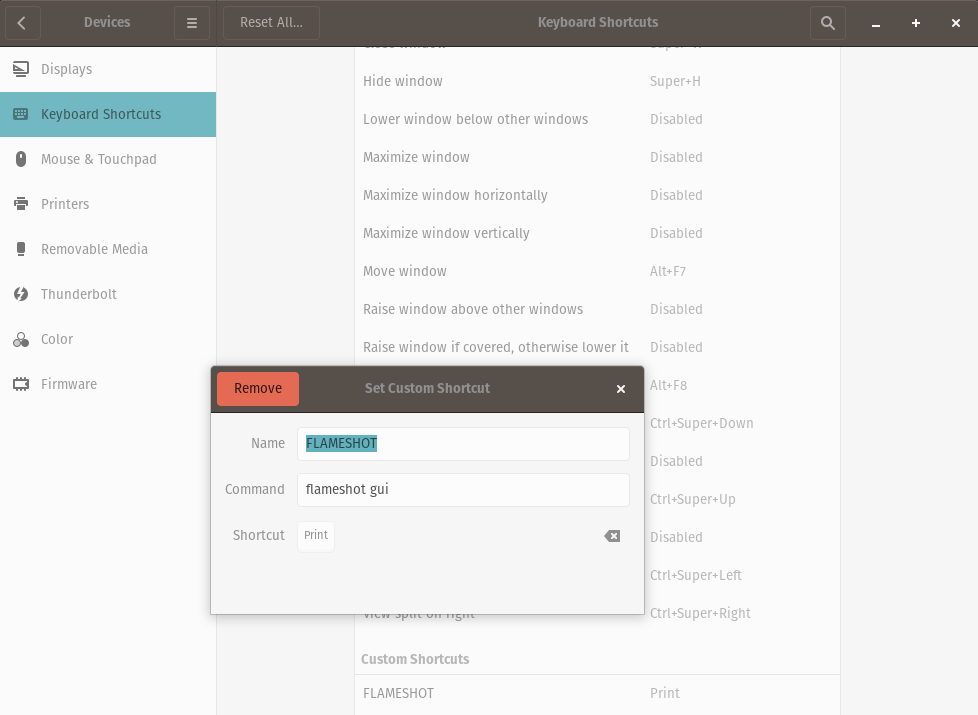
Done!
 realForbis
on 1 Dec 2019
realForbis
on 1 Dec 2019
What did help me was running "flameshot" and then "flameshot gui" while "flameshot" is still running in the background
 algiuxass
on 15 Dec 2019
algiuxass
on 15 Dec 2019
Same problem (flameshot does nothing)
- bspwm
- gtk3 installed
 rahatzamancse
on 15 Dec 2019
rahatzamancse
on 15 Dec 2019
You need to "bind" it to some "key" on the keyboard
realForbis
on 15 Dec 2019
Same issue on arch + i3
 marcelofern
on 4 Feb 2020
marcelofern
on 4 Feb 2020
I came across this problem, observing Ubuntu and Fedora 30. What happens is that, in Ubuntu, when you start Flameshot, it starts basically as a minimized icon in Ubuntu's customized GNOME Shell tray, from there, you can take screenshots. I also noticed that Telegram Desktop had its icon being displayed in Ubuntu's notifications tray.
So, we have this situation of GNOME Shell Vanilla not displaying the tray icons for these applications, because I noticed that neither Telegram nor Flameshot would appear in F30, up to date, as of today. Although Telegram will run and appear in the dash and the window will open, Flameshot, as it is designed, needs a small tweak, until GNOME or Flameshot dude works out a way. I read somewhere that GNOME don't want app icons in its tray anymore. Now, I can't remember where I read that -- but coming from GNOME, that is completely believable.
My fix was to edit:
sudo /usr/share/applications/flameshot.desktopand in
[Desktop Entry]
append the gui to the line of Exec=flameshot
Exec=flameshotto
Exec=flameshot guiThere are other entires but I don't know how they work.
After saving the file I was able to run Flameshot both in Wayland and Xorg.
Fixed my issue on debian kde
+1 :tada:
 amassarwi
on 2 Mar 2020
amassarwi
on 2 Mar 2020
On Debian 10 you have to install gnome-shell-extension-appindicator
sudo apt install gnome-shell-extension-appindicator gnome-tweaks
then log out and log in again, open up Gnome tweaks and enable "Kstatusnotifieritem/appindicator support"
in terminal type
flameshot config
and under general click on "Show tray icon"

 damsma
on 4 Mar 2020
damsma
on 4 Mar 2020
After install gnome-shell-extension-appindicator gnome-tweaks, even can not login to desktop.
 rollto
on 29 Mar 2020
rollto
on 29 Mar 2020
Cannot login into GNOME, kicking me back to login screen
after apt install gnome-shell-extension-appindicator gnome-tweaks
rollto
on 29 Mar 2020
Cannot login into GNOME, kicking me back to login screen
after apt install gnome-shell-extension-appindicator gnome-tweaks
i don't think this is because of installing gnome tweaks, maybe you tried to reconfigure Xorg before and something went wrong?
have you tried reverting your steps? checked the logs?
i've done this on 3 fresh installed debian 10 machines and none of them had this issue.
damsma
on 29 Mar 2020
Flameshot is good application ,
definitely it was "gnome-shell-extension-appindicator gnome-tweaks" that corrupt my gnome desktop environment .
I can only login xfce4 mate lxqt,lxde now,can not use gnome anymore,
tried chown .Xauthority no luck.
ls /usr/bin/*session
/usr/bin/cinnamon-session /usr/bin/lxqt-session
/usr/bin/dbus-run-session /usr/bin/lxsession
/usr/bin/gnome-session /usr/bin/mate-session
/usr/bin/gnome-session-custom-session /usr/bin/openbox-session
/usr/bin/lxqt-config-session /usr/bin/xfce4-session
rollto
on 30 Mar 2020
Running arch. Using i3.
When trying to run flameshot, was getting:
Cannot mix incompatible Qt library (version 0x50d02) with this library (version 0x50e01)
Used yay to reinstall qt-5 libs.
Now I am getting this behavior. Not sure if that precursor helps.
 ianseyer
on 30 Mar 2020
ianseyer
on 30 Mar 2020
I had this same issue after trying to save the screenshot as a file. I am using bspwm and flameshot just dose not open after I re install of flameshot or a reboot.
 JakeRoggenbuck
on 17 Apr 2020
JakeRoggenbuck
on 17 Apr 2020
In my case, I had another flameshot instance running in the background without me knowing it (the autostarted flameshot instance). Killed that instance and started it again and now it works.
If you want flameshot to autostart correctly at login, then modify
~/.config/autostart/Flameshot.desktopto contain:Exec=/bin/bash -c "sleep 10; flameshot &"instead of the regularExec
Thank you very much, it works for me.
TPX220-i7-16G-DualSSD(160G+250G)-LMDE4
 udhien80
on 28 Apr 2020
udhien80
on 28 Apr 2020
Executing
$ flameshot &
$ flameshot gui
solves the problem, but is this the only way to get flameshot to work correctly? Why is this happening? This isn't common behavior of other screen captures (e.g. scrot, gnome-screenshot, etc.)
 znm241
on 30 Apr 2020
znm241
on 30 Apr 2020
Executing
$ flameshot &
$ flameshot gui
solves the problem
indeed! I changed my shortcut now to:
/usr/bin/flameshot & bash -c "sleep 0.5 && /usr/bin/flameshot gui"
@lupoDharkael does flameshot need a running process to allow ad-hoc commands like flameshot gui? Is there any way to fix this?
alexanderadam
on 30 Apr 2020
1. Go to settings 2. Devices 3. Keyboard Shortcuts 4. Set Custom Shortcut  Done!
I confirm, this work well on MXLinux 19. now the flameshot is working
codingtalkie
on 1 May 2020
In my case, I had another flameshot instance running in the background without me knowing it (the autostarted flameshot instance). Killed that instance and started it again and now it works.
If you want flameshot to autostart correctly at login, then modify
~/.config/autostart/Flameshot.desktopto contain:Exec=/bin/bash -c "sleep 10; flameshot &"instead of the regularExec
I confirm this, this work as well on Mint 19.3 Cinnamon.
 nd3w
on 12 May 2020
nd3w
on 12 May 2020
Had the same issue on ArchLinux 5.7.6-zen running bspwm and X, it only works after running
flameshot &, then the other commands work, like flameshot gui, added it to bspwmrc to start with the WM and all works fine.
 gdsouza1
on 2 Jul 2020
gdsouza1
on 2 Jul 2020
I had the same issue trying to open Flameshot via terminal with flameshot or by clicking the app icon. Running flameshot gui works fine, though.
 diego-aquino
on 16 Sep 2020
diego-aquino
on 16 Sep 2020
For me flameshot and flameshot config work fine, but flameshot gui immediately exits with a 0 status code and no error message. Is there any verbose option to print more information on what is going on?
 tmccombs
on 25 Sep 2020
tmccombs
on 25 Sep 2020
Hey guys.
I have the same problem. My flameshot don't open when I click it in the applications list.
To fix it I changed my config to this:
[Desktop Entry]
Exec=flameshot gui --delay 1000
Adding the delay parameter, flameshot works correctly to me.
Hope this helps!
 laurindofljunior
on 8 Oct 2020
laurindofljunior
on 8 Oct 2020
@laurindofljunior so you get then the "gui" after the delay? Because for me the command does nothing and then exists after the delay...
 weilbith
on 9 Oct 2020
weilbith
on 9 Oct 2020
Hi @weilbith . I put it this before the "delay". You can test the command in the terminal. Open the terminal and try the command please:
flameshot gui --delay 1000
This command is the same that I use in my file 'flameshot.desktop'.
laurindofljunior
on 13 Oct 2020
That is exactly what I did. :smile:
weilbith
on 13 Oct 2020
That is exactly what I did. 😄
@weilbith I understand that you put the command after the "--delay" and not before like me. 😄 😄
I read it in your message at 10/09/2020.
laurindofljunior
on 13 Oct 2020
flameshot gui --delay 1000 did not work for me at one point, but flameshot gui itself seems to be hit-or-miss for me. Sometimes it works, sometimes it doesn't, and haven't been able to figure out a pattern for when it doesn't work.
tmccombs
on 13 Oct 2020
I think it might have something to do with putting my computer to sleep, because that causes other problems too, like my mouse stops working, and my slack app graphics get all messed up.
tmccombs
on 13 Oct 2020
Fixed problem with sudo apt install git g++ build-essential qt5-qmake qt5-default qttools5-dev-tools on Ubuntu 20.04
 Nightowlswing
on 28 Oct 2020
Nightowlswing
on 28 Oct 2020
Related issues
 borgmanJeremy
·
3Comments
borgmanJeremy
·
3Comments
 omkarnathsingh
·
4Comments
omkarnathsingh
·
4Comments
 thiswillbeyourgithub
·
3Comments
thiswillbeyourgithub
·
3Comments
 mrinvisible0
·
4Comments
mrinvisible0
·
4Comments
 kylewill
·
4Comments
kylewill
·
4Comments
Most helpful comment
Having the same issues. But calling
flameshot guishows something.